
1. Important Safety Information
Before operating your ASKGO F28 Electric Bike, please read and understand all safety instructions. Failure to follow these instructions may result in serious injury or property damage.
- Always wear a helmet and appropriate safety gear when riding.
- Familiarize yourself with local traffic laws and regulations regarding electric bicycles.
- Perform a pre-ride inspection before each use, checking brakes, tire pressure, battery charge, and all connections.
- Do not ride in adverse weather conditions, such as heavy rain, snow, or ice.
- Avoid riding under the influence of alcohol or drugs.
- Ensure the battery is securely locked in place before riding.
- Do not modify the electric bike's components or electrical system.
2. Package Contents
Your ASKGO F28 Electric Bike package includes the following components:
- ASKGO F28 Electric Bike (partially assembled)
- Removable Lithium Battery (480Wh)
- Battery Charger
- Tool Kit for Assembly
- Front and Rear Mudguards
- LED Headlight
- Rearview Mirrors
- Bell
- Kickstand
- Frame Storage Bag
- User Manual
3. Assembly Instructions
The ASKGO F28 Electric Bike arrives approximately 90% pre-assembled. Follow these steps to complete the assembly:
3.1 Unboxing and Initial Setup
Carefully remove the bicycle and all components from the packaging. Remove all protective wrapping and zip ties.

Image: The ASKGO F28 Electric Bike, showcasing its design and components.
3.2 Detailed Assembly Guide (Video)
For a visual step-by-step guide on assembling your ASKGO Electric Bike, please watch the official assembly video below. This video covers the unboxing process and installation of various components.
Video: Official ASKGO Electric Bike assembly guide for adults. This video demonstrates the unboxing, installation of the front wheel, handlebars, seat, pedals, and battery, and final checks.
3.3 Key Assembly Steps (Summary)
- Handlebar Installation: Secure the handlebars to the stem, ensuring they are centered and tightened correctly.
- Front Wheel Attachment: Carefully align the front wheel with the fork and secure it using the quick-release mechanism or axle nuts. Ensure the brake rotor is correctly positioned within the caliper.
- Pedal Installation: Identify the left (L) and right (R) pedals. The left pedal tightens counter-clockwise, and the right pedal tightens clockwise. Use a wrench to secure them firmly.
- Seat Post and Saddle: Insert the seat post into the frame and adjust the saddle height for comfortable riding. Secure the quick-release clamp.
- Accessory Installation: Attach the LED headlight, rearview mirrors, bell, and mudguards as per the instructions in the video.
- Battery Insertion: Slide the fully charged battery into its compartment on the frame and lock it securely with the provided key.
4. Component Overview
Understanding the main components of your ASKGO F28 Electric Bike will enhance your riding experience.
4.1 Motor and Power System
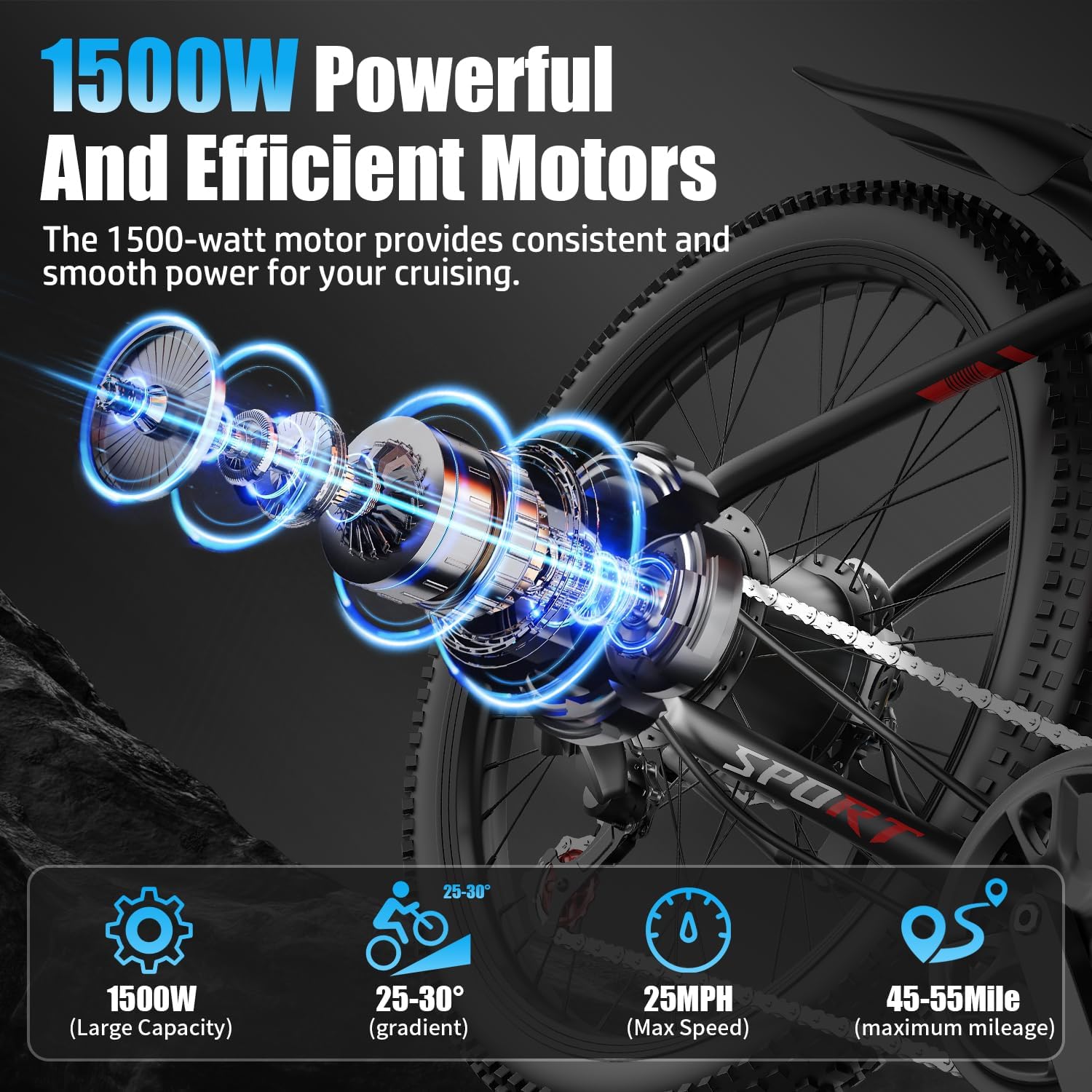
Image: The 1500W powerful and efficient motor, highlighting its capacity, gradient capability, max speed, and maximum mileage.
The ASKGO F28 is equipped with a 1500W motor, providing robust power for various terrains. This motor supports speeds over 25 MPH and is suitable for mountain trails, city commuting, and snow conditions.
4.2 Battery

Image: The 48V 10.4AH built-in removable battery, showing its large capacity, max range, BMS for safety, and charging time.
The bike features a 480Wh (48V 10.4AH) removable lithium battery. It offers a range of 35–55 miles per charge and fully recharges in approximately 7 hours. The battery is lockable and detachable for convenience and security.
4.3 Display and Controls

Image: The smart colorful display showing battery level, gear shift, travel speed, cruise control, and mileage, alongside the handbrake, function board, and shift paddle adjustment.
A smart colorful display provides essential riding information, including battery level, current speed, gear shift, cruise control status, and mileage. Handlebar controls allow for easy adjustment of settings and modes.
4.4 Suspension and Brakes

Image: The upgraded fork damping system, designed for comfortable seating, impact resistance, and effective fork damping.

Image: Separate views of the front and rear mechanical disc brakes, indicating their placement and function.
The bike features front suspension with upgraded fork damping to minimize bumps and enhance ride comfort. Responsive mechanical disc brakes on both the front and rear wheels provide reliable stopping power.
4.5 Tires and Lighting

Image: The 26-inch pneumatic tire and super bright LED headlight, illustrating suitability for snow, city roads, bumpy roads, and gravel roads.
Equipped with 26-inch pneumatic tires, the F28 is designed for various terrains. An integrated LED headlight ensures enhanced visibility for safe riding during day or night.
5. Operating Instructions
5.1 Power On/Off
- To power on the bike, ensure the battery is inserted and locked. Press and hold the power button on the display unit.
- To power off, press and hold the power button again until the display turns off.
5.2 Riding Modes
Your ASKGO F28 Electric Bike offers multiple riding modes:
- Pedal-Assist Mode: The motor provides assistance as you pedal. Use the controls on the handlebar to select different levels of assistance (e.g., 1-7 speeds). Higher levels provide more motor power.
- Pure Electric (Throttle) Mode: Engage the throttle to propel the bike without pedaling. This mode is ideal for quick acceleration or when you need a break from pedaling.
- Manual (Bicycle) Mode: Ride the bike like a traditional bicycle without any motor assistance.
5.3 Gear Shifting
The 7-speed gear system allows you to adjust your pedaling effort to match terrain and speed. Use the gear shifter on the handlebar to change gears. Shift to lower gears for climbing hills and higher gears for flat terrain or downhill riding.
5.4 Braking
The bike is equipped with mechanical disc brakes. Apply both front and rear brakes simultaneously for effective and controlled stopping. Avoid sudden, hard braking, especially with the front brake, to prevent loss of control.
6. Battery Information
6.1 Charging the Battery
- The battery can be charged while installed on the bike or removed.
- Connect the charger to the battery's charging port, then plug the charger into a standard wall outlet.
- The charger indicator light will typically show red during charging and turn green when fully charged.
- A full charge takes approximately 7 hours. Do not overcharge the battery.
6.2 Battery Care and Maintenance
- Store the battery in a cool, dry place, away from direct sunlight and extreme temperatures.
- If storing for an extended period, charge the battery to 50-70% every 2-3 months to maintain its health.
- Avoid fully discharging the battery regularly, as this can reduce its lifespan.
7. Maintenance
Regular maintenance ensures the longevity and safe operation of your electric bike.
- Tires: Check tire pressure before each ride. Maintain recommended PSI for optimal performance and safety.
- Brakes: Regularly inspect brake pads for wear and ensure brake levers are responsive. Adjust brake cables as needed.
- Chain: Keep the chain clean and lubricated to prevent rust and ensure smooth gear changes.
- Fasteners: Periodically check all bolts, nuts, and quick-release levers to ensure they are securely tightened.
- Cleaning: Clean your bike with a damp cloth and mild soap. Avoid using high-pressure washers directly on electrical components.
8. Troubleshooting
Here are some common issues and their potential solutions:
| Problem | Possible Cause | Solution |
|---|---|---|
| Bike does not power on | Battery not charged, battery not properly installed, loose connections | Charge battery, ensure battery is fully inserted and locked, check all electrical connections. |
| Motor not assisting | Low battery, pedal-assist level set to zero, sensor issue | Check battery level, increase pedal-assist level on display, inspect pedal-assist sensor. |
| Brakes feel weak | Worn brake pads, loose brake cable, contaminated rotors | Inspect/replace brake pads, adjust brake cable tension, clean rotors with disc brake cleaner. |
| Gears not shifting smoothly | Dirty chain, misaligned derailleur, loose shifter cable | Clean and lubricate chain, adjust derailleur, check shifter cable tension. |
9. Specifications

Image: Diagram illustrating the total length, total height, handle width, seat heights, front center, front end to seat, and tire width, along with recommended rider height and load capacity.
| Feature | Detail |
|---|---|
| Bike Type | Electric Bike |
| Model Name | F28 |
| Brand | ASKGO |
| Motor Power | 1500W |
| Battery Capacity | 480 Watt Hours (48V 10.4AH) |
| Range per Charge | 35-55 Miles |
| Charging Time | Approx. 7 hours |
| Wheel Size | 26 Inches |
| Number of Speeds | 7 |
| Frame Material | Alloy Steel |
| Suspension Type | Front |
| Brake Style | Disc (Mechanical) |
| Included Components | Horn, Kickstand, Lock, Mudguard, Tool Kit |
| Max Load Capacity | 365 lbs |
| Recommended Height | 5'3" - 6'4" |
| Certifications | UL2849 Certified |
10. Warranty and Support
Your ASKGO F28 Electric Bike comes with a 30-day free return policy and a 1-year warranty. For any assembly questions, operational assistance, or warranty claims, please contact ASKGO customer service. Our professional after-sales team is committed to your satisfaction.

