
WINDHORSE F2
WINDHORSE 26" Electric Bike F2 User Manual
Model: F2 | Brand: WINDHORSE
1. Introduction
This manual provides essential information for the safe assembly, operation, and maintenance of your WINDHORSE F2 26" Electric Bike. Please read this manual thoroughly before your first ride and keep it for future reference. Proper understanding and adherence to these instructions will ensure optimal performance and longevity of your e-bike.
2. Safety Guidelines
Your safety is paramount. Always wear a helmet and appropriate safety gear when riding. Familiarize yourself with local traffic laws and regulations regarding electric bicycles. Perform a pre-ride inspection before each use, checking brakes, tire pressure, battery charge, and all fasteners. Avoid riding in adverse weather conditions or under the influence of alcohol or drugs. Do not attempt modifications to the electrical system or motor.
- Always wear a certified helmet.
- Obey all local traffic laws and regulations.
- Perform a pre-ride safety check before each use.
- Do not ride under the influence of alcohol or drugs.
- Avoid riding in heavy rain, snow, or icy conditions.
- Ensure the battery is securely locked in place before riding.
3. Package Contents
Upon unpacking, verify that all components are present and undamaged. If any items are missing or damaged, please contact customer support.
- WINDHORSE F2 Electric Bike Frame (partially assembled)
- Front Wheel
- Removable Battery (pre-installed in frame)
- Seat and Seat Post
- Pedals (Left and Right)
- Front Fender and Rear Fender
- Headlight and Taillight
- Rear Rack
- Assembly Tools (Allen wrenches, wrench)
- User Manual
4. Assembly Instructions
Follow these steps to assemble your WINDHORSE F2 Electric Bike. It is recommended to have a second person assist with some steps.
4.1 Unboxing and Initial Inspection
Carefully remove the bike and all components from the packaging. Remove all protective wrapping and foam. Inspect the frame and components for any visible damage.
Video: Unboxing and initial component overview of the electric bike. This video demonstrates how to unpack the bike and identify all parts.
4.2 Handlebar Installation
Insert the handlebar stem into the frame's head tube. Ensure the stem is aligned with the front wheel. Tighten the top screw and the side screws on the stem securely to prevent shaking.

Image: The WINDHORSE F2 Electric Bike with handlebars properly installed and aligned.
4.3 Seat and Seat Post Installation
Insert the seat post into the seat tube of the frame. Adjust the seat height to a comfortable position where your feet can touch the ground when stopped. Secure the quick-release lever firmly.
4.4 Pedal Installation
Identify the left (L) and right (R) pedals. The right pedal (R) screws clockwise into the crank arm. The left pedal (L) screws counter-clockwise into the crank arm. Tighten them securely with a wrench.
4.5 Fender Installation
Attach the front and rear fenders using the provided screws and brackets. Ensure they are securely fastened and do not interfere with wheel rotation.
4.6 Headlight and Taillight Installation
Mount the headlight to the front fork using the bracket and screws. Connect the headlight cable to the corresponding connector on the bike's wiring harness. The taillight is typically integrated into the rear rack or fender.
4.7 Front Wheel Installation
Carefully align the front wheel with the fork dropouts. Ensure the brake rotor is correctly seated within the brake caliper. Insert the quick-release skewer through the hub and tighten it firmly. It is crucial that the quick-release skewer is tightened correctly to prevent accidents during riding.

Image: Close-up of the front wheel, disc brake, and front suspension fork.
4.8 Full Assembly Video Guide
Video: A detailed step-by-step guide on how to install the WINDHORSE F2 Electric Bike.
5. Components Overview
5.1 Removable Battery
The WINDHORSE F2 features a 36V 468WH / IPX5 waterproof lithium-ion battery. It is integrated into the frame for security and can be removed for convenient charging. The battery is UL certified and includes a BMS system for safety.
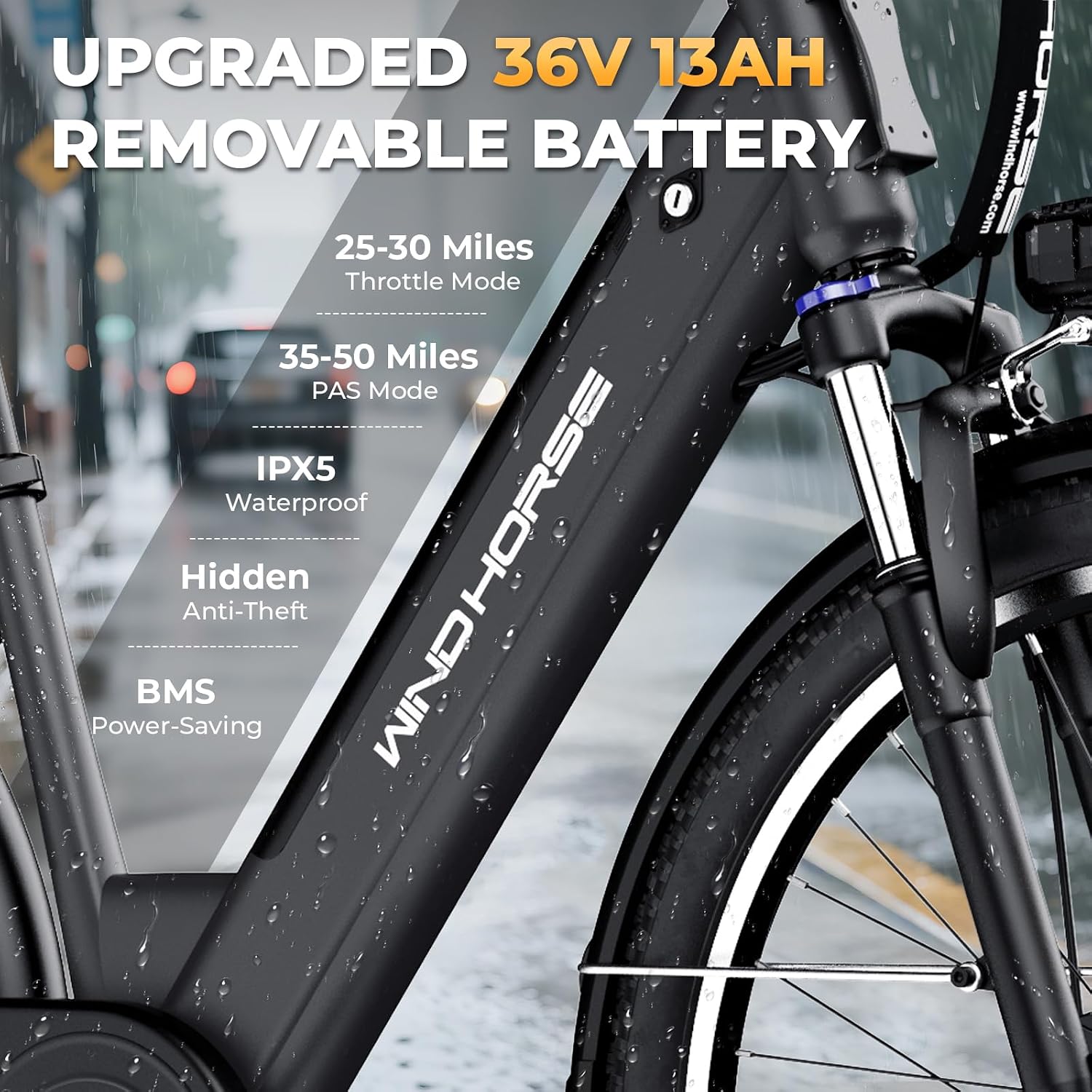
Image: Close-up of the integrated, removable, and waterproof 36V 13Ah battery.
5.2 Powerful Motor
Equipped with a robust 350W (750W peak) high-speed brushless motor, the e-bike offers smooth and powerful acceleration, reaching a top speed of 20 MPH.

Image: Diagram illustrating the 750W peak brushless motor in the rear wheel hub.
5.3 Smart LCD Display
The 3.5-inch large LCD display (IP67 waterproof and dustproof) shows battery level, current speed, distance traveled, and Pedal Assist System (PAS) level, providing clear ride data.
Image: The smart LCD display showing speed and assist level, along with controls for lighting, 7-speed shifter, and thumb throttle.
5.4 Shimano 7-Speed Gearing
The professional 7-speed Shimano drivetrain allows for precise gear changes, adapting to various terrains and riding conditions.
5.5 Front Suspension Fork
A lockable front suspension fork absorbs shocks and bumps, providing a smoother and more comfortable ride, especially on uneven surfaces. It can be locked for efficiency on smooth terrain.

Image: The lockable front suspension fork, suitable for various road conditions including city, sand, mountain, and snow.
5.6 Dual Disc Brakes
The e-bike is equipped with front and rear dual disc brakes, ensuring reliable stopping power and enhanced safety.
5.7 Tires
Durable 26-inch Chaoyang tires (26"x1.95") provide reliable grip and a smoother ride over various surfaces, improving handling and safety.
5.8 Integrated Lights and Horn
The bike includes an integrated LED headlight, rear light, and a loud horn for increased visibility and safety during day and night rides. Reflective elements further enhance visibility.
5.9 Rear Rack
A sturdy rear rack is included, offering a maximum payload capacity of 330 lbs, suitable for carrying cargo or a passenger seat.
Video: Overview of the WINDHORSE F2 Electric Bike for Adults, highlighting key features and design.
6. Operating Instructions
6.1 Powering On/Off
To power on the e-bike, long press the power button on the handlebar control panel. The LCD display will illuminate. To power off, long press the power button again.
Video: Demonstration of powering on the e-bike and navigating through riding modes.
6.2 Riding Modes
Your WINDHORSE F2 offers 5 working modes:
- Throttle Mode: Provides electric power without pedaling. Use the thumb throttle on the right handlebar.
- Pedal Assist Mode (PAS): Offers 3 levels of electric assistance while you pedal. Adjust levels using the '+' and '-' buttons on the control panel.
- Walk Assist Mode: Provides low-speed assistance for walking the bike. Press and hold the '-' button to activate.
- Cruise Mode: Maintains a constant speed. Hold the '+' button for 10+ seconds until the cruise sign flashes on the display. Release the accelerator to maintain speed. Braking cancels cruise mode.
- Normal Bike Mode: Ride as a traditional bicycle without electric assistance.

Image: Visual representation of the five riding modes: Throttle, Cruise, Pedal Assist, Walk Assist, and Pedal Only.
6.3 Shifting Gears
Use the Shimano 7-speed shifter on the right handlebar to change gears. Shift to lower gears for climbing hills and higher gears for faster speeds on flat terrain.
6.4 Lights and Horn Operation
Press the light button on the handlebar control panel to turn the headlight and taillight on or off. Press the horn button to activate the digital horn.
6.5 Battery Charging and Removal
To charge the battery, you can either charge it while it's installed in the bike or remove it. To remove, unlock the battery with the key, then press the release button and slide the battery out. Connect the charger to the battery port and then to a power outlet. The battery indicator lights will show charging status (blue for full, green for half, red for low). Charging time is approximately 6-7 hours.
7. Maintenance
Regular maintenance ensures the safety and longevity of your e-bike.
- Tires: Check tire pressure before each ride. Recommended pressure is usually indicated on the tire sidewall. Inspect for wear and punctures.
- Brakes: Regularly check brake pads for wear and ensure brake levers engage smoothly. Adjust brake cables as needed.
- Chain: Keep the chain clean and lubricated to ensure smooth shifting and prevent rust.
- Battery: Store the battery in a cool, dry place. Avoid fully discharging the battery for extended periods. Charge regularly, even when not in use.
- Fasteners: Periodically check all nuts, bolts, and quick-release levers to ensure they are tight and secure.
- Cleaning: Clean your e-bike with a damp cloth. Avoid using high-pressure water jets directly on electrical components.
8. Troubleshooting
Here are some common issues and their potential solutions:
- E-bike does not power on: Check if the battery is fully charged and properly inserted. Ensure the key is in the 'on' position if applicable.
- Motor not assisting: Verify that Pedal Assist Mode is active and set to a level above zero. Check if the throttle is engaged. Ensure all electrical connections are secure.
- Brakes feel weak: Inspect brake pads for wear. Adjust brake cable tension. If disc brakes, check for contamination on rotors or pads.
- Gears are not shifting smoothly: Check the derailleur alignment and cable tension. Ensure the chain is clean and lubricated.
- Unusual noises: Stop riding immediately and inspect the bike for loose parts, rubbing components, or damaged bearings.
9. Specifications
| Bike Type | Electric Bike |
| Model Name | F2 |
| Age Range | Adult |
| Brand | WINDHORSE |
| Number of Speeds | 7 (Shimano) |
| Wheel Size | 26 Inches |
| Frame Material | High Carbon Steel |
| Suspension Type | Front (Lockable) |
| Special Features | Adjustable Seat, Dual Disc Brake, LCD-Display, Rechargeable, Waterproof |
| Motor Power | 350W (750W Peak) |
| Battery Capacity | 36V 13Ah / 468 Watt Hours |
| Max Speed | 20 MPH |
| Range (Pedal Assist) | 35-50 Miles |
| Range (Throttle) | 25-30 Miles |
| Max Load Capacity | 330 lbs |
| Display | 3.5 inch LCD (IP67 waterproof) |
10. Warranty and Support
Your WINDHORSE F2 Electric Bike comes with a limited warranty. Please refer to the warranty card included in your package for specific terms and conditions. For technical support, troubleshooting assistance, or parts inquiries, please contact WINDHORSE customer service through the official website or the contact information provided on your purchase receipt.
For additional resources and product information, visit the WINDHORSE Store on Amazon.
Related documentsF2


Ask a question about this manual
Ask about setup, troubleshooting, compatibility, parts, safety, or missing instructions. Manuals+ will review the question and use this page’s manual context to help answer it.