
1. Introduction
Thank you for choosing the Shadowhawk S1912 High Power Rechargeable LED Flashlight. This manual provides detailed instructions for the safe and efficient operation, maintenance, and troubleshooting of your device. Please read this manual thoroughly before use and retain it for future reference.

Image 1.1: The Shadowhawk S1912 flashlight with its main features visible, including the LCD display, COB side light, and included battery and USB cable.
2. Package Contents
Verify that all items listed below are included in your package:
- 1 x Shadowhawk S1912 High Power Rechargeable LED Flashlight
- 1 x Rechargeable Battery
- 1 x USB Data Cable (Type-C)
- 1 x Lanyard
- 1 x Holster
- 1 x User Manual
3. Product Overview
The Shadowhawk S1912 flashlight is designed for versatility and durability, featuring an XHM90.2 LED for powerful main beam illumination and a COB side light for wide-angle area lighting. It includes an LCD display for battery status and a dual-switch design for intuitive control.

Image 3.1: An exploded diagram illustrating the various components of the Shadowhawk S1912 flashlight, including the XHM90.2 light bulb, high light transmission lens, COB work light, main light switch, COB side light switch, LCD digital display, USB rechargeable port, back cover, and strap.
Key Features:
- XHM90.2 LED Chip: Provides up to 10000 lumens of brightness.
- Slide-Zoomable Focus: Easily switch between a concentrated spot beam and a wide floodlight.
- COB Side Light: Offers soft, glare-free illumination for close-range tasks.
- LCD Percentage Display: Real-time battery level indication.
- Type-C Rechargeable: Convenient charging with smart protection against overcharging.
- 7 Lighting Modes: 3 main light modes (High, Medium, Strobe) and 4 COB side light modes (High, Medium, Red, Red-Blue Strobe).
- Dual Switch Design: Separate buttons for main and COB lights for easy operation.
- IP67 Waterproof: Designed to withstand rain and splashes.
- Durable Construction: Made from aerospace-grade aluminum alloy, resistant to impacts.
4. Setup
4.1 Battery Installation
Before first use, ensure the battery is correctly installed and fully charged.
- Unscrew the rear cover of the flashlight.
- Remove the transparent plastic film from the surface of the rechargeable battery.
- Identify the positive (+) and negative (-) terminals of the battery.
- Insert the battery into the flashlight with the positive (+) terminal facing towards the head of the flashlight.
- Screw the rear cover back on tightly to ensure proper contact and water resistance.

Image 4.1: A visual guide demonstrating the four steps for correctly installing the battery into the Shadowhawk S1912 flashlight, including removing the protective film, identifying terminals, inserting the battery, and securing the rear cover.
4.2 Initial Charging
It is recommended to fully charge the flashlight before its first use to ensure optimal performance and battery longevity.
- Locate the Type-C charging port, usually protected by a rubber cover, on the side of the flashlight.
- Open the rubber cover and connect the provided USB Type-C cable to the flashlight.
- Connect the other end of the USB cable to a compatible USB power source (e.g., wall adapter, power bank, computer USB port).
- The LCD display will show the charging progress. A full charge is indicated by 100% on the display.
- Once fully charged, disconnect the cable and securely close the rubber cover to maintain water resistance.

Image 4.2: The Shadowhawk S1912 flashlight connected to a USB-C charging cable, displaying '100%' on its LCD screen, indicating a full charge. The image also highlights the internal smart circuitry for safe charging.
5. Operating Instructions
5.1 Power On/Off
Press the main light button (usually located near the head) to turn on the flashlight. Press and hold the main light button for approximately 3 seconds to turn it off from any mode.
5.2 Main Light Modes
The main LED light offers three modes:
- High: Maximum brightness for long-range illumination.
- Medium: Balanced brightness for general use and extended battery life.
- Strobe: Flashing light for signaling or disorientation.
To cycle through these modes, short press the main light button repeatedly while the main light is on.
5.3 COB Side Light Modes
The COB side light offers four modes:
- High: Bright white light for hands-free work or area illumination.
- Medium: Lower white light for reading or less intense area lighting.
- Red Light: Steady red light for preserving night vision or as a warning signal.
- Red-Blue Strobe: Flashing red and blue lights for emergency signaling.
To activate the COB side light, press the dedicated COB side light button. Short press the COB side light button repeatedly to cycle through its modes. Press and hold the COB side light button for approximately 3 seconds to turn it off.
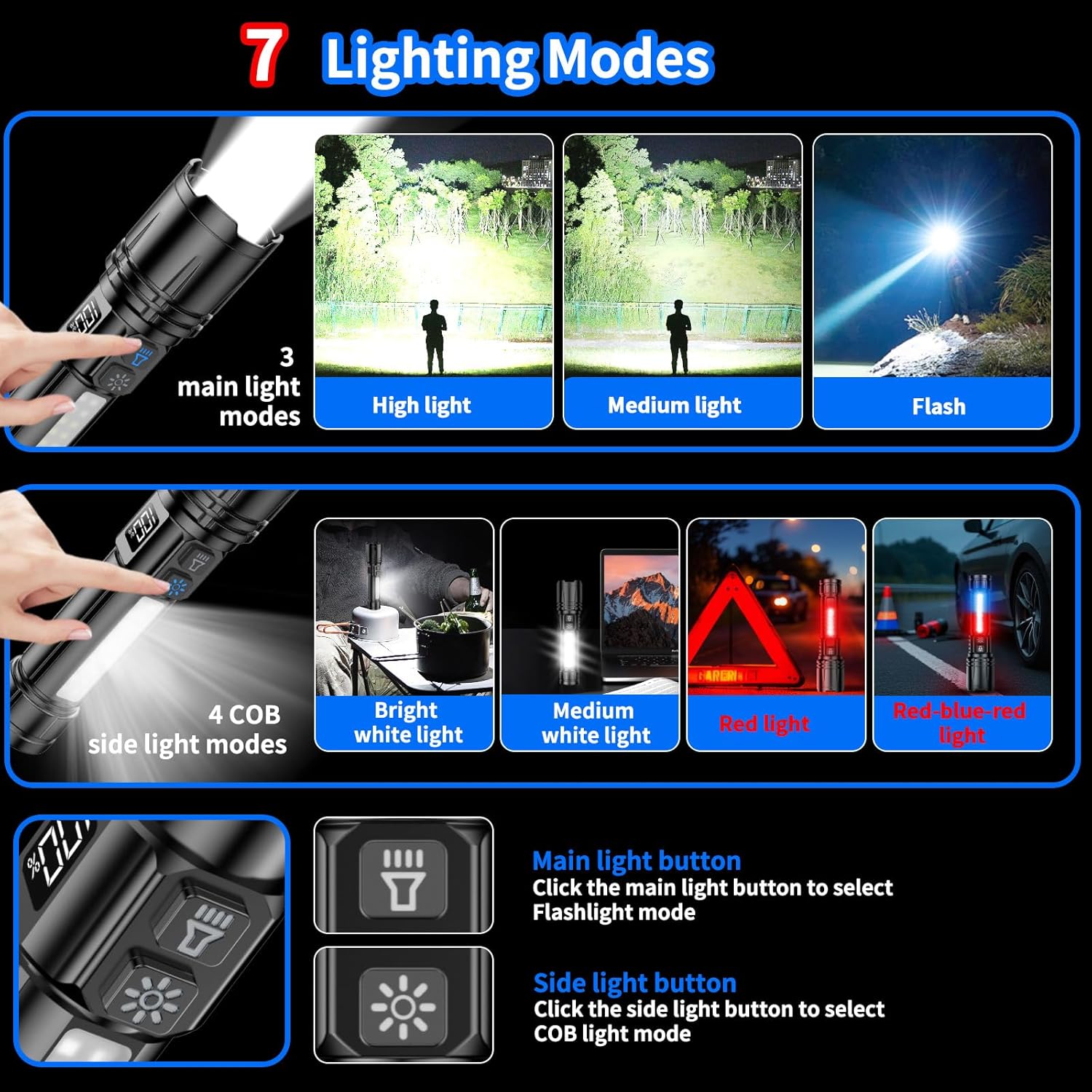
Image 5.1: A visual representation of the 7 lighting modes available on the Shadowhawk S1912 flashlight, including High, Medium, and Flash for the main light, and Bright White, Medium White, Red, and Red-Blue Light for the COB side light. It also shows the dual button controls.
5.4 Zoom Function
The flashlight features an adjustable focus mechanism. To adjust the beam from a wide floodlight to a concentrated spot beam, simply push or pull the head of the flashlight forward or backward.

Image 5.2: The Shadowhawk S1912 flashlight shown in both its 'zoom in' (spotlight) and 'zoom out' (floodlight) configurations, illustrating the adjustable focus capability.
5.5 LCD Display
The integrated LCD display provides a precise percentage readout of the remaining battery life, allowing you to monitor power levels accurately.

Image 5.3: The Shadowhawk S1912 flashlight prominently displaying '100%' on its digital LCD screen, indicating a full battery charge, contrasted with a generic flashlight showing only approximate battery levels.
6. Maintenance
6.1 Cleaning
- Wipe the flashlight body with a clean, soft cloth.
- For stubborn dirt, use a slightly damp cloth. Avoid harsh chemicals or abrasive cleaners.
- Keep the lens clean for optimal light output. Use a lens cleaning cloth if necessary.
6.2 Battery Care
- Recharge the battery regularly, even if not in frequent use, to maintain its health.
- Avoid fully discharging the battery frequently.
- If storing the flashlight for an extended period, charge the battery to about 50-70% and store it in a cool, dry place.
6.3 Storage
Store the flashlight in a cool, dry place away from direct sunlight and extreme temperatures. Ensure the rubber cover for the charging port is securely closed to prevent dust and moisture ingress.
7. Troubleshooting
| Problem | Possible Cause | Solution |
|---|---|---|
| Flashlight does not turn on. | Battery is depleted or incorrectly installed. | Charge the battery. Ensure the battery is inserted with correct polarity and the rear cover is tightened. |
| Light is dim or flickers. | Low battery or loose connection. | Recharge the battery. Check if the rear cover is tightened. |
| Flashlight does not charge. | Faulty cable, power source, or charging port. | Try a different USB cable and power source. Ensure the charging port is clean and free of debris. |
| COB side light not working. | Specific issue with COB light circuit. | Ensure the main light is off before attempting to use the COB light. If the issue persists after charging, contact customer support. |
| Flashlight gets warm during use. | Normal operation for high-power LEDs. | This is normal, especially on high brightness settings. The flashlight has multi-layer heat dissipation. If it becomes excessively hot, reduce brightness or turn off temporarily. |
8. Specifications
| Feature | Detail |
|---|---|
| Model | S1912 |
| Light Source | XHM90.2 LED (Main), COB LED (Side) |
| Brightness | Up to 10000 Lumens |
| Lighting Modes | 7 (Main: High/Medium/Strobe; COB: High/Medium/Red/Red-Blue Strobe) |
| Focus | Slide-Zoomable |
| Battery Type | Rechargeable Lithium-Ion (1 included) |
| Charging Port | USB Type-C |
| Battery Display | LCD Percentage Display |
| Material | Aerospace-grade Aluminum Alloy |
| Water Resistance | IP67 Waterproof |
| Dimensions (approx.) | 22D x 5.5W x 17.5H Centimeters |
| Weight (approx.) | 0.36 Kilograms |
| Country of Origin | China |
9. Safety Information
- Eye Safety: Do not look directly into the LED light or shine it directly into the eyes of people or animals. The high intensity light can cause temporary vision impairment or permanent eye damage.
- Children: Keep the flashlight out of reach of children.
- Heat: The flashlight may become warm during prolonged use, especially on high settings. This is normal. Avoid direct contact with hot surfaces for extended periods.
- Battery Safety: Use only the specified rechargeable battery. Do not attempt to open, crush, or expose the battery to fire or extreme temperatures. Dispose of batteries according to local regulations.
- Water Resistance: While IP67 waterproof, avoid submerging the flashlight for extended periods or using it in extreme underwater conditions. Ensure the charging port cover is sealed when not charging.
- Modifications: Do not attempt to disassemble or modify the flashlight. This may void the warranty and pose safety risks.
10. Warranty and Customer Support
Shadowhawk is committed to providing high-quality lighting products. If you have any questions or require assistance with your Shadowhawk S1912 flashlight, please do not hesitate to contact our customer service team.
We offer 24/7 customer service to address any concerns you may have. Please refer to the contact information provided in your product packaging or visit the official Shadowhawk website for support.
Importer Contact:
E-SHARKIRAI ENTERPRISES TRADING PRIVATE LIMITED
2-A/3. KUNDAN MANSION, Asaf Ali Road, New Delhi Central Delhi DELHl India 110002
Email: support@shadowhawk.top
Phone: +91 9818598163


