
Sinbo SMX-2775
Sinbo SMX-2775 Multi-Purpose Kitchen Chef User Manual
Model: SMX-2775
Introduction
Thank you for choosing the Sinbo SMX-2775 Multi-Purpose Kitchen Chef. This appliance is designed to simplify your kitchen tasks with its versatile functions, including stand mixing, blending, and meat grinding. To ensure safe and efficient operation, please read this manual thoroughly before first use and keep it for future reference.
Important Safety Instructions
When using electrical appliances, basic safety precautions should always be followed to reduce the risk of fire, electric shock, and/or injury to persons, including the following:
- Read all instructions carefully before operating the appliance.
- Do not immerse the motor unit in water or other liquids.
- Always unplug the appliance from the power outlet before cleaning, assembling, or disassembling parts.
- Keep hands and utensils away from moving parts during operation to prevent injury.
- Ensure all attachments are securely locked in place before operating.
- Do not operate the appliance with a damaged cord or plug, or after the appliance malfunctions or has been dropped or damaged in any manner.
- This appliance is for household use only. Do not use outdoors.
- Supervise children closely when the appliance is in use.
Product Overview and Components
Familiarize yourself with the main unit and its various attachments.

Figure 1: Main Unit Assembly
This image displays the Sinbo SMX-2775 Multi-Purpose Kitchen Chef, showcasing its primary components: the stand mixer base with a stainless steel bowl, the meat grinder attachment on the front port, and the glass blender jug on the top port. The control dial is visible on the side.
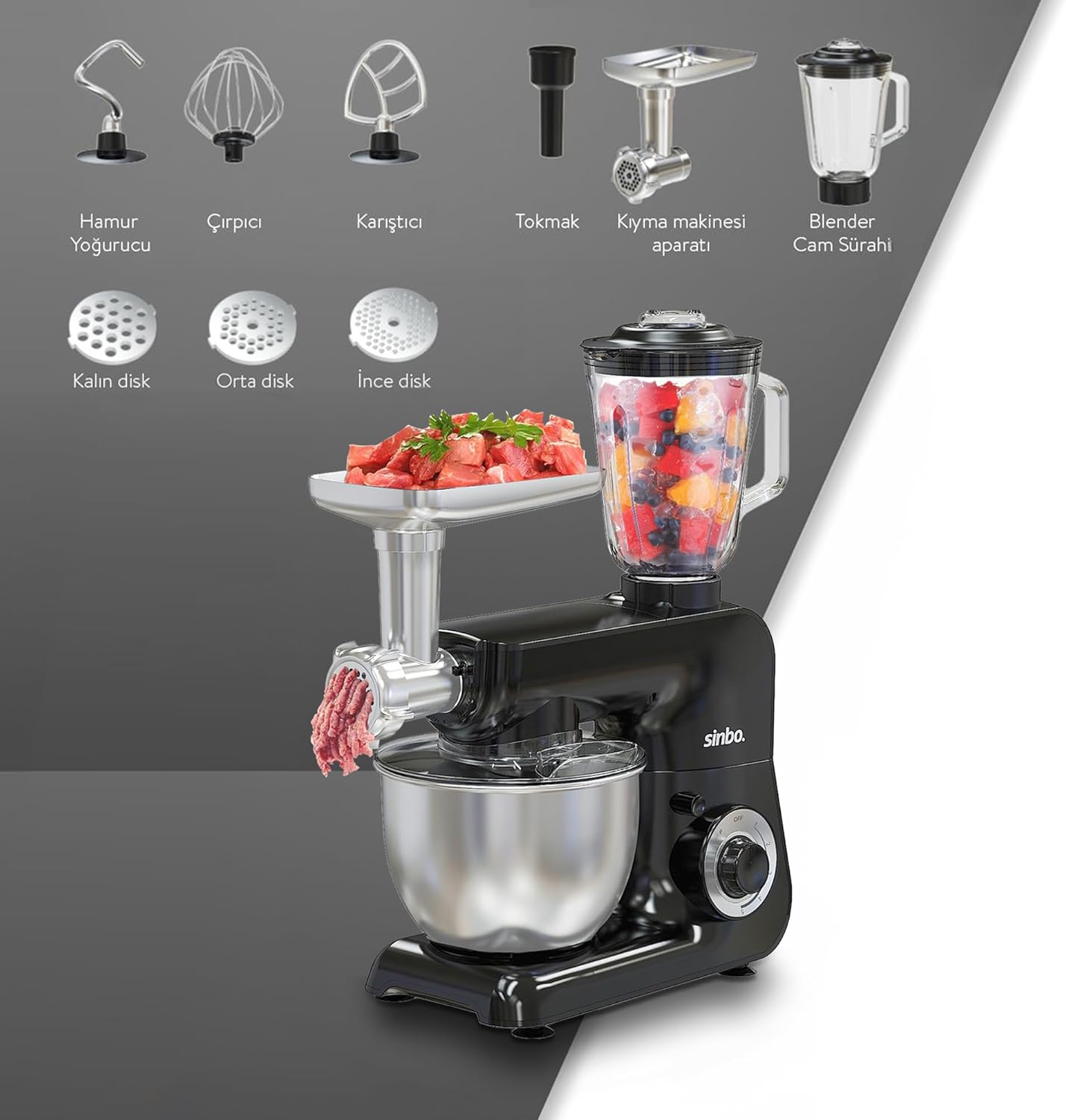
Figure 2: Included Accessories
This image illustrates the complete set of accessories for the Sinbo SMX-2775. It includes the dough hook, whisk, beater, tamper, meat grinder attachment with three different grinding discs (fine, medium, coarse), and the blender glass jug.
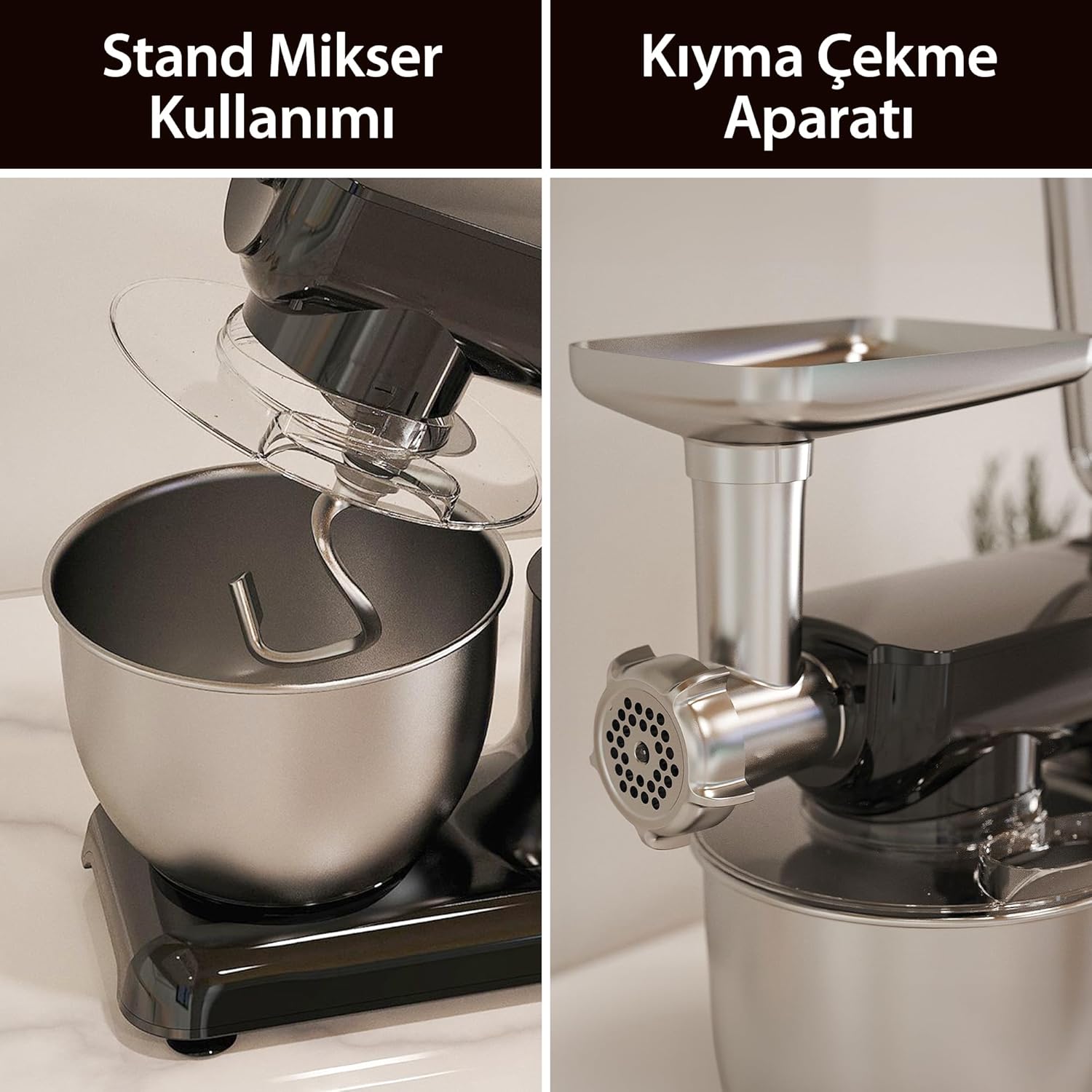
Figure 3: Multi-functional Operation
This image visually represents the versatile capabilities of the Sinbo SMX-2775, showing the stand mixer actively kneading dough in the bowl while the blender jug simultaneously processes ingredients, highlighting its 3-in-1 functionality.
Key Components:
- Motor Base: Houses the 1500W motor and control dial.
- Mixing Bowl: 4.5L stainless steel bowl with splash guard.
- Dough Hook: For kneading heavy doughs.
- Beater: For mixing batters, cakes, and lighter doughs.
- Whisk: For whipping cream, egg whites, and light mixtures.
- Blender Jug: 1.5L capacity, made of durable glass.
- Meat Grinder Attachment: Includes various grinding discs and sausage/kibbe attachments.
- Speed Control Dial: 5-speed settings plus Pulse function with LED illumination.
Setup and Assembly
Before first use, clean all removable parts as described in the "Maintenance and Cleaning" section.
- Motor Base Placement: Place the motor base on a stable, flat, and dry surface. Ensure adequate ventilation around the appliance.
- Attaching the Mixing Bowl: Place the stainless steel mixing bowl onto the base and twist clockwise until it locks securely.
- Attaching Mixer Accessories:
- Lift the mixer head by pressing the release button.
- Insert the desired attachment (dough hook, beater, or whisk) into the shaft and twist until it clicks into place.
- Lower the mixer head until it locks.
- Attaching the Blender: Place the blender jug onto the top port of the motor base and twist clockwise to secure. Ensure the lid is properly sealed.
- Attaching the Meat Grinder:
- Remove the front cover from the motor base.
- Insert the meat grinder assembly into the front port and twist clockwise to lock.
- Assemble the grinding components (screw, blade, disc, ring) as per the specific grinding task.
Operating Instructions
1. Stand Mixer Function

Figure 4: Stand Mixer Usage
This image shows the Sinbo SMX-2775 operating as a stand mixer, with the dough hook attachment in the stainless steel bowl, covered by a transparent splash guard. This setup is ideal for kneading dough.
The 4.5L stainless steel bowl and 1500W motor are suitable for various mixing tasks.
- Ensure the desired attachment (dough hook, beater, or whisk) is securely installed.
- Add ingredients to the mixing bowl.
- Attach the splash guard to prevent splattering.
- Plug in the appliance. Turn the speed control dial to the desired setting (1-5). For quick bursts, use the 'P' (Pulse) setting.
- After mixing, turn the dial to 'OFF' and unplug the appliance. Lift the mixer head and remove the attachment and bowl.
2. Blender Function
The 1.5L glass blender is perfect for smoothies, sauces, and purees.
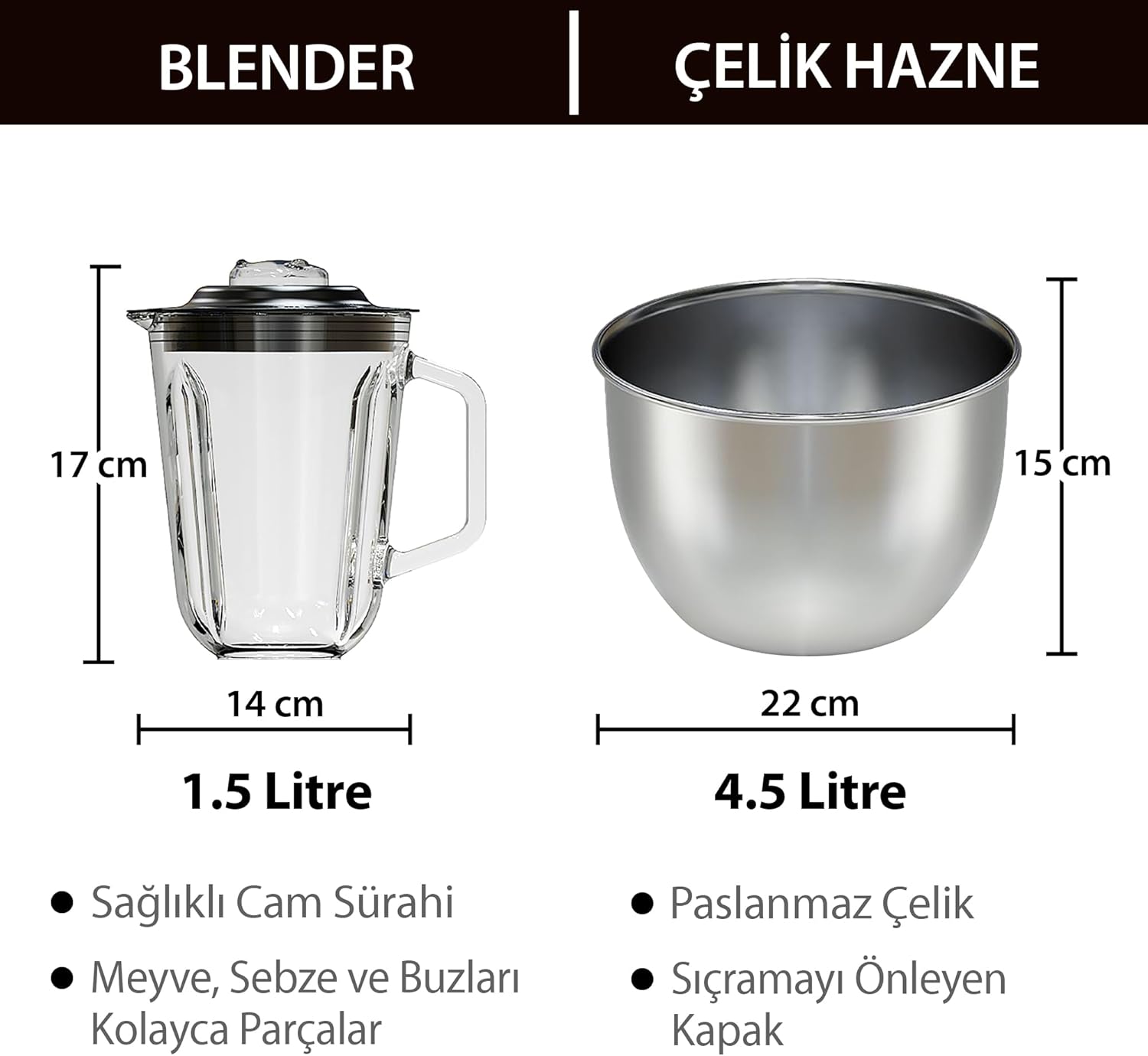
Figure 5: Blender and Bowl Dimensions
This image provides a size comparison and dimensions for the 1.5-liter glass blender jug and the 4.5-liter stainless steel mixing bowl, highlighting their capacities and physical measurements.
- Ensure the blender jug is securely attached to the top port.
- Add ingredients to the jug. Do not exceed the maximum fill line.
- Secure the lid firmly.
- Plug in the appliance. Select the desired speed (1-5) or use 'P' for pulse blending.
- After blending, turn the dial to 'OFF' and unplug. Carefully remove the jug.
3. Meat Grinder Function
The meat grinder attachment allows for fresh ground meat and homemade sausages.
Figure 6: Meat Grinder Usage
This image shows the Sinbo SMX-2775 with the meat grinder attachment in place, demonstrating its function for processing meat. The feed tray and grinder head are clearly visible.
- Ensure the meat grinder attachment is correctly assembled with the desired grinding disc (fine, medium, or coarse) and securely attached to the front port.
- Cut meat into small pieces that fit into the feeding tube.
- Plug in the appliance. Turn the speed dial to a medium setting (e.g., 3 or 4).
- Use the tamper to gently push meat into the grinder. Never use your fingers.
- For sausage making, attach the appropriate nozzle after grinding.
- After use, turn the dial to 'OFF' and unplug. Disassemble for cleaning.
Speed Control

Figure 7: Speed Control Dial
This image highlights the LED-illuminated speed control dial of the Sinbo SMX-2775, showing the 'OFF' position, 'P' for Pulse, and speed settings from 1 to 5. This allows for precise control over mixing, blending, and grinding tasks.
- OFF: Turns the appliance off.
- P (Pulse): Provides short bursts of maximum power. Hold for desired duration.
- 1-2 (Low Speed): Ideal for gentle mixing, folding, and kneading light doughs.
- 3-4 (Medium Speed): Suitable for mixing batters, mashing, and grinding meat.
- 5 (High Speed): Best for whipping cream, egg whites, and blending liquids.
Maintenance and Cleaning
Proper cleaning ensures the longevity and hygiene of your appliance.
- Always unplug the appliance before cleaning.
- Motor Base: Wipe the motor base with a damp cloth. Never immerse it in water.
- Mixing Bowl and Attachments (Dough Hook, Beater, Whisk): These parts are generally dishwasher safe or can be washed by hand with warm, soapy water. Rinse thoroughly and dry immediately.
- Blender Jug: The glass jug can be washed by hand with warm, soapy water or placed in the dishwasher. Ensure the blades are cleaned carefully.
- Meat Grinder Parts: Disassemble all parts of the meat grinder. Wash immediately after use with warm, soapy water to prevent food residue from drying. Use a brush for hard-to-reach areas. Dry all metal parts thoroughly to prevent rust.
- Storage: Store the appliance and its accessories in a clean, dry place.
Troubleshooting
If you encounter issues, refer to the following common problems and solutions:
| Problem | Possible Cause | Solution |
|---|---|---|
| Appliance does not start. | Not plugged in; power switch off; attachment not correctly installed. | Check power connection; ensure dial is not on 'OFF'; re-install attachment securely. |
| Motor stops during operation. | Overload protection activated; overheating. | Turn off and unplug. Reduce load. Let cool down for 30 minutes before restarting. |
| Loud noise or vibration. | Attachment not properly secured; uneven surface. | Ensure all attachments are locked. Place appliance on a stable, flat surface. |
| Meat grinder clogs. | Meat pieces too large; too much sinew/fat. | Cut meat into smaller pieces. Remove excess sinew/fat. Use pulse function to clear. |
Specifications
Technical details of the Sinbo SMX-2775 Multi-Purpose Kitchen Chef.

Figure 8: Overall Product Dimensions
This image provides the overall dimensions of the Sinbo SMX-2775 Multi-Purpose Kitchen Chef, indicating a width of 28 cm, a depth of 20 cm (for the meat grinder attachment), and a height of 53 cm.
- Model: SMX-2775
- Brand: Sinbo
- Motor Power: 1500W
- Mixing Bowl Capacity: 4.5 Liters (Stainless Steel)
- Blender Jug Capacity: 1.5 Liters (Glass)
- Speed Settings: 5 speeds + Pulse function (LED illuminated)
- Material: Stainless Steel (bowl), Glass (blender jug), Plastic (housing)
- Color: Black
- Product Dimensions: Approximately 28 cm (Width) x 20 cm (Depth) x 53 cm (Height)
- Key Feature: Removable Bowl
Warranty and Support
For warranty information, technical support, or service inquiries, please refer to the warranty card included with your product or contact Sinbo customer service. Keep your purchase receipt as proof of purchase.
Note: Specific warranty terms and contact details may vary by region.
Related documentsSMX-2775

Ask a question about this manual
Ask about setup, troubleshooting, compatibility, parts, safety, or missing instructions. Manuals+ will review the question and use this page’s manual context to help answer it.