
1. Introduction
Thank you for choosing the xdobo Mirage MAX Bluetooth Speaker. This manual provides essential information for setting up, operating, and maintaining your speaker. Please read it thoroughly before use to ensure optimal performance and longevity of your device.
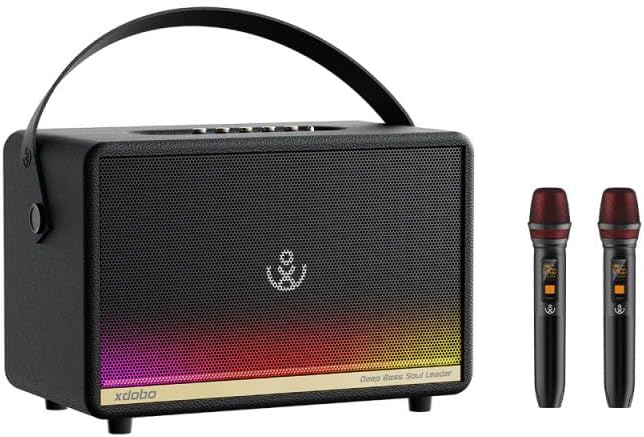
Image 1: xdobo Mirage MAX Bluetooth Speaker with included wireless microphones.
2. Product Overview
2.1 Key Features
- 320W Powerful Sound: Dual voice coil speakers deliver rich, room-filling audio with deep bass.
- Fast Charging Support: Type-C 45W input charges the speaker in approximately 2.5 hours.
- Up to 9 Hours Playtime: Long-lasting battery life for extended music enjoyment.
- Bluetooth 5.3 Connection: Ensures stable wireless connectivity with reduced latency and enhanced range.
- Portable & Stylish Design: Features a sleek handle, durable build, and LED lighting.
- Wireless Microphones: Supports U-section wireless double-microphone karaoke for entertainment.
2.2 Speaker Components
The Mirage MAX speaker is engineered with a customized all-wood box and a Class D amplifier drive unit. It features a dynamic audio setup with three independent Class D amplifiers driving two 60W silk membrane treble units and two 90W double voice coil bass units.

Image 2: Internal speaker configuration with bass and treble drivers.
3. Setup
3.1 Charging the Speaker
- Connect the provided Type-C charging cable to the speaker's charging port.
- Connect the other end of the cable to a compatible 45W power adapter (not included) or a USB power source.
- The charging indicator will illuminate. A full charge takes approximately 2.5 hours.
- Disconnect the cable once fully charged.

Image 3: Speaker control panel showing battery level indication.
3.2 Powering On/Off
- To power on, press and hold the Power button until the indicator lights up.
- To power off, press and hold the Power button again until the indicator turns off.
3.3 Bluetooth Pairing
- Ensure the speaker is powered on and in Bluetooth pairing mode (usually indicated by a flashing LED).
- On your device (smartphone, tablet, laptop), enable Bluetooth and search for available devices.
- Select "xdobo Mirage MAX" from the list of devices.
- Once paired, the speaker will emit a confirmation sound, and the LED indicator will become solid.
4. Operating Instructions
4.1 Basic Playback Controls
- Play/Pause: Press the Play/Pause button once.
- Volume Up: Press the Volume + button.
- Volume Down: Press the Volume - button.
- Next Track: Press and hold the Volume + button.
- Previous Track: Press and hold the Volume - button.
4.2 True Wireless Stereo (TWS) Connection
The xdobo Mirage MAX supports TWS functionality, allowing two Mirage MAX speakers to connect wirelessly for a stereo sound experience.
- Ensure both Mirage MAX speakers are powered on and not connected to any Bluetooth device.
- On one speaker (this will be the primary speaker), press the TWS button. It will enter TWS pairing mode.
- The primary speaker will automatically search for and connect to the secondary speaker.
- Once connected, both speakers will emit a confirmation sound.
- Now, connect your device to the primary speaker via Bluetooth as described in Section 3.3. Audio will play through both speakers in stereo.

Image 4: Two Mirage MAX speakers connected for True Wireless Stereo (TWS).
4.3 Using Wireless Microphones (Karaoke)
The Mirage MAX speaker comes with two U-section wireless microphones for karaoke functionality.
- Power on the speaker.
- Power on the wireless microphones. They will automatically connect to the speaker.
- Adjust microphone volume and effects using the dedicated controls on the speaker or microphones (refer to microphone specific instructions if provided separately).

Image 5: Mirage MAX speaker demonstrating karaoke feature with wireless microphones.
5. Maintenance
5.1 Cleaning
- Ensure the speaker is powered off and disconnected from any power source before cleaning.
- Wipe the exterior with a soft, damp cloth. Do not use abrasive cleaners, alcohol, or solvents.
- Avoid getting moisture into any openings.
5.2 Storage
- Store the speaker in a cool, dry place away from direct sunlight and extreme temperatures.
- If storing for an extended period, charge the battery to approximately 50% every few months to preserve battery life.
5.3 Water Resistance
The xdobo Mirage MAX is designed with water resistance. However, it is not recommended to submerge the speaker. Ensure all port covers are securely closed to maintain water resistance.

Image 6: The Mirage MAX speaker demonstrating its water-resistant design.
6. Troubleshooting
| Problem | Possible Cause | Solution |
|---|---|---|
| Speaker does not power on. | Low battery. | Charge the speaker fully. |
| Cannot pair via Bluetooth. | Speaker not in pairing mode; device Bluetooth off; too far from speaker. | Ensure speaker is in pairing mode. Turn device Bluetooth off and on. Move device closer to speaker. |
| No sound or low volume. | Volume too low on speaker or device; speaker not connected. | Increase volume on both speaker and connected device. Re-establish Bluetooth connection. |
| TWS connection fails. | Speakers already paired to another device; speakers too far apart. | Ensure both speakers are disconnected from other devices. Place speakers closer together. Follow TWS pairing steps carefully. |
| Microphones not working. | Microphones not powered on; low microphone battery. | Ensure microphones are powered on and charged. |
7. Specifications
| Feature | Detail |
|---|---|
| Model Name | XD-Mirage Max |
| Speaker Maximum Output Power | 320 Watts |
| Connectivity Technology | Bluetooth 5.3 |
| Charging Time | Approximately 2.5 Hours (with 45W Type-C input) |
| Playtime | Up to 9 Hours |
| Water Resistance Level | Waterproof |
| Product Dimensions | 7.7"D x 14.4"W x 8.7"H |
| Item Weight | 14.08 pounds (6.4 Kilograms) |
| Material | Acrylonitrile Butadiene Styrene (ABS), Electronic Components, Metal |
| Input Voltage | 5 Volts |
| Impedance | 4 Ohms |
| Frequency Response | 28 Hz (minimum) |
| Audio Output Mode | Stereo |
| Compatible Devices | Laptop, Smartphone, Tablet |
| Included Components | Speaker, Wireless Microphones (implied by images/features) |
8. Warranty and Support
8.1 Warranty Information
Please refer to the warranty card included with your product for detailed warranty terms and conditions. Keep your purchase receipt as proof of purchase for warranty claims.
8.2 Customer Support
For technical assistance, troubleshooting, or other inquiries, please contact xdobo customer support through their official channels. You can also visit the official xdobo store for more information: xdobo Official Store.


