
TP-Link DS108X
TP-Link DS108X 8-Port 10G Fanless Switching Hub User Manual
Model: DS108X
1. Introduction
The TP-Link DS108X is an 8-port 10G unmanaged switching hub designed to provide ultra-high-speed network connections for various devices. Its fanless design ensures silent operation, making it suitable for both office and home environments. With plug-and-play functionality and a durable metal casing, the DS108X offers a reliable and efficient solution for maximizing network performance.

Figure 1: TP-Link DS108X 8-Port 10G Fanless Switching Hub
This image displays the front view of the TP-Link DS108X switching hub, showcasing its compact design and the eight 10G RJ45 ports.
2. Product Overview and Features
The DS108X is engineered for high-performance networking, offering a range of features to enhance your connectivity:
- 8 x 10G Ports: Equipped with eight 10-Gigabit ports, providing a maximum switching capacity of 160Gbps for high-bandwidth applications.
- Multi-Gigabit Support: Compatible with 100M, 1G, 2.5G, 5G, and 10G speeds, automatically adjusting to the optimal connection speed for connected devices.
- Ultra-High-Speed Connectivity: Ideal for connecting 10G NAS, servers, gaming PCs, Wi-Fi 7/6E/6 routers, and access points, enabling rapid transfer of large data files and 4K/8K video.
- Fanless Design: Ensures silent operation, making it perfect for noise-sensitive environments like offices and homes.
- Durable Metal Casing: Provides excellent heat dissipation and long-term reliability, supporting both desktop placement and rackmount installation.
- Plug & Play: Requires no configuration or software installation, allowing for immediate network expansion.
- QoS (Quality of Service): Prioritizes traffic to ensure smooth performance for critical applications like gaming and video streaming.

Figure 2: Key Features Overview
This image illustrates the main features of the DS108X, including 8 10G ports, optimal 5-speed connection, plug & play, silent design, multicast optimization, QoS, desktop/rackmount support, and metal casing.
3. Package Contents
Please verify that all items are included in your package:
- DS108X Main Unit
- Power Cord
- Setup Guide
- Rackmount Kit
- Rubber Feet
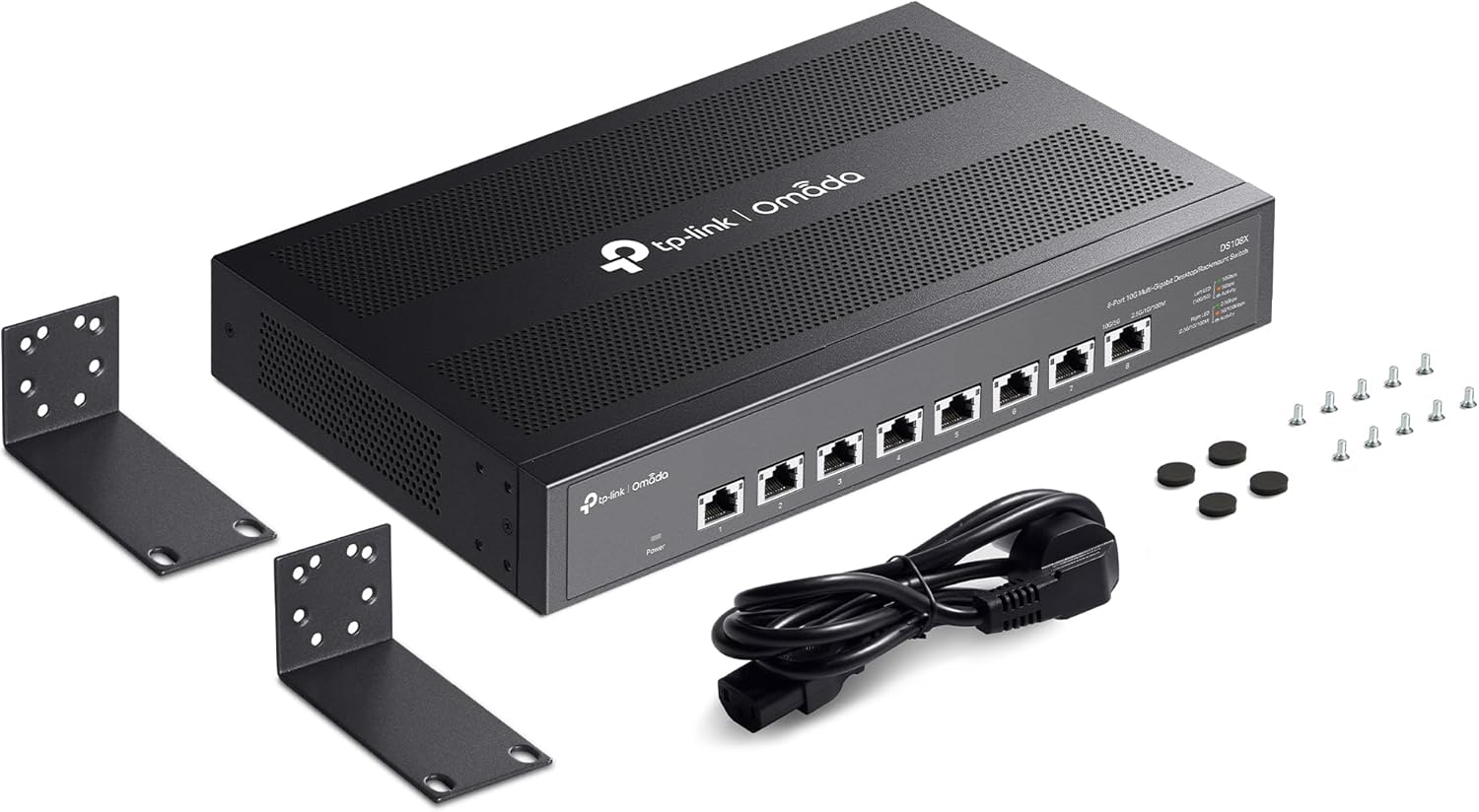
Figure 3: Included Accessories
This image shows the DS108X unit along with its power cord, rackmount brackets, screws, and rubber feet, which are all included in the package.
4. Physical Overview
Familiarize yourself with the components and indicators of the DS108X.
Front Panel
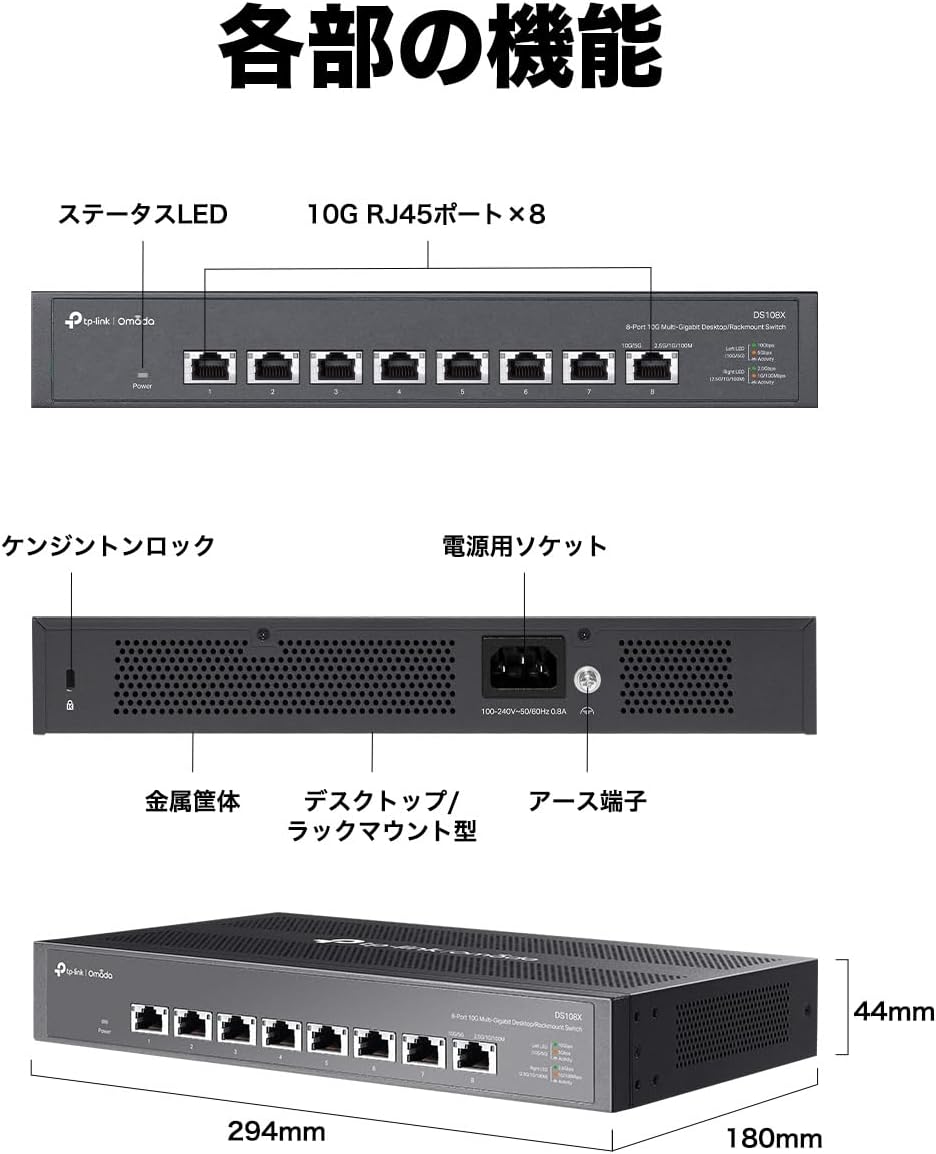
Figure 4: Front Panel Layout
The front panel features the Power LED, eight 10G RJ45 ports (labeled 1-8), and status LEDs for each port indicating link/activity and speed (100Mbps, 1Gbps, 2.5Gbps, 5Gbps, 10Gbps).
Rear Panel

Figure 5: Rear Panel Layout
The rear panel includes the Kensington Lock slot for security, the power socket for connecting the AC power cord, and a ground terminal for earthing.
Dimensions

Figure 6: Product Dimensions
The DS108X measures approximately 294mm in width, 180mm in depth, and 44mm in height, making it suitable for various installation environments.
5. Setup
The DS108X is a plug-and-play device, requiring minimal setup.
Basic Connection
- Power On: Connect the provided power cord to the power socket on the rear panel of the DS108X and plug the other end into a power outlet. The Power LED on the front panel will illuminate.
- Connect Devices: Use Ethernet cables to connect your network devices (e.g., computers, NAS, Wi-Fi access points, IP cameras, routers) to any of the 10G RJ45 ports on the front panel. The corresponding port LEDs will light up, indicating a successful connection and activity.
- Operation: Your network is now ready. The switch will automatically detect the optimal speed for each connected device.

Figure 7: Plug & Play Connection Steps
This diagram illustrates the simple three-step setup: 1. Power on the device. 2. Connect your network devices (IP phone, IP camera, access point, internet router) to the switch. 3. Setup is complete.
Installation Options
The DS108X supports both desktop and rackmount installations.
- Desktop Placement: Place the switch on a flat, stable surface. Ensure adequate ventilation around the device. Attach the included rubber feet to the bottom of the switch to prevent slipping and protect surfaces.
- Rackmount Installation: Use the provided rackmount kit to install the switch into a standard 19-inch equipment rack. Secure the brackets to the sides of the switch using the supplied screws, then mount the switch into the rack.

Figure 8: Flexible Installation Options
This image shows the DS108X installed in two configurations: on a desktop surface and mounted within a server rack, demonstrating its versatility.
6. Operating the Switch
Once connected, the DS108X operates automatically. It functions as an unmanaged switch, meaning it does not require any software configuration for basic network operation.
Network Performance
The DS108X maximizes the performance of your devices with ultra-high-speed communication. It is designed to handle demanding tasks such as:
- High-speed data transfer to and from NAS devices.
- Smooth 4K/8K video streaming and editing.
- Lag-free online gaming.
- Efficient backup and synchronization of large files.

Figure 9: 10x Speed Advantage
This image demonstrates the speed advantage of the DS108X. When connected to a Wi-Fi 7/6E/6 AP, the DS108X can achieve up to 10,000Mbps, which is 10 times faster than a standard Gigabit switch's 1,000Mbps.

Figure 10: NAS Backup Efficiency
This image illustrates how the DS108X significantly reduces backup times. Transferring 2TB of video to a NAS takes approximately 3.4 minutes with the DS108X, compared to approximately 34 minutes with a Gigabit switch, representing a 90% reduction in time.
7. Maintenance
To ensure the longevity and optimal performance of your DS108X, follow these maintenance guidelines:
- Cleanliness: Regularly clean the exterior of the switch with a soft, dry cloth. Avoid using liquid cleaners or aerosols.
- Ventilation: Ensure that the ventilation holes on the device are not obstructed. Proper airflow is crucial for heat dissipation, especially given its fanless design.
- Environment: Operate the switch in a cool, dry environment, away from direct sunlight, heat sources, and excessive moisture.
- Cable Management: Keep network cables organized and untangled to prevent damage and ensure stable connections.
- Power Cycle: If you experience network issues, a simple power cycle (unplugging the power cord, waiting 10 seconds, and plugging it back in) can often resolve minor glitches.

Figure 11: Efficient Heat Dissipation
This image highlights the efficient heat dissipation of the DS108X's fanless design, with arrows indicating airflow through the metal casing, ensuring stable and quiet operation.
8. Troubleshooting
If you encounter issues with your DS108X, refer to the following common problems and solutions:
| Problem | Possible Cause | Solution |
|---|---|---|
| No Power LED | Power cord not connected or power outlet issue. | Ensure the power cord is securely connected to the switch and a working power outlet. Try a different outlet. |
| Port LED not lit | Incorrect cable connection, faulty cable, or connected device is off. | Check the Ethernet cable connection at both ends. Try a different cable. Ensure the connected device is powered on and functioning correctly. |
| Slow network speed | Cable quality, connected device limitation, or network congestion. | Ensure you are using Cat6a or higher Ethernet cables for 10G connections. Verify the connected device supports 10G speeds. Reduce network traffic if possible. |
| Intermittent connection | Loose cable, interference, or temporary network glitch. | Reseat all Ethernet cables. Move the switch away from potential sources of electromagnetic interference. Power cycle the switch. |
9. Specifications
Detailed technical specifications for the DS108X:
- Model: DS108X
- Ports: 8 x 10G/Multi-Gigabit RJ45 Ports (100Mbps/1Gbps/2.5Gbps/5Gbps/10Gbps)
- Switching Capacity: 160 Gbps
- Jumbo Frame: 16 KB
- MAC Address Table: 32K
- Fan Quantity: Fanless
- Power Supply: 100-240V AC, 50/60Hz
- Dimensions (W x D x H): 294 x 180 x 44 mm (11.6 x 7.1 x 1.7 inches)
- Mounting: Desktop / Rackmount
- Operating Temperature: 0–50 °C (32–122 °F)
- Storage Temperature: -40–70 °C (-40–158 °F)
- Operating Humidity: 10–90% RH non-condensing
- Storage Humidity: 5–90% RH non-condensing
10. Warranty and Support
TP-Link stands behind the quality of its products.
- Manufacturer Warranty: The TP-Link DS108X comes with a 5-year manufacturer warranty, ensuring long-term peace of mind.
- Technical Support: For technical assistance, product registration, or to download the latest firmware and drivers, please visit the official TP-Link website: www.tp-link.com/support.
Related documentsDS108X


Ask a question about this manual
Ask about setup, troubleshooting, compatibility, parts, safety, or missing instructions. Manuals+ will review the question and use this page’s manual context to help answer it.