
Introduction
This manual provides essential instructions for the safe and effective operation of the BACODLUL CX-600A High Voltage Power Supply. Please read this manual thoroughly before installation and use, and retain it for future reference.
Safety Instructions
WARNING: This device generates high voltage. Improper use can result in serious injury or death. Always observe the following safety precautions:
- Ensure the power supply is properly grounded before connecting to the mains.
- Do not operate the device with wet hands or in damp environments.
- Never touch the high voltage output terminals when the unit is powered on.
- Disconnect the power supply from the mains before performing any maintenance or making connections.
- Ensure all connections are secure and insulated to prevent accidental contact.
- Do not open the casing of the power supply. There are no user-serviceable parts inside.
- Use only the specified input voltage range (AC180V-250V).
- Keep children and unauthorized personnel away from the device during operation.
Product Overview
The BACODLUL CX-600A is a high-voltage DC power supply designed for various electrostatic applications, including ionization, spraying, electrospinning, and purification systems. It features adjustable output voltage and current, along with essential safety indicators.
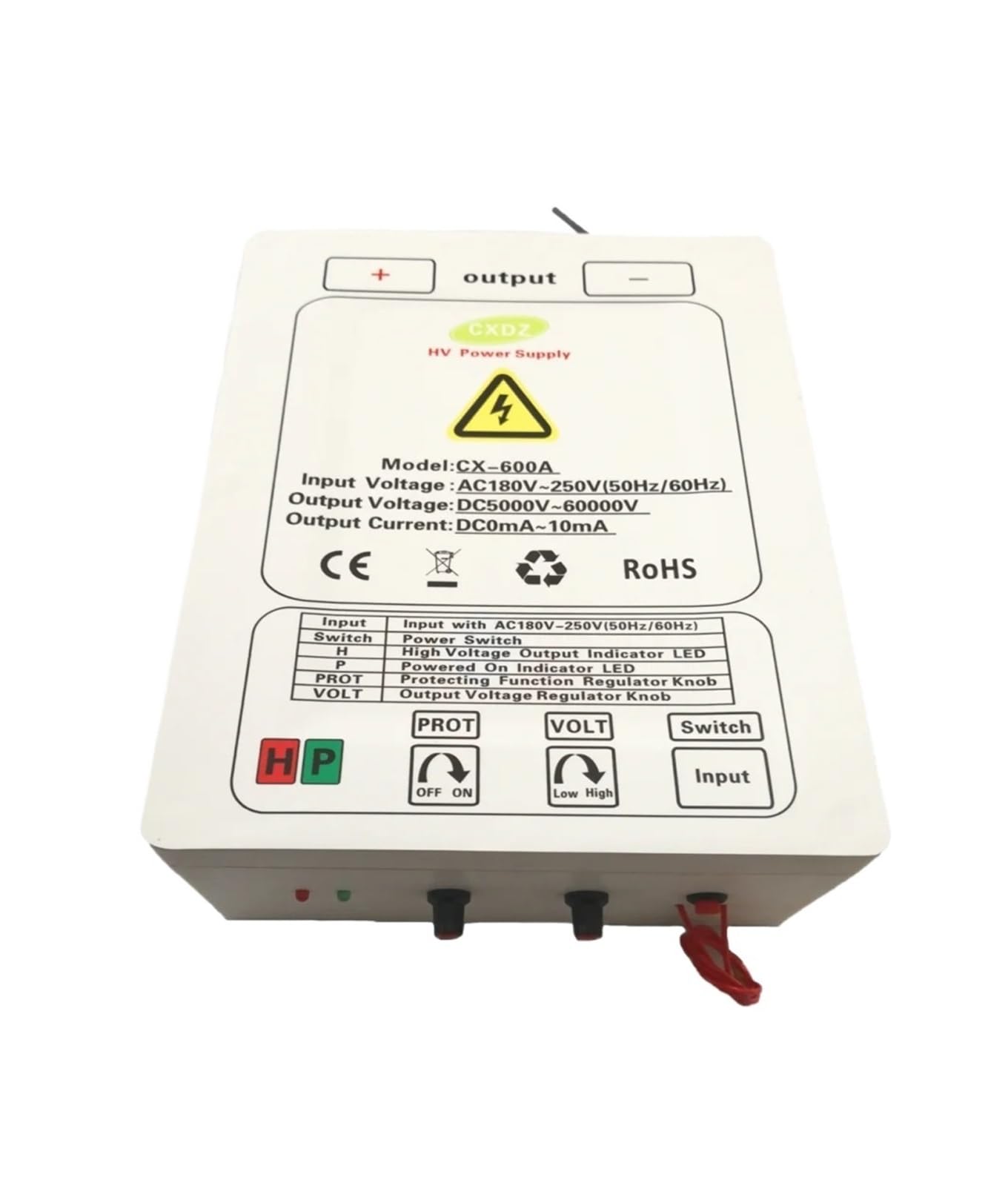
Figure 1: BACODLUL CX-600A High Voltage Power Supply, showing overall dimensions of 320mm (length) x 240mm (width) x 105mm (height). The unit features input and output terminals, control knobs, and indicator lights.

Figure 2: Detailed view of the CX-600A front panel, highlighting the control interface and technical specifications label.
Control Panel and Indicators
| Label | Description |
|---|---|
| Input | Input terminals for AC power (AC180V-250V, 50Hz/60Hz). |
| Switch | Main power switch for the unit. |
| H | High voltage output indicator LED. Illuminates when high voltage is active. |
| P | Powered On indicator LED. Illuminates when the unit is receiving power. |
| PROT | Protection Function Regulator Knob. Adjusts or activates protection features. |
| VOLT | Output Voltage Regulator Knob. Adjusts the DC output voltage from 5KV to 60KV. |
| Output | High voltage output terminals (+ and -). |
Specifications
- Model: CX-600A
- Input Voltage: AC180V-250V (50Hz/60Hz)
- Output Voltage: DC5000V-60000V (5KV-60KV)
- Output Current: DC 0-10mA
- Dimensions (L x W x H): Approximately 320mm x 240mm x 105mm
- Applications: Electrostatic Ionization, Spraying, Electrospinning, Cleaner Purification
Setup
- Unpacking: Carefully remove the power supply from its packaging. Inspect for any signs of damage.
- Placement: Place the unit on a stable, dry, and non-conductive surface. Ensure adequate ventilation around the unit.
- Grounding: Connect the grounding terminal of the power supply to a reliable earth ground. This is critical for safety.
- Input Power Connection: Connect the AC input power cable to the "Input" terminals on the unit. Ensure the input voltage matches the specified range (AC180V-250V).
- Output Connection: Connect your high-voltage application (e.g., electrostatic sprayer, electrospinning setup) to the "Output" terminals (+ and -). Ensure all high-voltage connections are properly insulated and secured.
Operating Instructions
- Initial Check: Before powering on, double-check all connections, especially the grounding and high-voltage output connections, to ensure they are secure and safe.
- Power On: Turn the "Switch" to the ON position. The "P" (Powered On) indicator LED should illuminate.
- Adjusting Voltage: Slowly turn the "VOLT" (Output Voltage Regulator) knob clockwise to increase the output voltage. The "H" (High voltage output) indicator LED will illuminate when high voltage is active. Turn counter-clockwise to decrease the voltage.
- Monitoring: Observe the "H" indicator to confirm high voltage output. If the "PROT" indicator illuminates, it signifies that a protection function has been activated, possibly due to an overload or short circuit. Reduce the voltage or check your load.
- Power Off: To turn off the unit, first turn the "VOLT" knob fully counter-clockwise to reduce the output voltage to minimum. Then, turn the "Switch" to the OFF position.
- Discharge: After powering off, always ensure that any connected high-voltage components are safely discharged before handling. High voltage can remain stored in capacitors even after the power supply is turned off.
Maintenance
The BACODLUL CX-600A High Voltage Power Supply requires minimal maintenance. Follow these guidelines:
- Cleaning: Keep the unit clean and free from dust. Use a dry, soft cloth to wipe the exterior. Do not use liquid cleaners or solvents.
- Inspection: Periodically inspect the power cord, input/output cables, and terminals for any signs of damage or wear. Replace damaged components immediately.
- Ventilation: Ensure that the ventilation openings on the unit are not blocked to prevent overheating.
- Storage: When not in use, store the power supply in a dry, cool, and dust-free environment.
Do not attempt to open the unit for internal cleaning or repairs. Refer all servicing to qualified personnel.
Troubleshooting
If you encounter issues with your CX-600A power supply, refer to the following common problems and solutions:
| Problem | Possible Cause | Solution |
|---|---|---|
| Unit does not power on (P LED off). | No input power; faulty power cable; internal fuse blown. | Check power outlet and cable. Ensure the power switch is ON. If problem persists, contact support. |
| No high voltage output (H LED off) when VOLT knob is turned. | VOLT knob not adjusted; protection circuit activated; faulty output connection. | Ensure VOLT knob is turned clockwise. Check if PROT LED is on. Verify output connections are secure and not shorted. |
| PROT LED illuminates during operation. | Overload, short circuit, or abnormal operating conditions. | Immediately reduce output voltage. Check the connected load for short circuits or excessive current draw. Adjust PROT knob if applicable. |
| Unstable output voltage. | Poor input power quality; loose connections; internal fault. | Ensure stable input power. Check all connections. If problem persists, contact support. |
Warranty and Support
Specific warranty information and detailed support contacts are not provided within this manual. For warranty claims, technical assistance, or service inquiries, please refer to the product's purchase documentation or contact your vendor directly.