
Introduction
Thank you for choosing the UBON Topper J23 Bluetooth TWS Earbuds. This manual provides detailed instructions to help you set up, operate, and maintain your earbuds for optimal performance. Please read this manual carefully before use and retain it for future reference.
Box Contents
Verify that all items are present in the package:
- 1 x Pair of UBON Topper J23 Earbuds
- 1 x Charging Case
- 1 x Charging Cable (Type-C)
- 1 x User Manual
Product Overview
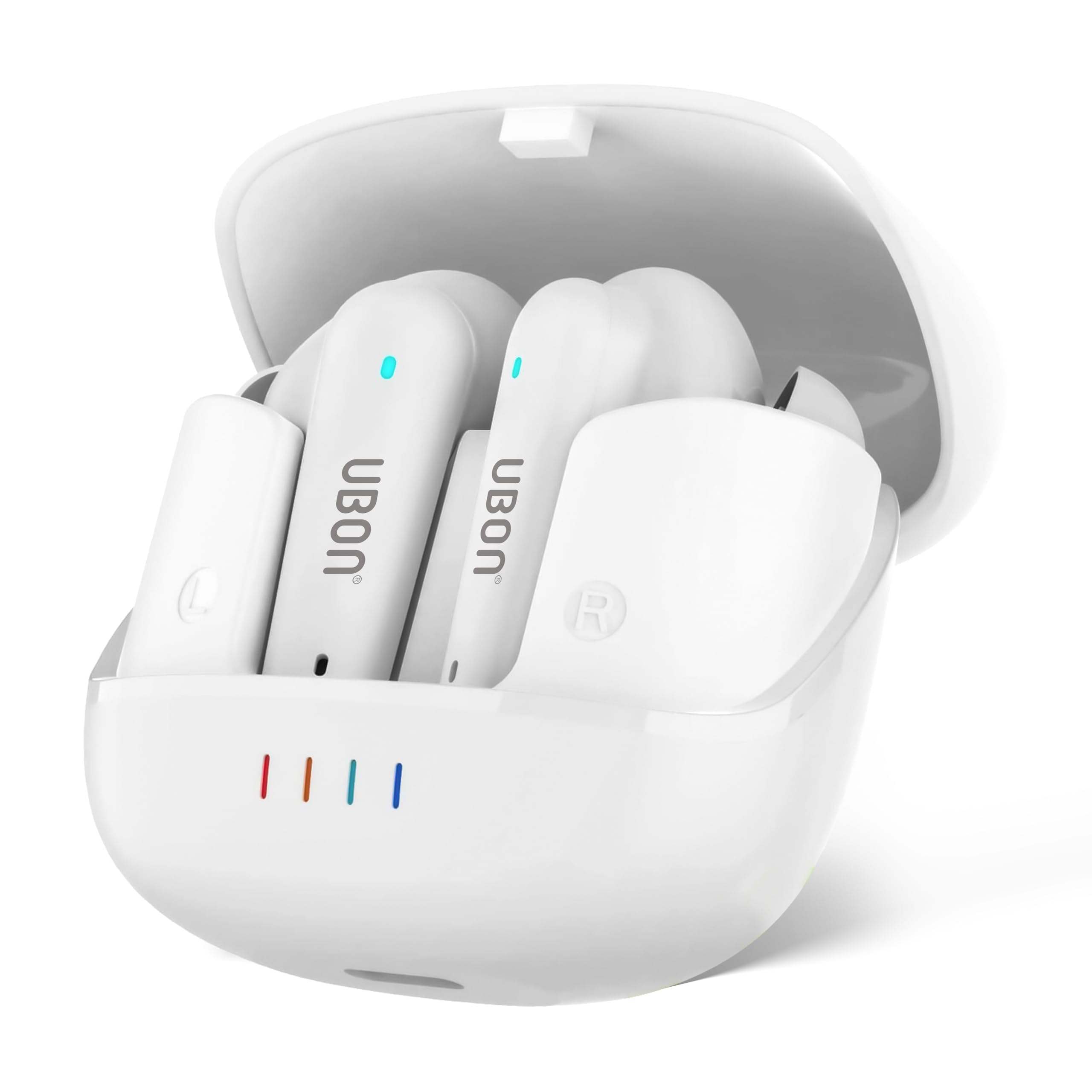
The UBON Topper J23 earbuds securely placed within their charging case, illustrating the compact design and ready-to-use state.

Close-up view of the charging case, highlighting the Type-C charging port for convenient and fast power input.

The earbuds outside their case, demonstrating their sporty design and indicating features like auto-pairing and touch operations.

A single earbud, emphasizing its Active Noise Reduction (ANR) capability for an immersive audio experience.

A user enjoying the earbuds, representing the HD sound quality and the availability of three different audio modes.

The UBON Topper J23 earbuds and cases displayed in various color options: white, blue, and black.
Note: No official product videos from the seller were found in the provided data to embed.
Setup and Pairing
1. Initial Charging
Before first use, fully charge the earbuds and the charging case. Connect the provided Type-C charging cable to the charging port on the case and a power source. The indicator lights on the case will show the charging status. A full charge provides up to 40 hours of total playtime with the case.
2. Power On
Open the charging case. The earbuds will automatically power on and enter pairing mode. You will typically see indicator lights flashing on the earbuds.
3. Bluetooth Pairing
- Ensure Bluetooth is enabled on your device (smartphone, tablet, laptop, etc.).
- Open the Bluetooth settings on your device.
- Look for "UBON Topper J23" in the list of available devices.
- Select "UBON Topper J23" to connect. Once connected, a voice prompt will confirm successful pairing, and the earbud indicator lights will stop flashing or change to a steady light.
The earbuds feature Bluetooth v5.3 for stable and fast connectivity. They will auto-pair with the last connected device when removed from the case, if Bluetooth is enabled on the device.
Operating Instructions
Touch Controls
The UBON Topper J23 earbuds are equipped with responsive touch sensors for easy control of music, calls, and voice assistants. Specific touch functions may vary slightly, but common controls include:
- Play/Pause: Single tap on either earbud.
- Next Track: Double tap on the right earbud.
- Previous Track: Double tap on the left earbud.
- Answer/End Call: Single tap on either earbud during an incoming call.
- Reject Call: Press and hold either earbud for 2 seconds during an incoming call.
- Activate Voice Assistant: Triple tap on either earbud.
Active Noise Reduction (ANR)
The earbuds feature Advanced ANR technology to minimize ambient noise, providing a clearer audio experience. This function is automatically enabled or can be toggled via specific touch controls (refer to the quick start guide included in your box for exact gestures if not listed above).
Low Latency Mode
For an optimized experience during gaming or video playback, activate the low latency mode. This reduces audio delay, ensuring synchronization between visuals and sound. This mode can typically be activated via a specific touch gesture (e.g., press and hold a specific earbud for a few seconds).
Audio Modes
The UBON Topper J23 offers 3 different audio modes to suit various listening preferences. These modes adjust the sound profile (e.g., bass boost, balanced, vocal clarity). Switch between modes using the designated touch controls on the earbuds.
Maintenance
- Cleaning: Regularly clean the earbuds and charging case with a soft, dry, lint-free cloth. Do not use harsh chemicals or abrasive materials.
- Storage: When not in use, store the earbuds in their charging case to protect them and keep them charged.
- Water Resistance: The earbuds are water-resistant. Avoid submerging them in water or exposing them to heavy rain for extended periods. Dry them thoroughly if they get wet.
- Charging: Use only the provided Type-C cable or a certified equivalent for charging.
Troubleshooting
Earbuds Not Charging
- Ensure the charging cable is securely connected to both the case and the power source.
- Check if the charging case itself has power. The indicator lights should illuminate.
- Ensure the earbuds are correctly seated in the charging case, making proper contact with the charging pins.
- Clean the charging contacts on both the earbuds and the case with a dry cotton swab.
Earbuds Not Pairing/Connecting
- Make sure the earbuds are fully charged.
- Ensure Bluetooth is enabled on your device and the earbuds are in pairing mode (indicator lights flashing).
- Turn off Bluetooth on your device, then turn it back on.
- Forget "UBON Topper J23" from your device's Bluetooth list and attempt to pair again.
- If only one earbud is working, try resetting the earbuds (refer to the quick start guide for specific reset instructions).
- Ensure the earbuds are within the effective Bluetooth range of your device.
Poor Sound Quality
- Check the volume level on both your device and the earbuds.
- Ensure the earbuds are clean and free from debris that might obstruct the sound.
- Move closer to your connected device to rule out interference or range issues.
- Try playing audio from a different source or application.
Specifications
| Feature | Detail |
|---|---|
| Brand | UBON |
| Model Number | J-23 |
| Model Name | Topper |
| Bluetooth Version | 5.3 |
| Ear Placement | In Ear |
| Form Factor | In Ear |
| Impedance | 32 Ohms |
| Noise Control | Sound Isolation (ANR Enabled) |
| Battery Average Life | 40 Hours (with charging case) |
| Control Method | Touch |
| Water Resistance Level | Water Resistant |
| Compatible Devices | Smartphones, Tablets, Laptops, Desktops, Gaming Consoles |
| Item Weight | 45 Grams |
| Enclosure Material | Acrylonitrile Butadiene Styrene (ABS) |
| Country of Origin | India |
Warranty and Support
The UBON Topper J23 Bluetooth TWS Earbuds come with a 1 Year Manufacturer Warranty from the date of purchase. Please retain your purchase receipt for warranty claims.
For technical support, warranty claims, or further assistance, please contact the manufacturer:
IVA EnterprisesB-45, G.T. Karnal Road Industrial Area,
North Delhi, Delhi - 110033, India
For more information, you may visit the official UBON store on Amazon: UBON Store
