
Geemax DDSLC005
Geemax Electric Tricycle User Manual
Model: DDSLC005
Brand: Geemax
Introduction
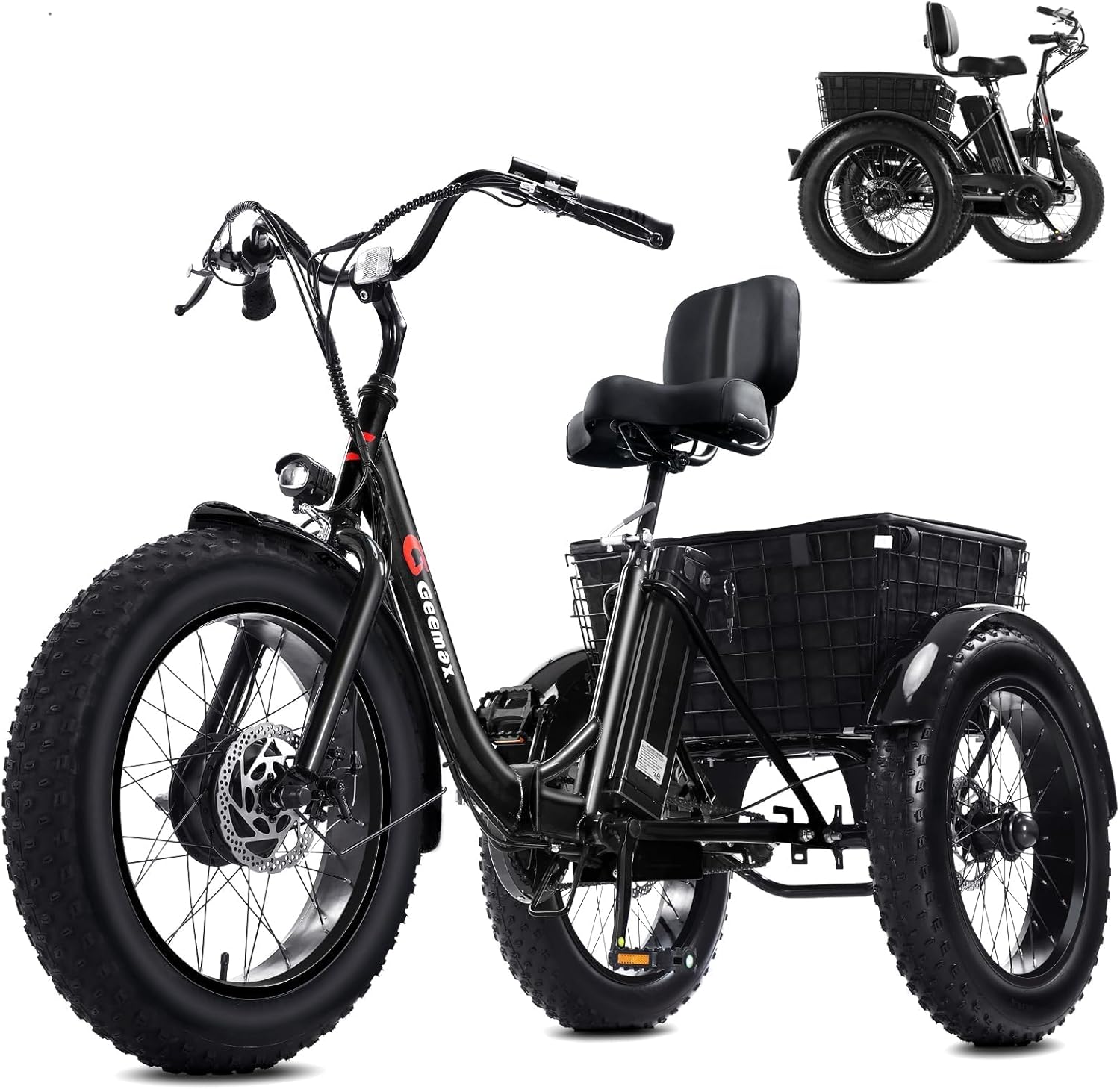
Figure 0: The Geemax Electric Tricycle, a 3-wheel electric bicycle designed for adults, featuring fat tires and a rear basket.
This manual provides essential information for the safe and efficient operation, maintenance, and troubleshooting of your Geemax Electric Tricycle for Adults. Please read this manual thoroughly before using your tricycle to ensure proper handling and to maximize its lifespan.
The Geemax Electric Tricycle is designed for adults, featuring 20" x 4.0 fat tires for excellent traction across various terrains, a powerful 500W peak motor, and a long-lasting 36V 13Ah lithium battery. It offers multiple riding modes and assist levels for a customizable experience.
Setup and Assembly
Your Geemax Electric Tricycle arrives 80% pre-assembled. Follow these steps to complete the assembly and prepare for your first ride.
- Unpacking: Carefully remove all components from the packaging. Inspect for any shipping damage.
- Unfolding (if applicable): The tricycle features a foldable design. Locate the folding mechanism (refer to diagram in Specifications section) and carefully unfold the frame until it locks securely into place.
- Handlebar Installation: Attach the handlebars to the stem, ensuring all bolts are tightened securely. Adjust the handlebar height and angle for comfortable riding.
- Seat Installation: Insert the seat post into the frame and adjust the seat height. Ensure the quick-release lever or bolt is securely fastened. The adjustable seat and handlebars accommodate various rider heights.
- Pedal Installation: Attach the pedals to the crank arms. Note that pedals are typically marked 'L' for left and 'R' for right. Thread them carefully to avoid cross-threading.
- Basket Attachment: Secure the rear basket to the tricycle frame using the provided hardware.
- Initial Battery Charge: Before first use, fully charge the battery. Refer to the 'Operating' section for charging instructions.
- Pre-Ride Checks: Before each ride, check tire pressure, brake function, and ensure all quick-release levers and bolts are tight.

Figure 1: The Geemax Electric Tricycle demonstrating its foldable design, showing both half-folded and fully folded configurations for compact storage and transport.
Operating Instructions
Familiarize yourself with the controls and features of your Geemax Electric Tricycle for a safe and enjoyable ride.
Powering On and Off
- To power on the tricycle, press and hold the power button on the LCD display.
- To power off, press and hold the power button again.
LCD Display and Controls
The LCD display provides real-time information about your ride. Use the control buttons to navigate through settings and adjust assist levels.
- Speed Display: Shows current riding speed.
- Battery Level Indicator: Displays remaining battery charge.
- Distance Covered: Tracks trip distance.
- Pedal Assistance Level: Adjust with '+' and '-' buttons (5 levels available).

Figure 2: Close-up view of the LCD display and handlebar controls, indicating speed, battery level, and pedal assist settings.
Riding Modes
The tricycle offers three distinct riding modes:
- E-trike Mode: Full electric power, no pedaling required.
- Assisted Tricycle Mode (Pedal Assist): The motor provides assistance as you pedal. Adjust the assist level (1-5) for more or less power.
- Normal Tricycle Mode: No electric assistance, operates like a traditional tricycle.
Braking System
The tricycle is equipped with disc brakes on each wheel for smooth and even stopping power. Always apply both brake levers simultaneously for optimal braking performance.

Figure 3: Detail of the disc brake system, highlighting its robust design for reliable stopping.
Battery Charging
The 36V 13Ah lithium battery can be charged directly on the tricycle or removed for charging. Use only the provided charger.
- On-Tricycle Charging: Locate the charging port on the battery pack and connect the charger.
- Off-Tricycle Charging: Unlock and remove the battery pack from the frame. Connect the charger to the battery pack.
- The charging indicator light on the charger will change color (e.g., red to green) when fully charged.
Video 1: This video demonstrates the operation of a Geemax electric bike, including powering on, adjusting assist levels via the LCD display, and showing the two methods for charging the battery (on-bike and removed). While the video features a two-wheel bike, the operational principles for the display and charging methods are similar for the electric tricycle.

Figure 4: Illustration of the 36V 13Ah lithium battery, highlighting its capacity and estimated range in both electric and assist modes.
Maintenance
Regular maintenance ensures the longevity and safe operation of your Geemax Electric Tricycle.
- Tire Pressure: Check tire pressure regularly (recommended pressure is usually on the tire sidewall). Proper inflation improves ride quality and prevents punctures. The 4.0 fat tires are designed for various terrains.
- Cleaning: Clean the tricycle with a damp cloth. Avoid high-pressure washing directly on electrical components.
- Battery Care:
- Charge the battery fully after each ride, especially if it will be stored for an extended period.
- Do not completely drain the battery.
- Store the battery in a cool, dry place, away from direct sunlight and extreme temperatures.
- Brake Inspection: Periodically check brake pads for wear and ensure brake levers operate smoothly. Adjust or replace as needed.
- Fastener Checks: Regularly inspect all bolts, nuts, and quick-release levers to ensure they are tight and secure.
- Lubrication: Lubricate the chain and other moving parts as needed to ensure smooth operation and prevent rust.
Troubleshooting
This section addresses common issues you might encounter with your electric tricycle. For problems not listed here, please contact customer support.
| Problem | Possible Cause | Solution |
|---|---|---|
| Tricycle does not power on. | Battery not charged, battery not properly seated, power cable loose. | Ensure battery is fully charged. Check if the battery is securely installed. Verify all connections. |
| Motor not assisting. | Pedal assist level set to 0, battery low, sensor issue. | Increase pedal assist level on the LCD display. Charge the battery. Check for loose sensor cables. |
| Brakes feel weak. | Worn brake pads, loose brake cable, air in hydraulic system (if applicable). | Inspect and replace brake pads if worn. Adjust brake cable tension. For hydraulic brakes, bleeding may be required by a professional. |
| Unusual noises during operation. | Loose components, lack of lubrication, foreign object. | Inspect all fasteners. Lubricate chain and moving parts. Check for debris caught in wheels or drivetrain. |
Specifications
Detailed technical specifications for the Geemax Electric Tricycle (Model DDSLC005).
| Feature | Detail |
|---|---|
| Model Name | DDSLC005 |
| Brand Name | Geemax |
| Motor | 36V 350W (Peak 500W) High-Speed Brushless Motor |
| Top Speed | Up to 20 MPH |
| Battery | 36V 13Ah Lithium Battery (UL Certified) |
| Range (Electric Mode) | Up to 28 miles per full charge |
| Range (Assist Mode) | Up to 40 miles per full charge |
| Tires | 20" x 4.0 Fat Tires (Puncture Resistant) |
| Riding Modes | 3 (E-trike, Assisted, Normal) |
| Pedal Assist Levels | 5 Levels |
| Brakes | Disc Brakes on each wheel |
| Foldable | Yes |
| Assembly Level | 80% Pre-assembled |
| Item Package Dimensions L x W x H | 55.1 x 23.6 x 13.7 inches |
| Package Weight | 90 Pounds |
| Item Weight | 90 Pounds |
| Color | Black |
| Material | Aluminum |
| Included Components | Basket |
| Manufacturer | Geemax - ZDB6 |
| Date First Available | October 26, 2023 |

Figure 5: Diagram illustrating key components and overall dimensions of the Geemax Electric Tricycle.

Figure 6: Recommended rider height range (5'2" - 6'4" Max) and maximum load capacity (350 lbs) for the tricycle.
Warranty and Support
Your Geemax Electric Tricycle is covered by a 1-Year Manufacturer Warranty from the date of purchase, covering defects in materials and workmanship.
For warranty claims, technical assistance, or any questions regarding your product, please contact Geemax Customer Support. Refer to your purchase documentation or the Geemax official website for contact details.
Additionally, the product is eligible for 30-day easy returns as per Amazon's policy.
Related documentsDDSLC005

Ask a question about this manual
Ask about setup, troubleshooting, compatibility, parts, safety, or missing instructions. Manuals+ will review the question and use this page’s manual context to help answer it.