1. Introduction
This manual provides detailed instructions for the setup, operation, and maintenance of your EMP EZIMEDPIL Bluetooth Pill Dispenser. This device is designed to assist with medication management by providing audio and visual alerts, along with smartphone notifications, to ensure timely and accurate dosage.

Image 1.1: The EziMedPil Bluetooth Pill Dispenser alongside its companion SmartLife app on a smartphone.
2. Package Contents
Please verify that all items are present in your package:
- EMP EZIMEDPIL Bluetooth Pill Dispenser Unit
- 9 Interchangeable Dosage Rings
- 2 Keys for Locking Mechanism
- 4 AA Batteries (pre-installed or included separately)
- User Manual (this document)
3. Product Overview
Familiarize yourself with the main components of your pill dispenser.
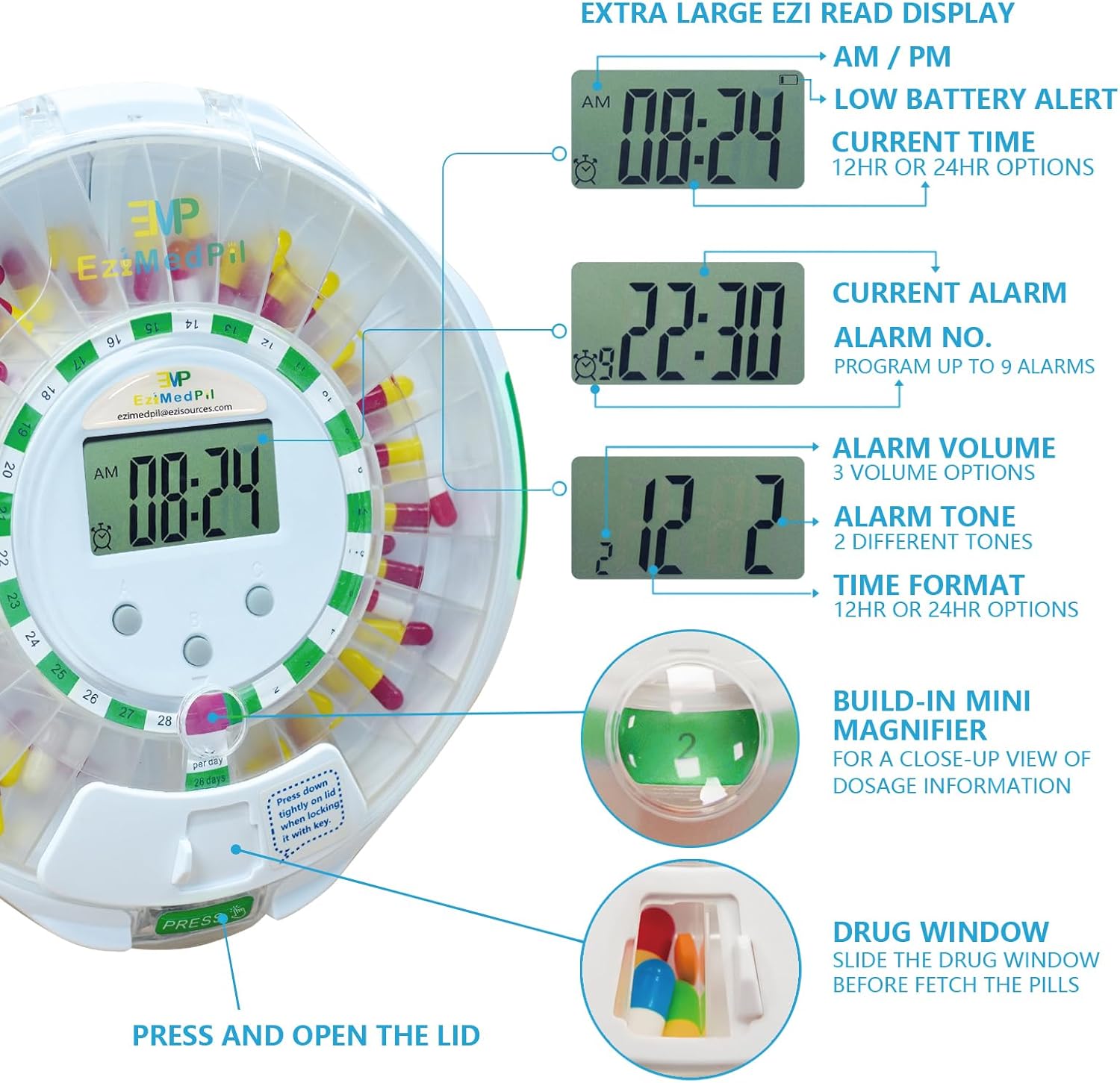
Image 3.1: Key features of the dispenser, including the LCD display, control buttons, magnifying glass, and drug window.
- LCD Display: Shows current time, alarm number, alarm volume, and time format (12HR or 24HR).
- Control Buttons: Three buttons (A, B, C) for manual time and alarm settings.
- Drug Window: Sliding door for accessing dispensed pills.
- Built-in Magnifier: Provides a magnified view of dosage information within the compartment.
- Locking Mechanism: Key-operated lock to secure the lid and prevent unauthorized access.
- Battery Compartment: Located on the underside, holds 4 AA batteries.
- Removable Carousel: Inner tray with 28 compartments for medication storage.
4. Setup
4.1 Battery Installation
- Turn the dispenser upside down.
- Locate the battery compartment cover.
- Open the cover and insert 4 AA batteries, ensuring correct polarity.
- Close the battery compartment cover securely.

Image 4.1: Battery compartment location and battery insertion.
4.2 Initial Time Setting
The time can be set using the three control buttons on the dispenser or via the SmartLife app after pairing. For manual setting, refer to the detailed instructions in the included quick start guide.
4.3 Installing Dosage Rings
The dispenser includes 9 interchangeable dosage rings to accommodate various medication schedules. Select the ring that matches your desired daily dosage frequency (e.g., 1 dose/day, 2 doses/day, etc.). Place the chosen ring onto the central carousel, aligning it correctly with the compartment numbers.

Image 4.2: Removable carousel and various dosage rings.
| Ring No. | Doses per Day | Programmable Time Period |
|---|---|---|
| 1 | 1 | 28 Days |
| 2 | 2 | 14 Days |
| 3 | 3 | 9 Days |
| 4 | 4 | 7 Days |
| 5 | 5 | 5 Days |
| 6 | 6 | 4 Days |
| 7 | 7 | 4 Days |
| 8 | 8 | 3 Days |
| 9 | 9 | 3 Days |
5. SmartLife App Installation & Pairing
5.1 App Download
Download the free SmartLife app from the Apple App Store (for iOS devices) or Google Play Store (for Android devices).
5.2 Bluetooth Pairing
- Ensure Bluetooth is enabled on your smartphone or tablet.
- Open the SmartLife app and follow the on-screen instructions to add a new device.
- The app will guide you through the pairing process with your EziMedPil dispenser.

Image 5.1: Connecting the dispenser to the SmartLife app via Bluetooth.
5.3 App Features
The SmartLife app allows you to:
- Set and adjust medication schedules (up to 9 alarms daily).
- View the current medication cycle and remaining doses.
- Receive phone notifications for scheduled doses.
- Adjust alarm settings, volume, and tone.
- Initiate an early dose if needed.
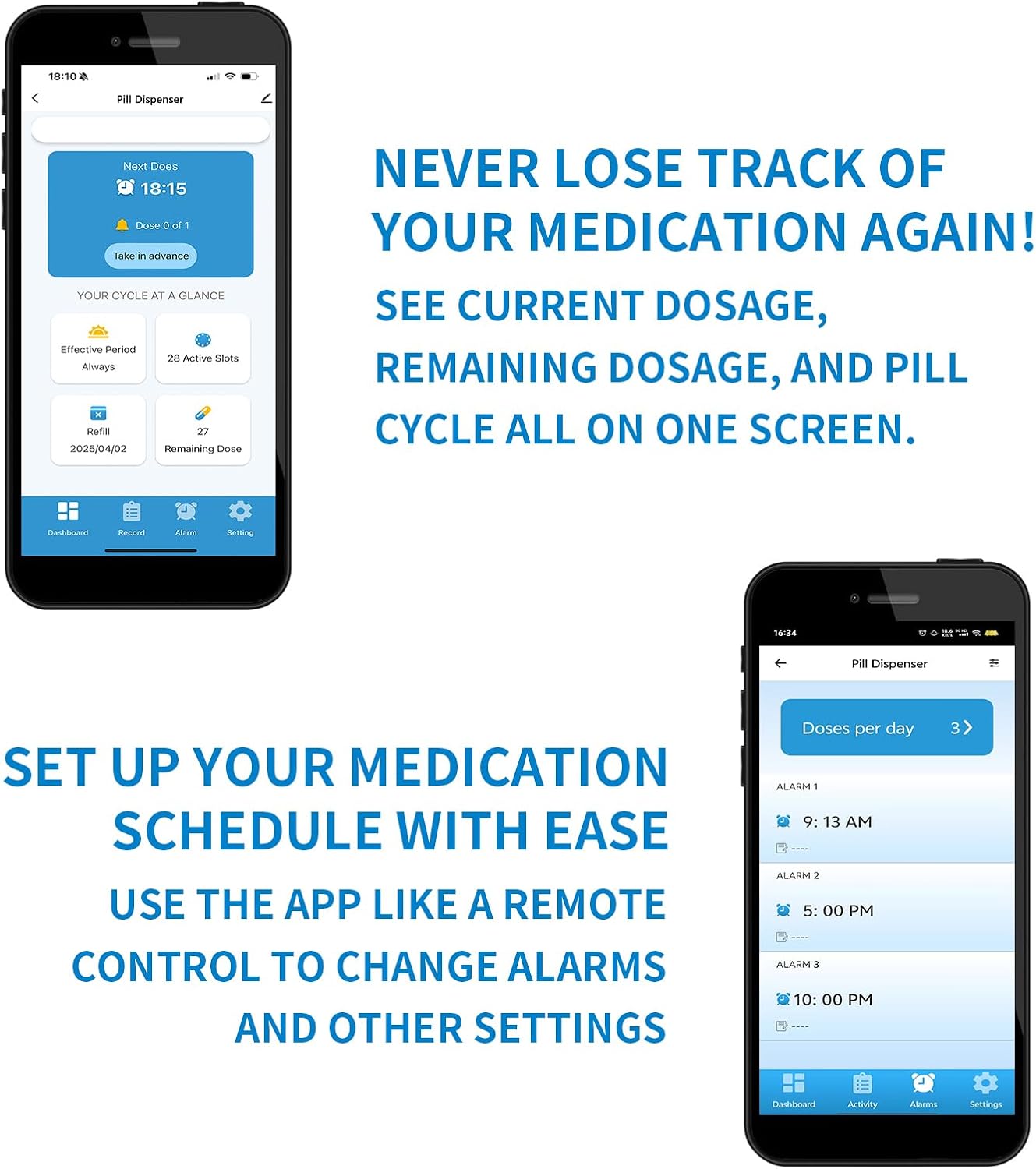
Image 5.2: SmartLife app interface for medication tracking and alarm settings.
6. Operating Instructions
6.1 Loading Medications
- Unlock the dispenser lid using one of the provided keys.
- Remove the clear lid and the carousel.
- Place your medications into the 28 spacious compartments according to your chosen dosage ring and schedule. Each compartment can hold up to 24 aspirin-sized tablets.
- Replace the carousel and secure the clear lid, ensuring the bubble ring creates a moisture-proof seal.
- Lock the lid with the key.

Image 6.1: Moisture-proof bubble ring and key lock system.
6.2 Setting Alarms
Alarms can be set directly on the device using the three buttons or more conveniently through the SmartLife app. You can program up to 9 daily alarms.
6.3 Dispensing Medications
When an alarm is due:
- The dispenser will automatically rotate to present the correct medication compartment.
- Audio alerts (beeps) and visual alerts (blue flashing lights) will activate for up to 30 minutes.
- You will also receive a notification on your paired smartphone via the SmartLife app.
- To retrieve medication, slide open the drug window and invert the dispenser to allow the pills to fall into your hand.
- Closing the drug window or setting the dispenser back down will stop the alarm.

Image 6.2: Dispenser rotation and alarm features.
7. Maintenance
7.1 Cleaning
To clean the dispenser, wipe the exterior with a soft, damp cloth. Ensure no moisture enters the electronic components. The removable carousel can be gently cleaned with mild soap and water, then thoroughly dried before reassembly.
7.2 Battery Replacement
When the low battery alert appears on the LCD display, replace all 4 AA batteries promptly to ensure continuous operation.
8. Troubleshooting
- Dispenser not turning on: Check if batteries are inserted correctly and are not depleted. Replace batteries if necessary.
- No alarm sound/light: Verify alarm settings in the SmartLife app or via manual controls. Ensure volume is not set to zero. Check battery level.
- No phone notifications: Ensure the dispenser is paired via Bluetooth and within range (approximately 30-50 feet). Check app notification settings on your phone. The SmartLife app must be running in the background or foreground for notifications to be received.
- Dispenser not rotating: Ensure the lid is properly closed and locked. Check for any obstructions in the carousel's path.
- Pills not dispensing: Ensure the drug window is fully open and the dispenser is inverted. Check for any pills stuck in the compartment.
- Dispenser slides on smooth surfaces: Consider placing the dispenser on a non-slip mat or adding rubber feet to the base for stability.
- Magnifying glass not clear: The built-in magnifier is designed for a close-up view of dosage information. Ensure the area is well-lit for optimal visibility.
9. Specifications
| Feature | Detail |
|---|---|
| Product Dimensions | 8.66 x 8.66 x 2.68 inches |
| Weight | 1.9 Pounds |
| Power Source | 4 AA Batteries (Included) |
| Material | Acrylonitrile Butadiene Styrene |
| Special Features | Automatic, Built-In Alarm, Lockable, Moisture Proof, Sturdy |
| Compartments | 28 (each holds up to 24 aspirin-sized tablets) |
| Alarms | Up to 9 per day |
| Connectivity | Bluetooth (SmartLife App) |
10. Safety Information
- Always keep the dispenser locked with the provided key to prevent unauthorized access, especially by children.
- Statements regarding dietary supplements have not been evaluated by the FDA and are not intended to diagnose, treat, cure, or prevent any disease or health condition.
- Consult with a healthcare professional regarding your medication schedule and any concerns.
- Do not immerse the electronic components of the dispenser in water.
11. Warranty and Support
For warranty information or technical support, please contact EMP EZIMEDPIL directly. Refer to the product packaging or the official EMP EZIMEDPIL website for contact details.


