
Introduction
This manual provides comprehensive instructions for the safe and efficient operation of the Hyper Tough Class 2 Battery Charger, Model HY-1421U1. Please read this manual thoroughly before using the charger to ensure proper function and to prevent injury or damage. Keep this manual for future reference.
Important Safety Information
WARNING: Read all safety warnings and instructions. Failure to follow the warnings and instructions may result in electric shock, fire, and/or serious injury.
- This charger is designed for specific battery types. Do not attempt to charge other types of batteries, as this may cause them to burst, leading to personal injury and damage.
- Do not expose the charger to rain or wet conditions. Water entering the charger will increase the risk of electric shock.
- Use only the charger specified by the manufacturer. Using any other charger may create a risk of injury and fire.
- Do not abuse the cord. Never use the cord for carrying, pulling, or unplugging the charger. Keep the cord away from heat, oil, sharp edges, or moving parts. Damaged or entangled cords increase the risk of electric shock.
- Do not operate the charger if it has received a sharp blow, been dropped, or otherwise damaged. Take it to an authorized service center for inspection.
- Do not disassemble the charger. Take it to an authorized service center when service or repair is required. Incorrect reassembly may result in a risk of electric shock or fire.
- Unplug the charger from the outlet before attempting any maintenance or cleaning.
- This appliance is not intended for use by persons (including children) with reduced physical, sensory or mental capabilities, or lack of experience and knowledge, unless they have been given supervision or instruction concerning use of the appliance by a person responsible for their safety.
Package Contents
Upon unpacking, ensure all items listed below are present and undamaged. If any parts are missing or damaged, do not operate the charger and contact customer support.
- Hyper Tough Class 2 Battery Charger (Model HY-1421U1)
- User Manual
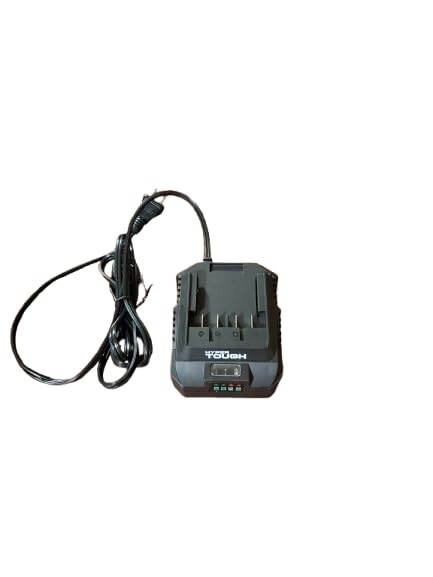
Image: Hyper Tough Class 2 Battery Charger Model HY-1421U1. This image displays the charger unit with its attached power cord. The charger is dark gray with the "HYPER TOUGH" logo visible on the front.
Setup
- Choose a Suitable Location: Place the charger on a dry, stable, non-flammable surface, away from direct sunlight, heat sources, and moisture. Ensure adequate ventilation around the charger.
- Connect to Power: Plug the charger's power cord into a standard 120 Volts AC electrical outlet. Ensure the outlet is functional and properly grounded.
- Prepare Battery: Ensure the battery to be charged is clean and free from debris. Check for any visible damage to the battery terminals or casing. Do not charge damaged batteries.
Operating Instructions
Follow these steps to charge your Hyper Tough battery:
- Insert Battery: Align the battery with the charging port on the charger. Slide the battery firmly into the charger until it clicks into place.
- Monitor Charging Indicator: The charger will typically have an indicator light (LED) to show the charging status.
- Solid Red/Orange: Indicates the battery is charging.
- Solid Green: Indicates the battery is fully charged.
- Flashing Red/Other: May indicate a fault or error. Refer to the Troubleshooting section.
- Charging Time: Charging times vary depending on the battery's capacity and its current charge level. Do not leave batteries on charge indefinitely once fully charged.
- Remove Battery: Once the battery is fully charged (indicated by a solid green light), press the release button (if present) and slide the battery out of the charger.
- Unplug Charger: Disconnect the charger from the power outlet when not in use.
Maintenance
- Cleaning: Disconnect the charger from the power supply before cleaning. Use a soft, dry cloth to wipe the exterior of the charger. Do not use abrasive cleaners or solvents. Keep the charging terminals clean and free of debris.
- Storage: Store the charger in a dry, indoor location, away from extreme temperatures. Keep it out of reach of children.
- Cord Inspection: Regularly inspect the power cord for any signs of damage, cuts, or fraying. If damaged, have it replaced by a qualified technician.
Troubleshooting
| Problem | Possible Cause | Solution |
|---|---|---|
| Charger indicator light does not illuminate. | No power to the charger; faulty outlet; charger malfunction. | Check power connection and outlet. Try a different outlet. If problem persists, charger may be faulty. |
| Battery does not charge. | Battery not properly inserted; battery is faulty; charger malfunction; incorrect battery type. | Ensure battery is fully seated. Test with a different, known-good battery. Verify battery compatibility. |
| Charger indicator light flashes an error code. | Battery temperature too high/low; battery fault; charger fault. | Allow battery to reach room temperature. Remove and reinsert battery. If error persists, battery or charger may be faulty. |
If you encounter issues not listed here or if the suggested solutions do not resolve the problem, contact Hyper Tough customer support.
Specifications
- Model: HY-1421U1
- Input Voltage: 120 Volts (AC)
- Product Dimensions: 6"D x 6"W x 4"H (approximately)
- Manufacturer: Hyper Tough
- Type: Class 2 Battery Charger
- ASIN: B0FK4JRX3Z
Warranty and Support
For warranty information, service, or technical support, please refer to the warranty card included with your product or visit the official Hyper Tough website. Keep your purchase receipt as proof of purchase.
Manufacturer: Hyper Tough
Contact: Refer to product packaging or manufacturer's website for current contact information.
