
1. Introduction
The Furmax Electric Standing Desk is designed to provide a versatile and ergonomic workspace, allowing seamless transitions between sitting and standing positions. This manual provides comprehensive instructions for assembly, operation, and maintenance to ensure optimal performance and longevity of your desk.

Image: The Furmax Electric Standing Desk in white, showcasing its spacious desktop with multiple devices and accessories, highlighting its modern design and functionality.
2. Safety Information
Please read and understand all safety instructions before using this product. Failure to do so may result in injury or damage to the product.
- Keep children and pets away from the desk during operation.
- Ensure there are no obstructions in the desk's path during height adjustment.
- Do not overload the desk beyond its maximum weight capacity of 154 lbs.
- Ensure all cables are properly managed to prevent entanglement or damage during movement.
- Only use the provided power adapter and avoid exposing the control panel to liquids.
3. Package Contents
Before beginning assembly, please verify that all the following components are present in your package:
- Desktop (Splice Board)
- Desk Legs (2)
- Crossbar/Support Beam
- Control Panel with USB Port
- Power Adapter
- Headphone Hooks (2)
- Mobile Phone Stand
- Assembly Hardware (screws, Allen wrench)
- Instruction Manual
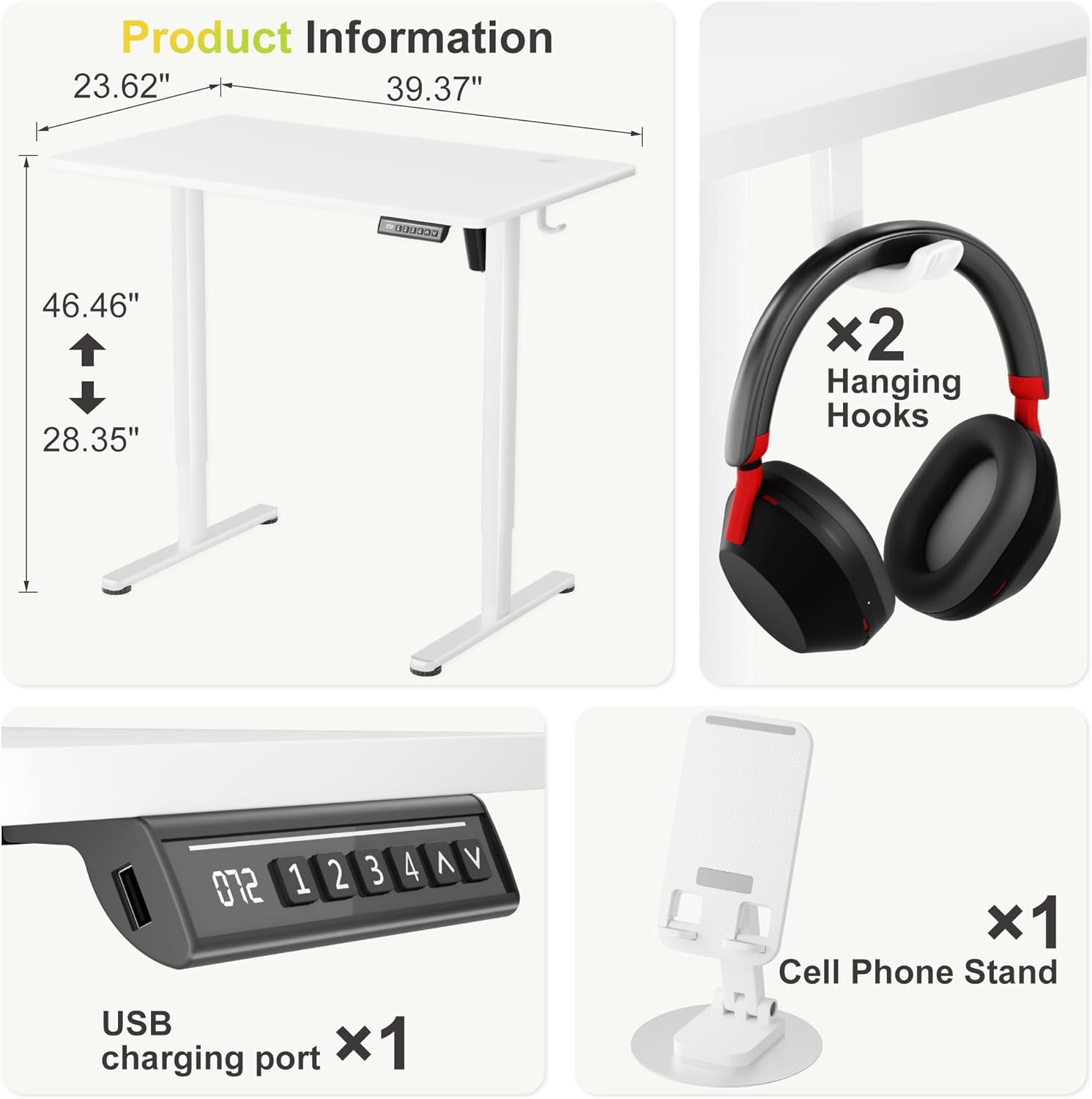
Image: A visual breakdown of the desk's key features, including its dimensions (39.37"L x 23.62"W, height adjustable from 28.35" to 46.46"), two hanging hooks, a USB charging port, and a mobile phone stand.
4. Assembly Instructions
Follow these steps carefully to assemble your Furmax Electric Standing Desk. All necessary tools are included.
- Assemble the Desk Frame: Attach the desk legs to the crossbar/support beam using the provided screws and Allen wrench. Ensure all connections are secure.
- Attach the Desktop: Carefully place the desktop upside down on a soft, clean surface. Align the pre-drilled holes on the desktop with the holes on the assembled frame. Secure the desktop to the frame using the appropriate screws.
- Connect the Control Panel and Power: Mount the control panel to the underside of the desktop in the designated area. Connect the motor cable and power adapter cable to the control panel. Plug the power adapter into a wall outlet.
- Install Accessories: Attach the headphone hooks to the sides of the desk and place the mobile phone stand in the designated cutout on the desktop.
Video: An official video from Furmax demonstrating the assembly process and key features of the Electric Standing Desk.
Video: A seller-provided video detailing important considerations before purchasing and assembling the Electric Standing Desk, including assembly tips and feature highlights.
Video: A seller-provided video showcasing the desk's functionality and ease of use after 2+ years of ownership, demonstrating its durability and consistent performance.
5. Operating Instructions
Height Adjustment
Use the up (^) and down (v) arrows on the control panel to manually adjust the desk height. The LED display shows the current height in inches.
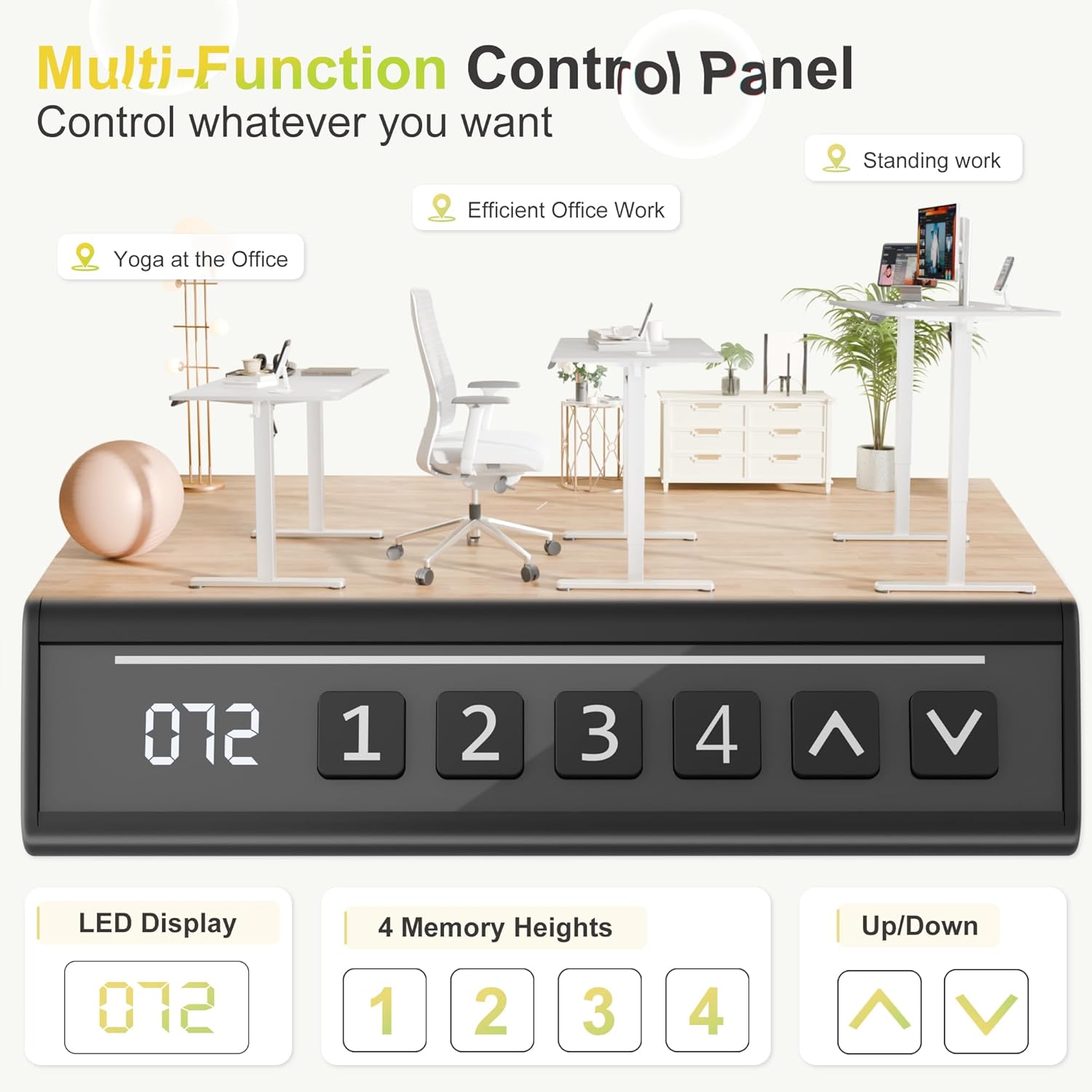
Image: A close-up of the multi-function control panel, featuring an LED display for current height, four memory preset buttons (1-4), and up/down arrow buttons for manual adjustment.
Memory Presets
The desk features 4 programmable memory presets (1, 2, 3, 4) to save your preferred sitting and standing heights. This allows for quick and convenient transitions.
- Adjust the desk to your desired height using the up (^) or down (v) arrows.
- Press the 'M' button (or 'SET' if available, typically indicated by a small 'M' or 'S' icon).
- Press the desired preset number (1-4) within 3 seconds to save the current height to that memory slot.
- To recall a saved height, simply press the corresponding preset number (1-4). The desk will automatically move to the saved position.
USB Charging Port
A built-in USB port is conveniently located on the side of the control panel, allowing you to charge your mobile devices or power small electronics directly from your desk.
6. Features
The Furmax Electric Standing Desk is equipped with several features designed to enhance your workspace:
- Ultra-Stable & Durable Construction: Built with a commercial-grade steel frame, ensuring rock-solid stability even at full height. It supports up to 154 lbs, suitable for multiple monitors and office equipment.
- Quiet Operation: The electric motor operates at a low noise level (less than 55dB), providing seamless and quiet height adjustments without distractions.
- Tidy Desktop: Features an integrated cable management tray and convenient hooks for headphones or bags, helping to keep your workspace organized and clutter-free.
- Organized Workspace: The 40"x24" eco-friendly desktop provides ample space for work or gaming setups.
- Adjustable Feet: Equipped with adjustable foot pads to ensure stability and level positioning on various floor surfaces.

Image: Illustrates the low-noise operation of the desk's motor, comparing its 55dB sound level to falling leaves (10dB), normal voice (65dB), and engine sound (90dB), emphasizing a seamless and quiet transition.

Image: Demonstrates the desk's robust load capacity of 154 lbs, showing three 50 lbs weights on the desktop, assuring users of its ability to support heavy equipment.
7. Maintenance
To keep your Furmax Electric Standing Desk in optimal condition, follow these simple maintenance guidelines:
- Regular Inspection: Periodically check all screws and connections to ensure they remain tight. Tighten any loose fasteners as needed.
- Cleaning: Wipe the desktop surface with a soft, damp cloth. For stubborn stains, use a mild soap solution. Avoid using abrasive cleaners, harsh chemicals, or solvents, as these can damage the finish.
- Cable Management: Ensure cables are neatly organized and not pinched or tangled, especially during height adjustments.
- Motor Care: The motor is maintenance-free. Do not attempt to open or lubricate the motor housing.
8. Troubleshooting
If you encounter any issues with your desk, refer to the following common problems and solutions:
- Desk not moving or unresponsive:
- Check if the power adapter is securely plugged into both the desk and the wall outlet.
- Ensure there are no obstructions preventing the desk from moving up or down.
- Try resetting the desk by unplugging it for 10 seconds and then plugging it back in.
- Uneven height or wobbling:
- Adjust the foot pads on the bottom of the desk legs to stabilize the desk on uneven surfaces.
- Verify that all assembly screws are tightened securely.
- Unusual motor noise:
- A minor humming sound during operation is normal. If the noise is excessive or unusual, ensure no cables are rubbing against moving parts.
- If the issue persists, contact customer support.
9. Specifications
| Feature | Detail |
|---|---|
| Brand | Furmax |
| Model Number | MY0250840-A |
| Desktop Size | 40"D x 24"W |
| Height Adjustment Range | 30.71" (sitting) to 46.46" (standing) |
| Load Capacity | 154 lbs |
| Desktop Material | Engineered Wood |
| Base Material | Steel |
| Color | White |
| Special Features | Adjustable Height, 4 Memory Presets, USB Charging Port, Headphone Hooks, Mobile Phone Stand |
10. Warranty and Support
For warranty information, technical assistance, or to purchase replacement parts, please refer to the documentation included with your original purchase or visit the official Furmax website. Ensure you have your model number (MY0250840-A) and proof of purchase available when contacting support.