
1. Important Safety Instructions
Please read all instructions carefully before using this treadmill. Keep this manual for future reference.
- Always place the treadmill on a level surface.
- Ensure adequate clearance around the treadmill (at least 2 feet on sides, 6 feet at rear).
- Keep children and pets away from the treadmill during operation.
- Use the safety key at all times. Attach it to your clothing before starting your workout.
- Do not operate the treadmill if it has a damaged cord or plug, or if it is not working properly.
- Consult a physician before beginning any exercise program.
- Wear appropriate exercise clothing and athletic shoes.
- Do not attempt to adjust or repair the treadmill yourself. Contact customer support for assistance.
2. Product Overview
The Winfita Folding Treadmill is designed for home use, offering a range of features to support your fitness goals. It includes a powerful motor, automatic incline, and smart connectivity.

Image: Winfita Folding Treadmill in active use and its compact folded state. This image illustrates the treadmill's design for both exercise and space-saving storage.
Key Features:
- 3.5 HP Brushless Motor: Provides consistent power for speeds up to 8.0 MPH.
- 12% Auto Incline: 12 levels of automatic incline adjustment for varied workout intensity.
- 300 lbs Weight Capacity: Sturdy alloy steel frame supports users up to 300 pounds.
- Spacious Running Surface: 17'' W x 42'' L running belt with 7-layer non-slip design.
- Double-Deck Shock Absorption: 8 built-in shock absorbers and 2 silicone pads reduce joint impact.
- User-friendly Console: 14'' LED display, quick-adjust buttons, USB charging, tablet holder, water bottle holders.
- Multiple Programs: 64 preset, 5 user-defined, and 3 countdown modes, plus BMI function.
- Bluetooth Connectivity: Syncs with fitness apps like Zwift, Kinomap, and FitShow.
- Soft-drop Folding System: Easy one-step folding for compact storage and transport wheels.
3. Setup and Assembly
The Winfita Treadmill requires some assembly. It is recommended to have two people for easier setup due to the weight of the main frame.
Included Components:
- Winfita Treadmill Main Frame
- Power Cord
- Safety Key
- Tool Kit
- Lubricant
- User Manual (this document)
Assembly Steps:
- Unpacking: Carefully remove all components from the packaging. Place the main frame on a clear, level surface.
- Base Stabilization: Ensure the treadmill base is stable before proceeding.
- Upright Installation: Attach the uprights to the main frame using the provided hardware from the tool kit. Do not fully tighten bolts until all components are aligned.
- Console Attachment: Connect the console to the uprights. Ensure all cables are properly connected.
- Final Tightening: Once all parts are in place and aligned, securely tighten all bolts.
- Power Connection: Plug the power cord into a grounded outlet.
Folding and Unfolding:
The treadmill features a soft-drop folding system for convenient storage.
- To Fold: Lift the running deck until it locks into the upright position. The soft-drop system will assist in the process.
- To Unfold: Gently push the release mechanism (often a lever or knob) and allow the running deck to slowly lower to the floor.

Image: A person demonstrating the soft-drop folding system, highlighting the ease of lifting and lowering the running deck for storage. Insets show the locking pin and transport wheels.
4. Operating Instructions
Familiarize yourself with the control console and its functions before starting your workout.
Control Console:
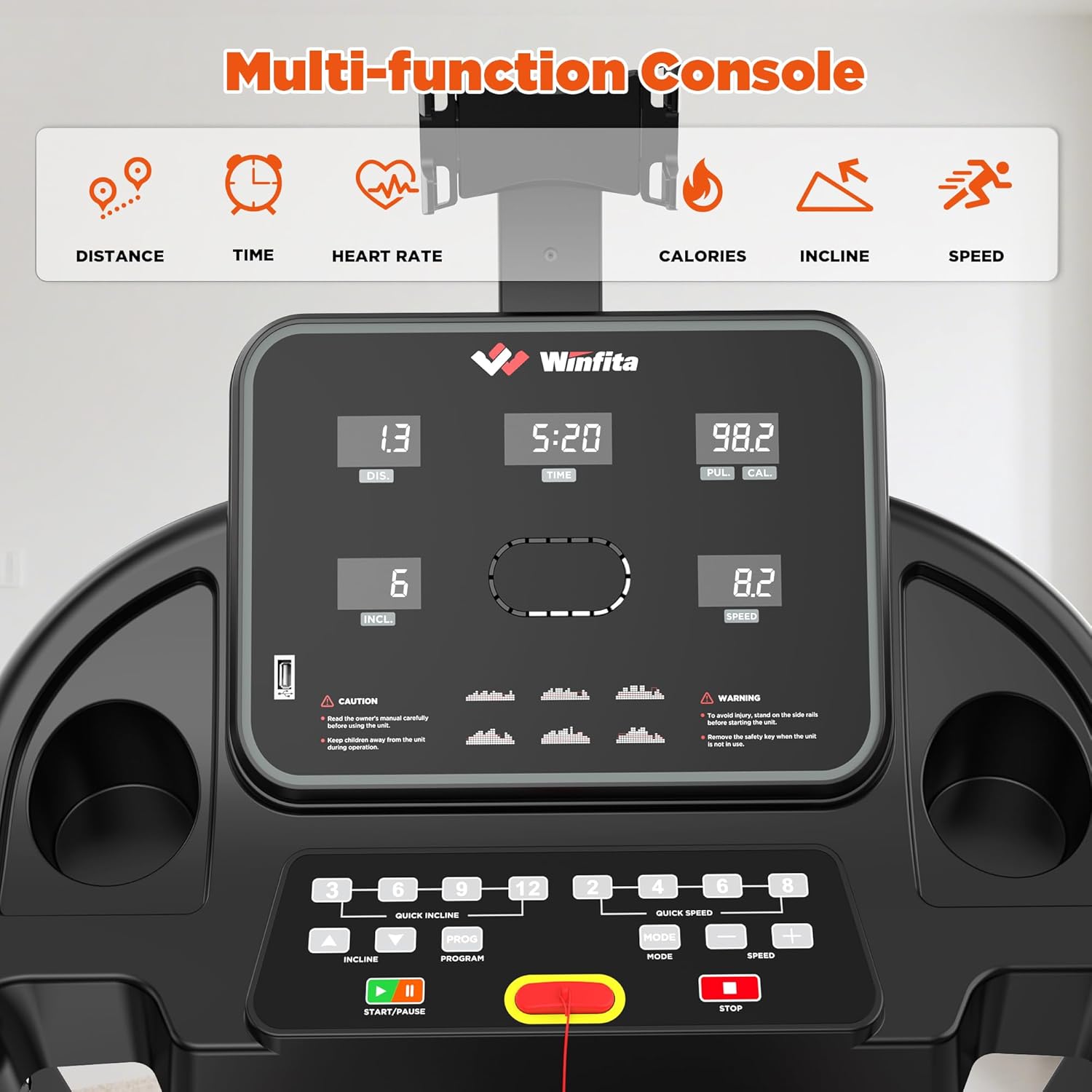
Image: A detailed view of the treadmill's multi-function console, showing the 14-inch LED display, various control buttons for speed and incline, and safety key placement.
- 14'' LED Display: Shows real-time data including speed, incline, time, distance, heart rate, and calories burned.
- Start/Pause Button: Initiates or temporarily stops your workout.
- Stop Button: Immediately stops the treadmill. Always use the safety key for emergency stops.
- Speed Adjustment: Use '+' and '-' buttons or quick-speed buttons (e.g., 3, 6, 9 MPH) to change speed.
- Incline Adjustment: Use '+' and '-' buttons or quick-incline buttons to change the incline level (0-12%).
- Program Button: Selects from 64 preset programs, 5 user-defined programs, or 3 countdown modes.
- Mode Button: Cycles through different display modes or workout settings.
Additional Features:

Image: Close-up views of the treadmill's tablet holder, water bottle holder, and USB charging port, demonstrating convenience features for users during workouts.
- USB Charging Port: Located on the console for charging devices during your workout.
- Tablet Holder: Securely holds your tablet or smartphone for entertainment or app use.
- Water Bottle Holders: Conveniently located for hydration.
- Music Speakers: Built-in speakers for audio playback via Bluetooth.
Bluetooth Connection and App Integration:
Connect your treadmill to smart fitness apps for enhanced workout tracking and control.

Image: A user interacting with a fitness app on their smartphone, which is wirelessly connected to the treadmill via Bluetooth. This illustrates the smart app integration feature.
- Enable Bluetooth: Ensure Bluetooth is enabled on your smartphone or tablet.
- Download App: Download a compatible fitness app (e.g., Zwift, Kinomap, FitShow) from your device's app store.
- Pair Device: Open the app and follow the on-screen instructions to pair with your Winfita Treadmill.
- Functionality: Once connected, you can sync real-time data, control speed and incline, track progress, and access various training programs through the app.
5. Maintenance
Regular maintenance ensures the longevity and optimal performance of your treadmill.
Lubrication:
- The running belt requires periodic lubrication to reduce friction and wear.
- Use the provided lubricant or a silicone-based treadmill lubricant.
- Refer to the specific instructions in the included lubricant package for application frequency and method. Generally, apply lubricant under the running belt every 3-6 months, depending on usage.
Cleaning:
- Wipe down the console and exterior surfaces with a damp cloth after each use to remove sweat and dust.
- Do not use abrasive cleaners or solvents.
- Periodically vacuum under the treadmill to prevent dust buildup from affecting motor performance.
Belt Adjustment:
- If the running belt becomes off-center or slips, it may need adjustment.
- Use the hex wrench from the tool kit to make small adjustments to the rear roller bolts. Turn clockwise to move the belt to the right, counter-clockwise to move it to the left.
- Consult the detailed instructions in the full user manual for precise belt adjustment procedures.
6. Troubleshooting
This section addresses common issues you might encounter with your treadmill.
| Problem | Possible Cause | Solution |
|---|---|---|
| Treadmill does not power on | Power cord not plugged in; circuit breaker tripped; safety key not in place. | Ensure power cord is securely plugged in. Check household circuit breaker. Insert safety key fully into the console. |
| Running belt slips or hesitates | Belt too loose; insufficient lubrication. | Adjust belt tension (refer to belt adjustment in Maintenance section). Apply lubricant under the running belt. |
| Belt is off-center | Uneven belt tension. | Adjust belt tracking (refer to belt adjustment in Maintenance section). |
| Unusual noise during operation | Loose components; motor issue; belt friction. | Check all bolts and tighten if necessary. Ensure proper lubrication. If noise persists, contact customer support. |
| Heart rate monitor inaccurate | Improper hand placement; dry hands. | Ensure both hands are firmly gripping the sensors. Lightly moisten hands if they are too dry. |
If you encounter a problem not listed here or if the suggested solutions do not resolve the issue, please contact Winfita Customer Service.
7. Specifications
Detailed technical specifications for the Winfita Folding Treadmill.
| Feature | Specification |
|---|---|
| Brand | Winfita |
| Model Name | Folding Treadmills for Home |
| Motor Power | 3.5 HP |
| Speed Range | 0.6 - 8.0 MPH |
| Incline Range | 0 - 12% Automatic Incline (12 levels) |
| Weight Capacity | 300 lbs |
| Running Belt Size | 17 inches (W) x 42 inches (L) |
| Unfolded Dimensions | 53.5 inches (L) x 27.6 inches (W) x 47.2 inches (H) |
| Folded Dimensions | 25.2 inches (L) x 27.6 inches (W) x 50 inches (H) |
| Material | Alloy Steel |
| Display Type | 14-inch LED |
| Connectivity | Bluetooth (Compatible with Zwift, Kinomap, FitShow) |
| Metrics Measured | BMI, Calories Burned, Heart Rate, Distance, Time, Speed, Incline |
| Special Features | Auto Incline, Foldable, Shock Absorbent, USB Charging Port, Water Bottle Holder, Wheeled |
| Item Weight | 98.5 Pounds |
8. Warranty and Support
Winfita is committed to providing quality products and customer satisfaction.
Warranty Information:
- This product comes with a 1-Year Warranty from the date of purchase.
- The warranty covers manufacturing defects and malfunctions under normal use.
- Please retain your proof of purchase for warranty claims.
Customer Support:
- Winfita offers 24/7 Customer Service for any inquiries or issues you may have.
- Lifetime Technical Support is also provided for the product.
- For assistance, please refer to the contact information provided on the Winfita official website or your purchase documentation.