
1. Introduction
Thank you for choosing the Epecoya Executive L-Shaped Desk (Model ZL-ZY0029). This manual provides essential information for the safe assembly, operation, and maintenance of your new desk. Please read these instructions thoroughly before beginning assembly and retain them for future reference.
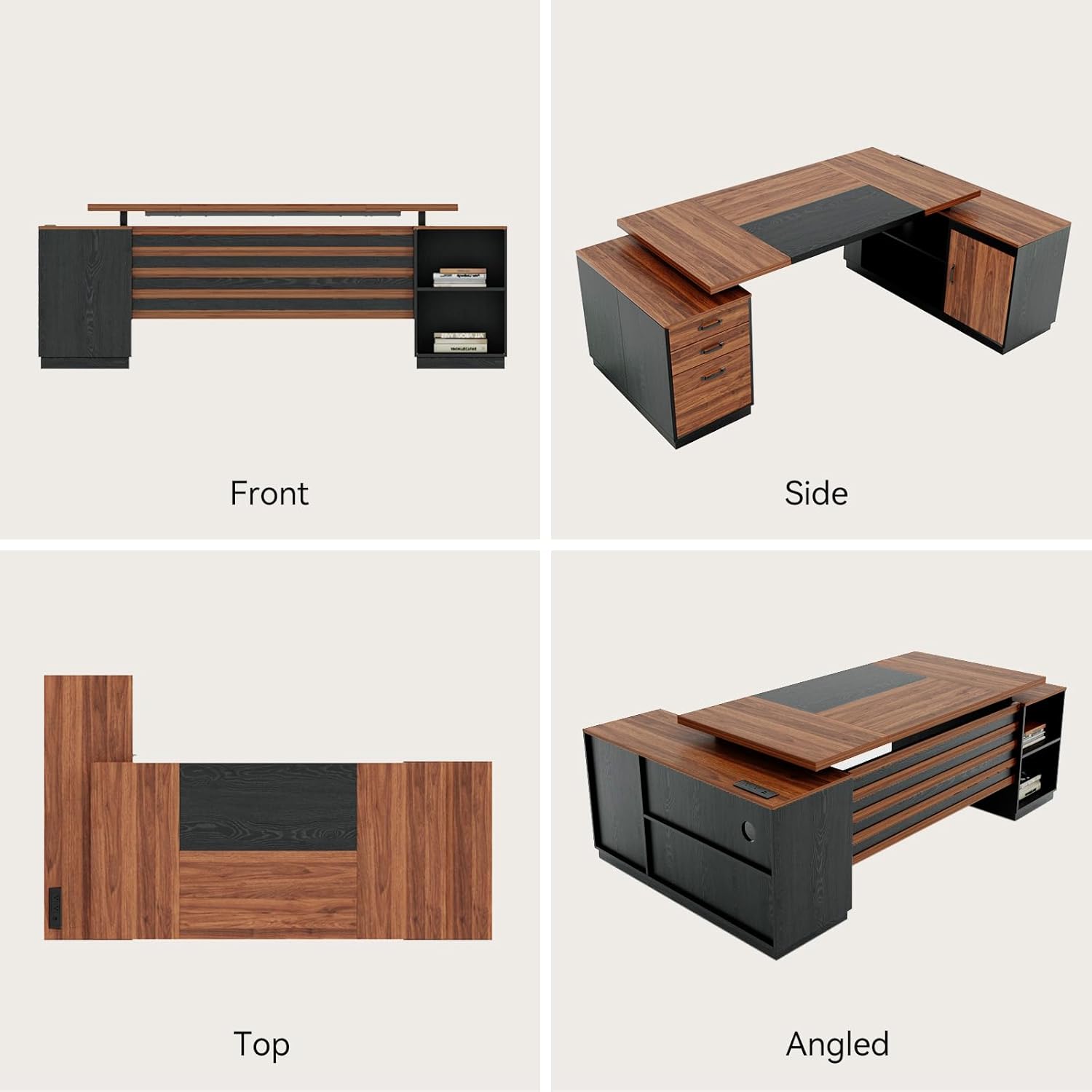
This L-shaped desk is designed to provide a spacious and organized workspace, featuring integrated storage solutions and a built-in power outlet for enhanced productivity.
2. Safety Information
- Always follow assembly instructions carefully.
- Ensure all connections are secure before use.
- Do not overload drawers or shelves beyond their capacity.
- Keep small parts away from children during assembly.
- Place the desk on a level surface to prevent tipping.
- Use the built-in power outlet only with compatible devices and avoid exceeding its maximum power rating.
3. Setup and Assembly
Assembly of the Epecoya Executive L-Shaped Desk is required. It is recommended that two people perform the assembly to ensure safety and ease of construction. Please refer to the detailed assembly instructions provided in the packaging for step-by-step guidance.
3.1 Package Contents
Verify that all components and hardware listed in the separate assembly guide are present before starting. If any parts are missing or damaged, please contact customer support.
3.2 Assembly Steps Overview
- Unpack all components and organize them according to the assembly guide.
- Assemble the main desk frame and desktop sections.
- Attach the storage cabinet and drawer unit to the main desk structure.
- Install the built-in power outlet into the designated slot on the desktop. Ensure it is securely fastened.
- Insert drawers and adjust as necessary.

4. Operating Instructions
The Epecoya Executive L-Shaped Desk is designed for optimal functionality in a home or professional office environment.
4.1 Workspace Utilization
The 78-inch L-shaped design provides ample surface area for multiple monitors, documents, and other office essentials. Position your computer, keyboard, and mouse for ergonomic comfort.

4.2 Integrated Power Outlet
The desk features a built-in power outlet with AC sockets and USB ports. Connect your computer, monitor, phone, and other devices directly to the desk for convenient charging and power access. This helps reduce cable clutter.

4.3 Storage System
The desk incorporates a 5-in-1 storage system:
- Multiple Storage Drawers: Three drawers are available for organizing office supplies, documents, and personal items. One drawer is designed as a lateral file drawer for letter/legal folders.
- Storage Cabinet: A closed cabinet with a door provides concealed storage for private goods or valuables.
- Open Shelves: Two open shelves offer quick access to books, decor, or frequently used items.
- Printer Stand: A dedicated area is provided for a printer, freeing up desktop space.

4.4 Product Videos
Video 1: Epecoya L-Shape Executive Desk Multi-Functional. This video demonstrates the multi-functional aspects of the Epecoya L-shaped executive desk, highlighting its various features and uses in an office setting.
Video 2: Epecoya L-Shaped Executive Desk for Office. This video provides a visual overview of the Epecoya L-shaped executive desk, showcasing its design and suitability for an office environment.
5. Maintenance
To ensure the longevity and appearance of your Epecoya Executive L-Shaped Desk, follow these care instructions:
- Cleaning: Wipe surfaces with a damp cloth for general cleaning. For spills, wipe immediately with a dry cloth. Avoid abrasive cleaners or harsh chemicals that may damage the finish.
- Dusting: Regularly dust with a soft, dry cloth.
- Protection: Use coasters for drinks and placemats for hot items to prevent damage to the desktop surface.
- Inspection: Periodically check all screws and fasteners to ensure they remain tight. Retighten if necessary.
6. Troubleshooting
This section addresses common issues you might encounter.
6.1 Desk Instability
- Issue: The desk feels wobbly or unstable.
- Solution: Ensure the desk is placed on a flat, level surface. Check all assembly screws and connections, tightening any that are loose. Verify that all cam locks are fully engaged.
6.2 Drawers Not Sliding Smoothly
- Issue: Drawers are difficult to open or close.
- Solution: Check that the drawer slides are correctly installed and aligned. Ensure no objects are obstructing the drawer's path. Lightly lubricate the slides with a silicone-based lubricant if needed.
6.3 Missing or Damaged Parts
- Issue: A part is missing or damaged upon unboxing.
- Solution: Refer to the package contents list in your assembly guide. Contact Epecoya customer support immediately with the specific part number and a description of the issue. Do not attempt to force assembly with incorrect or damaged parts.
6.4 Power Outlet Not Functioning
- Issue: Devices are not charging or receiving power from the built-in outlet.
- Solution: Ensure the power outlet unit is correctly installed and its power cord is securely plugged into a functional wall outlet. Check if the wall outlet itself is working by plugging in another device. Avoid overloading the power strip with too many high-power devices.
7. Specifications
| Feature | Detail |
|---|---|
| Brand | Epecoya |
| Model Number | ZL-ZY0029 |
| Shape | L-Shape |
| Product Dimensions (D x W x H) | 47.25" x 78" x 30" |
| Color | Brown & Black |
| Material | Engineered Wood |
| Finish Type | Powder Coated |
| Special Features | Built-In USB Outlet, Ergonomic |
| Number of Drawers | 3 |
| Number of Shelves | 2 |
| Number of Cabinets | 1 |
| Item Weight | 190 pounds |
| Recommended Assembly Persons | 2 |
8. Warranty and Support
8.1 Returns Policy
This product is eligible for 30-day easy returns. Please refer to your purchase documentation for detailed return procedures and conditions.
8.2 Customer Support
For any questions, assistance with assembly, missing parts, or other inquiries, please contact Epecoya customer support. Contact information can typically be found on your purchase receipt or the Epecoya official website.
Please have your model number (ZL-ZY0029) and purchase date ready when contacting support.