
1. Introduction
This manual provides essential information for the safe and efficient operation of your Y&H LTB2420 20A Bluetooth PWM Solar Charge Controller. This intelligent controller is designed to manage power flow from solar panels to batteries, supporting both 12V and 24V systems with automatic voltage detection. It is compatible with lead-acid and LiFePO4 batteries and features Bluetooth connectivity for remote monitoring and configuration via the LiMu Solar app.
2. Safety Instructions
Please read all safety instructions carefully before installation and operation. Failure to follow these instructions may result in personal injury or damage to the controller or battery.
- Ensure proper ventilation around the controller.
- Connect the battery first, then the solar panel, and finally the load. Disconnect in the reverse order.
- Avoid short circuits at the terminals.
- Do not expose the controller to water or excessive humidity. The device has an IP30 rating for dust and humidity resistance.
- The controller is designed for 12V/24V systems; ensure your battery voltage matches the system voltage.
- Do not attempt to disassemble or repair the controller yourself. Contact qualified personnel for service.
3. Product Overview
The Y&H LTB2420 is a smart PWM solar charge controller featuring a flame-retardant housing and Bluetooth communication for mobile app control. It offers robust protection and efficient charging for various battery types.
Key Features:
- Smart Bluetooth Connectivity: Monitor and configure settings wirelessly via the LiMu Solar app (default password: 666666).
- Multiple Charging Modes: Supports six charge modes including light control, timer, and manual.
- Battery Type Compatibility: Configurable for Lithium, Gel, and Lead-Acid batteries.
- Automatic System Voltage Detection: Automatically detects 12V or 24V battery systems.
- Precise PWM Charging: Three-stage intelligent PWM charging technology with high efficiency (up to 98%).
- Comprehensive Safety Protections: Includes reverse polarity (solar panel and battery), overvoltage, undervoltage, overload, short circuit, and over-temperature protection.
- Dual Output: 20A main load output (with segmented time control) and a 5V/1.5A USB port for charging mobile devices.
- Compact Design: Dimensions of 115 x 95 x 30 mm, weighing 150g.
Components:
The controller features clearly labeled terminals for PV input, battery connection, and load output, along with a USB port and LED indicators.
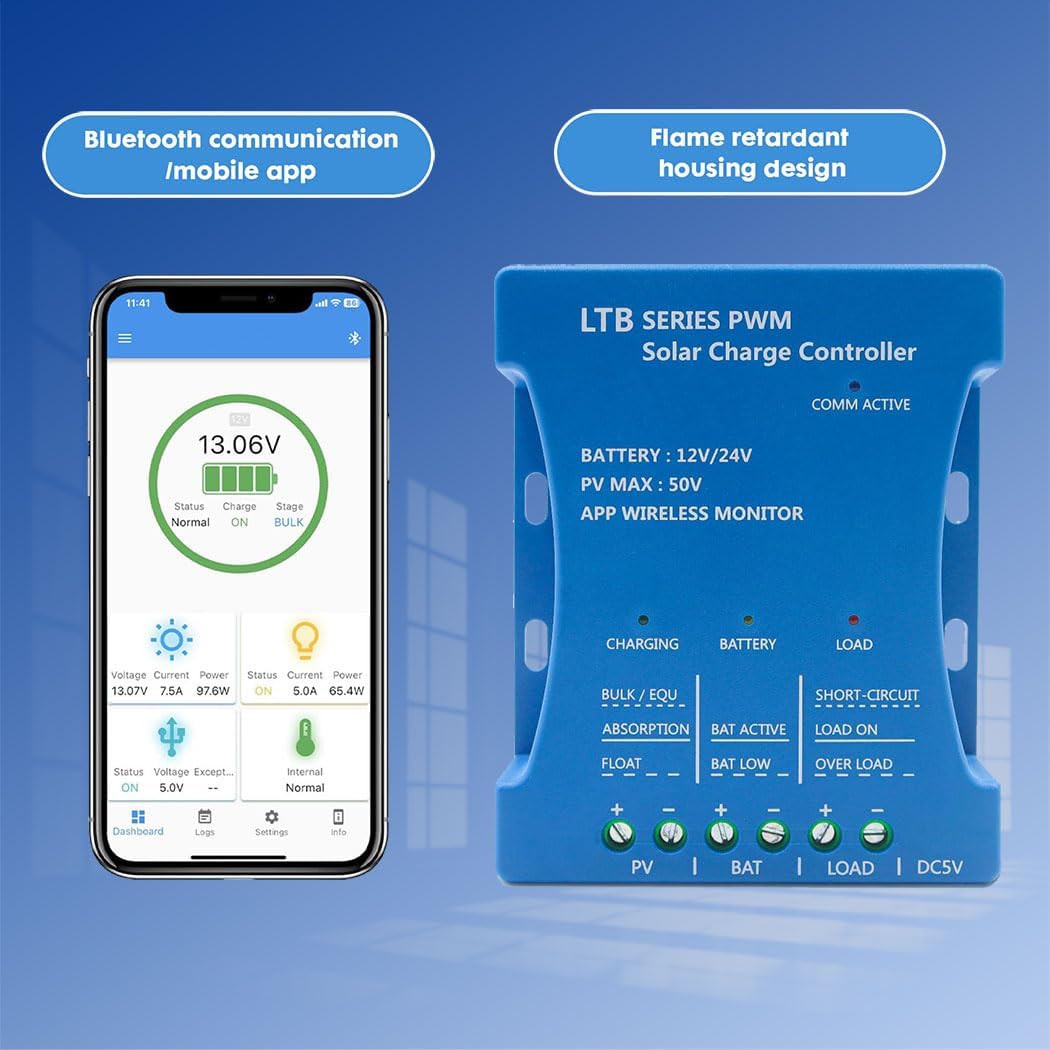
Image: The Y&H LTB2420 Solar Charge Controller, highlighting its Bluetooth communication and mobile app interface, along with its flame-retardant housing design.

Image: A detailed view of the Y&H LTB2420 Smart Solar Controller, with labels indicating the Battery, Load, Charging, 5V USB port, and Communication Active indicator.
4. Setup and Installation
Follow these steps for proper installation. The standard wiring order is crucial for safe operation.
Mounting the Controller:
Mount the controller in a dry, well-ventilated area, away from direct sunlight and heat sources. Ensure sufficient space around the controller for air circulation.
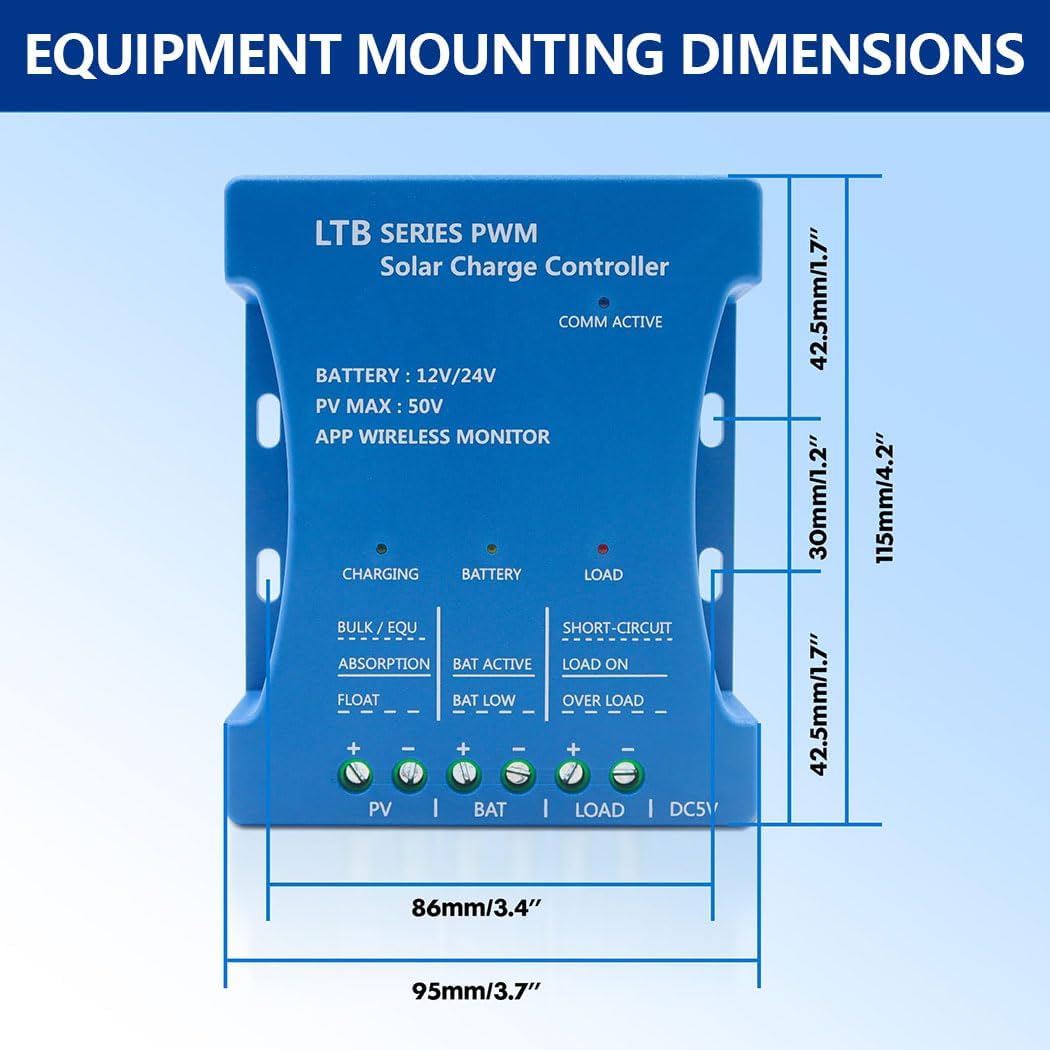
Image: Diagram showing the equipment mounting dimensions of the Y&H LTB2420 Solar Charge Controller, with measurements in millimeters and inches.
Wiring Connection Steps:
Important: Wiring should be done in strict accordance with the following order. Positive and negative poles should not be reversed. Disconnect wires in the reverse order (Load, Solar Panel, Battery).
- Connect Battery: Connect the battery to the controller's battery terminals. The controller will automatically detect 12V or 24V.
- Connect Solar Panels: Connect the solar panels to the controller's PV terminals.
- Connect Load (Optional): Connect your DC load to the controller's load terminals.

Image: A system connection diagram illustrating the correct wiring order for the Y&H LTB2420 Solar Charge Controller, showing connections for battery, solar panels, and optional DC loads like lights or an inverter.
5. Operating Instructions
LED Indicators:
The controller features a tri-color LED status indicator to show operational status.
- Charging Indicator: Indicates the charging status (e.g., Bulk, Absorption, Float).
- Battery Indicator: Shows battery status (e.g., normal, low, active).
- Load Indicator: Indicates load status (e.g., ON, OFF, short-circuit, overload).
Bluetooth App (LiMu Solar):
Download the "LiMu Solar" app from your device's app store. The default password for connection is 666666.
- Monitoring: View real-time data such as battery voltage, charging current, load current, and system status.
- Configuration: Adjust parameters including battery type (Lithium, Gel, Lead-Acid), charging modes (light control, timer, manual), and load control settings.
- Data Logging: Access historical data for system performance analysis.
USB Output:
The 5V/1.5A USB port can be used to charge smartphones and other compatible USB devices.
6. Maintenance
Regular maintenance ensures optimal performance and longevity of your solar charge controller.
- Inspect Connections: Periodically check all wiring connections for tightness and corrosion.
- Clean Controller: Keep the controller clean and free from dust. Use a dry cloth for cleaning.
- Ventilation: Ensure that the ventilation openings are not blocked.
- Battery Inspection: Regularly inspect your battery for any signs of damage or leakage.
7. Troubleshooting
If you encounter issues with your controller, refer to the following common problems and solutions.
| Problem | Possible Cause | Solution |
|---|---|---|
| No charging indication | Solar panel not connected or insufficient sunlight; reverse polarity of solar panel. | Check solar panel connections and ensure adequate sunlight. Verify correct polarity. |
| Load not working | Load disconnected; battery low voltage; overload or short circuit. | Check load connections. Charge battery. Reduce load or check for short circuits. |
| Controller not powering on | Battery not connected or reverse polarity; battery voltage too low. | Connect battery correctly, ensuring proper polarity. Charge battery to minimum operating voltage. |
| Bluetooth connection issues | Incorrect password; app not installed; device out of range. | Ensure default password (666666) is used. Install LiMu Solar app. Move device closer to controller. |
Safety Protections:
The controller incorporates several safety features to protect the system:
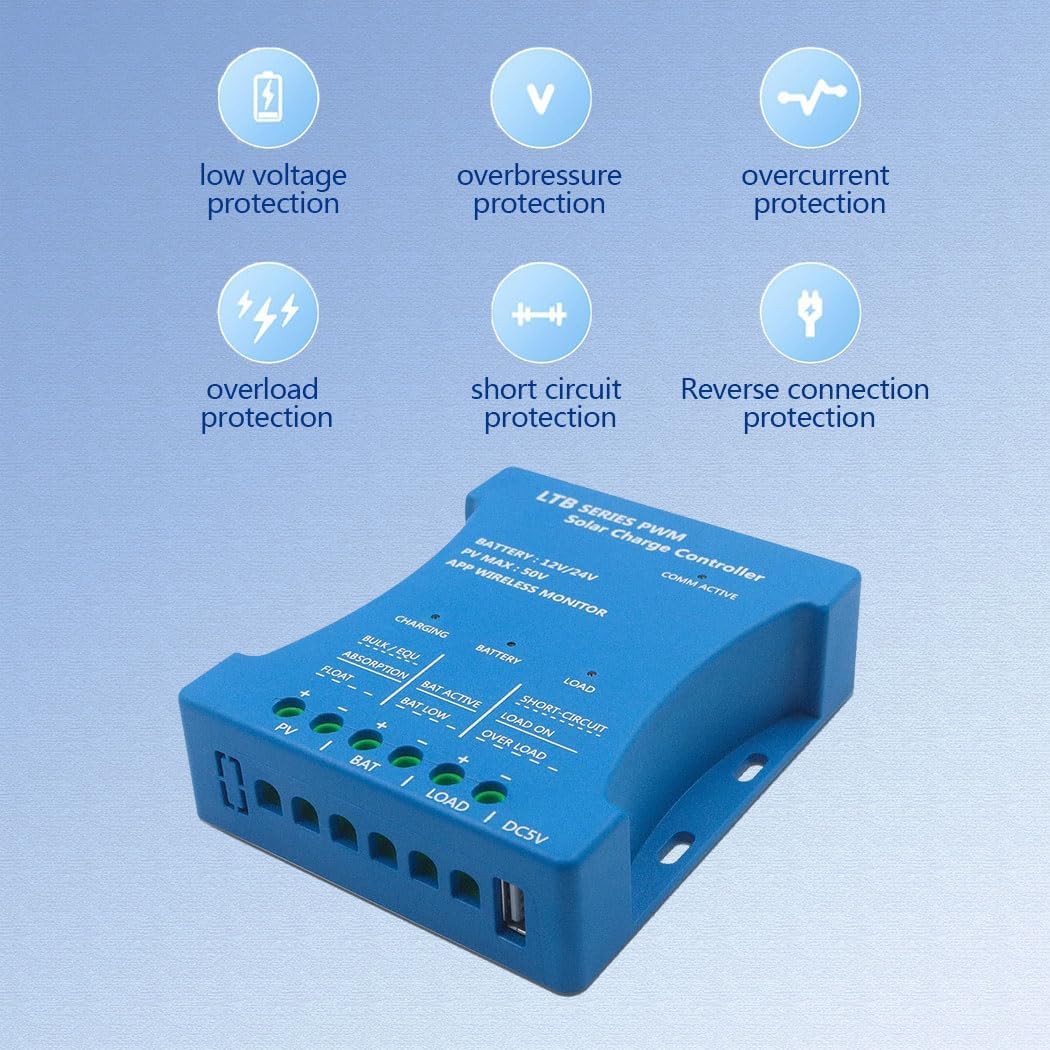
Image: The Y&H LTB2420 Solar Charge Controller, illustrating its various protection features including low voltage, overpressure, overcurrent, overload, short circuit, and reverse connection protection.
- Solar Panel Reverse Polarity Protection: Prevents damage if solar panel wires are connected incorrectly.
- Battery Reverse Protection: Protects against incorrect battery connection.
- Overvoltage Protection: Shuts down at 29.6V (for 24V system) to protect the battery.
- Undervoltage Protection: Shuts down at 11.2V (for 12V system) to prevent deep discharge.
- Overload Protection: Shuts down if load exceeds 160% for 5 seconds.
- Short Circuit Protection: Protects against short circuits on the load terminals.
- Over-temperature Protection: Shuts down if internal temperature exceeds 70°C.
8. Specifications
| Parameter | Value |
|---|---|
| Product Model | LTB2420 |
| Rated Current | 20A |
| Battery Voltage | 12V/24V (Auto-detection) |
| Max Solar Voltage (PV) | 50V |
| Charge Mode | PWM |
| Wireless Connection | BLE 5.0 |
| Power Consumption | <10mA |
| USB Output | 5V/1.5A |
| Charging Voltage Accuracy | ±0.5% (Lithium 14.2V/28.4V, Lead-Acid 14.6V/29.2V) |
| Temperature Compensation | -4mV/°C/2V |
| Charging Efficiency | Up to 98% |
| Dimensions (H x W x D) | 115 x 95 x 30 mm (4.5 x 3.7 x 1.2 inches) |
| Weight | 150g |
| Operating Temperature | Up to 70°C |
| IP Rating | IP30 (Dust and humidity resistant) |
| Manufacturer | Y&H |
| Material | Plastic |
| Display Type | LED |

Image: Internal PCB board display of the Y&H LTB2420 Solar Charge Controller, showing imported MOS field transistors, TI Texas Instruments microcontrollers, and low-resistance field tubes, indicating high-quality components.
9. Warranty and Support
For warranty information and technical support, please refer to the documentation provided with your purchase or contact Y&H customer service directly. Ensure you have your product model number (LTB2420) and purchase details available when seeking support.


