
Important Safety Information
- Always assemble the desk according to the instructions provided.
- Do not exceed the weight capacity of the desk.
- Be cautious when using the power outlets to prevent electrical hazards.
Product Overview
The SEDETA 61" Farmhouse L Shaped Executive Desk is designed for home office environments, offering ample workspace and integrated storage solutions. Its robust construction and thoughtful features enhance productivity and organization.
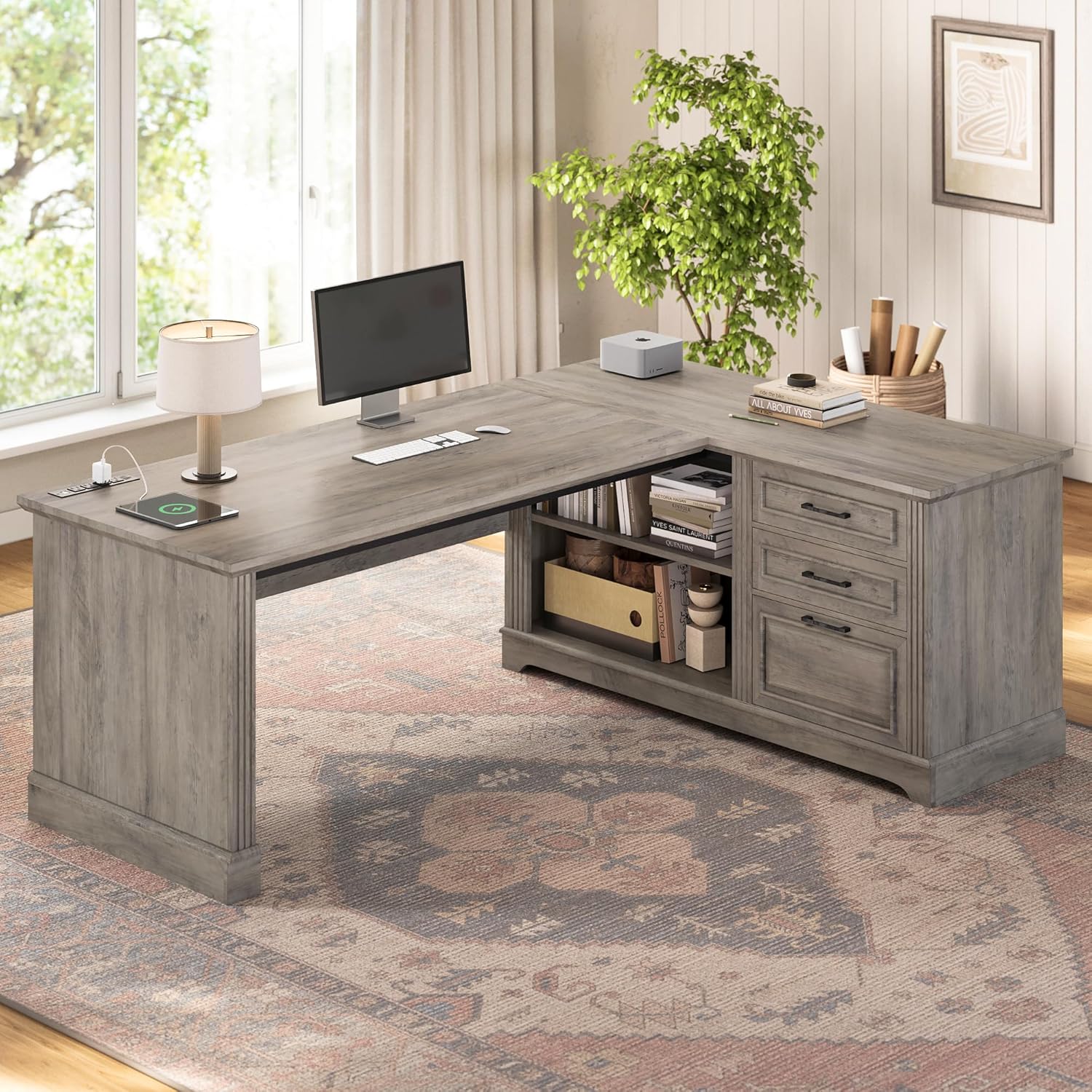
Description: This image displays the SEDETA 61-inch Farmhouse L Shaped Executive Desk in a home office, showcasing its overall design, spacious desktop, and integrated storage.
Key Features
- Ample Storage Space: Includes 3 drawers, with one file drawer accommodating A4/Legal/Letter sizes, and open storage shelves for various office essentials.
- Integrated Power Outlets: Features 4 AC power sockets and 2 USB charging ports with a main power switch for convenient and safe device charging.
- Farmhouse Design: Combines rustic country aesthetics with modern functionality, adding a comfortable atmosphere to any home office.
- Sturdy Desktop: The 2-inch thick desktop ensures stability and durability. It is waterproof, scratch-resistant, and easy to clean, providing a generous workspace of 61 inches long and 47.3 inches deep.
- Simple Installation: Comes with clear instructions and numbered parts for straightforward assembly.
Dimensions
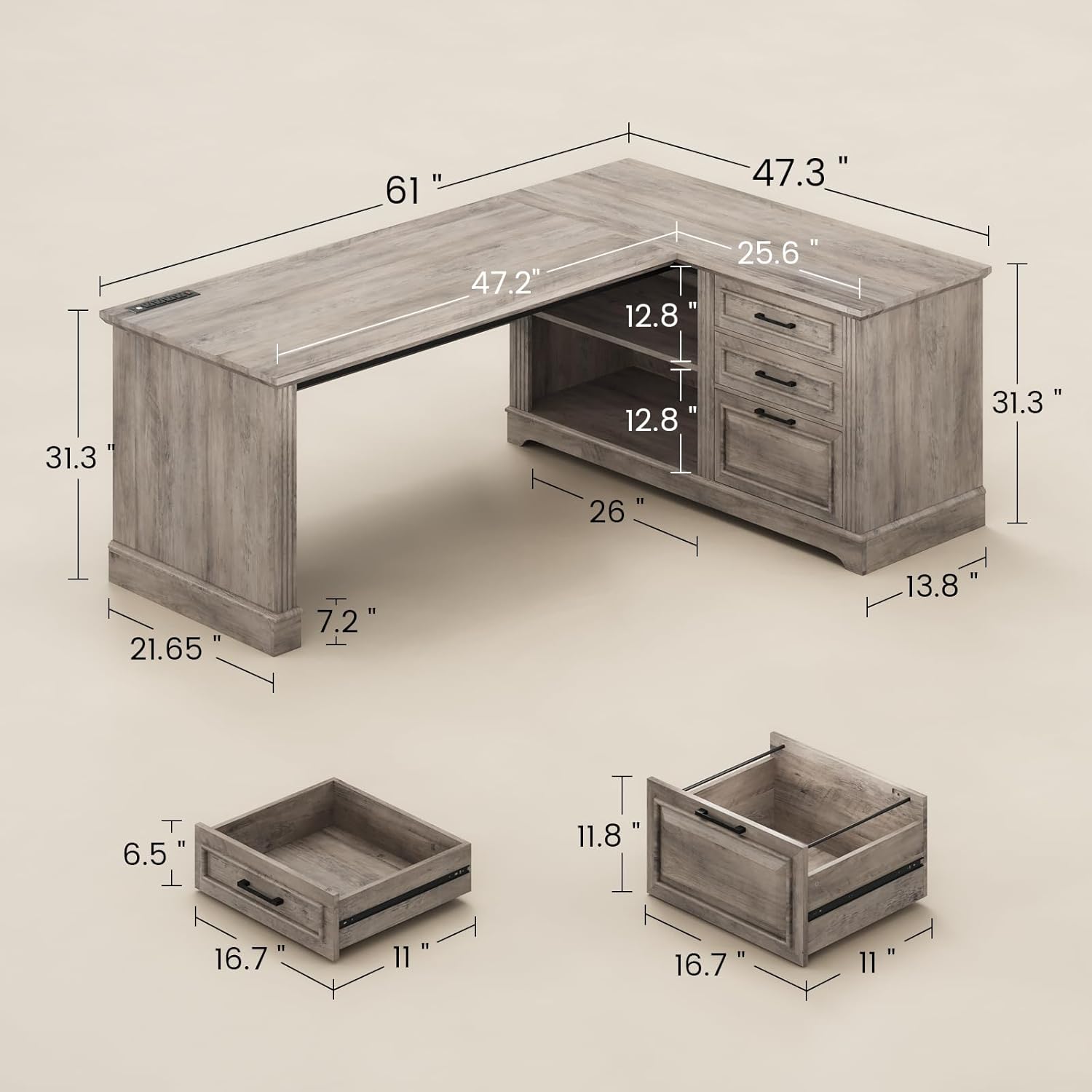
Description: This diagram illustrates the key dimensions of the desk, including its overall width (61"), depth (47.3"), and height (31.3"), along with drawer and shelf measurements.
- Product Dimensions: 47.3"D x 61"W x 31.3"H
- Item Weight: 106 Pounds
- Tabletop Thickness: 2 Inches
Package Contents
Before beginning assembly, please verify that all components and hardware are present and undamaged. Refer to the assembly video for a visual guide to all parts included in the package.
Setup and Assembly Instructions
Assembly of this desk typically requires two people and a screwdriver. Follow the steps carefully, referring to the visual guide below for clarity.
Visual Assembly Guide (Video)
Description: This video provides a detailed step-by-step visual guide for assembling the SEDETA L Shaped Executive Desk. It illustrates how to connect each numbered part and use the provided hardware.
Step-by-Step Assembly (Textual Summary)
- Prepare Components: Unpack all parts and identify them using the numbering provided in the instruction manual. Ensure all hardware (screws, dowels, cam locks) is present.
- Assemble Side Panels: Attach the side panels to the base and shelves using cam locks and screws as indicated in the diagrams.
- Install Drawer Slides: Secure the drawer slides to the designated panels within the cabinet structure.
- Construct Drawers: Assemble the drawer boxes and attach the drawer fronts with handles. Install the corresponding drawer slides onto the drawer boxes.
- Connect Desk Sections: Join the main desk sections using the connecting bar and secure with screws to form the L-shape.
- Install Power Outlet: Carefully place the power outlet strip into the pre-cut opening on the desktop and secure it with the provided screws.
- Finalize Assembly: Ensure all connections are tight and the desk is stable. Adjust any leveling feet if included.
Assembly Tips
- Use a soft cloth or cardboard to protect surfaces during assembly to prevent scratches.
- Do not overtighten screws to avoid damaging the wood material.
- If any parts are missing or damaged, contact customer service for assistance.
Operating Instructions
Using the Power Outlets
The desk includes a built-in power strip for convenient access to power and charging.

Description: This image displays the integrated power strip, highlighting its 4 AC outlets, 2 USB ports, and the main power switch for convenient device charging.
- Power On/Off: Use the red switch on the power strip to turn the power on or off for all connected devices.
- AC Outlets: Plug in devices requiring standard AC power, such as monitors, laptops, or lamps.
- USB Ports: Use the USB ports to charge compatible devices like smartphones and tablets.
- Maximum Load: Do not exceed the maximum power support of 1500W for the entire power strip to prevent overload.
Using the Drawers and Shelves
The desk features three drawers and open storage shelves for efficient organization of your workspace.

Description: This image illustrates the three drawers, with the bottom drawer designed to hold letter, A4, or legal-sized hanging file folders, demonstrating its functionality.
- Storage Drawers: The top two drawers are suitable for general office supplies, stationery, and small personal items.
- File Drawer: The bottom drawer is specifically designed to accommodate A4, letter, or legal-sized hanging file folders, keeping your documents organized.
- Open Shelves: Use the open shelves for books, decorative items, headphones, or other office essentials that require easy access.
Maintenance
- Cleaning: Wipe the desk surfaces with a soft, damp cloth. Avoid harsh chemicals or abrasive cleaners, which can damage the finish.
- Dusting: Dust regularly to maintain the desk's appearance and prevent dust buildup.
- Spills: Promptly clean up any spills to prevent moisture damage or staining to the wood finish.
- Hardware: Periodically check and tighten all screws and fasteners to ensure the desk remains stable and secure.
Troubleshooting
Desk is Wobbly
- Ensure all screws and cam locks are securely tightened. Re-tighten any loose fasteners.
- Verify the desk is placed on a level surface. If not, consider using shims or adjusting any integrated leveling feet.
Drawers Do Not Slide Smoothly
- Check that the drawer slides are correctly installed and aligned on both the drawer and the cabinet.
- Ensure no objects are obstructing the drawer's movement within the cabinet.
- Lubricate drawer slides with a silicone-based lubricant if they feel stiff.
Power Outlets Not Working
- Confirm the main power switch on the power strip is in the "ON" position.
- Check if the desk's power cord is securely plugged into a functional wall outlet.
- If the power strip has a reset button, press it to restore power.
- Ensure the total power draw from connected devices does not exceed the maximum capacity of 1500W.
Warranty and Support
SEDETA products are designed for quality and durability. If your executive desk arrives damaged, scratched, or with parts missing, please contact SEDETA customer service for free replacement parts or a partial refund.
For further assistance, please visit the official SEDETA store on Amazon: SEDETA Store.