
Aheaplus B6
Aheaplus Queen Size Bed Frame User Manual
Model: B6 | Brand: Aheaplus
Introduction
This manual provides comprehensive instructions for the assembly, operation, and maintenance of your Aheaplus Queen Size Bed Frame with Charging Station & LED Lights. Please read this manual thoroughly before assembly and use to ensure safe and optimal performance of your new bed frame. This platform bed features a leather upholstered headboard, integrated charging station, RGB LED lighting, and metal slat support, designed for comfort and convenience without the need for a box spring.

Figure 1: Aheaplus Queen Size Bed Frame (Black) with integrated LED lighting and charging station.
Safety Information
Please observe the following safety precautions to prevent injury or damage to the product:
- Ensure all components are present and undamaged before beginning assembly. Do not proceed with assembly if any parts are missing or damaged.
- Assemble the bed frame on a soft, clean surface (e.g., carpet) to prevent scratches or damage to the floor or product.
- Always use the provided tools and hardware. Do not substitute with other tools or hardware unless explicitly instructed.
- Tighten all screws and bolts securely, but do not overtighten to avoid stripping threads or damaging components.
- Keep small parts and packaging materials away from children and pets to prevent choking hazards.
- Do not exceed the maximum weight capacity of 1200 lbs.
- Ensure the power cord for the charging station and LED lights is routed safely to prevent tripping hazards and is not pinched by the frame.
- Only use the charging station for devices within its specified voltage and current limits (3 AC outlets 120V/12A, 2 USB ports 5V/2A).
Package Contents
Before assembly, verify that all parts listed below are included in your package. If any parts are missing or damaged, please contact customer support.
| Part | Description | Quantity |
|---|---|---|
| Headboard Assembly | Upholstered headboard with integrated LED lights and charging station. | 1 |
| Side Rails | Left and right frame side rails. | 2 |
| Footboard | Lower frame section. | 1 |
| Metal Slats | Support beams for the mattress. | Varies (multiple pieces) |
| Support Legs | Central support legs for the frame. | Varies |
| Hardware Pack | Screws, bolts, washers, and assembly tools (e.g., Allen wrench). | 1 |
| Instruction Manual | This document. | 1 |
Setup & Assembly
Assembly of the Aheaplus bed frame is designed to be straightforward, with all necessary tools and labeled parts included. It is recommended to have two people for assembly.
- Unpack and Identify Parts: Carefully unpack all components and lay them out on a clean, soft surface. Refer to the "Package Contents" section and the included parts list to identify each piece.
- Assemble the Headboard: Attach any necessary support brackets or legs to the headboard as per the detailed diagrams in the separate assembly guide (included in the hardware pack).
- Connect Side Rails to Headboard: Securely attach the side rails to the headboard using the provided bolts and the Allen wrench. Ensure the connections are firm.
- Attach Footboard: Connect the footboard to the other end of the side rails, ensuring all connections are tight and stable.
- Install Metal Slats: Place the metal slats across the frame, fitting them into the designated slots or attaching them with screws. Ensure even spacing for optimal mattress support. The durable steel structure provides even support and prevents sagging.
- Secure Mattress Retention: The frame includes a removable steel baffle around the edges to prevent the mattress from slipping off. Ensure this is properly installed.
- Connect Power: Once the frame is fully assembled and stable, connect the power cord from the headboard's charging station to a wall outlet.

Figure 2: Illustration of key assembly features including noise-free design, ample under-bed clearance (11 inches), and the removable steel baffle for mattress stability.

Figure 3: Dimensional overview of the Queen size bed frame, showing overall length, width, and height, crucial for planning room placement.
Operating Instructions
1. RGB LED Lighting System
The integrated RGB LED lighting system offers extensive customization to enhance your bedroom ambiance. It features over 60,000 colors and 29 flashing modes.
- Control: The LED lights are controlled via a remote control (included). Point the remote at the receiver on the headboard.
- Color Selection: Use the color palette on the remote to select from over 60,000 colors.
- Flashing Modes: Cycle through 29 different flashing modes to create dynamic lighting effects.
- Music Sync Function: Activate the music sync function to make the lights change color and rhythm with sound and music. Ensure the built-in microphone on the headboard is unobstructed.
- Timing Function: Set a timer for the lights to automatically turn off after a specified duration.

Figure 4: Overview of the LED lighting system features, including remote control, built-in microphone for music sync, timing function, and RGB color options.
2. Integrated Charging Station
The headboard features a convenient charging station to power your electronic devices.
- Power Outlets: The station includes 3 standard AC power outlets (120V/12A) for larger electronics like laptops or lamps.
- USB Ports: Two USB ports (5V/2A) are available for charging smartphones, tablets, and other USB-powered devices.
- Power Cord: The charging station is powered by a 6.5-foot power cord that connects to a standard wall outlet.
- Usage: Simply plug your devices into the appropriate outlets or ports. Ensure the bed frame's main power cord is connected to a live wall outlet.

Figure 5: Detail of the integrated charging station, highlighting the 3 AC outlets and 2 USB ports for convenient device charging.
Maintenance
Proper care and maintenance will extend the life and appearance of your bed frame.
- Cleaning the Upholstered Headboard: The PU leather upholstered headboard is designed to be easy to clean.
- For light dust, wipe with a soft, dry cloth.
- For spills or stains, immediately blot with a clean, damp cloth. Use a mild soap solution if necessary, then wipe with a clean, damp cloth to remove soap residue, and dry thoroughly.
- Avoid using harsh chemicals, abrasive cleaners, or excessive moisture, as these can damage the leather.
- Cleaning the Metal Frame: Wipe the metal frame with a soft, damp cloth. Dry immediately to prevent rust.
- Checking Connections: Periodically check all screws and bolts to ensure they remain tight. Retighten if necessary to maintain stability and prevent noise.
- Under-Bed Cleaning: The 11-inch clearance under the bed allows for easy cleaning, including access for sweeping robots. Regularly clean this area to prevent dust accumulation.
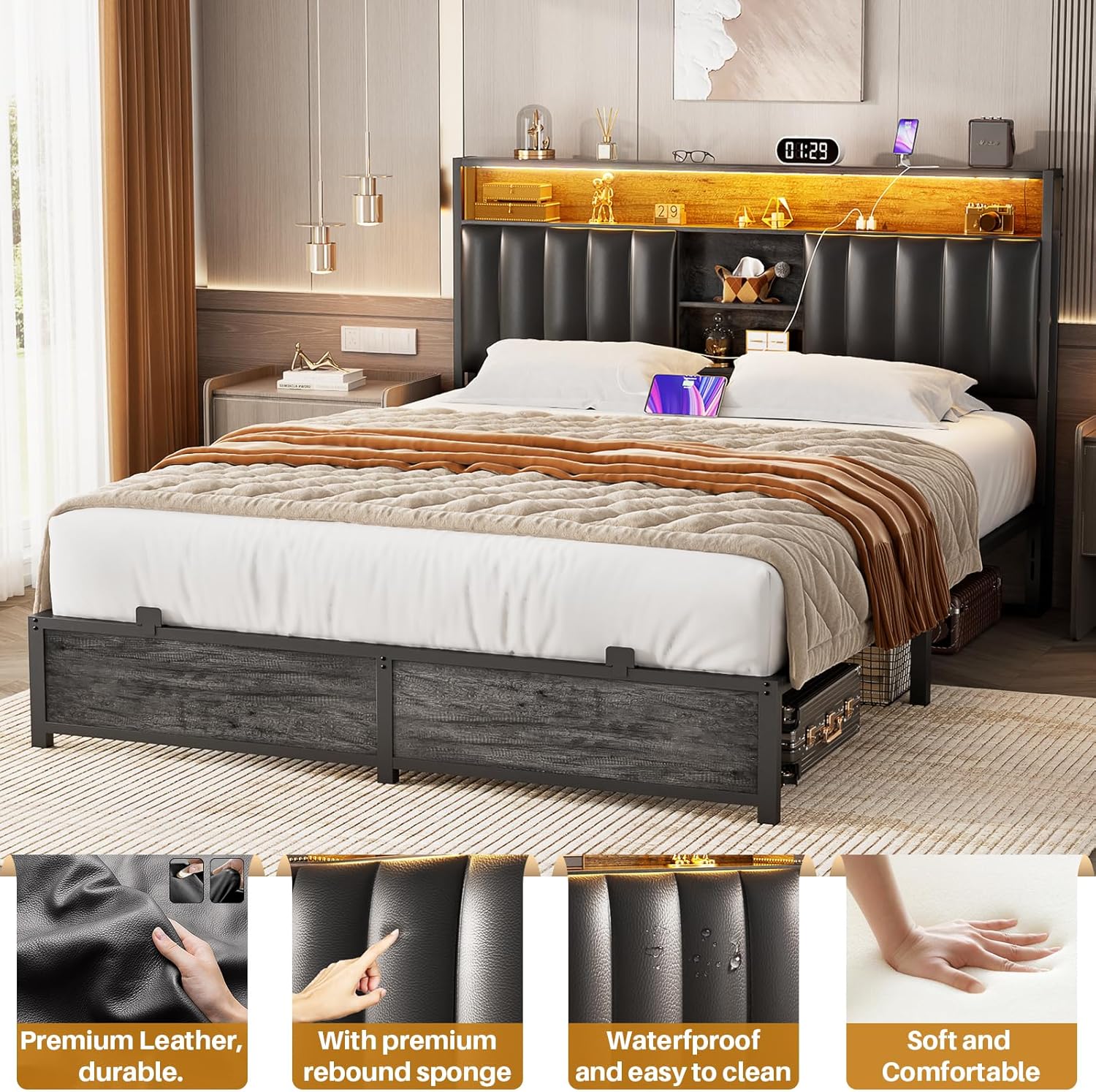
Figure 6: Features of the headboard's PU leather, highlighting its premium quality, rebound sponge filling, waterproof properties, and soft, comfortable texture, which contribute to its ease of maintenance.
Troubleshooting
This section addresses common issues you might encounter with your bed frame.
| Problem | Possible Cause | Solution |
|---|---|---|
| Bed frame is noisy/squeaks. | Loose bolts or connections. | Check and tighten all bolts and screws on the frame, especially at joints. Ensure slats are properly seated. |
| LED lights are not working. | Power cord not connected; remote control battery low; remote not pointed at receiver; LED strip damage. | Ensure the bed frame's power cord is securely plugged into a live outlet. Replace remote control batteries. Point remote directly at the headboard's LED receiver. If still not working, contact customer support. |
| Charging station not providing power. | Power cord not connected; wall outlet issue; device not compatible. | Verify the bed frame's power cord is plugged in. Test the wall outlet with another device. Ensure your device's power requirements are within the station's limits (120V/12A for AC, 5V/2A for USB). |
| Mattress slides on the frame. | Mattress retention baffle not installed or loose. | Ensure the removable steel baffle around the frame is correctly installed and secured to prevent mattress movement. |
Specifications
| Feature | Detail |
|---|---|
| Model | B6 |
| Size | Queen |
| Color | Black |
| Product Dimensions (L x W x H) | 87.4" x 61" x 43.3" |
| Material | Metal frame, PU leather upholstered headboard |
| Weight Capacity | Up to 1200 lbs |
| Under-Bed Clearance | 11 inches |
| Charging Station | 3 AC Outlets (120V/12A), 2 USB Ports (5V/2A) |
| LED Lighting | RGB, 60,000+ colors, 29 flashing modes, music sync, timing function |
| Assembly Required | Yes |
Warranty & Customer Support
Aheaplus is committed to providing high-quality products and exceptional customer service. Your bed frame comes with the assurance of lifetime customer support from our experienced team.
If you encounter any issues during assembly, operation, or maintenance, or if you have questions regarding your product, please do not hesitate to contact us. Our team is ready to assist you before and after your purchase.
For support, please refer to the contact information provided on the product packaging or the official Aheaplus website. Please have your model number (B6) and purchase details ready when contacting support.
Ask a question about this manual
Ask about setup, troubleshooting, compatibility, parts, safety, or missing instructions. Manuals+ will review the question and use this page’s manual context to help answer it.