
1. Introduction
This manual provides detailed instructions for the assembly, operation, and maintenance of your Tatub Twin Loft Bed with L-Shape Desk and LED Lights. Please read this manual thoroughly before assembly and use to ensure safe and correct operation.

Image 1.1: The Tatub Twin Loft Bed with L-Shape Desk and LED Lights, showcasing the bed, desk, and integrated lighting.
2. Safety Information
Adhere to all safety guidelines to prevent injury or damage to the product.
- Ensure all components are securely fastened before use.
- Do not exceed the maximum weight capacity of the bed (300 lbs) or desk (100 lbs).
- Children should not play on or under the loft bed without adult supervision.
- Regularly check all bolts and connections for tightness.
- The ladder must be securely attached before climbing.
- Keep electrical components (LED lights) away from water.
3. Package Contents
Verify that all parts are present before beginning assembly. If any parts are missing or damaged, contact customer support.
- Bed frame components
- L-Shape Desk components
- Ladder
- LED light strip and controller
- Adjustable monitor stand
- Storage shelves
- Hardware pack (screws, bolts, tools)
- Instruction manual
4. Setup and Assembly Instructions
Follow these steps carefully for proper assembly. It is recommended to have two adults for assembly.
4.1 Unpacking and Preparation
- Clear a spacious area for assembly.
- Lay out all components and hardware.
- Refer to the included hardware list to identify each part.
4.2 Frame Assembly
Begin by assembling the main metal frame structure. Ensure all connections are finger-tight before fully tightening with the provided tools.
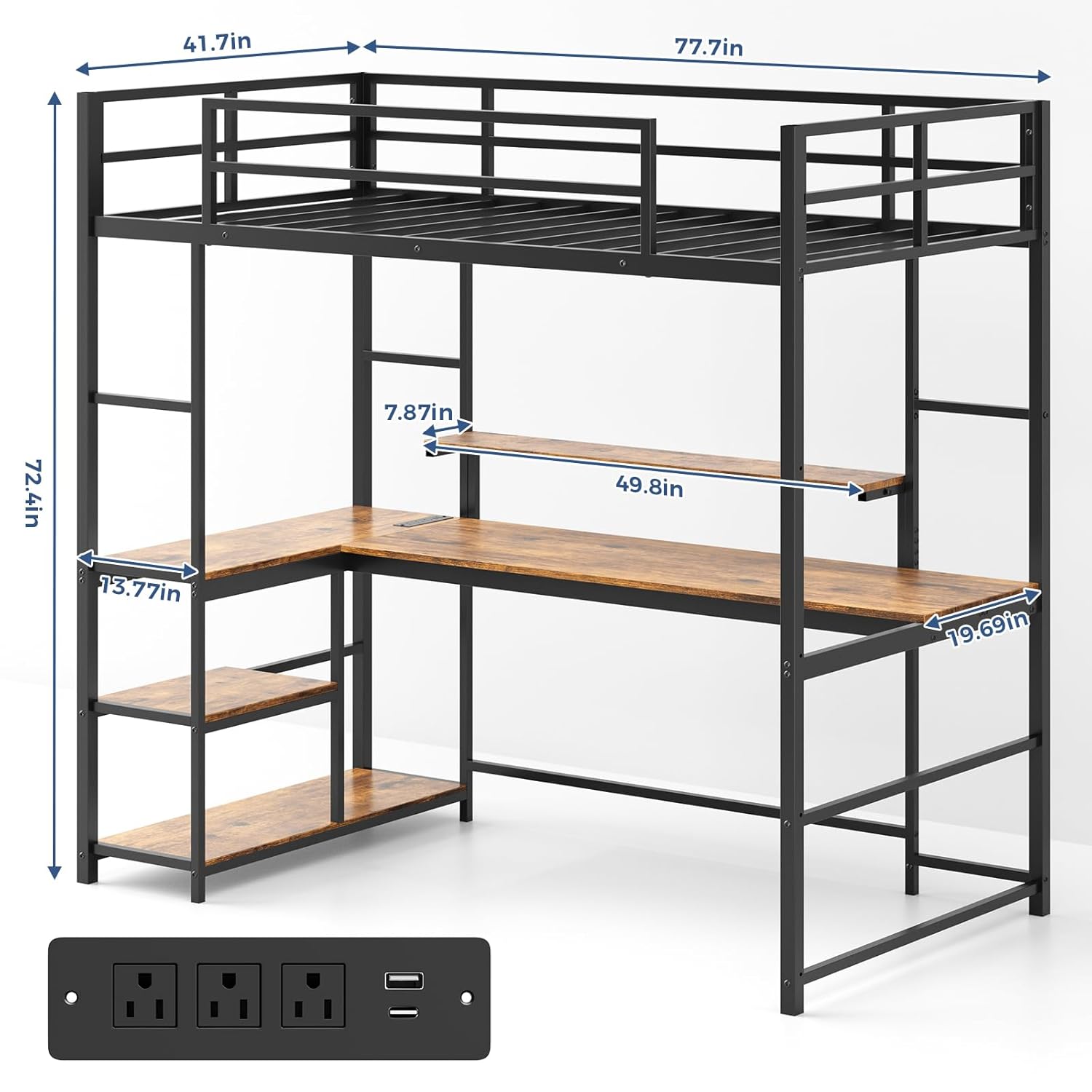
Image 4.1: Detailed dimensions of the loft bed, including bed frame, desk, and shelf measurements.
4.3 Desk and Shelf Installation
Attach the L-shape desk and storage shelves to the frame. The desk provides a 19.68-inch wide surface.

Image 4.2: Close-up view of the spacious L-shape desk and integrated storage shelves.
4.4 Ladder Attachment (Reversible)
The ladder can be installed on either the left or right side of the bed frame to suit your room layout. Refer to the specific instructions for reversible installation.

Image 4.3: Illustration demonstrating the reversible ladder design, allowing installation on either side of the bed.
4.5 Final Tightening
Once all components are in place, systematically tighten all bolts and screws. Do not overtighten.
5. Operating Instructions
5.1 LED Lights Operation
The integrated LED lights can be controlled via a dedicated app or the included remote control. They offer over 60,000 color options and a music sync feature.
- App Control: Download the specified app from your device's app store. Follow the in-app instructions to pair with the LED lights.
- Remote Control: Use the provided remote to power on/off, change colors, adjust brightness, and activate music sync modes.

Image 5.1: The LED lighting system, showing control options via a smartphone app and remote control, with music sync capabilities.
5.2 Adjustable Monitor Stand
The monitor stand on the desk is height-adjustable to optimize viewing comfort and maintain an organized workspace.
- To adjust the height, locate the adjustment mechanism (typically knobs or levers) on the stand.
- Raise or lower the stand to your desired height and secure it in place.

Image 5.2: Close-up of the adjustable monitor stand on the L-shape desk, demonstrating its height adjustment feature.
6. Maintenance
- Cleaning: Wipe metal and wood surfaces with a damp cloth. Avoid harsh chemicals.
- Hardware Check: Periodically inspect all bolts, screws, and connections to ensure they remain tight. Tighten as necessary.
- LED Lights: Ensure the LED strip and controller are free from dust and moisture.
7. Troubleshooting
| Problem | Possible Cause | Solution |
|---|---|---|
| Bed feels unstable or wobbly. | Loose hardware connections. | Check and tighten all bolts and screws on the frame. Ensure the bed is on a level surface. |
| LED lights not turning on. | Power connection issue, remote battery dead, or app not paired. | Verify power supply to the LED controller. Replace remote batteries. Re-pair the app with the LED lights. |
| Missing parts during assembly. | Packaging error. | Carefully re-check all packaging. If parts are still missing, contact Tatub customer support with your purchase details. |
| Difficulty with ladder installation. | Incorrect orientation or attachment. | Review Section 4.4 and the assembly diagrams for correct ladder placement and attachment points. |
8. Specifications
| Feature | Detail |
|---|---|
| Product Dimensions | 77.8"L x 41.7"W x 72.5"H |
| Item Model Number | Loft Bed |
| Brand | Tatub |
| Size | Twin |
| Color | Black-Brown |
| Special Feature | Loft Bed With L-Shape Desk, LED Lights, Adjustable Monitor Stand, Storage Shelves |
| Material | Metal frame, Wood desk/shelves |
| Weight Capacity (Bed) | 300 lbs |
| Weight Capacity (Desk) | 100 lbs |
9. Warranty and Support
For warranty information, missing parts, or technical assistance, please contact Tatub customer support. Keep your purchase receipt for warranty claims.
Customer Support: Refer to the contact information provided with your purchase or visit the official Tatub website.