
1. Introduction
The WEYLLAN PH3 MonoGimbal Head is a precision-engineered accessory designed for photographers using tripods and monopods with cameras and telephoto lenses. Constructed from premium aluminum alloy using a CNC manufacturing process, it offers robust support and smooth operation. Its gimbal-type design facilitates easy manipulation of large lenses by allowing rotation around their center of gravity. The head features an Arca-Swiss style quick release clamp for broad compatibility and includes safety mechanisms for secure equipment handling.

Figure 1: WEYLLAN PH3 MonoGimbal Head supporting a camera and telephoto lens.
2. Product Features
- Durable Construction: Made from premium aluminum alloy with CNC manufacturing for enhanced sturdiness and durability.
- Lightweight Design: Weighs approximately 0.9 lbs (410g) while supporting a maximum load of 22 lbs (10kg).
- Arca-Swiss Compatibility: Features an Arca-Swiss style clamp that supports a wide range of medium and telephoto lenses.
- Gimbal-Type Design: Allows lenses to rotate around their center of gravity, simplifying the handling of heavy equipment.
- Integrated Arca-Swiss Dovetail Base: Includes safety stop screws for secure attachment to quick release clamps.
- Universal Mounting: Equipped with a 3/8'' threaded hole for compatibility with various tripods and monopods.
- Safety Locking Screws: The base design incorporates safety locking screws to maintain lens position when changing shooting locations without detaching the lens.
- Versatile Quick Release Clamp: Compatible with various quick release plates, allowing for flexible setup configurations.
3. Package Contents

Figure 2: Package Contents
Please verify that all items are present in your package:
- 1 x PH3 Gimbal Head
- 1 x Quick Release Plate
- 1 x 3/8" to 1/4" Screw Adapter
- 1 x Screw Tool
- 2 x Allen Wrenches
- 2 x Safety Stop Screws
4. Setup Instructions
4.1 Attaching the Gimbal Head to a Tripod or Monopod
- Locate the 3/8" threaded hole at the base of the PH3 MonoGimbal Head.
- If your tripod or monopod has a 1/4" mounting screw, use the provided 3/8" to 1/4" screw adapter. Thread the adapter onto the tripod/monopod screw first, then attach the gimbal head.
- Align the gimbal head with the mounting screw on your tripod or monopod and rotate clockwise until securely fastened. Ensure it is tight to prevent any movement during use.
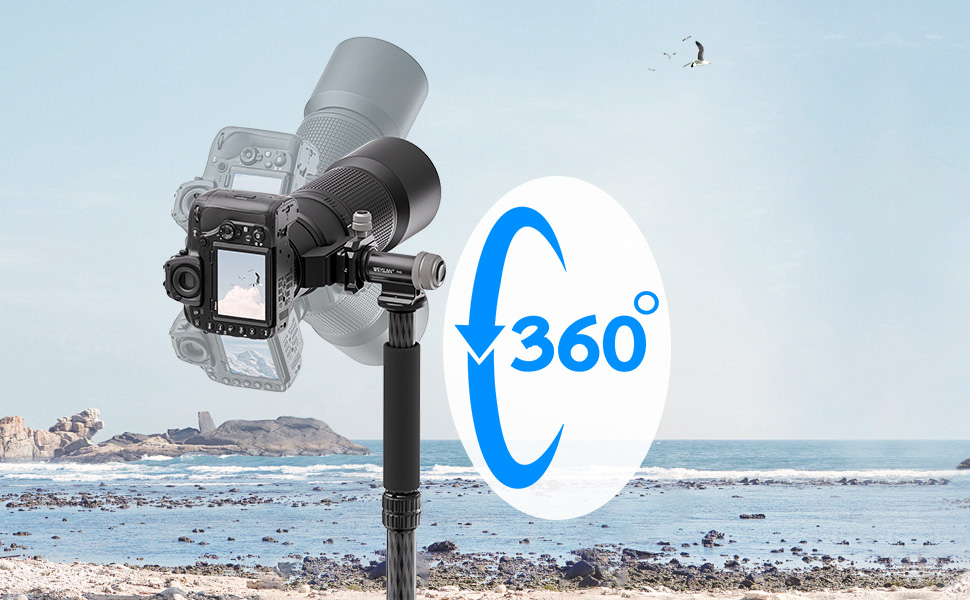
Figure 3: Base with 3/8" threaded hole and safety stop screws.
4.2 Attaching Your Camera and Lens
- Attach the provided Arca-Swiss quick release plate to the base of your camera or lens collar (if your lens has one). Ensure the screw is tightened securely using the screw tool.
- Open the quick release clamp on the gimbal head by turning the locking knob counter-clockwise.
- Slide the quick release plate with your camera/lens into the clamp. Ensure it is fully seated.
- Tighten the locking knob clockwise until the camera/lens is firmly secured. Verify that there is no play or movement.
Video 1: Demonstration of attaching the gimbal head to a monopod and mounting a camera.
5. Operating Instructions
5.1 Adjusting Tilt
The PH3 MonoGimbal Head allows for smooth vertical tilting of your camera and lens. Loosen the main locking knob to adjust the tilt angle. Once the desired angle is achieved, tighten the knob firmly to secure the position. The gimbal design ensures balanced movement, even with heavy telephoto lenses.
5.2 Adjusting Pan (360° Rotation)
The base of the gimbal head features a 360-degree panoramic rotation. Loosen the panning lock knob located at the base to rotate your setup horizontally. This allows for capturing panoramic images or tracking moving subjects smoothly. Tighten the panning lock knob to fix the horizontal position.

Figure 4: 360-degree panoramic rotation.
5.3 Safety Design for Transport
The PH3 head is designed with safety locking screws at the base. After locking these screws, your lens can remain mounted on the head even when carrying the monopod or tripod over your shoulder. This eliminates the need to remove the lens, providing convenience and security during transitions between shooting locations.

Figure 5: Safety design for carrying the head with a mounted lens.
Video 2: Overview of the monopod head's features, including fine-tuning and rapid adjustment modes.
6. Maintenance
To ensure the longevity and optimal performance of your WEYLLAN PH3 MonoGimbal Head, follow these maintenance guidelines:
- Cleaning: Use a soft, dry cloth to wipe down the gimbal head after each use. For stubborn dirt, a slightly damp cloth can be used, followed by immediate drying. Avoid harsh chemicals or abrasive materials.
- Lubrication: The moving parts are factory-lubricated. Do not apply additional lubricants unless specifically instructed by the manufacturer, as this can attract dust and impair performance.
- Storage: Store the gimbal head in a clean, dry environment, away from extreme temperatures and humidity. It is recommended to store it in its original packaging or a protective bag.
- Inspection: Periodically check all screws and knobs to ensure they are tight. If any components appear loose or damaged, discontinue use and contact customer support.
7. Troubleshooting
If you encounter any issues with your WEYLLAN PH3 MonoGimbal Head, please refer to the following common troubleshooting tips:
- Instability/Wobbling: Ensure all locking knobs (for tilt, pan, and quick release clamp) are fully tightened. Verify that the gimbal head is securely mounted to your tripod/monopod and that the camera/lens is properly seated on the quick release plate.
- Difficulty Adjusting: If movement feels stiff, check if any locking knobs are partially tightened. Ensure no foreign objects are obstructing the moving parts. Do not force adjustments.
- Quick Release Plate Not Securing: Confirm that the quick release plate is correctly aligned and fully inserted into the clamp. Ensure the locking knob is turned clockwise until tight. Check for any debris in the clamp mechanism.
If the problem persists after attempting these solutions, please contact WEYLLAN customer support for further assistance.
8. Specifications
| Feature | Specification |
|---|---|
| Model Number | PH3 |
| Material | Premium Aluminum Alloy (CNC) |
| Net Weight | 0.9 lbs / 410 g |
| Maximum Load Capacity | 22 lbs / 10 kg |
| Mounting Screw (Base) | 3/8'' Threaded Hole (with 1/4" adapter included) |
| Quick Release Plate Type | Arca-Swiss Standard |
| Color | Black |
| Manufacturer | WEYLLAN |
| Country of Origin | China |
| Parcel Dimensions | 15.24 x 9.91 x 9.91 cm |

Figure 6: Product Dimensions.
9. Warranty and Support
WEYLLAN products are manufactured to high-quality standards. For information regarding warranty coverage, technical support, or service inquiries, please refer to the contact information provided with your purchase or visit the official WEYLLAN website. Please retain your proof of purchase for any warranty claims.