
1. Introduction
Thank you for choosing the TKMARS Mini 1080P WiFi Sports Camera. This compact and versatile action camera is designed to capture your adventures in high definition, whether on land or underwater. With its integrated WiFi, magnetic attachment, and wide-angle lens, it's perfect for various activities including cycling, diving, vlogging, and pet monitoring. Please read this manual carefully before use to ensure optimal performance and longevity of your device.
2. Package Contents
Ensure all items listed below are present in your package. If any items are missing or damaged, please contact customer support.
- 1 x TKMARS Mini 1080P WiFi Sports Camera (Camera Host)
- 1 x USB Type-C Cable
- 1 x Waterproof Case
- 1 x Magnetic Lanyard
- 1 x Swivel Back Clip
- 1 x Frame Mount
- 1 x Helmet Mount
- 1 x Riding Stand
- 1 x 360° Adapter
- Side Brackets
- Curved with Flat Base
- User Manual
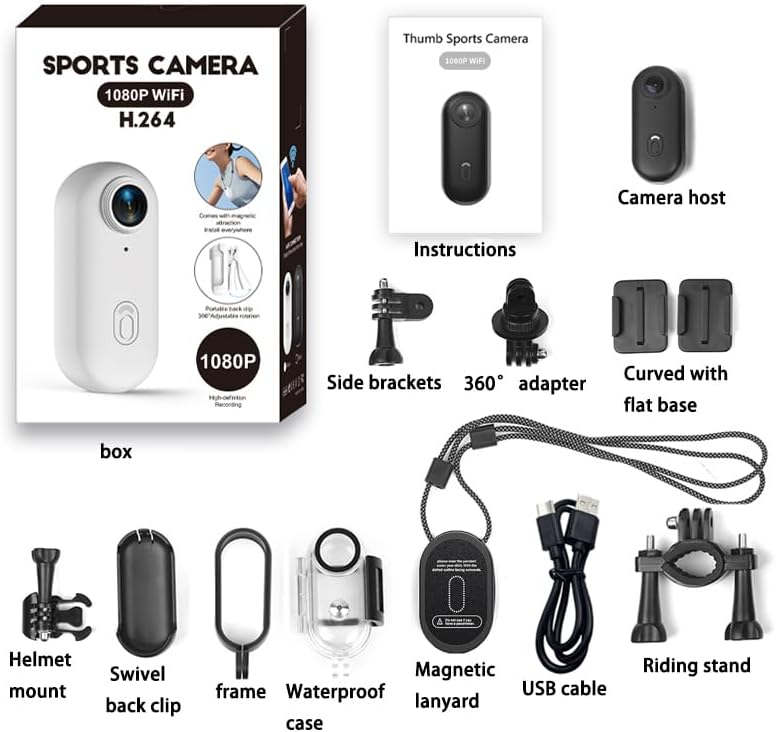
Image 2.1: All components included in the TKMARS Mini Sports Camera package.
3. Product Overview
3.1 Key Features
- Full HD 1080P Video: Records clear and smooth video at 30 frames per second (MP4 format with H.264 encoding).
- Integrated WiFi: Connects directly to your smartphone via a dedicated app for real-time viewing, instant download, and easy sharing.
- 120° Ultra-Wide Angle Lens: Captures a broad field of view, ideal for dynamic scenes.
- Magnetic Attachment + Clip: Allows quick and secure mounting on helmets, bikes, motorcycles, backpacks, clothing, or metallic surfaces.
- Long Battery Life: 800mAh battery provides up to 3.5 hours of continuous recording. Supports charging during recording.
- Waterproof up to 30 Meters: With the included waterproof case, the camera is resistant to splashes, rain, and immersion for water activities.
- Ultra-Compact Design: Easy to transport and discreet, perfect for daily life or travel.

Image 3.1: Overview of the TKMARS Mini Sports Camera highlighting Ultra HD video, waterproof design, APP real-time viewing, and magnetic attraction.

Image 3.2: The camera's small and compact dimensions (2.5 in x 1.1 in x 0.7 in) and approximately 90 minutes of recording time with WiFi off.

Image 3.3: Detailed measurements of the camera: 2.5 inches (6.3 cm) in length, 1.1 inches (2.8 cm) in width, and 0.7 inches (1.8 cm) in thickness.
4. Setup
4.1 Charging the Battery
- Connect the camera to a USB power source (e.g., computer, wall adapter) using the provided USB Type-C cable.
- The charging indicator light will illuminate.
- Charging typically takes approximately 2 hours for a full charge. The indicator light will change or turn off once fully charged.
4.2 Inserting a Micro SD Card
A Micro SD card (up to 256GB, Class 10 or higher recommended) is required for recording and is not included.
- Locate the Micro SD card slot on the camera.
- Gently insert the Micro SD card with the gold contacts facing down until it clicks into place.
- To remove, gently push the card in again until it springs out.
4.3 Powering On/Off
- To Power On: Press and hold the power button for a few seconds until the indicator light illuminates.
- To Power Off: Press and hold the power button again for a few seconds until the indicator light turns off.
4.4 App Installation and WiFi Connection
The camera features integrated WiFi for real-time viewing and file transfer via a dedicated smartphone application.
- Download the official TKMARS camera app from your smartphone's app store (iOS or Android). Refer to the camera's packaging or a quick start guide for the exact app name or QR code.
- Ensure the camera is powered on.
- On your smartphone, go to WiFi settings and connect to the camera's WiFi network. The network name (SSID) will typically start with "TKMARS" or a similar identifier, and the password will be provided in the app or camera documentation.
- Open the TKMARS app. You should now be able to see a live preview from the camera and access its functions.
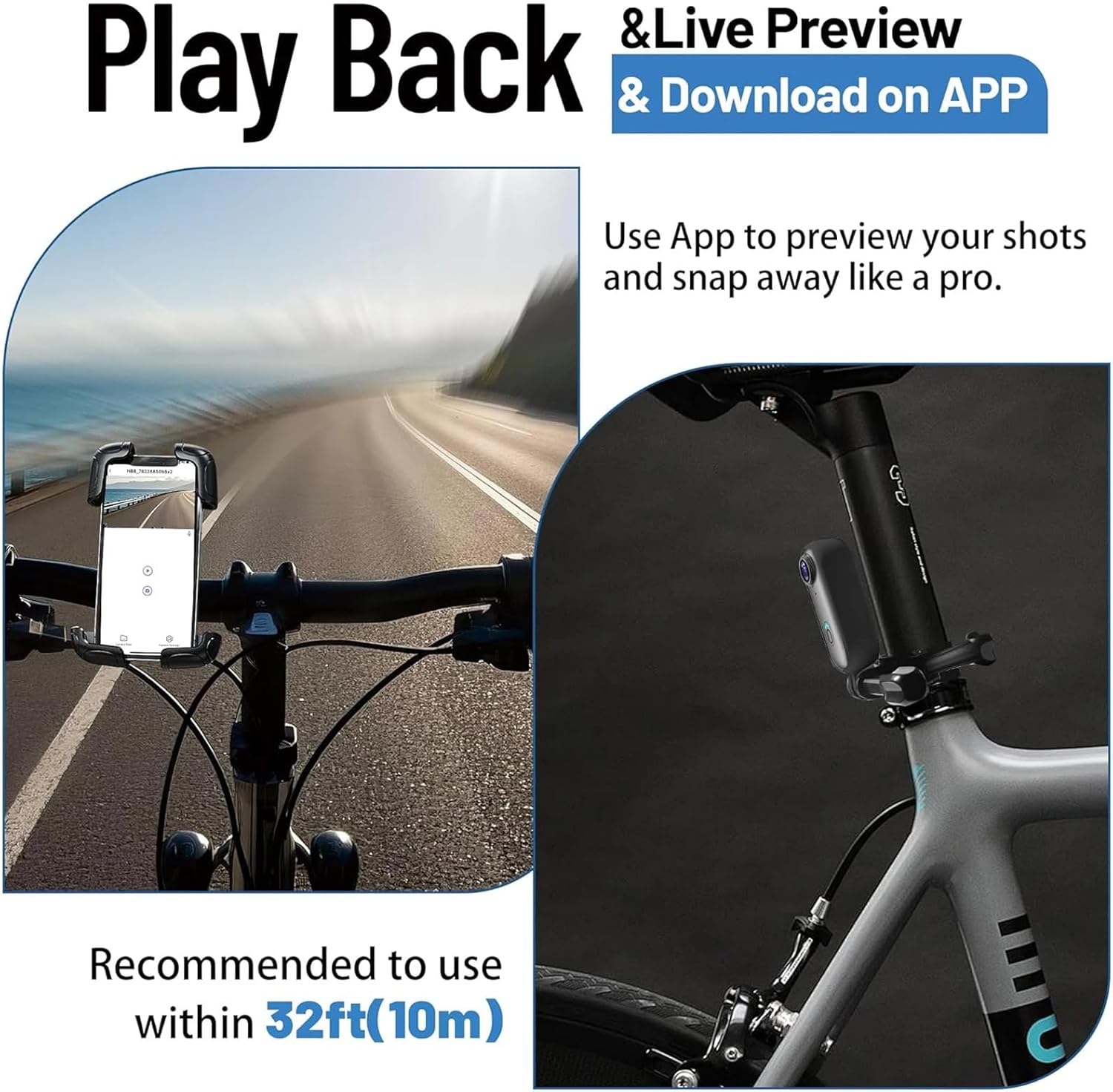
Image 4.1: Using the smartphone app for live preview and downloading content. Optimal WiFi range is within 10 meters (32 feet).
5. Operating Instructions
5.1 Video Recording
- Once powered on, the camera is typically in standby mode.
- Press the record button (usually the main power button, or a dedicated record button) once to start recording. The indicator light will flash to indicate recording is in progress.
- Press the record button again to stop recording. The indicator light will return to a steady state.
- Videos are saved in 1920x1080P resolution at 30 FPS in MP4 format.
5.2 Photo Capture
- While in standby mode, or through the app, you can capture photos.
- Refer to the app interface for a dedicated photo capture button or a mode switch.
- Photos are saved in 4032x3024 pixels in JPG format.
5.3 Real-time Viewing and File Management (via App)
- Connect your smartphone to the camera's WiFi network as described in Section 4.4.
- Open the TKMARS app to access the live view.
- From the app, you can start/stop recording, take photos, adjust settings, and browse recorded videos and photos on the Micro SD card.
- You can download files directly to your smartphone for easy sharing.
5.4 Mounting Options
The camera offers flexible mounting thanks to its magnetic base and included accessories.
- Magnetic Attachment: The camera has a built-in magnet for quick attachment to metallic surfaces. Use the magnetic lanyard for added security.
- Clip: Use the swivel back clip to attach the camera to clothing, backpack straps, or other thin edges.
- Accessory Mounts: Utilize the helmet mount, riding stand, 360° adapter, side brackets, and curved/flat bases for various applications like cycling, skiing, or car dashboard mounting.

Image 5.1: Examples of mounting the TKMARS Mini Sports Camera on a helmet, bicycle handlebars, and a car dashboard.

Image 5.2: The camera's design allows for truly hands-free operation, capturing wide-angle shots during various activities.
5.5 Waterproof Case Usage
The included waterproof case allows the camera to be submerged up to 30 meters (100 feet).
- Before each use, ensure the waterproof case is clean and free of debris, and that the O-ring seal is properly seated and undamaged.
- Place the camera securely inside the waterproof case.
- Close the case firmly, ensuring all latches are properly secured.
- After use in water, rinse the case with fresh water and allow it to air dry completely before opening.

Image 5.3: The camera inside its waterproof case, suitable for diving up to 30 meters (100 feet).
5.6 Charging During Recording
The camera supports recording while charging. This is useful for extended recording sessions, especially when connected to a power bank or a motorcycle's power supply.
- Connect the camera to a power source using the USB Type-C cable.
- Start recording as usual. The camera will draw power from the external source while operating.
6. Maintenance
6.1 Cleaning the Lens
- Use a soft, lint-free cloth specifically designed for camera lenses to clean the lens.
- Avoid using harsh chemicals or abrasive materials that could scratch the lens.
- For stubborn smudges, a small amount of lens cleaning solution can be applied to the cloth, not directly to the lens.
6.2 Storage
- Store the camera in a cool, dry place away from direct sunlight and extreme temperatures.
- If storing for an extended period, ensure the battery is partially charged (around 50%) to prolong its lifespan.
- Keep the camera and accessories in their original packaging or a protective case to prevent damage.
6.3 Battery Care
- Avoid fully discharging the battery frequently.
- Charge the battery regularly, even if the camera is not in use, to maintain battery health.
- Do not expose the battery to high temperatures or puncture it.
6.4 Waterproof Case Care
- Always inspect the O-ring seal for any dirt, hair, or damage before each use. Clean it with a soft cloth if necessary.
- After using the case in saltwater, rinse it thoroughly with fresh water to prevent salt buildup and corrosion.
- Allow the case to air dry completely before storing.
7. Troubleshooting
If you encounter issues with your TKMARS Mini Sports Camera, please refer to the following common solutions:
- Camera not turning on: Ensure the battery is fully charged. Connect to a power source and try again.
- Cannot connect to WiFi: Make sure the camera's WiFi is enabled. Restart both the camera and your smartphone. Ensure you are within the recommended WiFi range (approx. 10 meters).
- Recording issues (e.g., freezing, corrupted files): Check if the Micro SD card is properly inserted and formatted. Ensure the card is Class 10 or higher and has sufficient free space. Try using a different Micro SD card.
- Short battery life: Ensure the camera is fully charged before use. Note that WiFi usage and continuous recording will consume battery faster.
- Poor image/video quality: Clean the camera lens. Ensure you are recording in adequate lighting conditions.
- Water leakage in waterproof case: Immediately stop using the case in water. Inspect the O-ring seal for damage or debris. Ensure the case is properly closed and latched.
If the problem persists, please contact TKMARS customer support for further assistance.
8. Specifications
| Feature | Specification |
|---|---|
| Video Resolution | 1920x1080P (Full HD) |
| Video Frame Rate | 30 FPS |
| Video Format | MP4 (H.264) |
| Photo Resolution | 4032x3024 pixels |
| Photo Format | JPG |
| Lens Angle | 120° Wide Angle |
| Sensor Technology | CMOS |
| Battery Capacity | 800mAh Lithium |
| Charging Time | Approx. 2 hours |
| Recording Autonomy | Approx. 3.5 hours (varies with usage, e.g., WiFi off) |
| Storage | Micro SD card up to 256GB (not included) |
| Interface | USB Type-C |
| Connectivity | Wi-Fi |
| Waterproof Rating | Up to 30 meters (with waterproof case) |
| System Compatibility | Windows 2000/XP/Vista/7 and above |
| Dimensions | Approx. 6.3 cm x 2.8 cm x 1.8 cm (2.5 in x 1.1 in x 0.7 in) |
| Weight | Approx. 35.95g (1.27 oz) |
9. Warranty and Support
9.1 Warranty Information
The TKMARS Mini 1080P WiFi Sports Camera is covered by a standard manufacturer's warranty against defects in materials and workmanship. The specific terms and duration of the warranty may vary by region and retailer. Please retain your proof of purchase for warranty claims.
The warranty does not cover damage caused by misuse, accidents, unauthorized modifications, or normal wear and tear. For detailed warranty information, please refer to the documentation provided with your purchase or contact TKMARS customer support.
9.2 Customer Support
If you have any questions, require technical assistance, or need to make a warranty claim, please contact TKMARS customer support through the retailer where you purchased the product or visit the official TKMARS website for contact information.
When contacting support, please be prepared to provide your product model number (017) and a detailed description of the issue.