
1. Introduction
This manual provides comprehensive instructions for the setup, operation, and maintenance of your PXN V9 GEN2 Gaming Steering Wheel. This device is designed to enhance your racing simulation experience across multiple platforms.
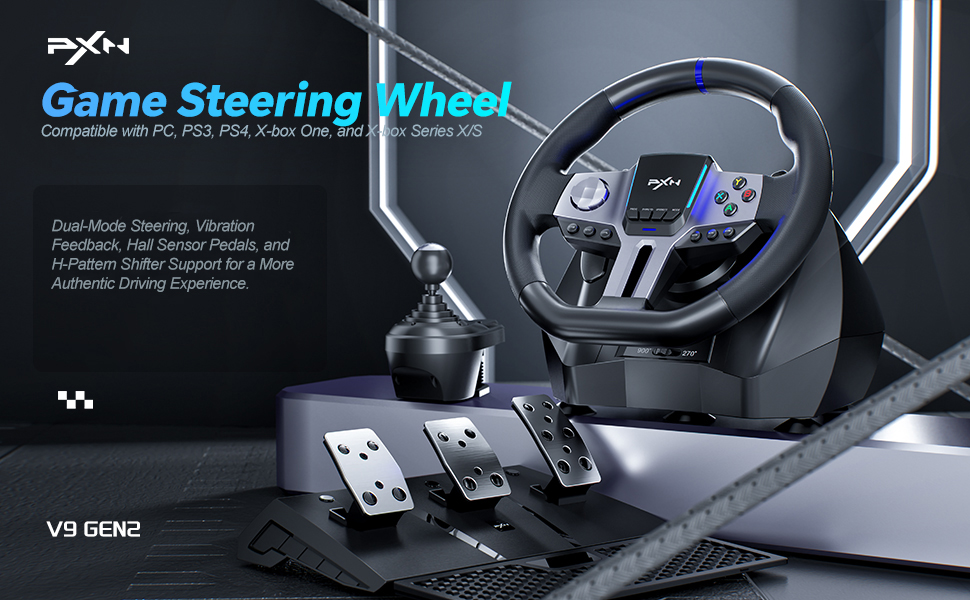
Figure 1.1: PXN V9 GEN2 Gaming Steering Wheel System.
The PXN V9 GEN2 offers multi-platform compatibility, supporting PC, PlayStation 3, PlayStation 4, Xbox One, and Xbox Series X/S. It features a 270°/900° rotation switch, Hall effect pedals, a 6+1 H-shifter, dual paddle shifters, vibration feedback, RGB lighting, and app support for customization.

Figure 1.2: Multi-platform compatibility of the PXN V9 GEN2.
2. Package Contents
Please verify that all the following items are included in your package:
- PXN V9 GEN2 Steering Wheel
- 3-Pedal Unit (Accelerator, Brake, Clutch)
- 6+1 Gear Shifter
- Mounting Clamps (2 units)
- USB-A to Type-C Cable (2 units)
- USB-A to Micro-USB Cable (1 unit)
- User Manual
3. Setup Guide
3.1 Mounting the Steering Wheel
- Place the steering wheel on a stable surface, such as a desk or racing cockpit.
- Attach the two mounting clamps to the underside of the steering wheel base.
- Tighten the clamps securely to the edge of your surface until the wheel is stable and does not move during use.
3.2 Connecting Peripherals
- Pedal Unit: Connect the pedal unit cable to the designated port on the rear of the steering wheel base.
- Gear Shifter: Connect the gear shifter cable to its dedicated port on the steering wheel base.

Figure 3.1: High-quality 6+1 gear shifter.

Figure 3.2: Hall effect pedals for precise input.
3.3 Platform Connection
Connect the main USB cable from the steering wheel base to your gaming platform.
- PC: Plug the USB cable directly into an available USB port on your computer. Drivers should install automatically.
- PlayStation 4 / Xbox One / Xbox Series X/S: For these consoles, you must connect the original console controller (turned off) to the designated USB port on the steering wheel base. This acts as an authentication pass-through. Then, connect the steering wheel's main USB cable to the console.
Video 3.1: Overview of PC Steering Wheel setup and functionality.
4. Operating Instructions
4.1 Switching Rotation Angle (270°/900°)
The PXN V9 GEN2 allows you to switch between 270-degree and 900-degree rotation modes. Use the toggle switch located on the steering wheel base to select your preferred rotation angle. 270° is generally suitable for racing games, while 900° provides a more realistic feel for simulation games like truck simulators.

Figure 4.1: Toggle switch for 270° and 900° rotation.
4.2 Using the Gear Shifter
The included 6+1 gear shifter simulates a real vehicle's shifting action. It features a 6-speed H-pattern gate plus a reverse gear. Additionally, it includes two customizable buttons for high/low gear switching and a dedicated handbrake function.
4.3 Using the Pedals
The Hall effect pedals provide high precision and linearity, accurately detecting foot pressure for accelerator, brake, and clutch inputs. The steering wheel features pedal indicator lights, and two RGB light strips on the wheel provide real-time feedback based on throttle and brake input.
4.4 App Customization
The


