
1. Setup Instructions
Carefully unpack the portable air conditioner and all accessories. Ensure all components are present before beginning installation.
1.1 Unpacking
- Remove all packaging materials, including tape and protective films.
- Keep the original packaging for future storage or transportation.
- Inspect the unit for any damage incurred during shipping. Contact customer support if damage is found.
1.2 Placement
- Place the unit on a flat, stable surface.
- Ensure there is at least 20 inches (50 cm) of clear space around the unit for proper airflow.
- Avoid placing the unit in direct sunlight or near heat sources.
1.3 Window Kit Installation
The window kit is essential for exhausting hot air outside, ensuring efficient cooling.
- Adjust the window slide bar to fit your window opening. Secure it with the provided screws.
- Connect the exhaust hose to the window slide bar adapter.
- Connect the other end of the exhaust hose to the exhaust outlet on the back of the portable AC unit. Ensure a secure, airtight connection.
- Close the window firmly against the window slide bar to seal the opening.
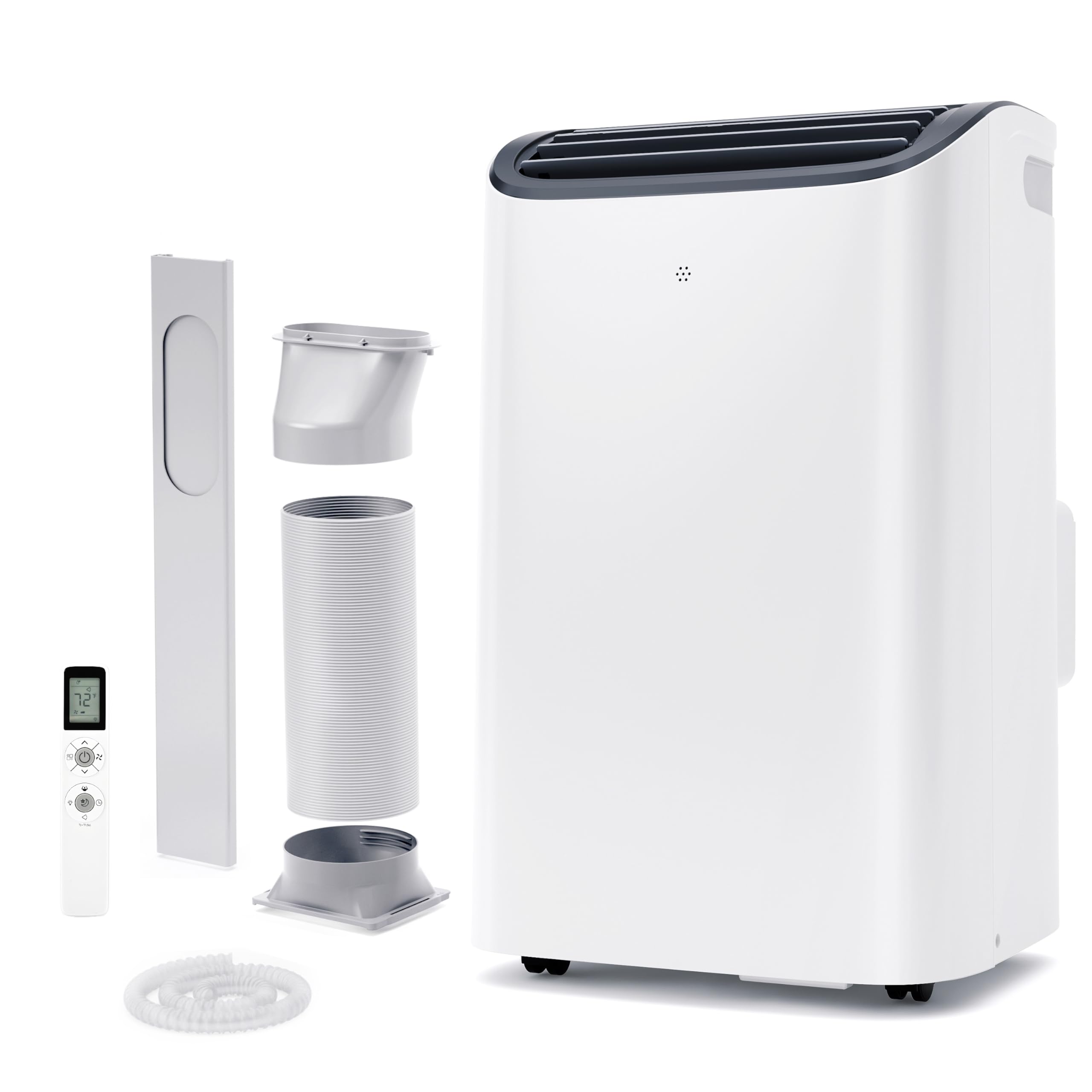
Image 1.1: The EUHOMY Portable Air Conditioner with its exhaust hose and window kit components. This image illustrates the overall appearance of the unit and the accessories required for proper setup, including the flexible exhaust hose and the adjustable window sealing plate.
1.4 Power Connection
- Plug the power cord into a grounded 115V/60Hz electrical outlet.
- Do not use extension cords or power strips with this appliance.
2. Operating Instructions
This section details how to use the various functions of your EUHOMY Portable Air Conditioner.
2.1 Control Panel Overview
The control panel is located on the top of the unit and features several buttons and a digital display.
- Power Button: Turns the unit ON or OFF.
- Mode Button: Cycles through Cool, Heat, Dehumidify, and Fan modes.
- Temperature Up/Down Buttons: Adjusts the desired temperature.
- Fan Speed Button: Selects fan speed (Low, Medium, High).
- Timer Button: Sets the auto-on or auto-off timer.
- Sleep Button: Activates Sleep mode for quiet operation.
- Swing Button: Activates or deactivates the automatic louver swing.
2.2 Operating Modes
Press the Mode button to select the desired operating mode:
- Cool Mode: Provides cooling. Set desired temperature between 61℉-88℉ (16-31℃).
- Heat Mode: Provides heating. Set desired temperature between 61℉-88℉ (16-31℃).
- Dehumidify Mode (Dry): Removes moisture from the air. The unit will operate at a fixed low fan speed. Connect the drain hose for continuous drainage.
- Fan Mode: Circulates air without cooling or heating. Fan speed can be adjusted.
2.3 Temperature and Fan Speed Adjustment
- In Cool or Heat mode, use the Up/Down buttons to set the desired temperature.
- In Cool, Heat, or Fan mode, press the Fan Speed button to cycle through Low, Medium, and High fan speeds.
2.4 Sleep Mode
Press the Sleep button to activate Sleep mode. In this mode, the fan speed is reduced to 46 dB for quieter operation, and the set temperature will gradually increase (in Cool mode) or decrease (in Heat mode) over several hours to optimize comfort and energy efficiency during sleep.
2.5 Auto Swing Function
Press the Swing button to activate the automatic louver swing, which helps distribute air more evenly throughout the room. Press again to stop the swing at a desired angle.
3. Maintenance
Regular maintenance ensures optimal performance and extends the lifespan of your unit.
3.1 Air Filter Cleaning
Clean the air filter every two weeks or more frequently if the unit is used in a dusty environment.
- Turn off the unit and unplug it from the power outlet.
- Locate the air filter panel, usually on the back or side of the unit.
- Remove the filter by gently pulling it out.
- Wash the filter under running water (warm, not hot) or use a vacuum cleaner to remove dust.
- Allow the filter to air dry completely before reinstalling. Do not expose to direct sunlight.
- Reinsert the dry filter into the unit and close the panel.
3.2 Water Drainage
The unit has an internal water collection tank. When the tank is full, the unit will stop operating and display an indicator. For continuous operation in Dehumidify mode, or to drain the tank manually:
- Turn off the unit and unplug it.
- Locate the drain port at the bottom rear of the unit.
- Place a shallow pan or bucket under the drain port.
- Remove the drain plug to allow water to flow out.
- Once drained, replace the drain plug securely.
- For continuous drainage, attach the provided drain hose to the drain port and direct the other end into a floor drain or suitable container.
3.3 Unit Storage
When storing the unit for an extended period:
- Drain all water from the unit completely.
- Clean the air filter.
- Run the unit in Fan mode for a few hours to dry the internal components.
- Unplug the power cord and wrap it neatly.
- Store the unit in a cool, dry place, preferably in its original packaging.
4. Troubleshooting
Refer to this section for common issues and their solutions.
| Problem | Possible Cause | Solution |
|---|---|---|
| Unit does not turn on | No power supply Power cord damaged Water tank full | Check power outlet and circuit breaker Contact customer support Drain the water tank |
| Unit not cooling/heating effectively | Air filter dirty Window kit not properly installed Room too large Doors/windows open | Clean air filter Ensure window kit is sealed Ensure unit is sized for the room Close all doors and windows |
| Water leakage | Drain plug loose Drain hose improperly connected | Ensure drain plug is secure Check drain hose connection and ensure it is not kinked |
| Unit is noisy | Unit not on a flat surface Air filter dirty | Place unit on a flat, stable surface Clean air filter |
5. Specifications
Technical specifications for the EUHOMY Portable Air Conditioner Model PAC006-12KWG-USZX.
| Feature | Detail |
|---|---|
| Model Name | PAC006-12KWG-USZX |
| Cooling Power | 12,000 BTU |
| Voltage | 115 Volts |
| Wattage | 1050 watts |
| Noise Level | 46 Decibels (Sleep Mode) |
| Refrigerant | R-32 |
| Product Dimensions | 14.06"D x 16.5"W x 27.09"H |
| Item Weight | 56 pounds |
| Dehumidification Capacity | 76 pints per day |
| Temperature Adjustment Range | 61℉-88℉ (16-31℃) |
| Included Components | Hose, Window Kit |
6. Warranty and Support
EUHOMY products are manufactured to high-quality standards. For warranty information and customer support, please refer to the warranty card included with your product or visit the official EUHOMY website.
For technical assistance or service inquiries, please contact EUHOMY customer support directly.
- Online Support: Visit the official EUHOMY website for FAQs and contact options.
- Email Support: Refer to your warranty card for the dedicated support email address.


