
1. Introduction
Thank you for choosing the THOMSON WS902DUO Cosy Bookshelf Speakers. These active stereo speakers deliver a powerful 150W audio experience with deep bass from two 10 cm woofers. They offer versatile connectivity options including Bluetooth 5.3, Optical, HDMI (ARC), RCA, and USB playback. The included remote control and side panel adjustments provide precise control over your audio. Please read this manual carefully before use to ensure proper operation and to maximize your listening experience.

Image 1.1: THOMSON WS902DUO Bookshelf Speakers in a living space, showcasing their elegant wood finish.
2. Important Safety Instructions
- Read these instructions thoroughly before operating the product.
- Keep these instructions for future reference.
- Heed all warnings on the product and in the operating instructions.
- Follow all instructions.
- Do not use this apparatus near water.
- Clean only with a dry cloth.
- Do not block any ventilation openings. Install in accordance with the manufacturer's instructions.
- Do not install near any heat sources such as radiators, heat registers, stoves, or other apparatus (including amplifiers) that produce heat.
- Do not defeat the safety purpose of the polarized or grounding-type plug. A polarized plug has two blades with one wider than the other. A grounding type plug has two blades and a third grounding prong. The wide blade or the third prong are provided for your safety. If the provided plug does not fit into your outlet, consult an electrician for replacement of the obsolete outlet.
- Protect the power cord from being walked on or pinched, particularly at plugs, convenience receptacles, and the point where they exit from the apparatus.
- Only use attachments/accessories specified by the manufacturer.
- Use only with the cart, stand, tripod, bracket, or table specified by the manufacturer, or sold with the apparatus. When a cart is used, use caution when moving the cart/apparatus combination to avoid injury from tip-over.
- Unplug this apparatus during lightning storms or when unused for long periods of time.
- Refer all servicing to qualified service personnel. Servicing is required when the apparatus has been damaged in any way, such as power-supply cord or plug is damaged, liquid has been spilled or objects have fallen into the apparatus, the apparatus has been exposed to rain or moisture, does not operate normally, or has been dropped.
3. Package Contents
Please check that all items listed below are included in your package:
- THOMSON WS902DUO Bookshelf Speakers (2 units)
- Remote Control
- Power Cable
- Speaker Connection Cable
- 3.5mm Jack to RCA Adapter Cable
- User Manual (this document)

Image 3.1: Packaging of the THOMSON WS902DUO Bookshelf Speakers.
4. Product Overview
4.1. Side Control Panel (Active Speaker)
The active speaker features a side control panel for easy access to essential functions.

Image 4.1: Side control panel.
- Bass Control: Adjusts the low-frequency output.
- Treble Control: Adjusts the high-frequency output.
- Volume Control: Adjusts the overall sound volume.
- Power Switch: Turns the speakers on or off.
- LED Indicator: Shows the current status or selected input.
4.2. Rear Panel (Active Speaker)
The rear panel of the active speaker provides all necessary input and output connections.
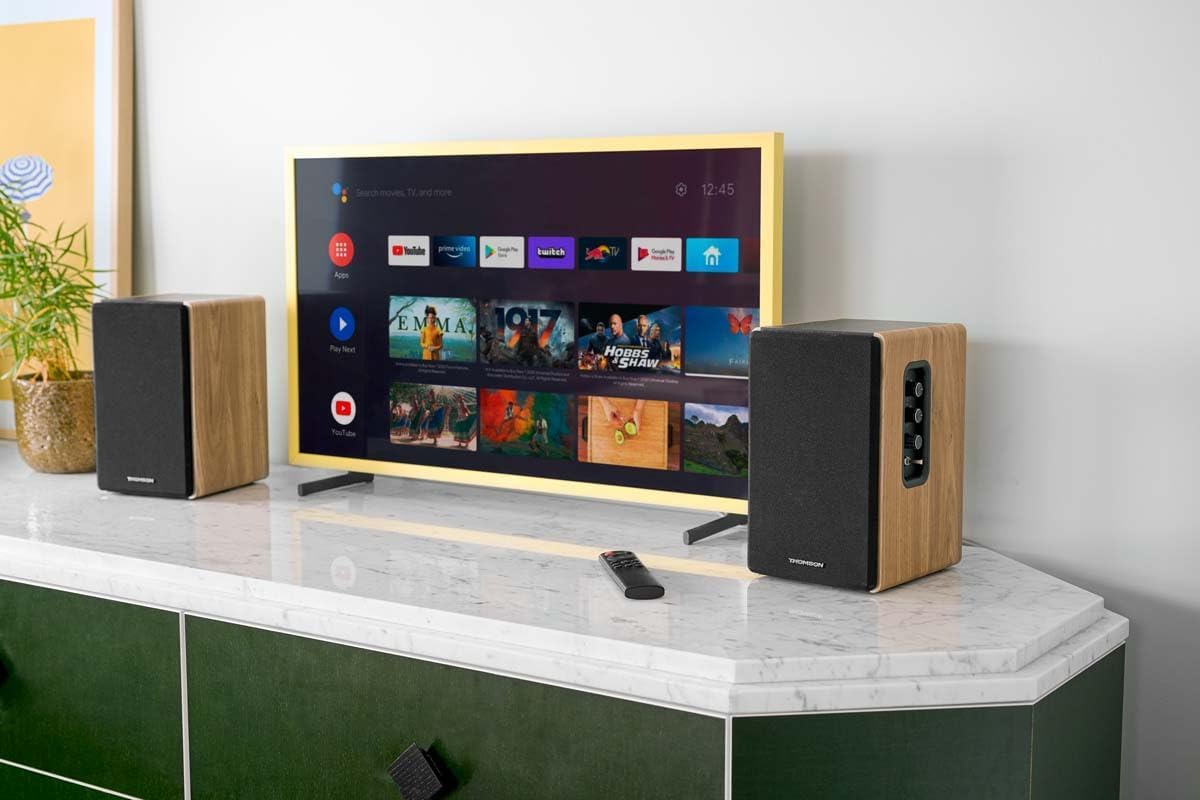
Image 4.2: Rear panel connections.
- Optical Input: For connecting digital audio sources like TVs, game consoles, or Blu-ray players.
- Aux In (RCA): For connecting analog audio sources such as turntables, CD players, or PCs. A 3.5mm jack adapter is provided.
- TV Audio (HDMI ARC): For connecting to a TV's HDMI ARC port, allowing TV remote control of the speaker volume.
- USB Play: For playing MP3 files directly from a USB flash drive.
- Sub Out: For connecting an external active subwoofer for enhanced bass.
- Speaker Output: Connects to the passive speaker.
- Power Input: Connects to the main power supply.
4.3. Remote Control
The remote control provides convenient access to all speaker functions from a distance.

Image 4.3: Remote control.
- Power Button: Turns the speakers on/off.
- Mute Button: Mutes/unmutes the sound.
- Volume +/-: Adjusts the volume level.
- Playback Controls (Play/Pause, Skip): For USB playback.
- Source Selection Buttons (OPT, BT, ARC, USB, LINE): Selects the audio input source.
- EQ Mode Buttons (MOVIE, MUSIC, DIALOG): Selects preset equalization modes.
5. Setup
5.1. Speaker Placement
Place the speakers on a stable, flat surface such as a bookshelf, desk, or speaker stands. For optimal stereo imaging, position the speakers equidistant from your listening position and at ear level. Ensure there is adequate space around the speakers for ventilation.
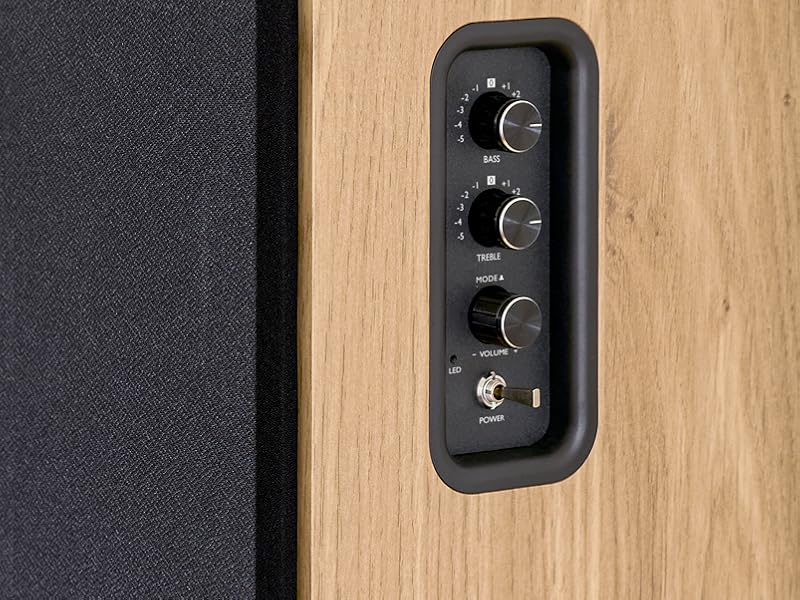
Image 5.1: Recommended speaker placement on a desk.
5.2. Connecting the Speakers
- Identify the active speaker (with controls and inputs) and the passive speaker.
- Connect the included speaker cable from the speaker output terminals on the active speaker to the input terminals on the passive speaker. Ensure correct polarity (+ to + and - to -).
5.3. Connecting Audio Sources
Connect your desired audio sources to the active speaker using the appropriate cables.
- Optical Input: Use an optical cable to connect your TV, game console, or Blu-ray player to the OPTICAL IN port.
- HDMI (ARC) Input: Use an HDMI cable to connect your TV's HDMI ARC port to the TV AUDIO (HDMI) port on the speaker. This allows your TV remote to control the speaker volume.
- RCA (AUX) Input: Use an RCA cable (or the provided 3.5mm jack to RCA adapter) to connect devices like a turntable, CD player, or PC to the AUX IN (RCA) ports.
- USB Input: Insert a USB flash drive containing MP3 files into the USB PLAY port.

Image 5.2: Speakers connected to a television via HDMI ARC.
5.4. Bluetooth Pairing
- Ensure the speakers are powered on.
- Press the 'BT' button on the remote control or the side panel to select Bluetooth input. The LED indicator will flash, indicating pairing mode.
- On your smartphone, tablet, or computer, enable Bluetooth and search for available devices.
- Select "THOMSON WS902DUO" from the list of devices.
- Once paired, the LED indicator will stop flashing and remain solid. You can now stream audio wirelessly.
5.5. Subwoofer Connection (Optional)
If you wish to enhance bass further, connect an active subwoofer to the 'Sub Out' port on the rear panel of the active speaker using an RCA cable.
6. Operating Instructions
6.1. Power On/Off
Use the power switch on the side control panel or the power button on the remote control to turn the speakers on or off.
6.2. Source Selection
Press the corresponding source button on the remote control (OPT, BT, ARC, USB, LINE) to switch between connected audio inputs. The LED indicator will change to reflect the selected source.
6.3. Volume Control
Adjust the volume using the 'Volume' knob on the side control panel or the 'VOL+/-' buttons on the remote control.
6.4. Audio Adjustments
Fine-tune the sound to your preference:
- Bass/Treble: Use the 'Bass' and 'Treble' knobs on the side control panel to adjust the low and high frequencies.
- EQ Modes: Press the 'MOVIE', 'MUSIC', or 'DIALOG' buttons on the remote control to select preset equalization settings optimized for different content types.
6.5. USB Playback
When a USB flash drive with MP3 files is inserted and USB source is selected, the speakers will automatically begin playing. Use the playback control buttons on the remote control (Play/Pause, Skip) to manage your music.
6.6. Bluetooth Operation
After successful pairing (see Section 5.4), you can stream audio from your Bluetooth device. Use your device's controls or the speaker's remote control for playback and volume adjustments.
7. Maintenance
Proper maintenance ensures the longevity and performance of your speakers.
- Cleaning: Wipe the speaker surfaces with a soft, dry cloth. Do not use liquid cleaners or abrasive materials.
- Ventilation: Ensure that the ventilation openings are not blocked to prevent overheating.
- Storage: If storing the speakers for an extended period, unplug them from the power outlet and store them in a cool, dry place.
- Avoid Moisture: Keep the speakers away from water and high humidity.
8. Troubleshooting
If you encounter any issues, refer to the following troubleshooting guide:
| Problem | Possible Cause | Solution |
|---|---|---|
| No power | Power cable not connected; Power switch off; Wall outlet not working. | Ensure power cable is securely connected. Turn on the power switch. Test the wall outlet with another device. |
| No sound | Incorrect input source selected; Volume too low; Mute function active; Audio cable not connected properly. | Select the correct input source. Increase volume. Press Mute button on remote. Check all audio cable connections. |
| Bluetooth pairing fails | Speakers not in pairing mode; Device too far; Bluetooth disabled on source device. | Ensure speakers are in Bluetooth pairing mode (flashing LED). Move device closer to speakers. Enable Bluetooth on your source device. |
| USB playback not working | USB drive not formatted correctly; Files not MP3; USB drive not inserted properly. | Ensure USB drive is FAT32 formatted. Verify files are in MP3 format. Re-insert USB drive firmly. |
| Sound distortion | Volume too high; Source audio quality poor; Bass/Treble settings too extreme. | Lower the volume. Test with a different audio source. Adjust Bass and Treble controls. |
9. Specifications
| Feature | Specification |
|---|---|
| Brand | THOMSON |
| Model Number | WS902DUO |
| Max Speaker Output Power | 150 Watts |
| Frequency Response | 60 Hz |
| Connectivity Technology | Bluetooth, HDMI (ARC), Optical, RCA, USB |
| Bluetooth Version | 5.3 |
| Audio Output Mode | Stereo (2.0 channels) |
| Input Voltage | 230 Volts (AC) |
| Mounting Type | Shelf Mount |
| Speaker Type | Multimedia Bookshelf |
| Special Features | Stereo Pairing, USB Port, Sub-Out, Remote Control, EQ Modes |
| Recommended Uses | Smartphone, Tablet, PC, TV, Game Console, DVD Player, Turntable |
| Color | Natural Wood Finish |
| Control Method | Remote Control, Side Panel Knobs |
| Woofer Size | 10 Centimeters |
| Dimensions (H x W x D) | 28 cm x 24 cm x 47 cm (approximate, per speaker) |
| Weight | 5048 Grams (total for pair) |
| Number of Items | 2 |
| Country of Origin | China |
10. Warranty Information
This THOMSON WS902DUO product comes with a 1-year limited warranty from the date of purchase. This warranty covers manufacturing defects and workmanship under normal use. It does not cover damage caused by misuse, accidents, unauthorized modifications, or normal wear and tear. Please retain your proof of purchase for warranty claims.
11. Customer Support
For technical assistance, warranty claims, or any questions regarding your THOMSON WS902DUO speakers, please contact your retailer or visit the official THOMSON support website. Please have your model number (WS902DUO) and proof of purchase ready when contacting support.
Online Support: www.thomsonconsumer.com (Please check for regional support contacts)


