
1. Product Overview
The SCYTHE Big Shuriken 4 is a compact, low-profile CPU cooler designed for systems with limited space, such as Mini-ITX builds and HTPCs. It features a highly efficient heatsink with multiple heat pipes and a slim fan to provide effective cooling while maintaining a small footprint.
Key features include:
- Intel LGA 1851 and AMD AM5 support.
- Compact dimensions: 67mm high, 4.7" x 4.8" x 2.6" (fan size).
- Designed for compatibility with Mini-ITX PCs.
- Equipped with 6 heat pipes for enhanced heat dissipation.

Image: The SCYTHE Big Shuriken 4 CPU Cooler, showcasing its compact design with the fan mounted on top of the heatsink.
2. Safety Information
Please read and understand all safety instructions before installing or operating the CPU cooler. Failure to do so may result in personal injury or damage to your equipment.
- Electrical Safety: Always disconnect power from your computer before installing or removing any components.
- Sharp Edges: The heatsink fins can be sharp. Handle with care to avoid cuts.
- Thermal Paste: Avoid direct contact with skin and eyes. If contact occurs, rinse thoroughly with water. Keep out of reach of children.
- Static Electricity: Discharge any static electricity from your body before handling components by touching a grounded metal object.
- Ventilation: Ensure adequate airflow within your PC case for optimal cooling performance and system stability.
3. Package Contents
Verify that all items listed below are present in your package. If any items are missing or damaged, please contact SCYTHE customer support.
- SCYTHE Big Shuriken 4 CPU Cooler (Heatsink and Fan pre-assembled)
- Mounting Hardware Kit (for Intel LGA 1851/1700/1200/115X and AMD AM5/AM4 sockets)
- Thermal Grease
- Installation Manual
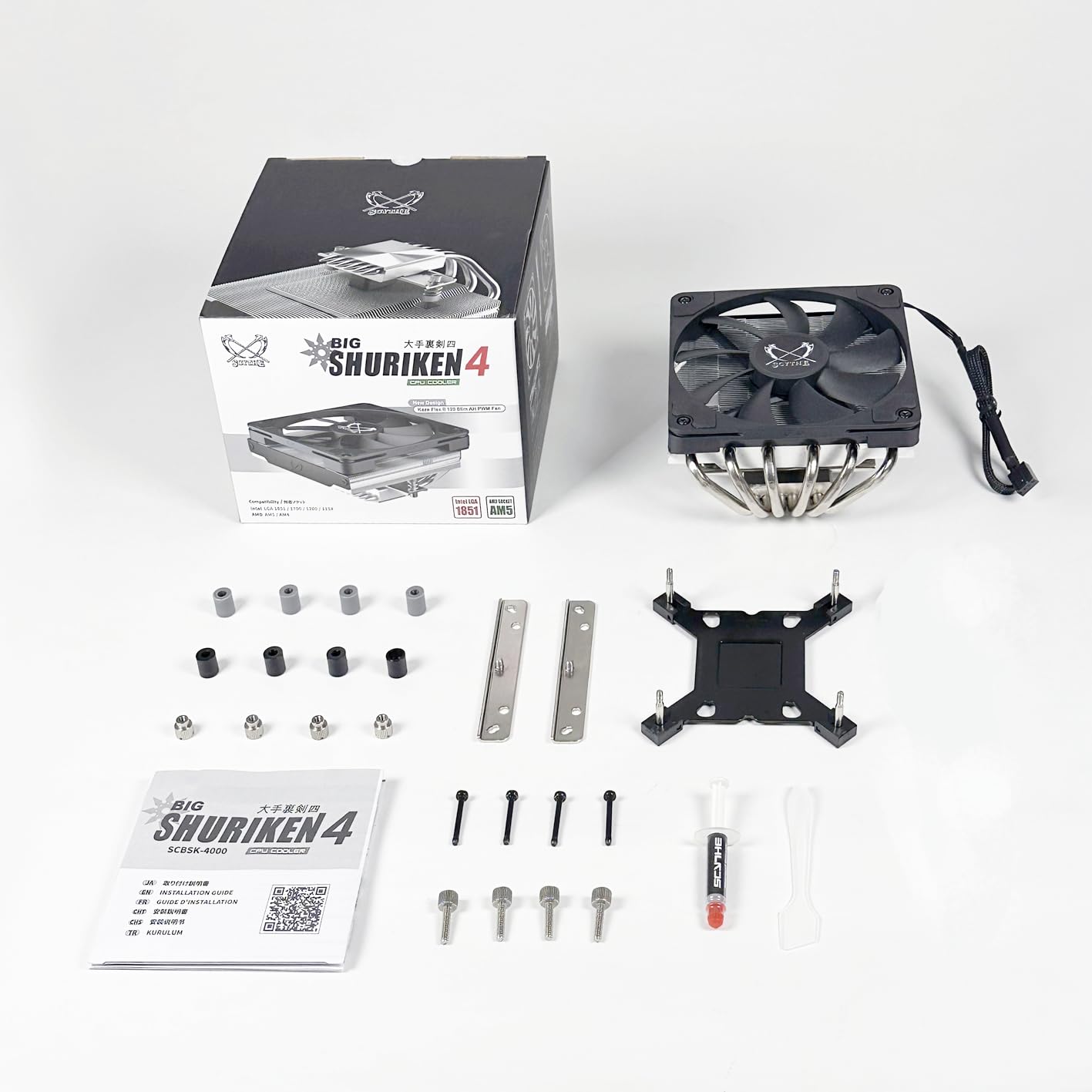
Image: All components included with the SCYTHE Big Shuriken 4 CPU Cooler, laid out for inspection. This includes the cooler itself, mounting brackets, screws, thermal paste, and the instruction manual.
4. Setup and Installation
Follow these steps carefully to install your SCYTHE Big Shuriken 4 CPU Cooler. Refer to your motherboard's manual for specific details regarding CPU socket and cooler mounting points.
4.1. Preparation
- Ensure your computer is powered off and unplugged from the wall outlet.
- Open your PC case to access the motherboard and CPU socket.
- If replacing an existing cooler, carefully remove it and clean any old thermal paste from the CPU and cooler base using isopropyl alcohol and a lint-free cloth.
- Identify your CPU socket type (e.g., Intel LGA 1851/1700/1200/115X or AMD AM5/AM4) and select the appropriate mounting hardware from the kit.
4.2. Applying Thermal Paste
Apply a small amount of thermal paste (included) to the center of the CPU's integrated heat spreader (IHS). A pea-sized dot or a thin line is usually sufficient. The pressure from the cooler will spread it evenly.
4.3. Mounting the Cooler
- Attach the correct backplate (if required for your socket) to the rear of the motherboard.
- Secure the appropriate mounting brackets to the cooler's base or directly to the motherboard around the CPU socket, as per the detailed instructions in the included manual.
- Carefully place the Big Shuriken 4 cooler onto the CPU, aligning the mounting holes.
- Secure the cooler by tightening the screws in a diagonal pattern (e.g., top-left, bottom-right, top-right, bottom-left) to ensure even pressure. Do not overtighten.
- Connect the 4-pin PWM fan cable from the cooler to the CPU_FAN header on your motherboard.

Image: The SCYTHE Big Shuriken 4 CPU Cooler installed on a compact Mini-ITX motherboard, demonstrating its low-profile fit.

Image: The SCYTHE Big Shuriken 4 CPU Cooler installed inside a PC case, showing how it fits within a system's internal layout.
5. Operating Instructions
Once installed, the SCYTHE Big Shuriken 4 CPU Cooler operates automatically. The fan speed is controlled by your motherboard's BIOS/UEFI settings or through operating system software, based on the CPU temperature.
- BIOS/UEFI Settings: Most motherboards allow you to configure fan curves, which adjust fan speed based on CPU temperature. Consult your motherboard manual for instructions on accessing and adjusting these settings.
- Software Control: Some motherboard manufacturers provide utility software that allows for fan speed control directly from your operating system.
- Monitoring: Use system monitoring software to keep an eye on your CPU temperatures to ensure optimal cooling performance.
6. Maintenance
Regular maintenance helps ensure the longevity and optimal performance of your CPU cooler.
- Dust Removal: Periodically (e.g., every 3-6 months), power off and unplug your computer. Use compressed air to blow dust out of the heatsink fins and fan blades. Hold the fan blades gently to prevent them from spinning rapidly during cleaning, which can damage the fan motor.
- Thermal Paste: The thermal paste typically lasts for several years. If you notice a significant increase in CPU temperatures over time, consider re-applying fresh thermal paste. This requires removing the cooler, cleaning the old paste, and applying new paste.
- Fan Inspection: Check the fan for any signs of wear, unusual noise, or wobble. If the fan is failing, it may need to be replaced.
7. Troubleshooting
If you encounter issues with your CPU cooler, refer to the following common problems and solutions:
| Problem | Possible Cause | Solution |
|---|---|---|
| High CPU Temperatures | Improper cooler mounting, insufficient thermal paste, excessive dust, poor case airflow. | Re-seat the cooler, re-apply thermal paste, clean heatsink/fan, improve case ventilation. |
| Fan Not Spinning | Fan cable disconnected, faulty fan header, fan failure. | Check fan cable connection to CPU_FAN header, try another fan header, replace fan if faulty. |
| Loud Fan Noise | Fan hitting cables, dust buildup, fan bearing issue, high fan speed settings. | Ensure no obstructions, clean fan, adjust fan curve in BIOS/software. |
8. Specifications
Detailed technical specifications for the SCYTHE Big Shuriken 4 CPU Cooler:
| Feature | Specification |
|---|---|
| Product Dimensions | 4.8"L x 2.63"W x 4.72"H (122mm x 67mm x 120mm) |
| Item Model Number | SCBSK-4000 |
| Manufacturer | SCYTHE |
| Power Connector Type | 4-Pin PWM |
| Voltage | 12 Volts (AC) |
| Wattage | 1.92 watts |
| Cooling Method | Forced Air |
| Compatible Devices | Desktop, Laptop (compatible with specific CPU sockets) |
| Noise Level | 31.78 dB (Maximum) |
| Material | Aluminum (Heatsink) |
| Maximum Rotational Speed | 1900 RPM |
9. Warranty and Support
SCYTHE products are manufactured to high-quality standards. For warranty information and technical support, please refer to the official SCYTHE website or contact their customer service directly.
Please retain your proof of purchase for warranty claims.
For further assistance, visit the official SCYTHE store: SCYTHE Store on Amazon