
UDIRC 1:16 RC Truck
UDIRC 1:16 Scale Fast All-Terrain RC Truck Instruction Manual
Model: 1:16 RC Truck
1. Introduction
This manual provides essential information for the safe and efficient operation of your UDIRC 1:16 Scale Fast All-Terrain RC Truck. Please read through these instructions carefully before first use and retain for future reference.
2. Safety Information
WARNING: Not suitable for children under 36 months due to small parts. Adult supervision is recommended during operation. Always ensure the battery is handled with care to prevent fire hazards. Disconnect the battery when not in use or when charging. Do not charge unattended.
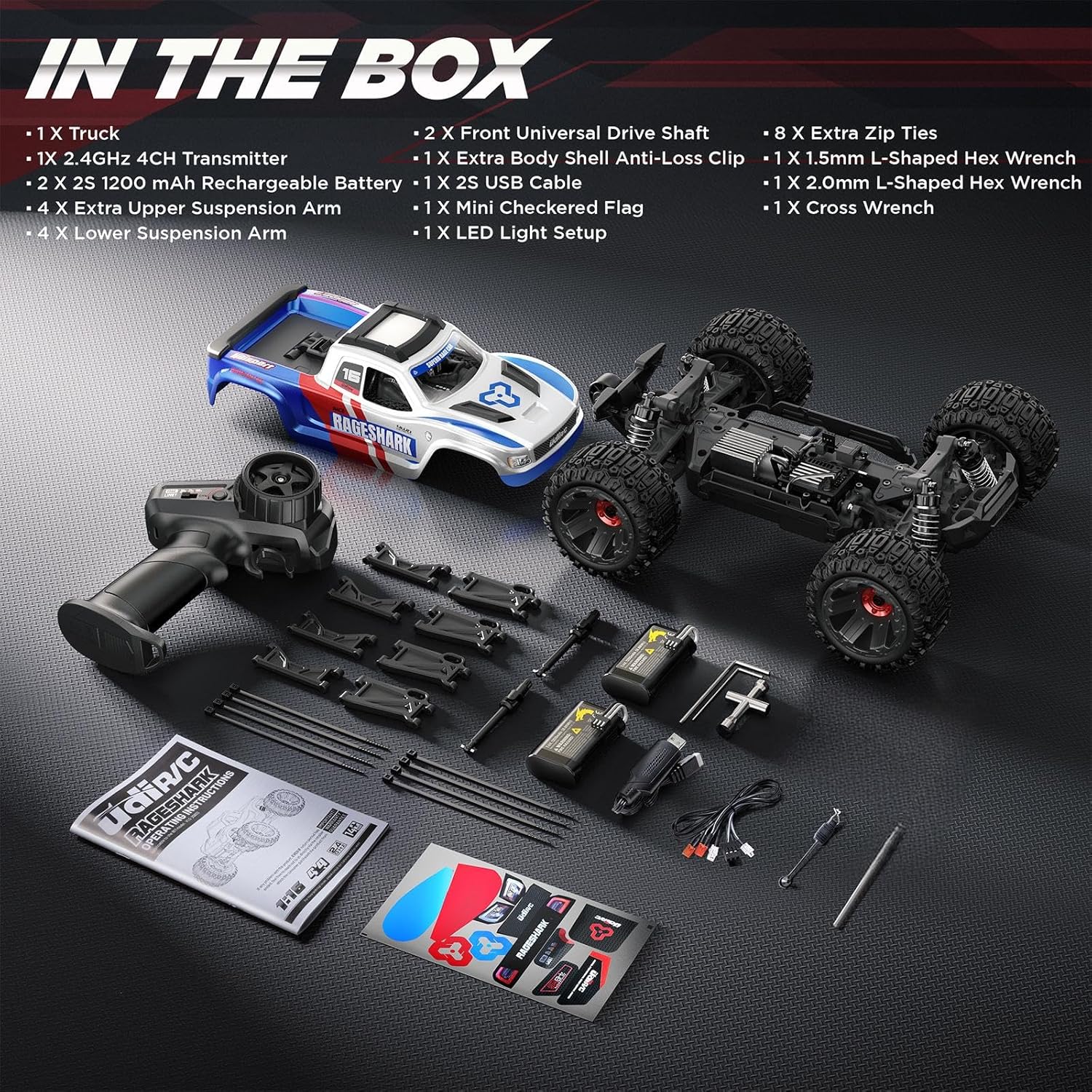
3. What's in the Box
- 1 x Truck
- 1 x 2.4GHz 4CH Transmitter (Remote Control)
- 2 x 2S 1200 mAh Rechargeable Batteries
- 1 x USB Charging Cable
- 1 x Screwdriver
- 1 x Extra Arms and Universal Drive Shaft
- 1 x Body Stickers
- 1 x DIY Light Kit
- 2 x Front Universal Drive Shaft
- 1 x Extra Body Shell Anti-Loss Clip
- 8 x Extra Zip Ties
- 1 x 1.5mm L-Shaped Hex Wrench
- 1 x 2.0mm L-Shaped Hex Wrench
- 1 x Cross Wrench
- Instruction Manual

4. Setup
4.1. Charging the Batteries
The truck comes with two 7.4V 1200mAh Li-ion batteries. Use the provided USB charging cable to charge them. Ensure batteries are fully charged before first use for optimal performance.

4.2. Remote Control Battery Installation
The remote control requires 4 AA batteries (not included). Alternatively, a 2-cell LiPo battery can be used in the remote control's battery compartment. Open the battery compartment cover on the underside of the remote control, insert the batteries, and close the cover.
4.3. Installing the Truck Battery
To install the truck battery, first remove the truck body. Secure the charged battery in the battery tray using the hook-and-loop strap. Connect the battery to the truck's power connector. The battery tray features padding on both sides and bottom for protection. This padding can be removed to accommodate larger batteries if desired.
4.4. Body Installation and Removal
The truck features a clipless body system for easy access. To remove the body, press the latch at the rear of the truck, then lift the body off. To install, align the front of the body, then push the rear down until it clicks into place. The body is reinforced for durability.
4.5. Light Kit Installation
A DIY light kit is included. The lights can be clipped into designated slots on the front bumper and rear of the truck. Refer to the detailed instructions in the included manual for specific wiring and installation steps.

5. Operating Instructions
5.1. Powering On and Off
To power on the truck, press and hold the power button located on the chassis (under the body). To power off, press and hold the same button. The remote control has a separate on/off switch.
5.2. Speed Modes
The remote control features multiple speed modes (e.g., 3-speed modes) to suit different skill levels. A beginner-friendly speed limit mode ensures safe control while learning. Adjust the speed mode using the switch on the remote control.
5.3. Handling and Control
Experience responsive driving with full proportional control, a 3-wire precision steering servo, 4-wheel independent suspension, and adjustable oil-filled shocks. The remote control allows for precise steering trim adjustment. The truck is designed for smooth, stable, and fun operation.

5.4. All-Terrain Playability
The truck is ready-to-run and designed for exciting playability on all terrains. It can conquer low grass, dirt, or gravel with ease. The heavy-duty 4WD system ensures excellent traction and control.

6. Maintenance
6.1. Cleaning
After use, especially on dirty or wet terrains, it is recommended to remove the body and clean out any debris (leaves, twigs, dirt) from the internal components. The fully-sealed driveshaft is designed for 99% dust blocking and low maintenance, protecting the transmission from overheating and wear.

6.2. Upgradable Platform
The truck is built on an upgradable platform. You can reach higher speeds with brushless upgrade kits (sold separately), offering options for 31 MPH or 56 MPH. This is an excellent way to learn RC customization and maintenance.

6.3. Genuine Parts Availability
All genuine parts are available for purchase, ensuring compatibility and efficiency for repairs and upgrades. Step-by-step video and PDF guides are available for installation and maintenance.

7. Troubleshooting
7.1. Difficulty Accessing Power Button
Some users may find the power button a little tight to access. It is located on the chassis under the body. You can often reach it by inserting your finger under the fender well and pushing the button, rather than removing the entire body every time.
7.2. General Issues
If you encounter any operational issues, ensure all batteries are fully charged and correctly installed in both the truck and the remote control. Check all connections for security. For persistent problems, refer to the detailed troubleshooting section in the full instruction manual or contact customer support.
8. Specifications
- Product Dimensions: 11.5 x 8.84 x 5.24 inches
- Item Weight: 3.8 pounds
- Manufacturer Recommended Age: 14 - 20 years
- Batteries: 2 Nonstandard Battery batteries required (included)
- Brand: UDIRC
- Model: 1:16 RC Truck
- Top Speed (Out of Box): 22 MPH
- Upgradable Speed: Up to 56 MPH with brushless kits (sold separately)
- Drive System: Heavy-Duty 4WD
- Components: Metal differential, drive shaft gears, metal main shaft, 11 ball bearings, 117 hex screws, adjustable oil-filled shocks.
9. Warranty and Support
Newbie Protection Program | 1-Year Zero-Hassle Warranty: The product includes a 365-day worry-free warranty. Enjoy free technical support and parts replacement within the first year for Amazon customers. This program is designed to help you learn confidently and level up your RC skills with full support.
Contact Information: For support, please refer to the contact details provided in the included operational guide or visit the UDIRC store on Amazon.
Related documents1:16 RC Truck


Ask a question about this manual
Ask about setup, troubleshooting, compatibility, parts, safety, or missing instructions. Manuals+ will review the question and use this page’s manual context to help answer it.