
VicoSafe CG7
VicoHome CG7 Outdoor Security Camera User Manual
Brand: VicoSafe | Model: CG7
1. Introduction
This manual provides comprehensive instructions for the installation, operation, and maintenance of your VicoHome CG7 Outdoor Security Camera. Please read this manual thoroughly before using the product to ensure proper functionality and safety.
The VicoHome CG7 is a wireless, battery-powered 3MP WiFi camera designed for outdoor security. It offers extended battery life, color night vision, and smart motion detection to provide reliable surveillance for your property.

Figure 1: VicoHome CG7 Outdoor Security Camera. This image shows the camera's main body, lens, and two adjustable antennas, mounted on a wall bracket.
2. What's in the Box
Verify that all components are present in the package:
- 1 × VicoHome CG7 Outdoor Security Camera
- 1 × Charging Cable
- 1 × Mounting Kit & Screws
- 1 × Quick Start Guide (this manual serves as a detailed guide)
3. Setup Guide
The VicoHome CG7 is designed for quick and easy setup without complex wiring. Follow these steps to get your camera operational.
3.1 Initial Charging
Before first use, fully charge the camera using the provided charging cable. The charging port is typically located on the back or bottom of the camera, often protected by a weather-resistant cover.
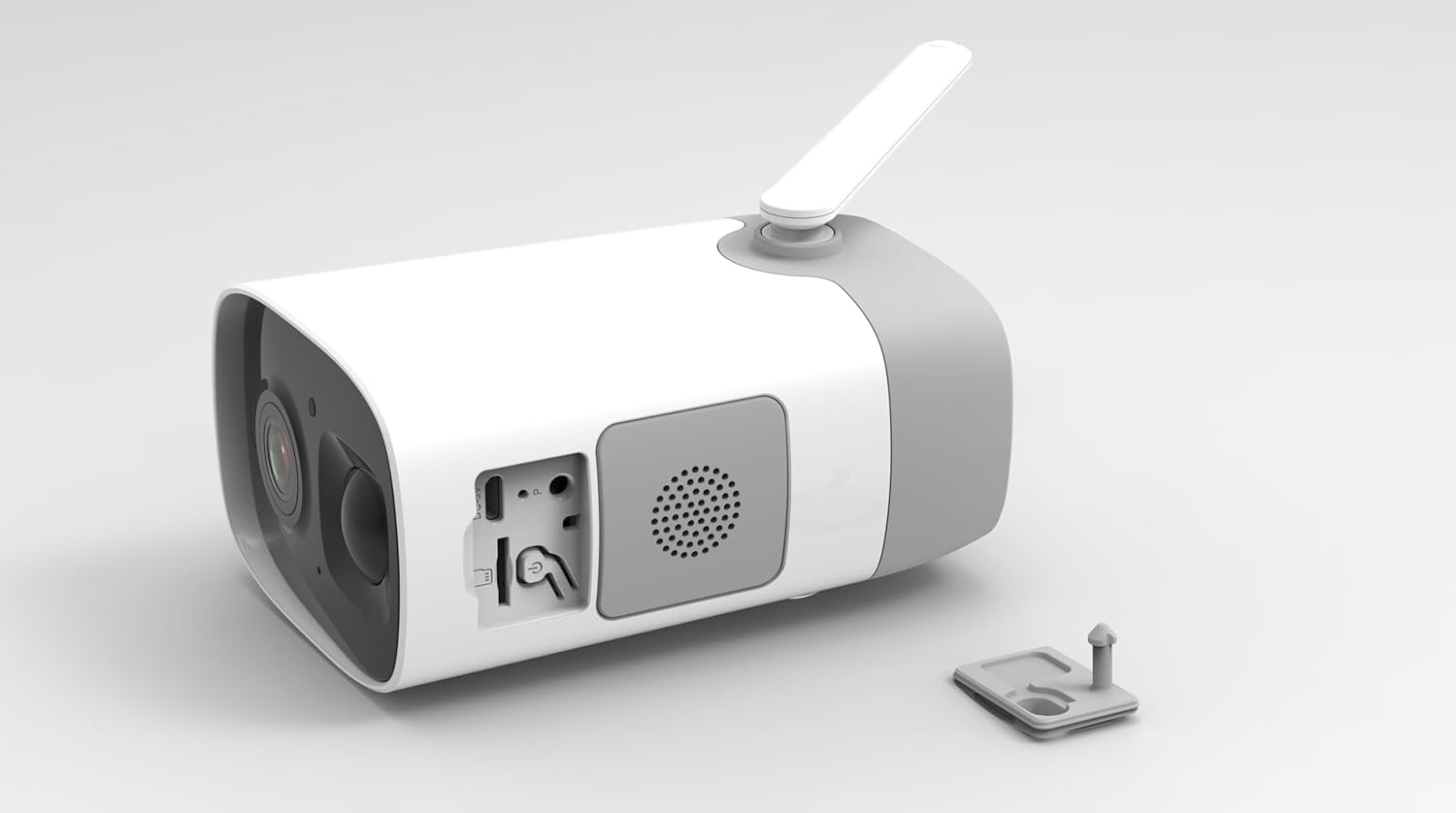
Figure 2: Rear view of the VicoHome CG7 camera with the protective cover for the charging port and reset button open, revealing the USB port and a speaker grille.
3.2 Download and Install VicoHome App
Search for "VicoHome" in your smartphone's app store (Google Play Store for Android or Apple App Store for iOS) and install the application. Create an account or log in if you already have one.
3.3 Camera Pairing and Wi-Fi Connection
- Open the VicoHome app and tap "Add Device" or the "+" icon.
- Follow the on-screen instructions to power on your camera and put it into pairing mode. This usually involves pressing a reset button or power button for a few seconds.
- Select your 2.4GHz Wi-Fi network and enter the password. The camera does not support 5GHz Wi-Fi.
- The app will generate a QR code. Position your camera's lens to scan this QR code from your phone screen. A voice prompt from the camera will confirm successful pairing.
- Once connected, you can name your camera and complete the setup process in the app.
3.4 Mounting the Camera
Choose a suitable outdoor location that provides the desired viewing angle and strong Wi-Fi signal. Use the included mounting kit and screws to securely attach the camera to a wall or other stable surface.

Figure 3: Bottom view of the VicoHome CG7 camera, illustrating the screw holes for mounting the device securely.
4. Operating Your Camera
The VicoHome CG7 is operated primarily through the VicoHome mobile application, offering a range of features for effective home security.
4.1 Live View and Recording
Access the live feed of your camera anytime through the VicoHome app. The camera captures video in 3MP (2304×1296) resolution, ensuring clear and detailed footage. Recordings are triggered by motion detection and can be stored locally on a microSD card (not included) or in the cloud (subscription may be required).
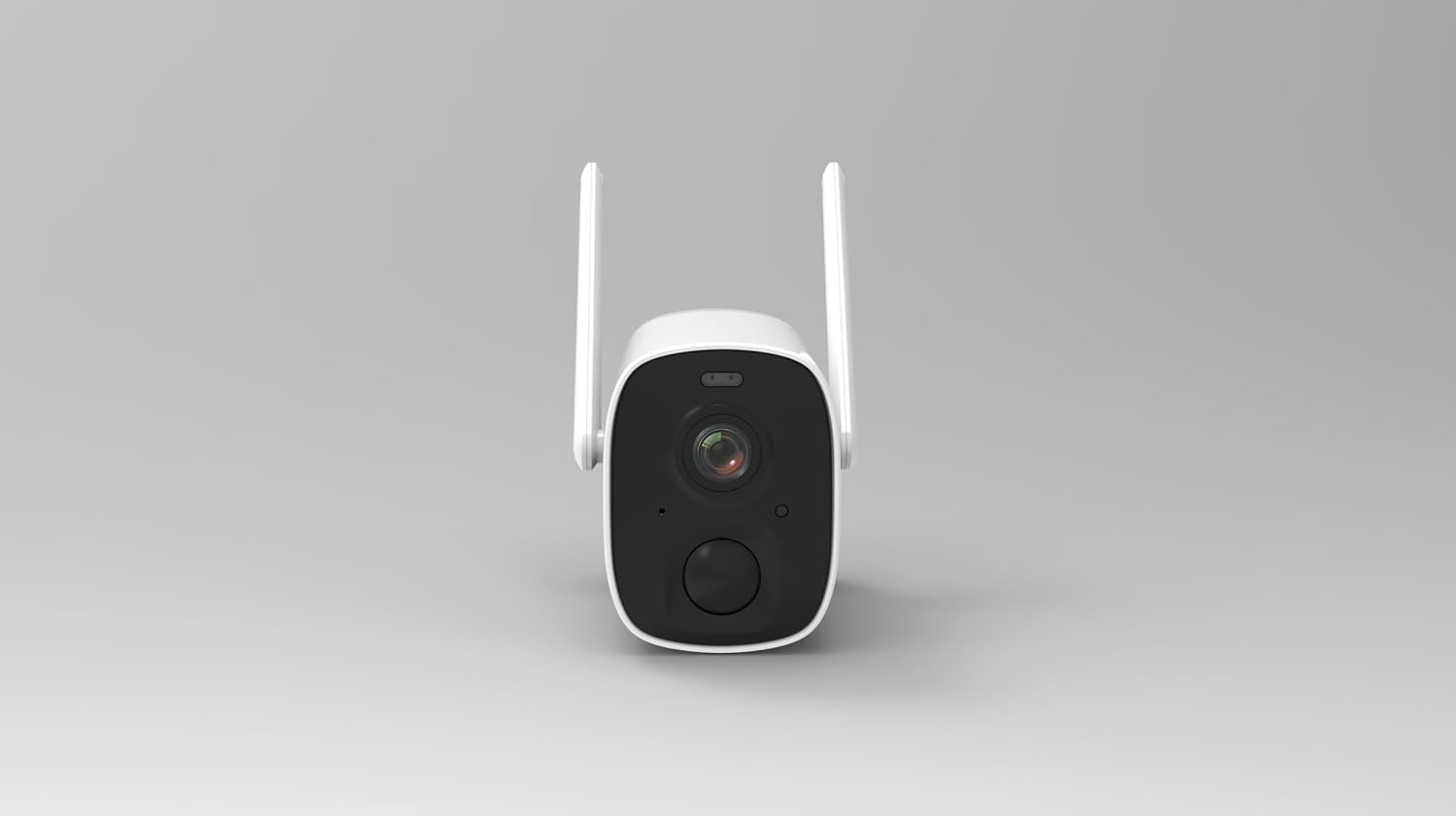
Figure 4: Front view of the VicoHome CG7 camera, highlighting the main lens, infrared sensors, and motion detection sensor.
4.2 Night Vision Modes
The camera features dual night vision capabilities:
- Infrared (IR) Monochrome: Provides clear black and white footage in low-light conditions, maintaining stealth.
- Color LED Mode: Activates built-in LEDs to provide full-color night vision, enhancing detail and recognition up to 23ft.
4.3 AI Motion Detection and Alerts
The VicoHome CG7 utilizes a real PIR sensor with intelligent AI detection to minimize false alarms. It can differentiate between people, vehicles, and packages. When motion is detected, you will receive instant notifications on your smartphone.
- Custom Zones: Set specific areas within the camera's view for motion detection.
- Sensitivity Adjustment: Adjust the sensitivity of the motion sensor to suit your environment.
4.4 Two-Way Audio and Siren
Communicate with visitors or deter intruders using the built-in speaker and microphone. You can speak directly through the camera via the VicoHome app. The camera also features a siren that can be activated manually or automatically upon detection to scare off unwanted guests.
4.5 Weatherproof Design
With an IP65 weatherproof rating, the VicoHome CG7 is designed to withstand various outdoor conditions, including rain, heat, and snow, ensuring reliable performance year-round.
5. Maintenance
Proper maintenance ensures the longevity and optimal performance of your VicoHome CG7 camera.
- Battery Charging: Recharge the camera battery when prompted by the app or when the battery level is low. The 8000mAh battery can last up to 8 months on a single charge under typical usage.
- Cleaning: Periodically clean the camera lens and body with a soft, damp cloth to remove dust, dirt, or water spots that may affect image clarity. Do not use harsh chemicals.
- Firmware Updates: Keep the camera's firmware updated through the VicoHome app. Updates often include performance improvements, new features, and security enhancements.
- Wi-Fi Signal: Ensure the camera maintains a strong 2.4GHz Wi-Fi signal for consistent performance. Relocate the camera or Wi-Fi router if signal strength is poor.
6. Troubleshooting
If you encounter issues with your VicoHome CG7 camera, refer to the following common problems and solutions:
| Problem | Possible Cause / Solution |
|---|---|
| Camera not powering on | Battery is depleted. Charge the camera fully. Ensure the charging cable is properly connected. |
| Cannot connect to Wi-Fi |
|
| Poor image quality |
|
| Motion detection not working or too many false alarms |
|
| Two-way audio not functioning |
|
If the problem persists, please contact VicoSafe customer support for further assistance.
7. Technical Specifications
| Feature | Detail |
|---|---|
| Model Name | CG7 Outdoor Camera Wireless |
| Brand | VicoSafe |
| Indoor/Outdoor Usage | Outdoor |
| Power Source | Battery Powered (8000mAh, up to 8 months) |
| Connectivity Protocol | Wi-Fi (2.4GHz only) |
| Video Capture Resolution | 3MP (2304×1296p) |
| Field of View | 110° Wide-Angle Lens |
| Night Vision | IR Monochrome + Color LED Mode (up to 23ft) |
| Motion Detection | Smart PIR Sensor (detects people, vehicles, packages) |
| Audio | Two-Way Audio, Built-in Siren |
| Weatherproof Rating | IP65 |
| Compatible Devices | Smartphone (via VicoHome App), Amazon Alexa, Google Assistant |
| Mounting Type | Wall Mount |
| Product Dimensions (L x W x H) | 3.2 x 4.7 x 3.2 inches |
| Item Weight | 2.2 pounds |
| Batteries Required | 1 12V battery (included) |
| Video Capture Format | MP4 |
8. Warranty and Support
For detailed warranty information, technical support, and customer service, please refer to the official VicoSafe website or the specific warranty card included with your product packaging. You can also find frequently asked questions and troubleshooting tips on the VicoHome app or website.
Manufacturer: Vicohome
Ask a question about this manual
Ask about setup, troubleshooting, compatibility, parts, safety, or missing instructions. Manuals+ will review the question and use this page’s manual context to help answer it.