
1. Introduction
This manual provides essential information for setting up, operating, and maintaining your JBL Bar 700MK2 7.1 Channel Soundbar System. This system delivers immersive audio with detachable wireless speakers, Dolby Atmos, and a powerful 10-inch wireless subwoofer. Please read this manual thoroughly before using the product to ensure optimal performance and safety.

Image: The JBL Bar 700MK2 soundbar, two detachable surround speakers, a wireless subwoofer, and a remote control.
2. What's in the Box
Carefully unpack all components and ensure the following items are included:
- 1x JBL Bar 700MK2 Soundbar
- 2x Detachable wireless surround speakers
- 1x Wireless subwoofer
- 1x Remote control with 2 x batteries
- Power cords (up to 6pcs depending on region SKUs)
- 1 x HDMI cable
- 4 x Side caps
- 2 x L-shape wall-mount bracket (main bar) + 2 x U-shape wall-mount bracket (for surround speakers) kit with screws
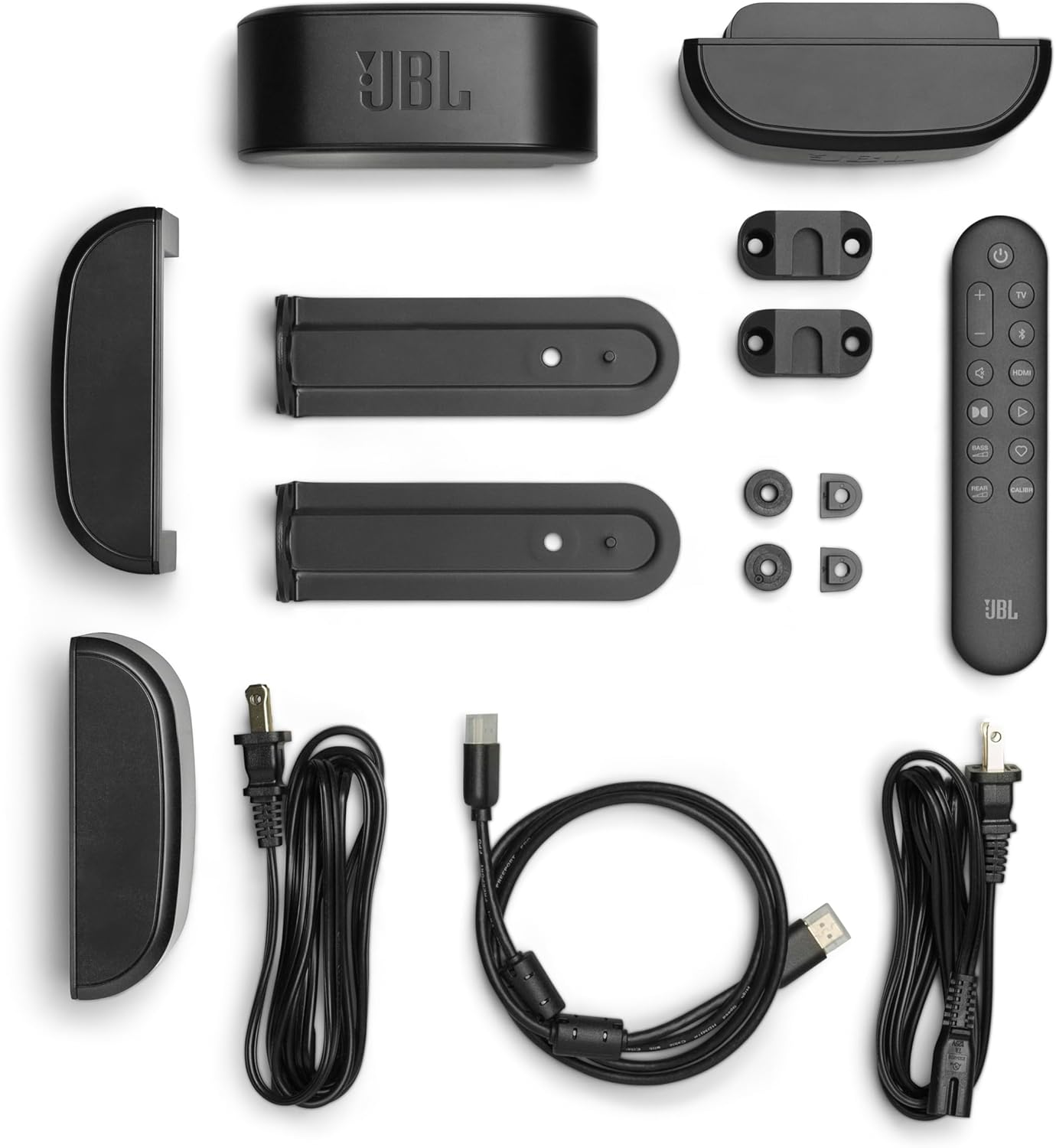
Image: All components included in the JBL Bar 700MK2 packaging, laid out for inspection.
3. Setup
3.1 Placement
Position the soundbar centrally below your television. The wireless subwoofer can be placed anywhere in the room, ideally near a wall for enhanced bass. The detachable surround speakers can be connected to the main soundbar or placed behind your listening position for true surround sound.

Image: A JBL Bar 700MK2 soundbar positioned under a TV on a media console, with the wireless subwoofer on the floor beside it.
3.2 Connections
Connect the soundbar to your TV using the supplied HDMI cable for the best audio quality, especially for Dolby Atmos. Ensure the HDMI cable is connected to the HDMI ARC/eARC port on your TV and the HDMI OUT (TV ARC/TV eARC) port on the soundbar. An optical cable can be used as an alternative connection.

Image: A close-up of the rear panel of the JBL Bar 700MK2 soundbar, highlighting the various input and output ports.
3.3 Detachable Speakers
The two surround speakers can be detached from the main soundbar. To detach, simply lift them off. To reattach, align them with the magnetic connectors on the soundbar. They charge automatically when connected to the soundbar. For surround sound, place them behind your listening area.

Image: A detailed view of the two detachable wireless surround speakers, showing their compact design.
3.4 Wireless Subwoofer Pairing
The subwoofer automatically pairs with the soundbar when both are powered on. If pairing is lost, refer to the troubleshooting section or the JBL ONE app for manual pairing instructions.
3.5 JBL ONE App Setup
Download the JBL ONE app from your device's app store. The app guides you through the initial setup, sound calibration, and offers customization options for your soundbar system.
4. Operating Instructions
4.1 Basic Controls
- Power: Use the power button on the soundbar or remote to turn the system on/off.
- Volume: Adjust volume using the remote control or the soundbar's controls.
- Source Selection: Switch between HDMI, Optical, Bluetooth, and Wi-Fi sources using the remote.
4.2 Sound Modes and Enhancements
- Dolby Atmos: Experience immersive 3D audio for compatible content.
- MultiBeam 3.0: Creates a wide, cinematic soundstage that fills your room.
- PureVoice 2.0: Automatically optimizes dialogue clarity, ensuring every word is heard.
- SmartDetails: Enhances subtle audio details for a richer listening experience.
4.3 Night Listening
To enjoy content without disturbing others, activate 'Night Listening' via the JBL ONE app. Place the detachable speakers in front of you. The soundbar and subwoofer will be muted, providing an intimate audio experience through the detached speakers.
Video: Official JBL product video demonstrating the features of the JBL Bar 700MK2, including detachable speakers, Dolby Atmos, and Night Listening mode. This video highlights the system's capabilities for immersive home theater audio.
4.4 Music Streaming
The JBL Bar 700MK2 supports various music streaming services and ecosystems including AirPlay, Google Cast, Spotify Connect, Tidal Connect, and Roon Ready for high-definition audio playback.
5. Key Features
- Real Surround Sound with Detachable Wireless Speakers: Easily transform your soundbar into a true surround sound system by placing the long-lasting battery-powered speakers behind you.
- 780W Max Output Power and a 10" Wireless Subwoofer: Delivers powerful, room-filling sound with deep, thundering bass.
- Dolby Atmos: Experience extraordinary cinematic sound from all directions with 3D audio.
- MultiBeam 3.0: Provides a wide, cinema-like soundstage for immersive audio.
- PureVoice 2.0: Ensures clear and consistent dialogue by optimizing speech based on ambient sound and volume.
- SmartDetails: Enhances subtle sound elements for a detailed and balanced audio field.
- Night Listening: Enjoy private listening with detachable speakers, muting the main soundbar and subwoofer.
- Easy Sound Calibration: The system automatically adjusts sound for optimal 3D surround effects based on your room's acoustics.
- Works with All Ecosystems and Music Streaming Services: Supports AirPlay, Google Cast, Spotify Connect, Tidal Connect, and Roon Ready.
- JBL ONE App: Provides comprehensive control, customization, and software updates for your soundbar system.
6. Specifications
| Brand | JBL |
| Model Name | Bar 700MK2 |
| Item Model Number | JBLBAR700M2BLKAM |
| Speaker Type | Soundbar |
| Surround Sound Channel Configuration | 7.1 |
| Speaker Maximum Output Power | 780 Watts |
| Subwoofer Diameter | 10 Inches |
| Frequency Response | 20 Hz |
| Connectivity Technology | Bluetooth, HDMI, Optical, USB, Wi-Fi |
| Wireless Communication Technology | Airplay, Bluetooth, Wi-Fi |
| Product Dimensions | 5"D x 45.8"W x 2"H |
| Item Weight | 32 Pounds |
| Color | Black |
| Material | Plastic |
| Mounting Type | Wall Mount |
| Control Method | Remote |
7. Troubleshooting
If you encounter issues with your JBL Bar 700MK2, refer to the following common problems and solutions:
- No Power: Ensure all power cords are securely connected to the soundbar, subwoofer, and a working power outlet.
- No Sound:
- Check the input source selection on the soundbar.
- Verify that the HDMI or optical cable is correctly connected to both the soundbar and your TV.
- Increase the volume on both the soundbar and your TV.
- Ensure your TV's audio output is set to external speakers.
- Subwoofer Not Pairing: If the subwoofer does not automatically connect, press and hold the pairing button on the back of the subwoofer and then on the soundbar (refer to the JBL ONE app for specific instructions).
- Poor Surround Effect:
- Ensure detachable speakers are placed correctly behind your listening position.
- Run the sound calibration feature via the JBL ONE app.
- Check for obstructions between the soundbar and surround speakers.
- Detachable Speakers Not Charging: Ensure they are securely attached to the main soundbar. Clean the charging contacts if necessary.
- Remote Control Not Working: Replace the batteries. Ensure there are no obstructions between the remote and the soundbar.
For further assistance, consult the JBL ONE app or the official JBL support website.
8. Maintenance
To ensure the longevity and optimal performance of your JBL Bar 700MK2 system, follow these maintenance guidelines:
- Cleaning: Use a soft, dry cloth to clean the surfaces of the soundbar, subwoofer, and detachable speakers. Avoid using abrasive cleaners, waxes, or solvents.
- Speaker Care: Keep the detachable speakers and their charging contacts clean and free of debris.
- Ventilation: Ensure adequate ventilation around all components to prevent overheating. Do not block any ventilation openings.
- Storage: If storing the system for an extended period, detach the surround speakers and ensure they are fully charged before storage. Store in a cool, dry place.
9. Warranty and Support
The JBL Bar 700MK2 comes with a limited warranty. For detailed information regarding warranty terms, conditions, and registration, please refer to the warranty card included in your product packaging or visit the official JBL website.
For technical support, product registration, or to download the latest software updates, please use the JBL ONE app or visit the JBL Support Website.


