
1. Introduction
This manual provides detailed instructions for the installation, operation, and maintenance of your PLKEQS M300S Android 14 Car Stereo. This multimedia player is designed specifically for Ford Fiesta models manufactured between 2009 and 2017, offering advanced features such as wireless CarPlay, wired Android Auto, GPS navigation, FM RDS radio, Bluetooth 5.0, and steering wheel control integration. Please read this manual thoroughly before using the product to ensure proper functionality and safety.
2. Package Contents
Please verify that all items listed below are included in your package. If any items are missing or damaged, please contact customer support.
- Host Screen (Main Unit) ×1
- Cables and Frame required for installation ×1 set
- 4LED Reversing Camera ×1 (Gift)
- Disassembly Tool ×1 (Gift)
- External Microphone ×1 (Gift)
- Power Cable ×1
- 4-Pin USB Cable ×1
- 6-Pin USB Cable ×1
- GPS Antenna ×1
- RCA Cable Set ×1
- Reverse Input Cable ×1
- Camera Video Line ×1
- Camera Power Cable ×1
- RCA Harness with 4G SIM Card Slot (for 4G version only) ×1
- RCA Harness (for WiFi version only) ×1
- 4G LTE Antenna (for 4G version only) ×1
- Canbus Decoder ×1
- Radio Antenna Adapter Cable ×1
- Rear Camera Input RCA Cable ×1

This image displays the complete contents of the product package. It shows the main head unit, various cables (power, USB, RCA, camera), antennas (GPS, 4G LTE), external microphone, Canbus decoder, and the reverse camera. Each component is numbered and labeled for easy identification, providing a clear overview of what is included.
3. Specifications
| Feature | Specification (M300S Model) |
|---|---|
| Operating System | Android 14.0 |
| Processor | 8-core 8581 chip (4*A55 @ 1.6GHz, 4*A55 @ 1.2GHz) |
| RAM / ROM | 4GB RAM / 64GB ROM |
| Display Resolution | 1280*720 |
| Screen Type | IPS High-Definition Multi-touch Screen |
| Network Connectivity | 5G WiFi, 4G, USB, Hotspot |
| Bluetooth Version | 5.0 |
| CarPlay | Wireless |
| Android Auto | Wired |
| Digital Sound Processor (DSP) | Yes |
| Radio Data System (RDS) | Yes |
| Cooling Fan | Built-in |
| Supported Media Formats | Mp3, Mp4, WMA, JPEG |
| Supported Optional Accessories | TPMS, DAB, OBD, DVR |
| Model Number | M300S (66538279-M300S) |
| Manufacturer | PLKEQS |
| Country of Origin | China |

This table provides a detailed comparison of technical specifications across various PLKEQS car stereo models, including M100S, M120S, M150S, M200S, M300S, M400S, M500S, M600S, and M700S. It lists differences in internet connectivity, operating system, core processor, RAM/ROM configurations, Bluetooth module, screen resolution, screen type, cooling fan presence, full AV output, DSP, and RDS features. The M300S model is highlighted with 4G internet, Android 14, 8-core 8581 chip, 4G+64G RAM/ROM, Bluetooth 5.0, 1280*720 IPS screen, built-in cooling fan, optional full AV output, DSP, and RDS.
4. Setup and Installation
Installing the PLKEQS M300S car stereo requires specific technical skills and knowledge. It is highly recommended to seek assistance from professional installation engineers at a certified car conversion workshop to ensure correct and safe installation.
Pre-Installation Checklist:
- Vehicle Compatibility: Ensure your Ford Fiesta is from the 2009-2017 model years.
- Required Components: Confirm you have the correct radio frame bezel and the original car cable plug adapter for your vehicle.
- Tools: Gather necessary tools, including the provided disassembly tool.
- Safety: Disconnect the car battery before starting any electrical work.
Installation Steps (General Guidance):
- Carefully remove the original car radio and dashboard trim using appropriate tools.
- Connect the provided wiring harness to the car's original wiring. Ensure all connections are secure.
- Install the GPS antenna, 4G LTE antenna (if applicable), and external microphone in suitable locations.
- If installing a reverse camera, route the camera cable and connect it to the 'CAM-IN' port on the stereo. Refer to the wiring diagram for correct connections.
- Mount the PLKEQS M300S head unit into the dashboard opening, securing it with the appropriate frame and brackets.
- Reconnect the car battery and test all functions of the new stereo.
- Reassemble the dashboard trim.
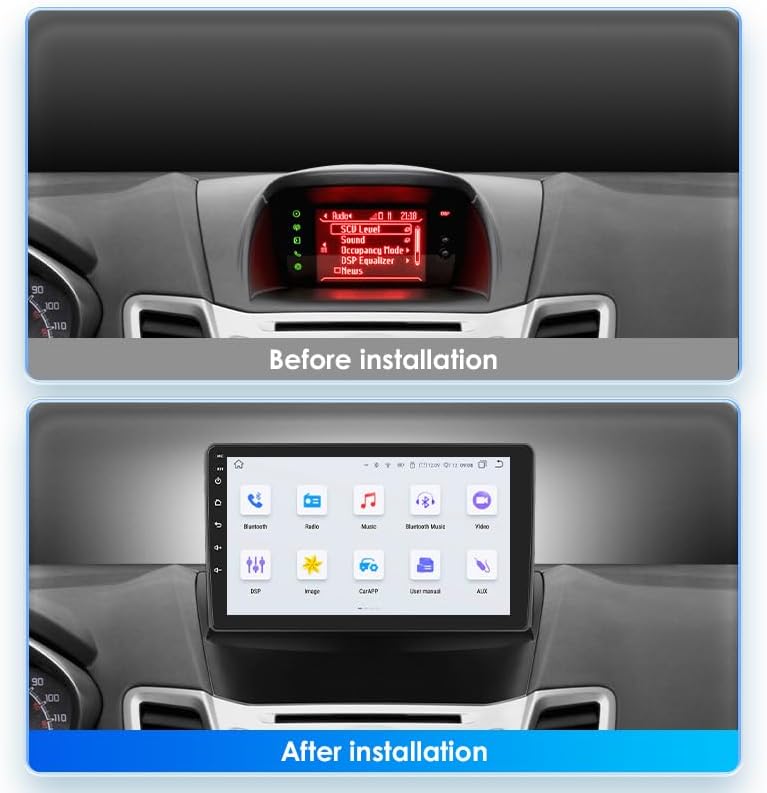
This image illustrates the visual transformation of the car's dashboard. The top panel shows the original car radio display before installation, while the bottom panel displays the new 9-inch PLKEQS M300S car stereo seamlessly integrated into the dashboard, showing its main interface.

This image explains the reverse camera functionality. It includes a wiring diagram for connecting the reverse camera to the car stereo and a clear display of the reverse camera's view on the stereo screen, complete with parking guidelines, enhancing safety during reversing maneuvers.
5. Operating Instructions
5.1. Wireless CarPlay & Wired Android Auto
The PLKEQS M300S supports both wireless Apple CarPlay and wired Android Auto, allowing seamless integration with your smartphone for navigation, communication, and entertainment.
- Wireless CarPlay: Connect your iPhone via Bluetooth for a wireless CarPlay experience. Once paired, CarPlay will launch automatically, mirroring essential iPhone apps to your car stereo screen. Use Siri voice control for hands-free operation.
- Wired Android Auto: Connect your Android phone via a USB cable to activate Android Auto. This provides access to Google Maps, Google Assistant, and other compatible apps directly on the stereo display.

This image highlights the compatibility of the car stereo with both Apple CarPlay and Android Auto. The main screen shows various app icons, while smaller insets demonstrate the user interfaces for CarPlay (via Bluetooth or USB cable) and Android Auto (via Bluetooth or USB cable), including navigation, calls, and music playback.
5.2. GPS Navigation
The stereo comes with pre-installed offline maps and supports online navigation when connected to the internet.
- Offline Navigation: Use the pre-loaded maps for navigation without an internet connection.
- Online Navigation: Connect to 5G WiFi or your phone's hotspot to access real-time traffic updates and download additional map data from the app store.
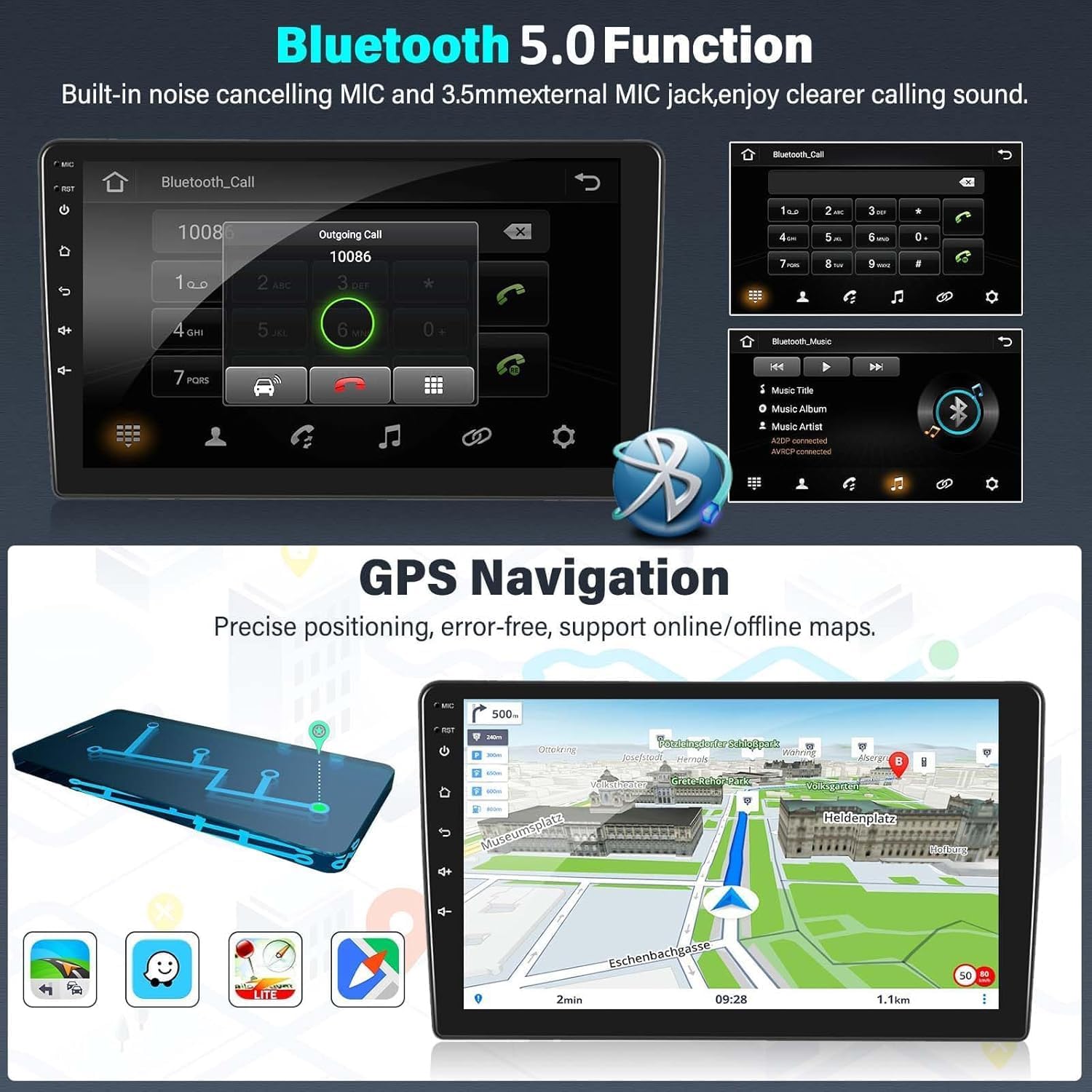
This image displays two key features: the Bluetooth 5.0 function for hands-free calling, showing a dial pad and call interface, and the GPS navigation system, illustrating a detailed map with route information and various navigation icons.
5.3. Bluetooth 5.0 Functionality
Connect your smartphone via Bluetooth 5.0 for hands-free calling and audio streaming.
- Hands-Free Calling: Pair your phone to make and receive calls directly from the stereo. The built-in noise-canceling microphone ensures clear audio.
- Bluetooth Music: Stream audio from your phone to the car stereo for high-quality sound playback.
5.4. FM RDS Radio
Enjoy your favorite radio stations with the integrated FM/AM tuner, featuring RDS for enhanced information display.
- Automatic Tuning: Scan and save radio stations automatically.
- RDS Features: Display station name, program type, and other information where available.
- DAB Support: Compatible with external DAB devices for access to digital radio stations.

This image demonstrates the FM RDS radio interface, showing frequency tuning and station information. It also illustrates the steering wheel control feature, with an inset showing a hand interacting with car steering wheel buttons, indicating seamless integration with the vehicle's original controls.
5.5. Steering Wheel Control (SWC)
The stereo supports the original car's steering wheel controls, allowing you to manage audio, calls, and other functions without taking your hands off the wheel. Configuration may be required in the system settings to map the buttons correctly.
5.6. Reverse Image Input
When the vehicle is shifted into reverse gear, the stereo automatically switches to the reverse camera display, providing a clear view of the area behind your car for safer parking and maneuvering.
5.7. Other Features
- 5G WiFi & 4G Connectivity: For fast internet access and online services.
- 1080P Video Playback: Enjoy high-definition video content.
- USB Connectivity: Play media from USB drives or connect compatible devices.
- Picture-in-Picture & Split Screen: Multitask by viewing two applications simultaneously.
- Multi-language Support: Operate the system in your preferred language.
- Mirror Link: Mirror your smartphone screen to the stereo display.
- DVR Support: Connect an external DVR for recording driving footage.
6. Maintenance
To ensure the longevity and optimal performance of your PLKEQS M300S car stereo, follow these maintenance guidelines:
- Cleaning the Screen: Use a soft, lint-free cloth to gently wipe the touchscreen. For stubborn smudges, slightly dampen the cloth with water or a screen-safe cleaner. Avoid harsh chemicals or abrasive materials.
- Software Updates: Periodically check for software updates through the system settings or the manufacturer's website to ensure you have the latest features and bug fixes.
- Environmental Conditions: Avoid exposing the unit to extreme temperatures, direct sunlight for prolonged periods, or excessive moisture.
- Cable Connections: Periodically check all cable connections to ensure they are secure and free from damage.
7. Troubleshooting
If you encounter issues with your PLKEQS M300S car stereo, please refer to the following common troubleshooting steps:
- No Power: Check the power cable connections and ensure the car battery is properly connected. Verify the car's fuse box for any blown fuses related to the stereo.
- No Sound: Check speaker connections. Ensure the volume is not muted or set too low. Verify audio settings in the system.
- Touchscreen Unresponsive: Try restarting the unit. If the issue persists, a factory reset might be necessary (note: this will erase all user data).
- GPS Not Working: Ensure the GPS antenna is properly installed and has a clear view of the sky. Check GPS settings in the system.
- Bluetooth Connection Issues: Ensure Bluetooth is enabled on both the stereo and your phone. Delete previous pairings and try reconnecting.
- CarPlay/Android Auto Not Connecting: For CarPlay, ensure Wi-Fi and Bluetooth are on. For Android Auto, try a different USB cable. Ensure your phone's operating system is up to date.
- Steering Wheel Controls Not Working: Access the SWC learning function in the system settings and reconfigure the buttons.
If these steps do not resolve the issue, please contact PLKEQS customer support for further assistance.
8. Warranty and Support
PLKEQS offers a warranty for this product during the specified warranty period. For detailed information regarding warranty terms, conditions, and duration, please refer to the product description or contact PLKEQS customer service directly.
For technical support, installation inquiries, or any other questions, please reach out to PLKEQS customer support. Contact information can typically be found on the product packaging or the official PLKEQS website.