
1. Safety Guidelines
Operating an electric scooter requires adherence to safety precautions to prevent injury or damage. Always prioritize your safety and the safety of others.
- Wear a Helmet: Always wear a certified helmet when riding the scooter.
- Follow Local Laws: Be aware of and comply with all local traffic laws and regulations regarding electric scooter use.
- Pre-Ride Check: Before each ride, inspect the brakes, tires (for proper inflation and wear), lights, and ensure all components are securely fastened.
- Visibility: Use the scooter's lights during low-light conditions and wear reflective clothing to enhance visibility.
- Weather Conditions: Avoid riding in heavy rain, snow, or icy conditions, as this can reduce traction and braking effectiveness.
- Weight Limit: Do not exceed the maximum weight limit of 265 pounds (120 kg).
- Single Rider: This scooter is designed for a single rider. Do not carry passengers.
- Avoid Distractions: Do not use mobile phones or other distracting devices while riding.
2. Product Overview
The ASKGO K11 Electric Scooter is designed for adult riders, offering a powerful motor, extended range, and practical storage solutions. It features 14-inch tires for stability and a dual braking system for safety.
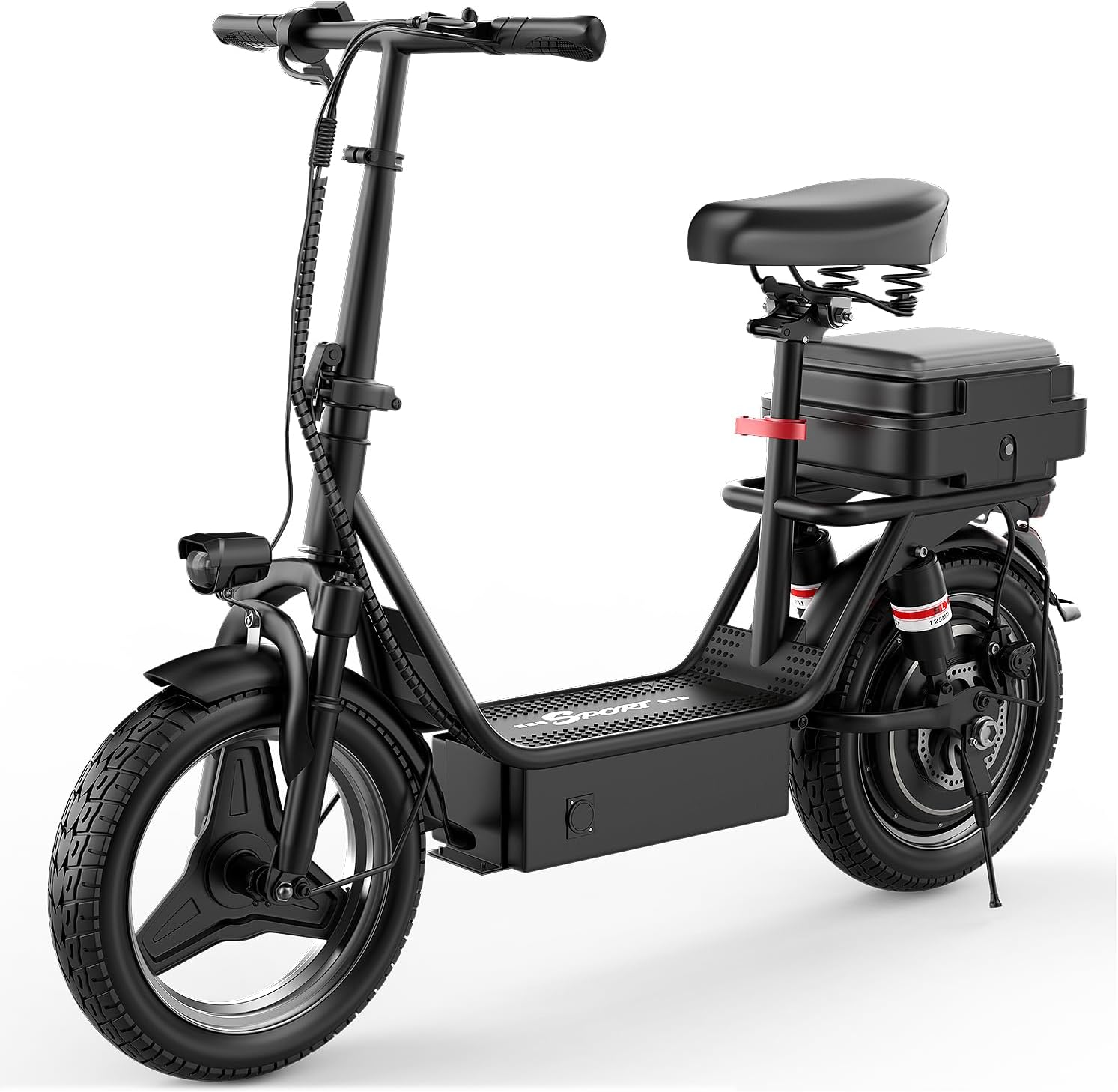
Figure 2.1: Main view of the ASKGO K11 Electric Scooter, showcasing its overall design with seat and rear storage box.
Key Features:
- Powerful 500W Motor: Provides speeds up to 25 MPH.
- Extended Range: Up to 35 miles on a single charge (actual range varies).
- 14-inch Pneumatic Tires: For improved shock absorption and stability.
- Dual Braking System: Ensures reliable stopping power.
- Ample Storage: Includes a rear storage box and a widened front panel for cargo or pet carriers.
- Front and Rear Lights: Enhances visibility for night riding.
- Digital Display: Shows current speed, battery level, and driven distance.

Figure 2.2: Detailed view of the scooter's features, including the digital display, adjustable seat, wide deck, and removable rear storage box.
3. Assembly and Setup
The ASKGO K11 Electric Scooter arrives nearly 100% pre-assembled. Follow these steps for final setup and initial preparation.
- Unpacking: Carefully remove all components from the packaging. Retain packaging for future transport or returns.
- Handlebar Installation: Securely attach the handlebars to the stem. Ensure all bolts are tightened according to the provided instructions.
- Seat Adjustment: Adjust the seat height to a comfortable riding position and secure it firmly.
- Initial Charge: Before first use, fully charge the scooter's battery. Connect the charger to the scooter's charging port and then to a power outlet. The charging indicator on the charger will typically change color when fully charged. This process may take 4-6 hours.
- Pre-Ride Inspection: Perform a thorough safety check as outlined in Section 1.
4. Operating Instructions
4.1 Powering On/Off
- To Power On: Insert the key into the ignition and turn it to the 'ON' position. The digital display will illuminate.
- To Power Off: Turn the key to the 'OFF' position and remove it.
4.2 Riding the Scooter
Once powered on, ensure you are in a safe, open area before riding.
- Starting: Place one foot on the deck and push off gently with the other foot to gain initial momentum.
- Acceleration: Gently twist the throttle on the right handlebar to accelerate. Apply throttle smoothly to maintain control.
- Braking: The scooter is equipped with a dual braking system. Use the brake levers on the handlebars to slow down or stop. Apply both brakes simultaneously for optimal stopping power and control.

Figure 4.1: The E-ABS front and rear disc brake system, providing reliable stopping power.
4.3 Digital Display Functions
The HD LCD display provides essential riding information:
- Current Speed: Displays your real-time speed in MPH.
- Battery Bar: Indicates the remaining battery charge level.
- Driven Distance: Shows the total distance traveled.

Figure 4.2: The multifunctional handlebar design, highlighting the HD LCD display and various controls.
4.4 Storage Features
The K11 scooter offers practical storage options:
- Rear Storage Box: A sturdy box located behind the seat provides secure storage for groceries, backpacks, or other items.
- Widened Front Panel: The front deck area is designed to accommodate a pet cage or additional cargo, enhancing versatility.
5. Battery and Charging
The ASKGO K11 is equipped with a high-capacity battery designed for an extended range.
- Charging Time: A full charge typically takes 4-6 hours.
- Range: The scooter can travel up to 35 miles on a single charge. Actual range may vary based on rider weight, terrain, speed, and ambient temperature.
Battery Care Tips:
- Avoid completely draining the battery before recharging.
- Store the scooter in a cool, dry place when not in use, and ensure the battery is partially charged if storing for extended periods.
- Use only the official charger provided with the scooter.
6. Maintenance
Regular maintenance ensures the longevity and safe operation of your ASKGO K11 Electric Scooter.
- Tire Pressure: Check tire pressure regularly and inflate to the recommended PSI (refer to tire sidewall for specifications).
- Brake Inspection: Periodically check brake levers and cables for proper tension and wear. Ensure brake pads are not excessively worn.
- Cleaning: Clean the scooter with a damp cloth. Avoid using high-pressure water jets directly on electrical components.
- Fastener Check: Ensure all bolts and fasteners are tight. Re-tighten as necessary.
- Storage: Store the scooter in a dry, covered area to protect it from the elements.
7. Troubleshooting
This section addresses common issues you might encounter with your ASKGO K11 Electric Scooter.
- Scooter Does Not Power On:
- Ensure the key is fully inserted and turned to the 'ON' position.
- Check the battery level. If the battery is depleted, charge the scooter fully.
- Verify that all electrical connections are secure.
- Reduced Range or Power:
- Check tire pressure; underinflated tires can reduce efficiency.
- Ensure the battery is fully charged. Battery performance can be affected by extreme temperatures.
- Rider weight, terrain, and riding style significantly impact range.
- Brakes Not Responding Effectively:
- Inspect brake pads for wear and replace if necessary.
- Check brake cables for proper tension and adjustment.
- If issues persist, consult a qualified technician.
8. Specifications
Detailed technical specifications for the ASKGO K11 Electric Scooter.
| Feature | Specification |
|---|---|
| Brand | ASKGO |
| Model Name | K11 |
| Motor Power | 500W |
| Max Speed | 25 MPH |
| Max Range | Up to 35 Miles |
| Wheel Size | 14 Inches |
| Wheel Type | Solid |
| Brake Style | Rear Braking (Dual Braking System) |
| Weight Limit | 265 Pounds |
| Material | Alloy Steel |
| Special Features | Basket, Dual Braking System, Rechargeable |
| Included Components | Charger |
9. Warranty and Support
ASKGO is committed to providing quality products and customer satisfaction.
- Warranty: The ASKGO K11 Electric Scooter comes with a one-year warranty from the date of purchase. This warranty covers manufacturing defects under normal use. Please retain your proof of purchase.
- Customer Support: If you have any questions, require assistance with assembly, operation, or encounter any issues with your scooter, please contact the ASKGO after-sales team. Refer to your purchase documentation or the ASKGO website for contact details.