
1. Introduction
Thank you for choosing the SEDETA 78-inch Electric Standing Gaming Desk. This manual provides essential information for the safe assembly, operation, and maintenance of your new desk. Please read these instructions thoroughly before use and retain them for future reference.
This versatile desk is designed to enhance your gaming and work experience with features such as adjustable height, integrated storage drawers, LED lighting, and convenient power outlets.

Image 1.1: The SEDETA 78-inch Electric Standing Gaming Desk in a typical setup, showcasing its spacious design and integrated features.
2. Package Contents and Specifications
2.1 Package Contents
Please verify that all components are present before beginning assembly. Refer to the included parts list in your packaging.
2.2 Product Specifications
- Brand: SEDETA
- Model: 78-inch Electric Standing Gaming Desk
- Product Dimensions (Min Height): 23.6"D x 78.7"W x 28.5"H
- Adjustable Height Range: 28.5" to 47"
- Color: White
- Style: Modern
- Base Material: Metal
- Top Material Type: Engineered Wood
- Maximum Load Capacity: 200 lbs
- Motor Noise Level: Less than 30 dB
- Power Outlet: 3 AC Outlets, 2 USB Ports
- Special Features: 3 Fabric Drawers, LED Lights, Power Outlet, Keyboard Tray, Monitor Stand
- Assembly Required: Yes
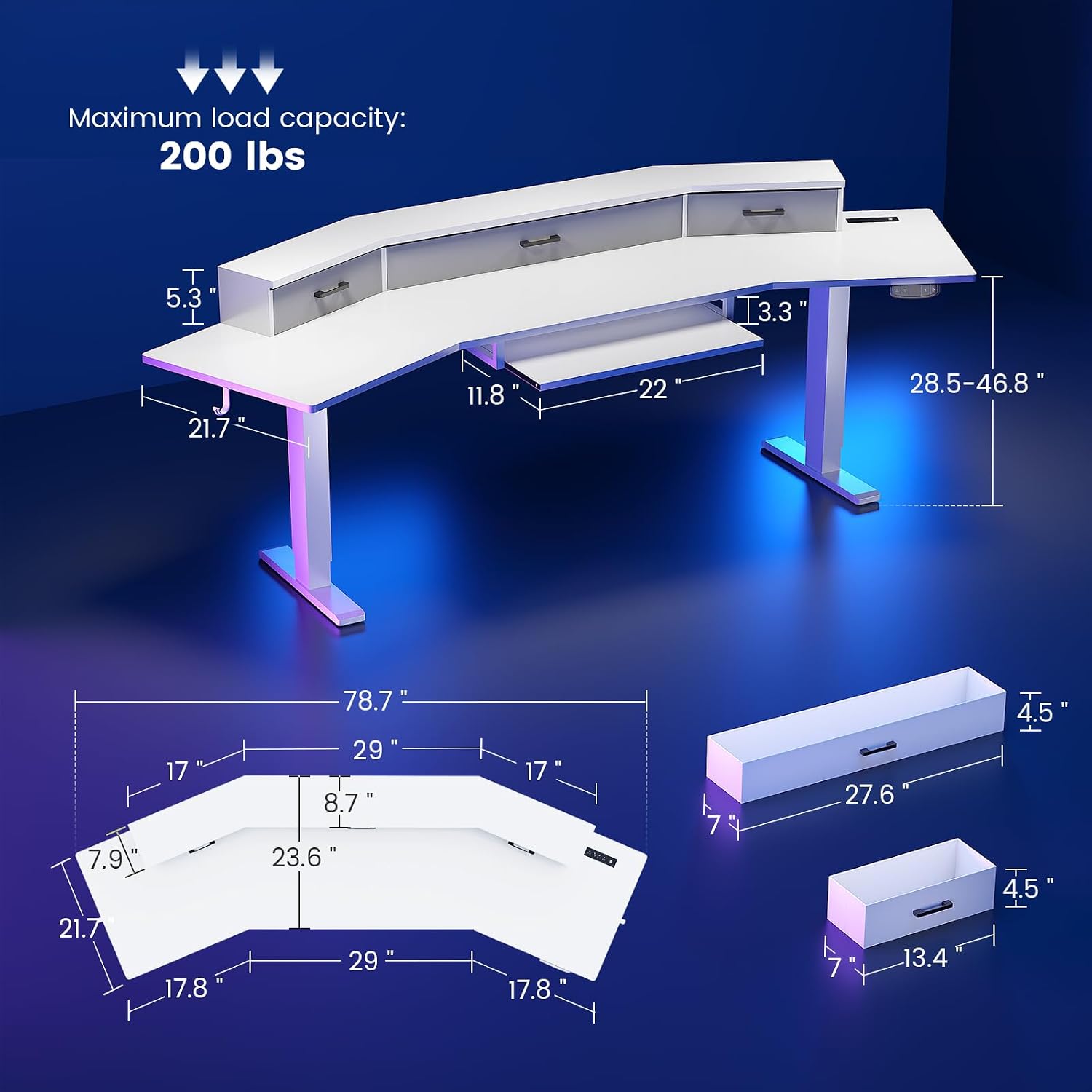
Image 2.1: Detailed dimensions and maximum load capacity of the desk.
3. Setup and Assembly
Assembly of the SEDETA Electric Standing Gaming Desk requires careful attention to detail. Please follow the instructions provided in your product packaging step-by-step. It is recommended to have two people for assembly.
3.1 Before You Begin
- Clear a spacious area for assembly.
- Unpack all components and verify against the parts list.
- Gather necessary tools (usually a screwdriver and Allen wrench are included or required).
3.2 Assembly Steps (General Guidance)
- Assemble the desk frame and legs according to the provided diagrams. Ensure all screws are tightened securely.
- Attach the desktop sections. Pay attention to the orientation for the ergonomic wing shape.
- Install the electric lifting mechanism and connect all cables as instructed.
- Mount the monitor stand and keyboard tray.
- Insert the fabric drawers into their designated slots.
- Connect the power strip and LED light strip.
- Perform an initial power-up and test the height adjustment function.
Important: If you encounter any issues during assembly, such as missing parts or difficulty with the lifting mechanism, please refer to the Troubleshooting section or contact customer support immediately.

Image 3.1: The unique wing-shaped design of the desk, providing ample space.
4. Operating Instructions
4.1 Height Adjustment
The desk features an electric lifting system with a control panel. Use the up and down arrows to adjust the desk height. The LED display shows the current height. Two customizable height presets allow you to save your preferred sitting and standing positions.
- Adjusting Height: Press the Up or Down arrow buttons to move the desk to your desired height.
- Saving Presets: Adjust the desk to your desired height, then press and hold one of the preset buttons (e.g., 1 or 2) until the display flashes or beeps, indicating the height is saved.
- Recalling Presets: Press the saved preset button (1 or 2) to automatically move the desk to the stored height.

Image 4.1: Illustration of the desk's adjustable height range.

Image 4.2: The control panel for height adjustment and quiet motor operation.
4.2 LED Lighting System
The integrated RGB LED light strip can be controlled via a dedicated app or remote control. It offers over 60,000 colors and 29 flashing modes.
- App Control: Download the specified app (refer to packaging or product information for app name) to access full customization options, including color selection, flashing modes, and timer functions.
- Music Sync: The built-in microphone allows the LED lights to change color and rhythm with ambient sound and music.
- Timer Function: Set schedules for the lights to turn on or off automatically.

Image 4.3: Features of the ambient LED light strip.
4.3 Integrated Power Outlet
The desk includes a built-in power strip for convenient charging and powering of your devices.
- AC Outlets: 3 standard 120V/12A AC outlets for monitors, PCs, or other electronics.
- USB Ports: 2 USB 5V/2A ports for charging smartphones, tablets, or other USB-powered devices.
- Power Cord: The desk comes with a 6.5-foot power cord to connect to a wall outlet.

Image 4.4: The convenient charging station with AC and USB ports.
4.4 Storage Features
The desk is equipped with multiple storage solutions to keep your workspace organized.
- Fabric Drawers: Three large fabric drawers are integrated into the monitor stand for storing accessories, documents, or personal items.
- Keyboard Tray: A pull-out keyboard tray provides ergonomic placement for your keyboard and mouse.
- Hooks: Convenient hooks are located on the desk sides for hanging headphones or other items.

Image 4.5: Overview of the desk's rich storage functions.
5. Maintenance
Regular maintenance will ensure the longevity and optimal performance of your SEDETA desk.
- Cleaning: Wipe the desk surfaces with a soft, damp cloth. Avoid harsh chemicals or abrasive cleaners that could damage the finish.
- Electrical Components: Ensure all power cables and connections are secure. Do not expose electrical components to moisture.
- Moving the Desk: When moving the desk, ensure it is in its lowest position and disconnect all power cables. Lift the desk carefully to avoid damage to the lifting mechanism.
- Weight Distribution: Distribute weight evenly across the desktop and avoid exceeding the maximum load capacity of 200 lbs.
6. Troubleshooting
If you encounter issues with your SEDETA Electric Standing Gaming Desk, please refer to the following common troubleshooting steps:
6.1 Desk Not Adjusting Height / E20 Error
- Check Power: Ensure the desk is properly plugged into a working power outlet.
- Cable Connections: Verify that all cables connecting the control panel, motor, and power supply are securely attached and not damaged.
- Reset Procedure: Many electric desks have a reset function. Typically, this involves pressing and holding the 'Down' button until the desk moves to its lowest position, slightly rises, and then stops. Refer to your specific assembly manual for the exact reset procedure.
- Obstructions: Check for any obstructions under or around the desk that might be preventing movement.
- Overload: Ensure the desk is not overloaded beyond its 200 lbs capacity. Remove items and try again.
6.2 LED Lights Not Working
- Power Connection: Ensure the LED light strip is correctly connected to its power source.
- Remote/App: Check the batteries in the remote control or ensure the app is properly connected to the light strip via Bluetooth or Wi-Fi.
6.3 Power Outlets Not Functioning
- Desk Power: Confirm the desk itself is powered on.
- Circuit Breaker: Check if the power strip has a reset button or if a household circuit breaker has tripped.
If these steps do not resolve the issue, please contact SEDETA customer support for further assistance.
7. Warranty and Support
SEDETA is committed to providing quality products. If your item arrives damaged, scratched, or with missing parts, please contact our customer support team immediately. We will arrange for a free replacement or offer a partial refund as applicable.
For all inquiries, technical support, or warranty claims, please contact SEDETA customer service through the retailer where you purchased the product or visit the official SEDETA website for contact information.
Please retain your proof of purchase for warranty purposes.