
Introduction
This manual provides detailed instructions for the assembly, installation, operation, and maintenance of your SOLIDEE 48-inch Natural Color Bathroom Vanity. Please read all instructions carefully before beginning assembly and retain this manual for future reference. Proper installation and care will ensure the longevity and optimal performance of your vanity.
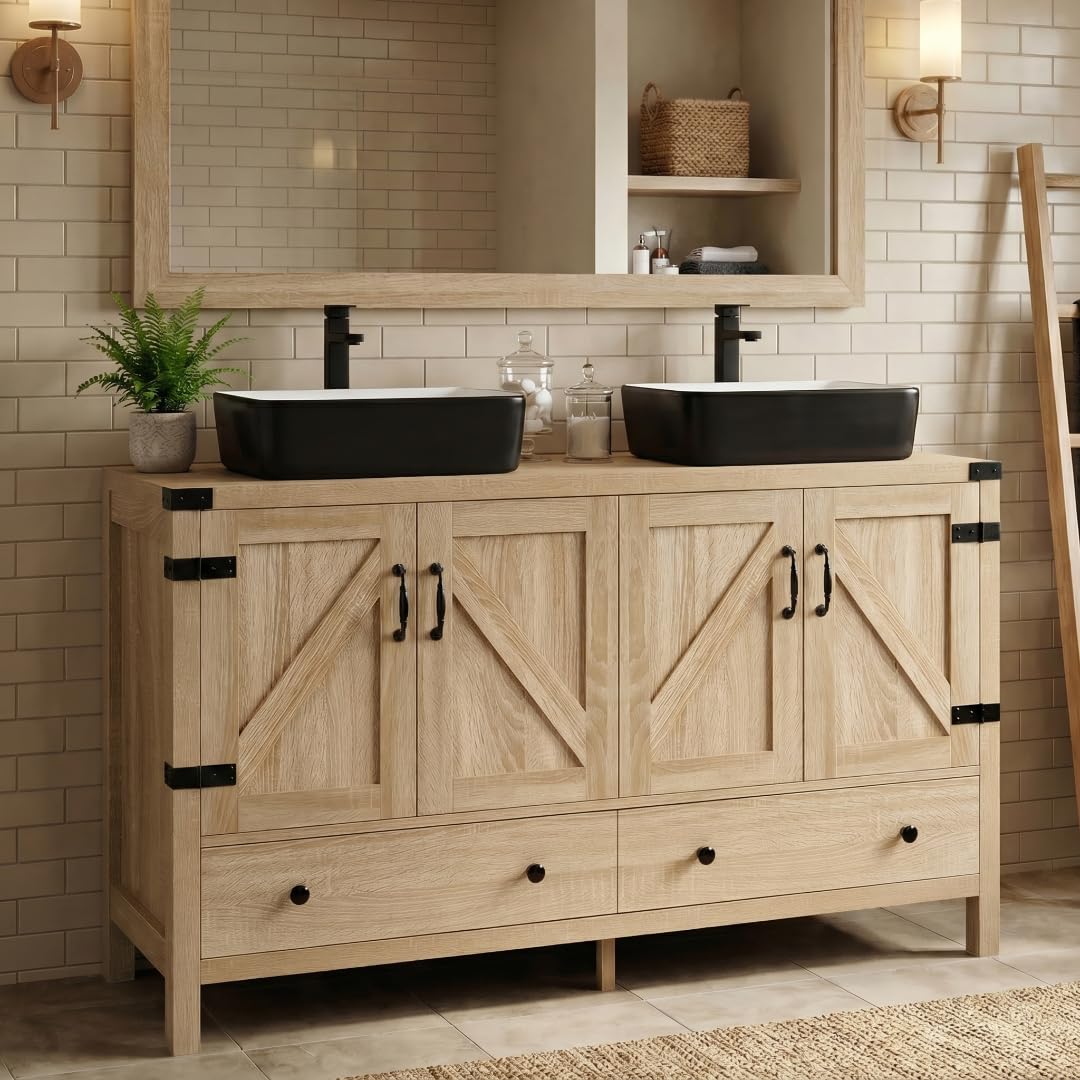
Figure 1: SOLIDEE 48-inch Natural Color Bathroom Vanity with two black and white ceramic vessel sinks.
Safety Information
- Always use appropriate safety gear, including gloves and eye protection, during assembly and installation.
- Ensure all connections are secure before use.
- Do not overload drawers or cabinets.
- Keep small parts away from children to prevent choking hazards.
- If you are unsure about any step, consult a qualified professional.
Package Contents
Your SOLIDEE 48-inch Natural Color Bathroom Vanity is shipped in three separate packages. Please verify that all components are present before beginning assembly.

Figure 2: Packaging breakdown for the SOLIDEE Bathroom Vanity.
Package 1:
- 1 x Main Cabinet
- 1 x All Cabinet Hardware (hinges, handles, drawer slides)
- 1 x Installation Manual
Package 2 (x2):
- 1 x Vessel Sink (per package)
- 1 x Faucet and Drain (per package)
- 1 x All Plumbing Hardware (hot/cold lines, mounting hardware) (per package)
Specifications
| Feature | Detail |
|---|---|
| Brand | SOLIDEE |
| Model Number | BA20701 |
| Vanity Dimensions (D x W x H) | 19"D x 48"W x 32"H |
| Sink Dimensions (L x W x H) | 19.3" x 15.2" x 5.3" |
| Bowl Thickness | 0.5" |
| Material | Engineered Wood (MDF) |
| Sink Material | 4-layered glaze spraying ceramic |
| Color | Natural Wood (Vanity), Black and White (Sinks) |
| Number of Doors | 4 |
| Number of Drawers | 2 |
| Mounting Type | Freestanding (Floor Mount) |
| Assembly Required | Yes, self-assembly |

Figure 3: Detailed dimensions of the vanity cabinet.

Figure 4: Dimensions and features of the ceramic vessel sink.
Setup & Installation
This vanity requires self-assembly. Refer to the included installation manual for detailed, step-by-step instructions. The general process involves assembling the cabinet, installing the sinks, and connecting the plumbing.
Before You Begin:
- Ensure you have all necessary tools (e.g., screwdriver, wrench, level).
- Clear the installation area and protect your flooring.
- Familiarize yourself with all parts and hardware.
- It is recommended to check your existing plumbing connections and ensure they are compatible with the included faucets and drains before purchasing or beginning installation.
Assembly Steps (General Overview):
- Cabinet Assembly: Follow the instructions to assemble the MDF wood cabinet structure. This includes attaching side panels, back panel, bottom, and top.
- Drawer and Door Installation: Install the drawer slides and assemble the drawers. Attach the magnetic doors and their handles.
- Sink Placement: Carefully place the two ceramic vessel sinks onto the designated areas on the vanity top. Ensure proper alignment with the pre-drilled holes for plumbing.
- Faucet and Drain Installation: Install the included faucets and pop-up drains into the sinks. Connect the hot and cold water supply lines to the faucets.
- Final Connections: Connect the drain assemblies to your household plumbing system. Test for leaks.

Figure 5: Included faucet, pop-up drain, and water supply lines.
Operating Instructions
The SOLIDEE Bathroom Vanity is designed for functional use in a bathroom environment. Its primary function is to provide a stable base for the vessel sinks and offer storage.
- Sinks: Use the ceramic vessel sinks for washing hands and other typical bathroom activities. Ensure the pop-up drain is functioning correctly to prevent water overflow.
- Storage: Utilize the cabinets and drawers for storing bathroom essentials. The magnetic doors provide smooth and effortless opening and closing.

Figure 6: Interior storage design of the vanity.
Maintenance
Regular cleaning and proper care will help maintain the appearance and functionality of your vanity.
- Cabinet: Wipe the engineered wood surfaces with a soft, damp cloth. Avoid abrasive cleaners or harsh chemicals that could damage the finish. Dry immediately to prevent water damage.
- Sinks: Clean the ceramic sinks with a non-abrasive bathroom cleaner and a soft sponge or cloth. Rinse thoroughly after cleaning.
- Faucets: Wipe faucets with a soft cloth and mild soap and water. Avoid harsh chemicals that can tarnish the finish.
- Hardware: Periodically check all screws and connections to ensure they remain tight.
Troubleshooting
Common Issues:
- Missing Assembly Instructions: If the physical instruction manual is missing, please contact SOLIDEE customer service for a digital copy.
- Drawer Malfunction: If a drawer track breaks or becomes loose during assembly or use, inspect the slides for damage. Ensure all screws are securely fastened. If damage is significant, contact customer service for replacement parts.
- Water Leaks: Check all plumbing connections (faucet, drain, supply lines) for tightness. Ensure plumber's tape or sealant was used where recommended during installation.
- Color Variation: The natural wood texture design may exhibit slight color variations under different lighting conditions. This is a characteristic of the material and not a defect.
Warranty and Support
For warranty information, replacement parts, or technical assistance, please refer to the contact details provided in your original purchase documentation or visit the official SOLIDEE website. Please have your model number (BA20701) and purchase date available when contacting support.