
1. Introduction
This manual provides detailed instructions for the assembly, operation, and maintenance of your RALGEND LED TV Stand, Model 1401DSUDBF. Please read this manual thoroughly before assembly and use to ensure proper function and safety.

Image 1.1: The RALGEND LED TV Stand, Model 1401DSUDBF, showcasing its rustic brown and black design with integrated LED lighting and storage for media devices.
2. Safety Information
WARNING:
- Please confirm that the size of your TV and its base stand are compatible with this product.
- The top surface bears a maximum weight of 150 lb (68 kg).
- Each mesh shelf bears a maximum weight of 22 lb (10 kg).
- Each fabric drawer bears a maximum weight of 25 lb (11.3 kg).
- Follow the installation guide carefully to avoid any potential hazards.
- Do not overload the TV stand beyond its specified weight limits.
- Ensure all connections for the power outlets and USB ports are secure before use.
3. Package Contents
Before beginning assembly, please verify that all components listed below are present and undamaged. If any parts are missing or damaged, please contact customer support.
- 1 x TV Stand (disassembled components)
- 1 x Accessory Kit (hardware, screws, etc.)
- 1 x Charging Station (integrated power strip)
- 1 x LED Light Strip
- 1 x Instructions Manual
4. Assembly Instructions
The RALGEND LED TV Stand is designed for straightforward assembly. All parts are clearly numbered, and a detailed illustrated manual along with necessary tools are included in the package. Please follow the step-by-step instructions provided in the included manual for proper assembly.
General Assembly Steps:
- Unpack all components and lay them out on a clean, soft surface to prevent scratches.
- Identify all parts using the provided parts list in the separate assembly manual.
- Assemble the main frame structure according to the diagrams.
- Attach the top and bottom shelves.
- Install the fabric drawers into their designated slots.
- Mount the charging station and LED light strip as instructed.
- Ensure all screws and fasteners are tightened securely.
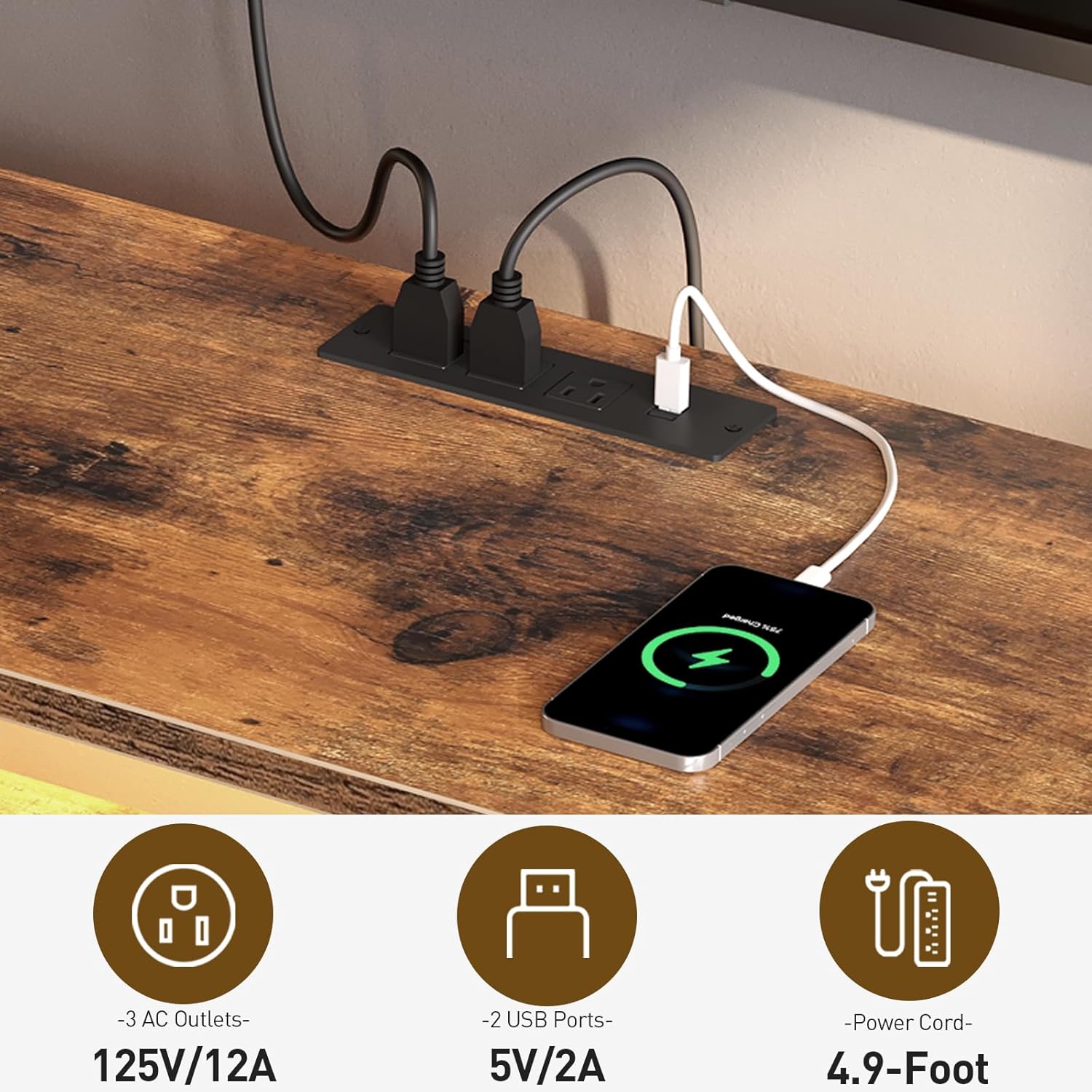
Image 4.1: An exploded diagram illustrating the various components of the TV stand and their assembly order.

Image 4.2: Detailed dimensions of the TV stand, including measurements for TV compatibility (up to 65 inches) and weight capacities for shelves and drawers.
5. Operating Instructions
5.1 LED Light Strip Operation
The integrated LED light strip enhances the ambiance of your media center. It can be controlled via a remote or a mobile application.
- Colors: Over 6000 colors available.
- Modes: 12 dynamic modes for various lighting effects.
- Speed: 5 adjustable speed levels for dynamic modes.
- Brightness: 3 adjustable brightness levels.
- Timer Function: Set the lights to turn off automatically.
Refer to the separate LED light strip manual for specific instructions on pairing the remote or mobile app.

Image 5.1: Controls for the LED light strip, highlighting options for app and key control, color selection, music mode, and timer.
5.2 Power Outlets and USB Ports
The TV stand includes a built-in charging station with 3 AC outlets and 2 USB ports for convenient power supply to your devices.
- AC Outlets: 3 outlets, 125V/12A.
- USB Ports: 2 ports, 5V/2A.
- Power Cord: 4.9-foot (59-inch) power cord.
Plug the TV stand's power cord into a standard wall outlet. You can then connect your TV, gaming consoles, Bluetooth speakers, DVDs, Wi-Fi devices, and other electronics to the integrated outlets and USB ports.

Image 5.2: The media charging station, featuring 3 AC outlets and 2 USB ports, providing convenient power for various electronic devices.
5.3 Storage Features
The TV stand offers various storage options to keep your entertainment area organized.
- Fabric Drawers: Two cloth drawers are provided for storing small items such as remotes, cables, or media accessories. These drawers are made from reinforced non-woven fabric for durability.
- Open Shelves: The mesh shelves on both sides are ideal for media devices, providing effective ventilation to prevent overheating.

Image 5.3: The premium fabric drawers, constructed from reinforced non-woven fabric, suitable for organized storage of various items.

Image 5.4: The open storage shelves, designed for media devices and decor, promoting effective heat dissipation.
Video 5.5: An official RALGEND video showcasing the LED TV Stand with its fabric drawers and overall design. This video highlights the product's features and functionality.
6. Maintenance
To ensure the longevity and appearance of your RALGEND LED TV Stand, follow these maintenance guidelines:
- Cleaning: Wipe surfaces with a soft, damp cloth. Avoid harsh chemicals or abrasive cleaners that may damage the finish.
- Dusting: Regularly dust the stand to prevent buildup, especially on the mesh shelves to maintain ventilation.
- Spills: Immediately wipe up any spills to prevent staining or damage to the particleboard.
- LED Lights: If the LED strip becomes dirty, gently wipe it with a dry, soft cloth. Do not use liquids directly on the light strip or electrical components.
- Power Outlets: Ensure the power outlets and USB ports remain free of dust and debris. Do not insert foreign objects into the ports.
7. Troubleshooting
If you encounter any issues with your RALGEND LED TV Stand, refer to the following common troubleshooting steps:
- LED Lights Not Working:
- Check if the LED light strip is properly connected to its power source.
- Ensure the remote control has working batteries or the mobile app is correctly paired.
- Verify that the power outlet supplying the TV stand is functional.
- Power Outlets/USB Ports Not Functioning:
- Confirm the TV stand's main power cord is securely plugged into a live wall outlet.
- Check if the wall outlet itself is working by plugging in another device.
- Avoid overloading the power strip; ensure the total wattage of connected devices does not exceed the strip's capacity.
- Stand Instability:
- Ensure all assembly screws and fasteners are fully tightened.
- Verify the stand is placed on a flat, level surface.
- Adjust the leveling feet (if applicable) to compensate for uneven floors.
If problems persist, please contact RALGEND customer support for further assistance.
8. Specifications
| Feature | Detail |
|---|---|
| Brand | RALGEND |
| Model Name | TV Stand |
| Item Model Number | 1401DSUDBF |
| Product Dimensions | 15"D x 55.1"W x 20"H (38cm D x 140cm W x 51cm H) |
| Color | Rustic Brown + Black |
| Material | Particle Board (Top Material), Metal (Frame Material) |
| Weight Limit (Top) | 150 Pounds (68 kg) |
| Weight Limit (Mesh Shelf) | 22 Pounds (10 kg) per shelf |
| Weight Limit (Fabric Drawer) | 25 Pounds (11.3 kg) per drawer |
| Number of Shelves | 2 (mesh) |
| Number of Drawers | 2 (fabric) |
| Special Features | LED Light Strip, Integrated Charging Station (3 AC Outlets, 2 USB Ports) |
| Assembly Required | Yes |
9. Warranty and Support
For warranty information and customer support, please refer to the documentation included with your purchase or contact the retailer directly. RALGEND is committed to providing quality products and assistance.