Introduction
This manual provides detailed instructions for the operation and maintenance of your CYBORIS YGS-S18 2-in-1 Magnetic Split Bluetooth Speaker. Designed for versatility, this speaker system offers both combined and separated stereo sound experiences, magnetic attachment capabilities, and robust waterproofing for various environments.
What's in the Box
- CYBORIS YGS-S18 2-in-1 Magnetic Split Bluetooth Speaker (2 units)
- Instruction Manual (this document)
- TYPE-C Charging Cable
- 3.5mm Audio Cable

Image: The CYBORIS YGS-S18 speaker in its combined form, along with its charging and audio cables.
Product Overview
The CYBORIS YGS-S18 consists of two individual speaker units that can be magnetically joined or separated for a wider stereo sound field. Each unit features intuitive controls and a vibrant LED light display.
Controls and Ports

Image: Close-up of the speaker showing the control buttons: Power On/Off/Play/Pause, Switch Playback Mode/Turn Light On/Off, Volume -/Previous track, and Volume +/Next track.
- Power On/Off / Play/Pause Button: Controls power and music playback.
- Mode Button (M): Switches between Bluetooth, TF card, AUX, and USB playback modes. Also controls the LED lights.
- Volume - / Previous Track Button: Decreases volume with a short press, skips to previous track with a long press.
- Volume + / Next Track Button: Increases volume with a short press, skips to next track with a long press.
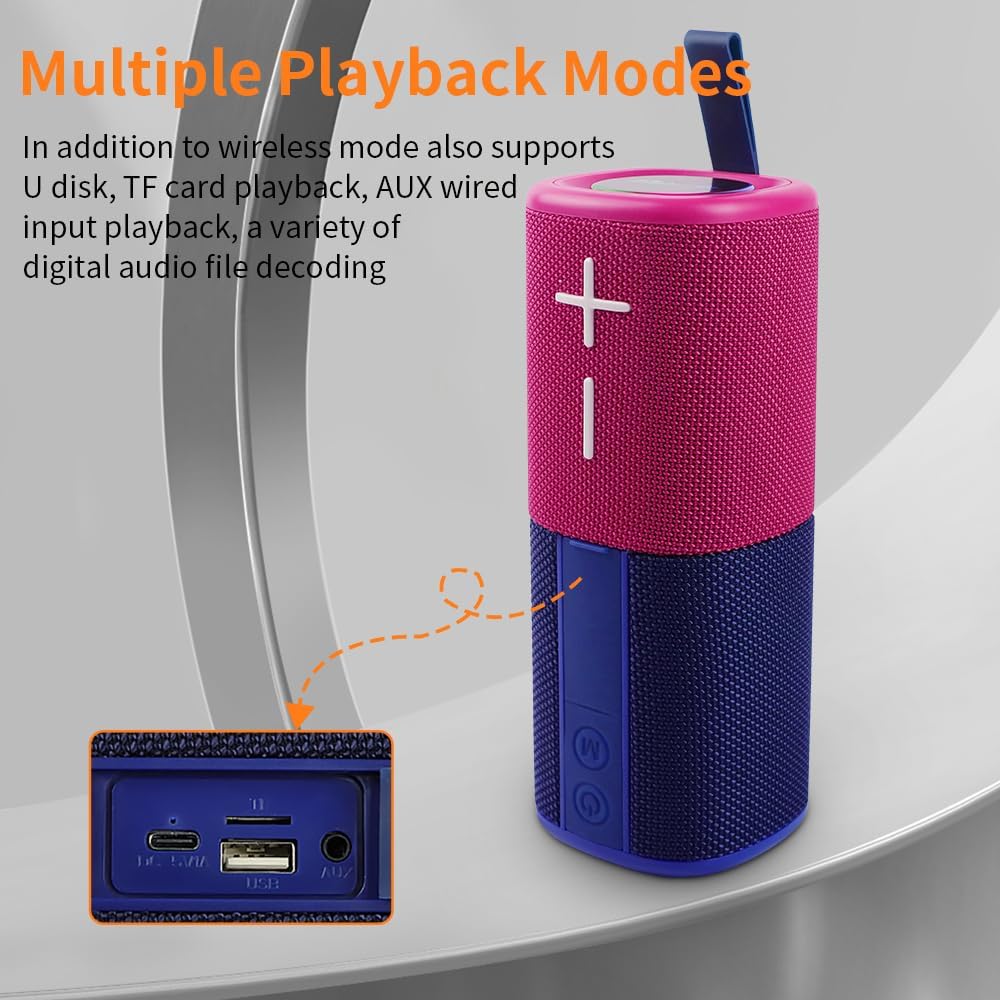
Image: The side panel of the speaker revealing the input ports: DC 5V/A (Type-C charging), TF card slot, USB port, and AUX port.
- DC 5V/A Port (Type-C): For charging the speaker.
- TF Card Slot: For playing music directly from a TF (MicroSD) card.
- USB Port: For playing music directly from a USB flash drive.
- AUX Port: For wired audio input using the 3.5mm audio cable.
Setup
1. Charging the Speakers
Before first use, fully charge both speaker units. Connect the provided Type-C charging cable to the DC 5V/A port on each speaker and to a compatible USB power adapter (not included). The LED indicator will show charging status.
2. Powering On/Off
Press and hold the Power On/Off button on each speaker unit to power them on or off. A sound prompt will indicate the power status.
3. Bluetooth Pairing (Single Speaker Mode)
- Ensure the speaker is powered on and in Bluetooth mode (indicated by a flashing blue LED).
- On your device (smartphone, tablet, laptop), enable Bluetooth and search for available devices.
- Select "YGS-S18" from the list. A sound prompt will confirm successful pairing.
4. True Wireless Stereo (TWS) Pairing (Splittable Mode)
To achieve a wider stereo sound, you can pair both speaker units together:
- Ensure both speaker units are powered on and not connected to any other Bluetooth device.
- Press the Power On/Off button on one speaker unit twice quickly. It will enter TWS pairing mode.
- The two speakers will automatically connect to each other. A sound prompt will confirm successful TWS pairing.
- Once TWS paired, connect your device to one of the speakers via Bluetooth (as described in step 3). Both speakers will now play audio in stereo.

Image: Two CYBORIS YGS-S18 speakers, separated and placed on either side of a laptop, demonstrating True Wireless Stereo (TWS) connectivity for an immersive sound experience.
Operating Instructions
Music Playback
- Play/Pause: Short press the Power On/Off button.
- Volume Adjustment: Short press the Volume + or Volume - buttons.
- Next/Previous Track: Long press the Volume + for next track, or Volume - for previous track.
Switching Playback Modes
Press the 'M' (Mode) button to cycle through available playback modes: Bluetooth, TF Card, AUX, and USB. Insert the respective media (TF card, USB drive) or connect the 3.5mm audio cable for these modes to become active.
Hands-Free Calling
When connected via Bluetooth, the speaker's built-in microphone allows for hands-free calls:
- Answer Call: Short press the Power On/Off button.
- End Call: Short press the Power On/Off button during a call.
- Reject Call: Long press the Power On/Off button.
LED Light Effects
The speaker features colorful breathing lights that can be controlled:
- Turn Lights On/Off: Long press the 'M' (Mode) button.

Image: The base of the CYBORIS YGS-S18 speaker unit illuminated with colorful LED lights, indicating active light effects.
Magnetic Attachment
Each speaker unit is equipped with strong magnets, allowing it to attach to metallic surfaces such as refrigerators, metal shelves, or vehicle panels. This feature provides flexible placement options for your audio experience.

Image: Two CYBORIS YGS-S18 speakers, one red and one blue, magnetically attached to the side of a refrigerator, demonstrating their versatile placement.
Maintenance
- Cleaning: Use a soft, dry cloth to clean the speaker's exterior. Do not use harsh chemicals or abrasive materials.
- Water Resistance: The speaker has an IPX6 waterproof rating, meaning it can withstand strong jets of water. However, it is not designed for submersion. Ensure all port covers are securely closed before exposure to water.
- Storage: Store the speaker in a cool, dry place away from direct sunlight and extreme temperatures when not in use for extended periods.

Image: The CYBORIS YGS-S18 speaker, in its combined form, being splashed with water, highlighting its IPX6 waterproof capability.
Troubleshooting
| Problem | Possible Cause | Solution |
|---|---|---|
| Speaker does not power on. | Low battery or no charge. | Charge the speaker using the provided Type-C cable. |
| Cannot pair via Bluetooth. | Speaker is already connected to another device, or not in pairing mode. | Ensure the speaker is in Bluetooth pairing mode (flashing blue LED). Disconnect from other devices if necessary. Restart both the speaker and your device. |
| TWS pairing fails. | Speakers are too far apart, or one is already paired to a device. | Ensure both speakers are close to each other and not connected to any other Bluetooth device. Follow TWS pairing steps carefully. |
| No sound from TF card/USB/AUX. | Incorrect mode selected, or media not properly inserted/connected. | Press the 'M' button to select the correct input mode. Ensure the TF card/USB drive is inserted correctly or the AUX cable is fully plugged in. |
| Sound quality is poor. | Low battery, interference, or source audio quality. | Charge the speaker. Move closer to the connected device. Try different audio sources. |
Specifications
| Feature | Detail |
|---|---|
| Brand | CYBORIS |
| Model Name | S18 (YGS-S18) |
| Speaker Type | Outdoor, Portable, Splittable |
| Connectivity Technology | Bluetooth V5.3 |
| Wireless Communication Range | Up to 18 meters (59 feet) |
| Audio Output Mode | Stereo (when TWS paired) |
| Speaker Maximum Output Power | 20 Watts (total) |
| Frequency Response | 20 KHz |
| Battery Capacity | 2 x 2000mAh (Total 4000mAh) Polymer Lithium Battery |
| Playtime | Up to 24 hours |
| Water Resistance Level | IPX6 (Waterproof) |
| Control Method | Touch buttons |
| Product Dimensions | 3"D x 3"W x 8"H (combined) |
| Item Weight | 0.8 Kilograms (1.76 pounds) |
| Supported Playback Modes | Bluetooth, TF Card, AUX, USB |
Official Product Videos
CYBORIS YGS-S18 Speaker Overview
Video: This video provides a general overview of the CYBORIS YGS-S18 speaker, demonstrating its split functionality and portability. It highlights how the two units can be separated for a wider sound experience.
Warranty and Support
The CYBORIS YGS-S18 speaker comes with a limited warranty. For specific warranty details, please refer to the warranty card included with your product or contact CYBORIS customer support. For further assistance, visit the official CYBORIS store or contact their support channels.


