
1. Introduction
The DBEIXIWEI BT-998 is a versatile 4-channel HiFi audio power amplifier designed for both home and car audio systems. It features Bluetooth 5.0 connectivity, USB and SD card playback, MP3 format support, and an FM stereo radio tuner. This manual provides detailed instructions for the proper setup, operation, and maintenance of your amplifier to ensure optimal performance and longevity.
2. Safety Information
- Ensure the power supply is DC 12V as specified. Using an incorrect voltage can damage the device.
- Do not expose the amplifier to water, moisture, or extreme temperatures.
- Avoid placing the unit in direct sunlight or near heat sources.
- Do not open the amplifier casing. Refer all servicing to qualified personnel.
- Keep the unit away from children.
- Ensure proper ventilation around the amplifier to prevent overheating.
- When connecting speakers, ensure correct polarity (+ to + and - to -) to avoid damage and ensure proper sound reproduction.
- Remote Control Battery Warning: Do not mix old and new batteries. Do not mix alkaline, standard (carbon-zinc), or rechargeable batteries.
3. Package Contents
Please check that all items are present in the package:
- 1 x DBEIXIWEI BT-998 Power Amplifier
- 1 x Remote Control
4. Product Overview
4.1 Front Panel Controls
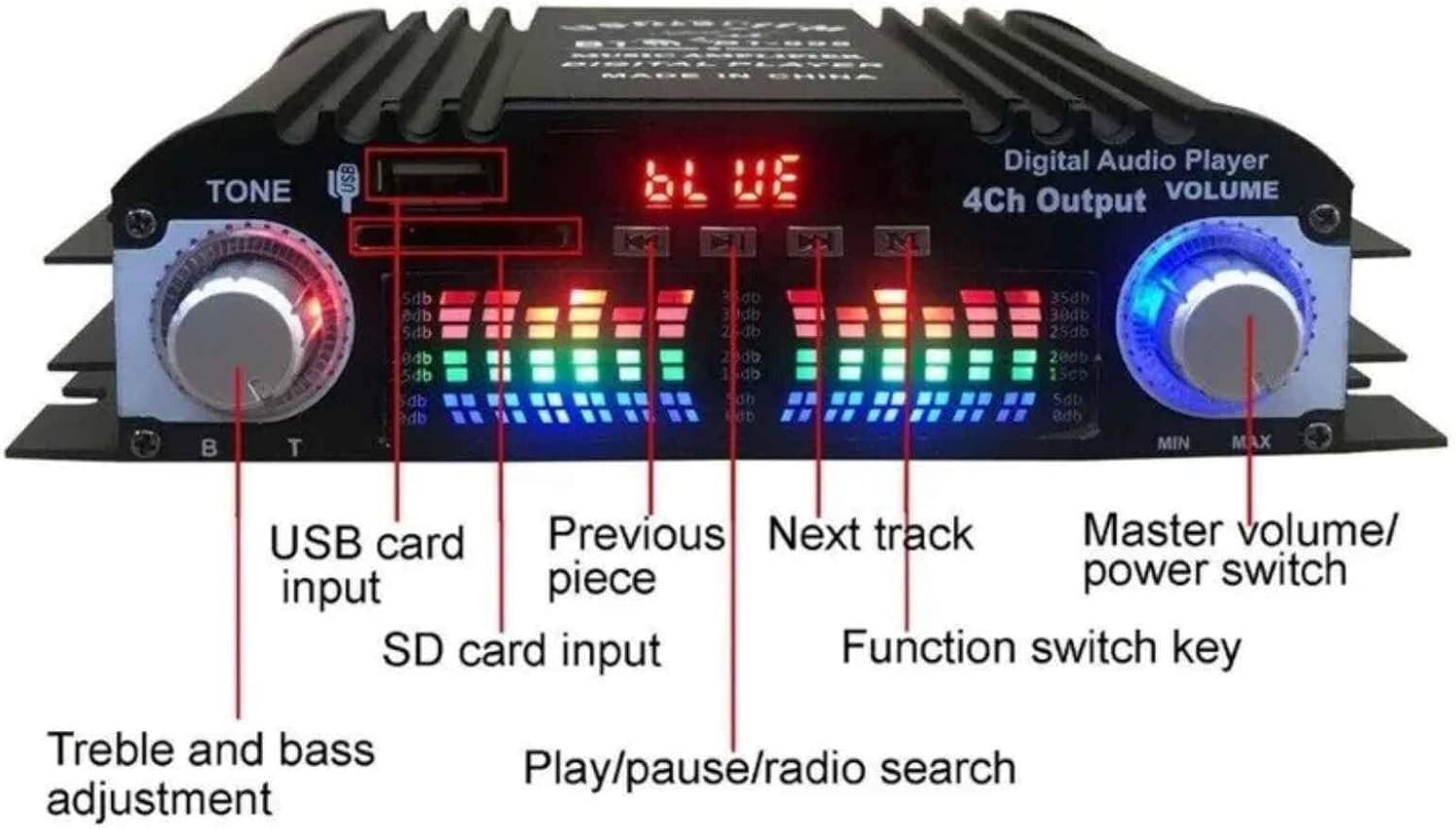
Image 4.1: Front panel of the BT-998 amplifier, highlighting the various inputs and controls. From left to right: Treble and Bass adjustment knob, USB card input, SD card input, Previous track button, Play/Pause/Radio Search button, Next track button, Function switch key, and Master Volume/Power Switch knob.
- TONE (Treble and Bass Adjustment): Adjusts the high and low frequencies of the audio output.
- USB Card Input: Port for connecting USB flash drives for audio playback.
- SD Card Input: Slot for inserting SD memory cards for audio playback.
- Previous Piece (Button): Skips to the previous track or station.
- Play/Pause/Radio Search (Button): Plays or pauses current audio. In FM mode, press and hold to search for radio stations.
- Next Track (Button): Skips to the next track or station.
- Function Switch Key (MODE): Cycles through input modes (Bluetooth, USB, SD, FM, AUX).
- Master Volume/Power Switch: Controls the overall volume level. Press and hold to power the unit on or off.
- LCD Display: Shows current mode, track information, and other status indicators.
4.2 Rear Panel Connections
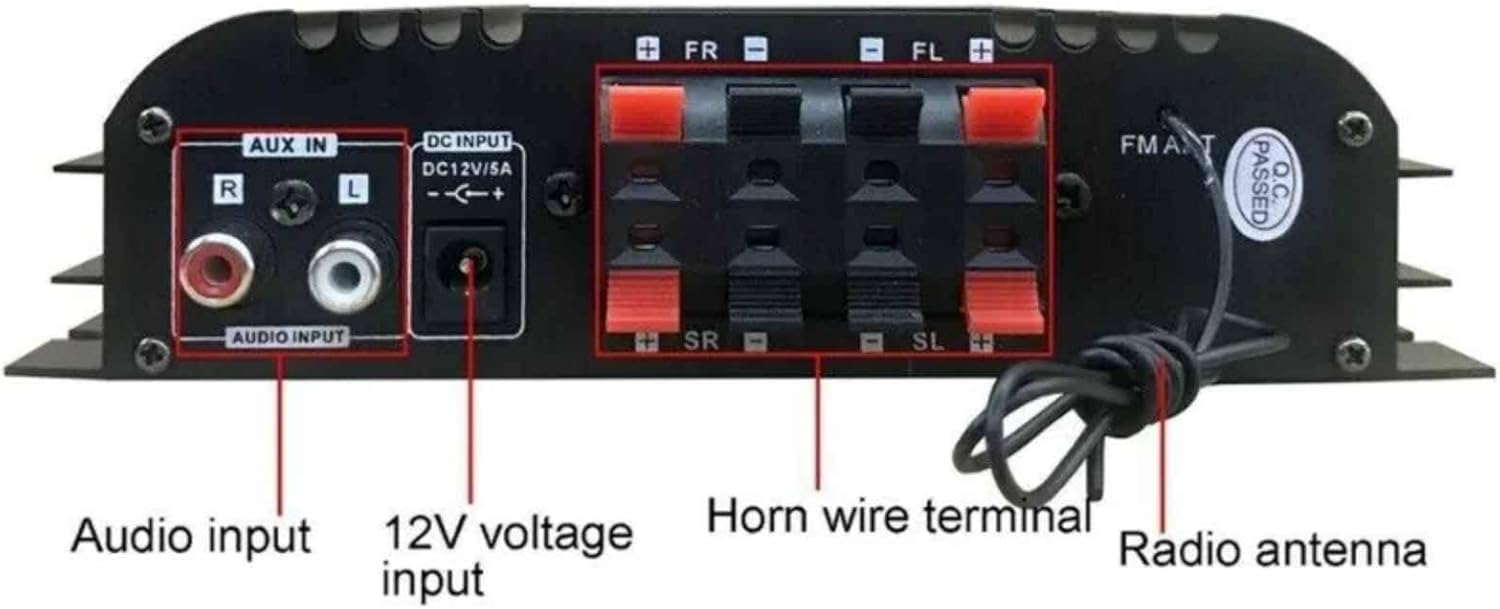
Image 4.2: Rear panel of the BT-998 amplifier, showing the various input and output terminals. From left to right: Audio Input (RCA L/R), DC 12V/5A Power Input, Horn Wire Terminals (FR+, FR-, FL+, FL-, SR+, SR-, SL+, SL- for 4 channels), and FM Antenna connection.
- AUX IN (Audio Input): RCA L/R jacks for connecting external audio sources (e.g., CD player, TV).
- DC INPUT (DC12V/5A): Power input for connecting the 12V DC power adapter.
- Horn Wire Terminal (Speaker Outputs): Terminals for connecting up to four speakers (Front Right, Front Left, Surround Right, Surround Left). Ensure correct polarity (+ and -).
- FM ANT (FM Antenna): Connection point for the included FM radio antenna.
5. Setup Instructions
- Connect Speakers: Connect your speakers to the "Horn Wire Terminal" on the rear panel. Ensure that the positive (+) terminal of the speaker connects to the positive (+) terminal on the amplifier, and the negative (-) terminal of the speaker connects to the negative (-) terminal on the amplifier. The amplifier supports up to four speakers (Front Right, Front Left, Surround Right, Surround Left).
- Connect Audio Source (Optional):
- AUX Input: For external devices, connect an RCA cable from your audio source's output to the "AUX IN" jacks on the amplifier.
- USB/SD Card: Insert a USB flash drive or SD card into the respective slots on the front panel.
- Bluetooth: No physical connection needed for Bluetooth.
- Connect FM Antenna: Attach the included FM antenna to the "FM ANT" terminal on the rear panel for improved radio reception.
- Connect Power: Connect the DC 12V power adapter (not included, but required) to the "DC INPUT" jack on the rear panel. Ensure the power adapter meets the DC12V/5A specification.
- Power On: Press and hold the Master Volume/Power Switch knob on the front panel to turn on the amplifier. The LCD display will illuminate.
6. Operating Instructions
6.1 Power On/Off and Volume Control
- Power On/Off: Press and hold the Master Volume knob to turn the amplifier on or off.
- Volume Adjustment: Rotate the Master Volume knob clockwise to increase volume and counter-clockwise to decrease volume.
- Tone Adjustment: Use the TONE knob to adjust the treble (T) and bass (B) levels to your preference.
6.2 Input Mode Selection
Press the "MODE" button on the front panel or the remote control to cycle through the available input sources: Bluetooth, USB, SD, FM Radio, and AUX Input.
6.3 Bluetooth Operation
- Switch the amplifier to Bluetooth mode using the "MODE" button. The LCD display will show "BLUE" or a similar indicator.
- On your mobile device (smartphone, tablet, etc.), enable Bluetooth and search for available devices.
- Select "BT-998" (or similar name) from the list of devices to pair.
- Once paired, you can play audio from your device through the amplifier.
- Use the Previous/Next Track and Play/Pause buttons on the amplifier or remote control to manage playback.
6.4 USB/SD Card Playback
- Insert a USB flash drive or SD card containing MP3 audio files into the corresponding slot on the front panel.
- Switch the amplifier to USB or SD mode using the "MODE" button. The amplifier will automatically begin playing the audio files.
- Use the Previous/Next Track and Play/Pause buttons on the amplifier or remote control to navigate and control playback.
6.5 FM Radio Operation
- Switch the amplifier to FM mode using the "MODE" button.
- To automatically search for and save available radio stations, press and hold the Play/Pause/Radio Search button. The amplifier will scan frequencies and store stations.
- Once scanning is complete, use the Previous/Next Track buttons to cycle through the saved stations.
6.6 Remote Control Usage

Image 6.6: The BT-998 amplifier shown with its included remote control, which allows for convenient operation from a distance.
The included remote control provides convenient access to all major functions, including power, mode selection, volume, track navigation, and radio tuning. Ensure the remote has working batteries and is pointed towards the amplifier's front panel for optimal response.
7. Maintenance
- Cleaning: Use a soft, dry cloth to clean the exterior of the amplifier. Do not use liquid cleaners or abrasive materials.
- Ventilation: Ensure the ventilation slots are clear of dust and obstructions to prevent overheating.
- Storage: If storing the amplifier for an extended period, disconnect it from power and store it in a cool, dry place.
8. Troubleshooting
| Problem | Possible Cause | Solution |
|---|---|---|
| No power | Power adapter not connected or faulty; power outlet not working. | Check power connections. Ensure the DC 12V power adapter is correctly plugged in and functional. Test the power outlet. |
| No sound output | Incorrect input mode; speaker wires loose or incorrectly connected; volume too low; faulty audio source. | Verify the correct input mode is selected. Check all speaker wire connections for proper polarity. Increase volume. Test with a different audio source. |
| Bluetooth not pairing | Amplifier not in Bluetooth mode; device too far; Bluetooth already paired with another device. | Ensure amplifier is in Bluetooth mode. Move device closer to the amplifier. Disconnect from other Bluetooth devices. |
| USB/SD card not playing | Incorrect input mode; unsupported file format; corrupted files; card/drive not inserted correctly. | Switch to USB/SD mode. Ensure files are in MP3 format. Reinsert the USB drive/SD card. Try a different USB drive/SD card. |
| Poor FM radio reception | Antenna not connected or poorly positioned; weak signal. | Connect the FM antenna securely. Adjust the antenna's position for better reception. Perform an auto-scan for stations. |
9. Specifications
| Feature | Detail |
|---|---|
| Model | BT-998 |
| Color | Black |
| Material | Aluminum alloy + plastic |
| Bluetooth Version | 5.0 (unobstructed, 15 meters range) |
| Number of Channels | 4 |
| Rated Voltage | DC 12V |
| Rated Power | 40W * 4 |
| Resolution | 47K |
| Distortion Rate | 0.4% |
| Impedance | 4-16 ohm |
| Signal to Noise Ratio (SNR) | -95dB |
| Item Weight | 9.9 ounces |
| Package Dimensions | 6.69 x 3.94 x 1.57 inches |
10. Warranty and Support
For warranty information or technical support, please contact the seller or manufacturer directly. Retain your purchase receipt as proof of purchase.