
1. Introduction
This manual provides detailed instructions for the assembly, operation, and maintenance of your HLDIRECT 32-inch Computer Desk with Storage Bag. Please read this manual thoroughly before assembly and use to ensure proper function and longevity of your product.
The HLDIRECT 32-inch Computer Desk is designed for modern homes, offices, or small spaces. Measuring 32 inches in length and 20 inches in width, with a desktop height of 30 inches, it offers ample legroom and a spacious work surface for various daily needs, including work, study, or entertainment. Its minimalist design features clean lines and no unnecessary decorations.
This versatile desk can accommodate laptops, books, monitors, keyboards, and gaming setups. Its lightweight design allows for easy relocation, making it suitable for use as a coffee corner, craft table, or temporary dining table.
2. Safety Information
- Always place the desk on a flat, stable surface.
- Use the adjustable footpads to level the desk and prevent wobbling.
- Avoid placing heavy items unevenly on the desk to maintain stability.
- Do not exceed the maximum load-bearing capacity of 50kg (110 lbs).
- Keep small parts and assembly tools away from children during assembly.
- Regularly check all screws and connections to ensure they remain tight.
3. Package Contents
Before beginning assembly, verify that all components are present and undamaged. If any parts are missing or damaged, please contact customer support.
- Desktop Panel
- Desk Frame Components (Legs, Support Bars)
- Fabric Storage Bag
- Adjustable Footpads
- Assembly Hardware (Screws, Allen Wrench)
- Instruction Manual

Image: All required assembly tools and parts are included for convenience.
4. Setup and Assembly Instructions
Assembly of this desk is designed to be straightforward and can typically be completed within 30 minutes. All necessary tools are provided. Please follow these steps carefully:
- Step 1: Attach the Support Bars. Secure the support bars under the tabletop using the provided screws. Ensure they are aligned correctly.
- Step 2: Connect the Frame. Attach the desk frame components (legs) to the tabletop assembly. Make sure all connections are firm and stable.
- Step 3: Add the Side Fabric Bag. Install the fabric storage bag to the side of the desk. It can be installed on either the left or right side according to your preference.
- Step 4: Adjust Footpads. Once the desk is assembled, place it in its desired location. Adjust the footpads at the bottom of each leg to ensure the desk is level and stable on uneven floors.
Image: Assembly steps for the HLDIRECT computer desk.

Image: Adjustable footpads help keep the desk steady on uneven surfaces.
5. Operating Instructions
5.1 Using the Storage Bag
The integrated fabric storage bag provides convenient access to your essentials, helping to keep your workspace organized. It features multiple pockets suitable for storing items such as notebooks, pens, tablets, headphones, and other small office supplies.

Image: The fabric storage bag keeps essentials within reach.

Image: Features of the side storage bag, including multiple pockets and flexible installation.
5.2 Adjusting for Stability
The desk is equipped with adjustable footpads. To ensure maximum stability, especially on uneven floors, rotate the footpads clockwise or counter-clockwise until all four legs make firm contact with the ground and the desk no longer wobbles.
6. Maintenance
6.1 Cleaning
The desk's thick particleboard surface is wear-resistant, scratch-proof, and stain-resistant, making it easy to clean. Use a soft, damp cloth with a mild detergent to wipe down the surface. Avoid abrasive cleaners or harsh chemicals that could damage the finish. Dry immediately with a clean cloth.

Image: The desk surface is water-resistant and easy to clean.
6.2 General Care
- Periodically check and tighten all screws and bolts to maintain structural integrity.
- Avoid exposing the desk to direct sunlight or extreme temperature changes to prevent material degradation.
- Do not place hot items directly on the desktop without a protective coaster.
7. Troubleshooting
7.1 Desk Wobbles After Assembly
- Check Footpads: Ensure all four adjustable footpads are properly extended and making firm contact with the floor. Adjust them individually until the desk is stable.
- Tighten Screws: Verify that all assembly screws are fully tightened. Loose connections can cause instability.
- Even Weight Distribution: Ensure that heavy items are distributed evenly across the desktop.

Image: The triangular structure design provides extra stability.
7.2 Missing or Damaged Parts
If you find any parts missing or damaged upon opening the package, please contact HLDIRECT customer support immediately for assistance. Do not attempt to assemble the desk with incomplete or damaged components.
8. Specifications
| Feature | Detail |
|---|---|
| Brand | HLDIRECT |
| Model Number | 1 |
| Colour | White |
| Product Dimensions | 50D x 80W x 74H Centimetres (32 x 20 x 30 inches) |
| Material | Wood (Thick Particleboard), Alloy Steel (Base) |
| Item Weight | 7 kg (15.4 lbs) |
| Special Features | Adjustable Footpads, Compact Design, Convertible (Multi-Scenario Use), Side Storage Bag |
| Desk Design | Computer Desk |
| Style | Modern |
| Finish Type | Laminated |
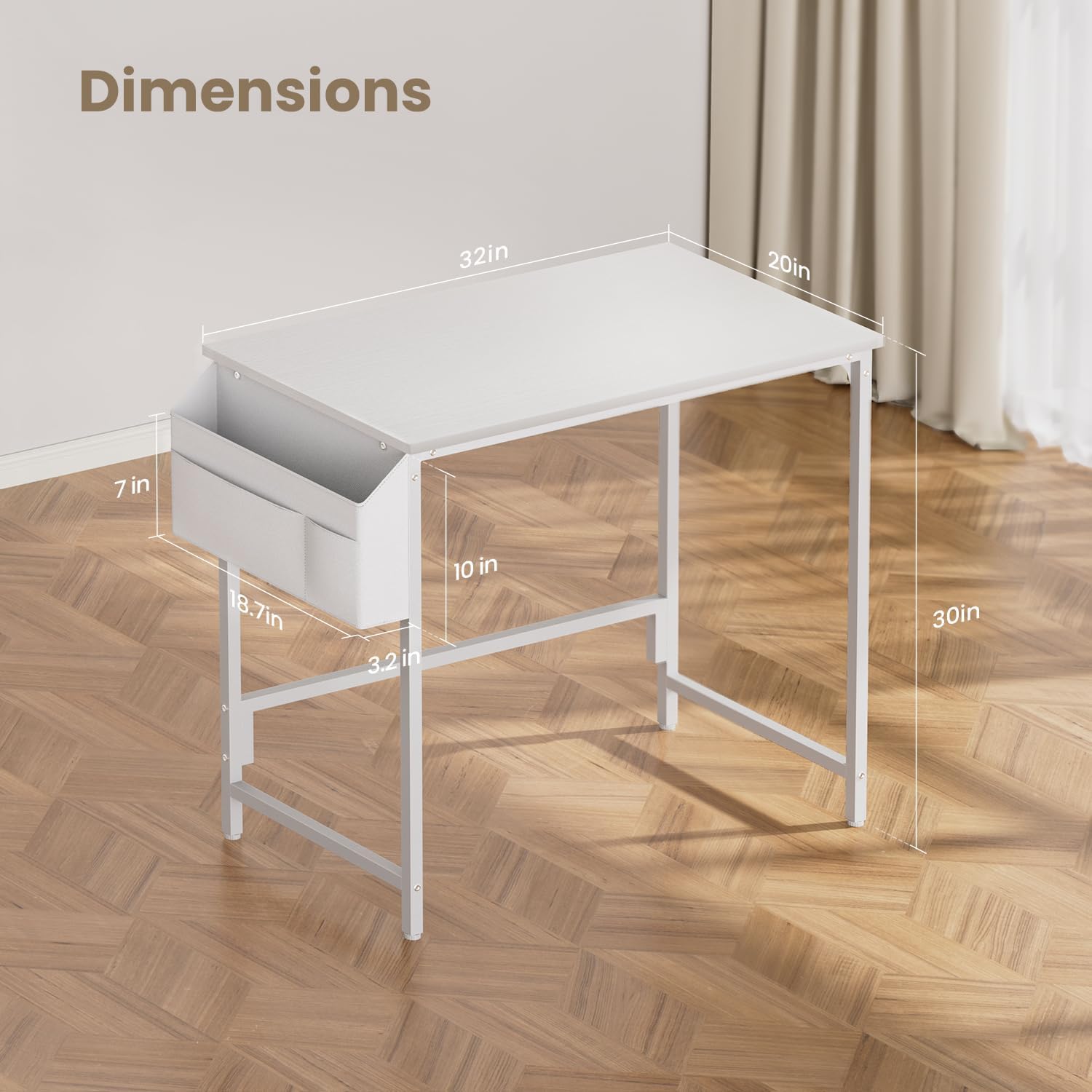
Image: Key dimensions of the HLDIRECT 32-inch computer desk.
9. Warranty and Support
For warranty information or customer support, please refer to the product packaging or contact the retailer where the product was purchased. HLDIRECT is committed to providing quality products and assistance.