
Introduction
Thank you for choosing the MMWOWARTS H2 Hybrid Active Noise Cancelling Bluetooth Headphones. This manual provides essential information for setting up, operating, and maintaining your headphones. Please read it thoroughly to ensure proper use and to maximize your listening experience.
Product Overview
The MMWOWARTS H2 headphones feature Hybrid Active Noise Cancellation, Transparency Mode, high-quality sound, and a comfortable over-ear design. They offer up to 60 hours of playtime, making them suitable for extended use.
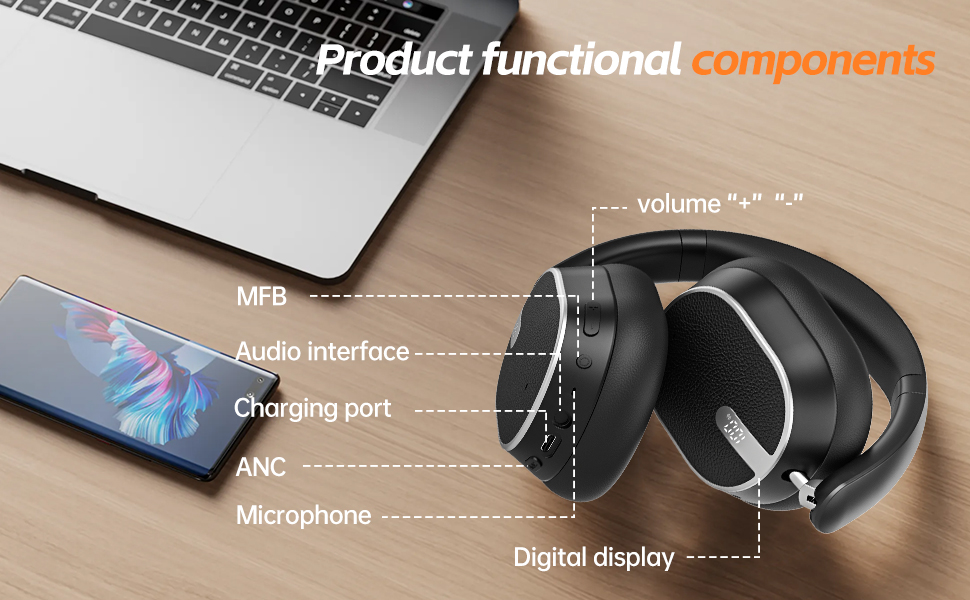
Image: Detailed diagram illustrating the functional components of the MMWOWARTS H2 headphones, including volume controls, Multi-Function Button (MFB), audio interface, charging port, ANC button, microphone, and digital display.
Setup
1. Charging Your Headphones
Before first use, fully charge your headphones. Connect the provided USB-C charging cable to the charging port on the headphone and the other end to a compatible USB power source. The LED indicator will show charging status.
Image: Close-up view of the right earcup of the MMWOWARTS H2 headphones, highlighting the USB-C charging port and control buttons.
2. Bluetooth Pairing
- Ensure your headphones are charged.
- Press and hold the Multi-Function Button (MFB) for a few seconds until the LED indicator blinks red and blue, indicating pairing mode.
- On your device (smartphone, tablet, laptop), enable Bluetooth and search for available devices.
- Select "MMWOWARTS H2" from the list.
- Once connected, the LED indicator will turn solid blue.
The headphones will automatically attempt to reconnect to the last paired device when powered on.
Operating Instructions
1. Power On/Off
- Power On: Press and hold the MFB until the LED indicator lights up.
- Power Off: Press and hold the MFB until the LED indicator turns off.
2. Volume Control
- Volume Up: Press the '+' button.
- Volume Down: Press the '-' button.
3. Playback Control
- Play/Pause: Press the MFB once.
- Next Track: Press and hold the '+' button.
- Previous Track: Press and hold the '-' button.
4. Call Management
- Answer/End Call: Press the MFB once.
- Reject Call: Press and hold the MFB for 2 seconds.
- Activate Voice Assistant: Double-press the MFB.
5. Noise Control Modes
Press the ANC button to cycle through the following modes:
- Hybrid Active Noise Cancellation (ANC): Minimizes external noise for an immersive audio experience.
- Transparency Mode: Allows you to hear your surroundings while still enjoying your audio, ideal for awareness in busy environments.
- Normal Mode: Standard audio playback without noise control.
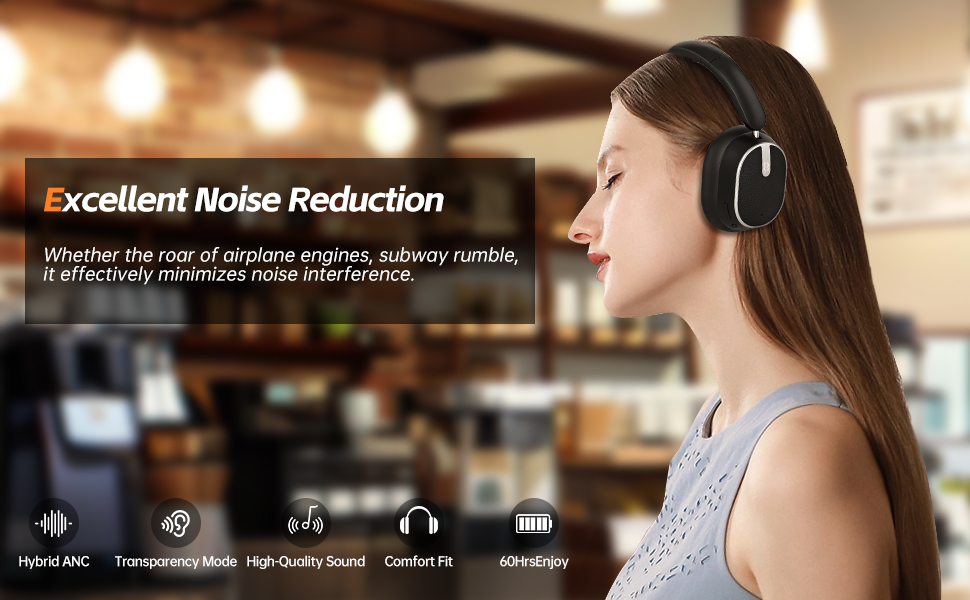
Image: A woman wearing the MMWOWARTS H2 headphones, illustrating the excellent noise reduction capability in a cafe setting. Icons for Hybrid ANC, Transparency Mode, High-Quality Sound, Comfort Fit, and 60 hours of enjoyment are displayed.

Image: A woman wearing the MMWOWARTS H2 headphones, highlighting the Transparency Mode feature for staying connected with surroundings.
Maintenance
- Clean the earcups and headband with a soft, dry cloth.
- Avoid exposing the headphones to extreme temperatures, moisture, or corrosive substances.
- Store the headphones in a cool, dry place when not in use. The foldable design allows for compact storage.
Image: The MMWOWARTS H2 headphones shown in their folded configuration, demonstrating their portability and ease of storage.
Troubleshooting
- Cannot Power On: Ensure the headphones are fully charged.
- Cannot Pair: Ensure Bluetooth is enabled on your device and the headphones are in pairing mode (blinking red/blue LED). Try forgetting the device on your phone and re-pairing.
- No Sound: Check volume levels on both the headphones and your connected device. Ensure the headphones are properly paired.
- Poor Sound Quality: Ensure there are no obstructions between the headphones and your device. Move closer to your device.
Specifications
- Model Name: H2
- Brand: MMWOWARTS
- Connectivity Technology: Wireless (Bluetooth)
- Wireless Communication Technology: Bluetooth 5.0
- Noise Control: Hybrid Noise Cancellation
- Earpiece Shape: Over Ear
- Control Method: Touch
- Battery Life: Up to 60 Hours
- Item Weight: 14 ounces (0.4 Kilograms)
- Compatible Devices: Cellphones, Tablets, Laptops, Smart Speaker
- Charging Port: USB-C
- Audio Interface: 3.5mm Auxiliary Port (cable included)
Product Videos
Warranty and Support
For warranty information or technical support, please refer to the contact details provided on the product packaging or visit the MMWOWARTS official website. Keep your purchase receipt for warranty claims.