
1. Introduction
Thank you for choosing the POXURIO KF100346-02 Cordless Ozone Generator. This device is designed to effectively remove odors and pollutants from various environments using ozone generation. Please read this manual thoroughly before operation to ensure safe and efficient use of the product.

Image: The POXURIO KF100346-02 Cordless Ozone Generator, a compact black unit with a handle and digital display.
2. Important Safety Information
WARNING: Ozone is a powerful oxidant and can be harmful if inhaled directly. Always ensure no humans, pets, or plants are present in the area during operation. Ventilate the treated area thoroughly before re-entry.
- Do not operate the device in occupied spaces.
- Ensure adequate ventilation after each use. Wait at least 30 minutes before re-entering the treated area.
- Keep out of reach of children and pets.
- Do not block the air intake or outlet vents during operation.
- Use only the provided charger and batteries.
- Do not disassemble or attempt to repair the unit yourself. Contact customer service for assistance.
- Avoid using near flammable materials or liquids.
3. Package Contents
Verify that all items are included in your package:
- 1x POXURIO Ozone Generator
- 2x Rechargeable Lithium Battery (5000mAh each)
- 1x Quick Charger
- 1x Remote Control
- 2x Remote Control Battery
- 1x User Manual (this document)
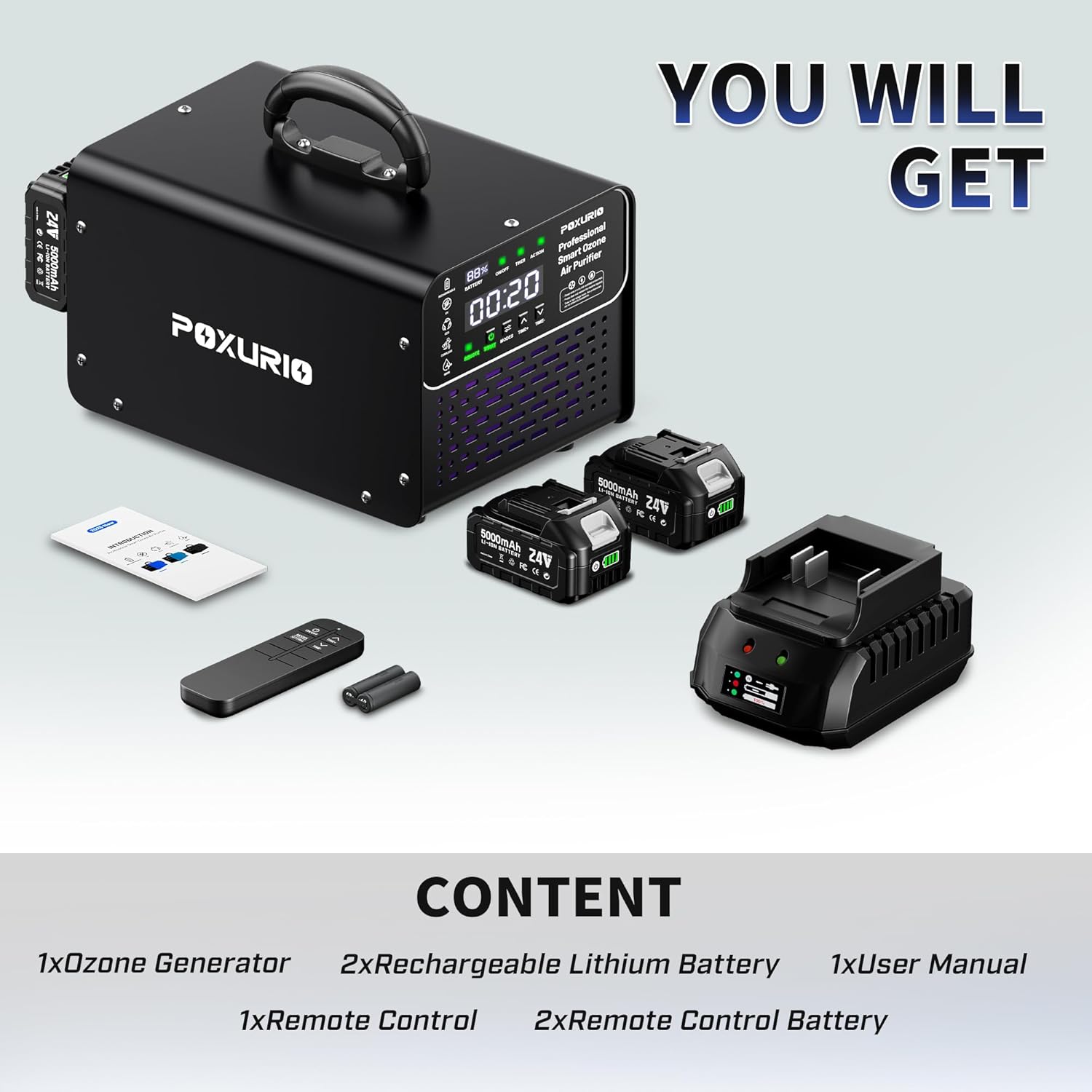
Image: The POXURIO Ozone Generator, two rechargeable batteries, a quick charger, a remote control, and a user manual are displayed on a wooden surface.
4. Product Features
- High Ozone Output: Generates 1,000,000mg of ozone for effective odor and pollutant breakdown.
- Cordless Design: Equipped with two 5000mAh batteries for up to 10 hours of cordless operation.
- Wide Coverage: Suitable for areas up to 10,000 square feet.
- Efficient Air Circulation: Powerful fan disperses ozone quickly throughout the room.
- Convenient Control: Features a clear LCD screen and remote control for easy operation and timing settings.
- Automatic Shut-off: Automatically stops operation when the set time expires.
5. Product Diagram and Components
Familiarize yourself with the main components of your ozone generator:
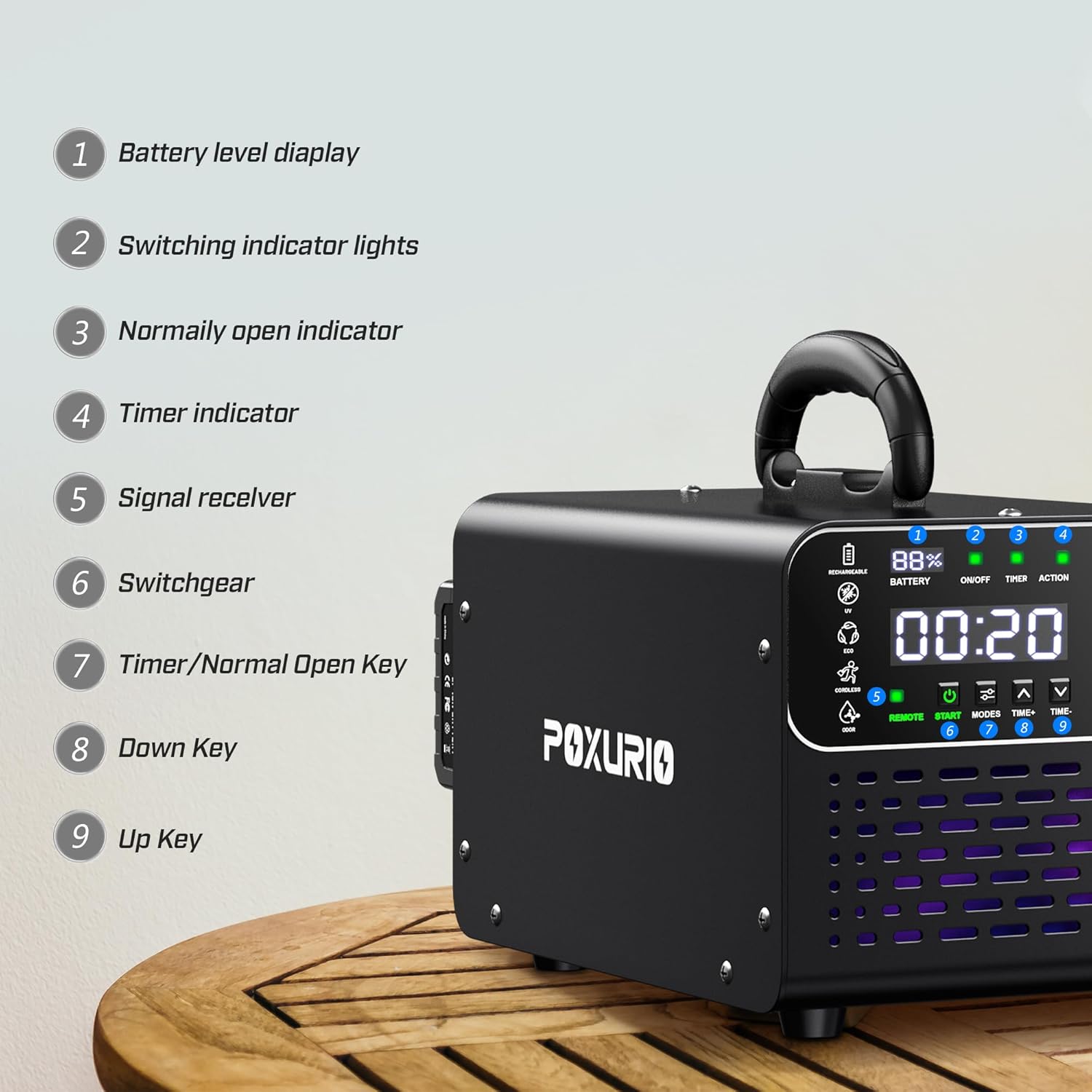
Image: A close-up view of the POXURIO Ozone Generator's control panel, highlighting numbered components.
- Battery level display
- Switching indicator lights
- Normally open indicator
- Timer indicator
- Signal receiver (for remote control)
- Switchgear
- Timer/Normal Open Key
- Down Key
- Up Key
6. Setup
6.1 Charging the Batteries
Before first use, ensure both rechargeable lithium batteries are fully charged using the provided quick charger. Insert the batteries into the charger and wait for the indicator light to show a full charge.
6.2 Installing Batteries
Insert the charged batteries into the designated slots on the side of the ozone generator. Ensure they click securely into place.
6.3 Placement
Place the ozone generator in the center of the room or area to be treated, ensuring it is on a stable, elevated surface. Do not place it directly on the floor or near obstacles that could block airflow.
7. Operating Instructions
Follow these steps for safe and effective operation:
- Prepare the Area: Remove all people, pets, and plants from the room or area to be treated. Clean up the primary odor source if possible.
- Set the Timer: Use the control panel on the unit or the remote control to set the desired operating time. The LCD screen will display the remaining time. Recommended operating times vary by room size (refer to specifications or product information for guidance).
- Start Operation: Press the 'Start' button on the unit or remote control. The unit will begin generating ozone.
- Vacate the Area: Immediately leave the treated area and close all doors and windows. Place a 'Do Not Enter' sign on the door to prevent accidental re-entry.
- Ventilate: Once the set time has elapsed and the unit has automatically shut off, wait at least 30 minutes before re-entering the area. Open windows and doors to allow for thorough ventilation.

Image: A four-step visual guide showing how to use the ozone generator: clean odor source, adjust settings, leave the room, and ventilate.
7.1 Video Guide: Cordless Ozone Generator Overview
Video: An official product video from POXURIO-US demonstrating the features and basic operation of the Cordless Ozone Generator, including its effectiveness in various environments like farms and living spaces.
8. Maintenance
8.1 Cleaning the Filter Screen
Regularly check and clean the filter screen to ensure optimal performance. Dust and debris can accumulate, reducing airflow and efficiency.
- Turn off and unplug the unit before cleaning.
- Locate the filter screen (typically on the back or side of the unit).
- Remove the filter screen and gently brush off any accumulated dust. You may use a vacuum cleaner with a brush attachment.
- If heavily soiled, wash the filter screen with mild soap and water, rinse thoroughly, and allow it to dry completely before re-installing.
8.2 Battery Care
- Store batteries in a cool, dry place when not in use.
- Avoid fully discharging the batteries frequently to prolong their lifespan.
- Charge batteries regularly, even if not in use, to maintain their health.
9. Troubleshooting
If you encounter issues with your POXURIO Ozone Generator, refer to the following common problems and solutions:
| Problem | Possible Cause | Solution |
|---|---|---|
| Unit does not power on | Batteries are not charged or not properly installed. | Ensure batteries are fully charged and securely inserted. |
| Ozone output seems low | Filter screen is dirty or blocked. | Clean the filter screen as described in the Maintenance section. |
| Remote control not working | Remote control batteries are dead or incorrectly inserted. | Replace remote control batteries or check polarity. Ensure line of sight to the unit's signal receiver. |
| Unit stops prematurely | Timer setting expired. | This is normal operation. Reset the timer if further treatment is needed after proper ventilation. |
If the problem persists after attempting these solutions, please contact POXURIO customer service for further assistance.
10. Specifications
| Feature | Detail |
|---|---|
| Model Number | KF100346-02 |
| Ozone Output | 1,000,000 mg/h |
| Power Source | AC/DC (Cordless with batteries) |
| Battery Capacity | 2 x 5000mAh (Nonstandard Battery) |
| Battery Usage Status | Up to 240 minutes (4 hours) per battery, 8-10 hours total with two batteries. |
| Rated Power | 40 watts |
| Timer Range | 0-120 minutes |
| Air Flow Volume | Max 300 CFM |
| Remote Control Range | 15 meters |
| Noise Level | 39 Decibels |
| Product Dimensions (D x W x H) | 7.28 x 12.2 x 9.84 inches |
| Item Weight | 8.68 Pounds |
| Control Method | Remote, Touch (Button Control) |
| Filter Type | HEPA (Filter screen included) |
| Contaminant Filtration Capability | Odors |

Image: The POXURIO Ozone Generator with its dimensions (9.84in H, 7.28in D, 12.2in W) and key specifications listed, including power, battery usage, timed operation, air flow, remote range, and component life.
11. Warranty and Support
POXURIO offers a 365-day customer service period for this Ozone Generator. If you encounter any issues or have questions regarding your product, please do not hesitate to contact our customer support team.
For assistance, please refer to the contact information provided on the product packaging or the official POXURIO website.