
Introduction
Welcome to your AM ARROWMAX Precision Electric Screwdriver SES ULTRA. This manual provides essential information for the safe and effective use of your new tool. Please read it thoroughly before operation and retain it for future reference.
The SES ULTRA is a versatile electric screwdriver designed for precision tasks. Key features include:
- 70 S2 Steel Precision Bits: A comprehensive set for various applications.
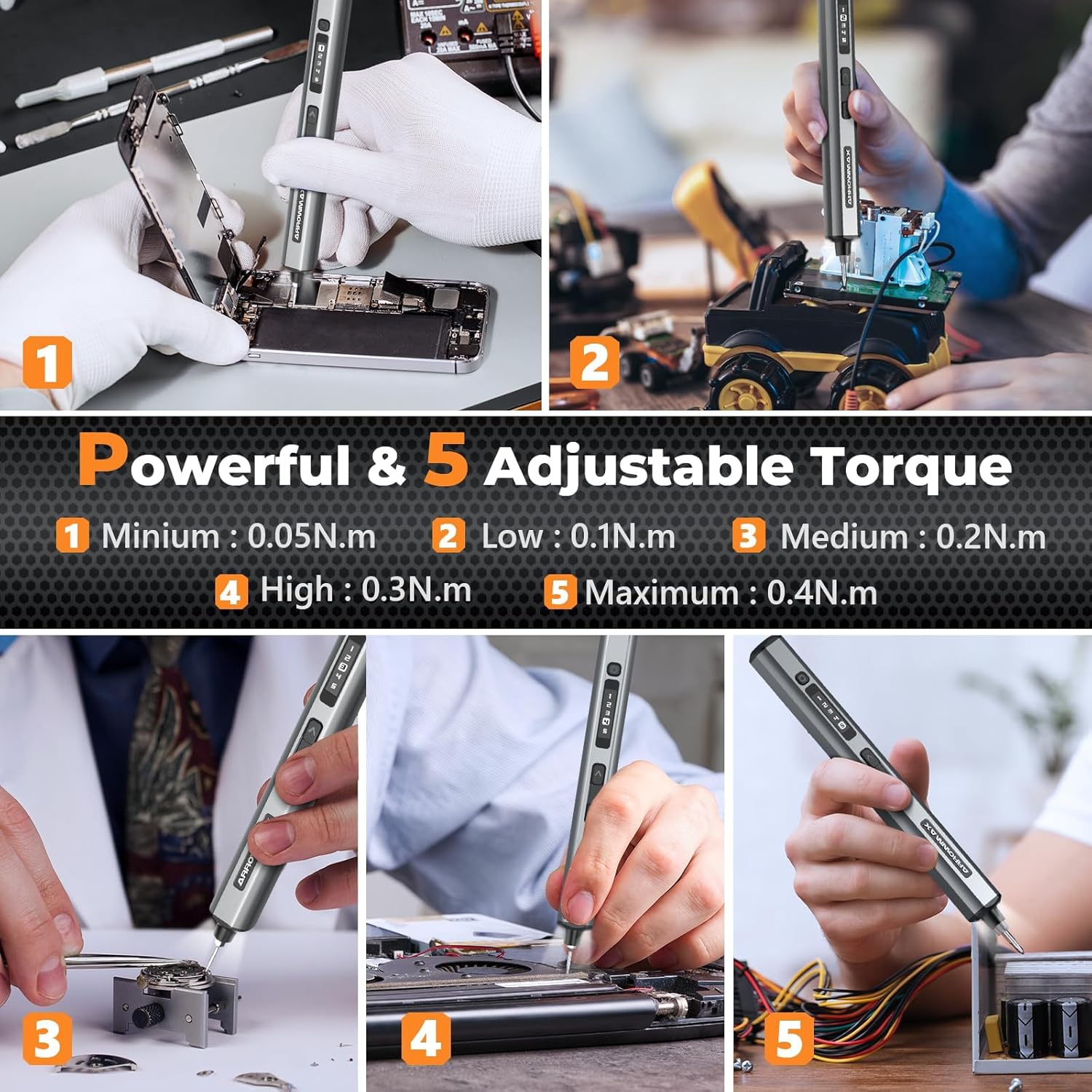
- 5 Adjustable Torque Settings: Ranging from 0.05 N.m to 0.4 N.m (electric) and up to 3 N.m (manual).
- Forward and Reverse Functions: For tightening and loosening screws.
- Compact Cubic Design: Ergonomic for comfortable grip and control.
- OLED Screen: Displays important operational information.
- 4 Shadowless LED Lights: Illuminates the work area.
- 500mAh Battery: Long-lasting power for extended use.
- 280 RPM Speed: Efficient and quick operation.

AM ARROWMAX SES ULTRA electric screwdriver with its case and various bits.
Components Overview
Familiarize yourself with the main components of your electric screwdriver:
- Electric Screwdriver Body: The main unit with controls and display.
- Precision Bit Set: 70 S2 steel bits in various sizes.
- Storage Case: Organizes and protects the screwdriver and bits.
- USB-C Charging Cable: For recharging the device.

Diagram illustrating the components of the SES ULTRA electric screwdriver, including magnetic charging port, torque adjustment button, status display, reverse key, forward key, aluminum alloy body, LED lights, and bit installation port.
Setup
1. Initial Charging
Before first use, fully charge the electric screwdriver. The device is equipped with a 500mAh battery.
- Connect the provided USB-A to USB-C charging cable to the screwdriver's USB-C port.
- Connect the other end to a compatible USB-A power adapter (not included).
- The OLED screen will indicate charging status. A full charge can power the screwdriver for approximately 900 precision screws.

Close-up of the SES ULTRA electric screwdriver showing the Type-C charging port and an illustration of the internal battery. Note: Only supports USB-A to USB-C charging.
2. Bit Installation
The screwdriver features a magnetic bit holder for easy and secure bit changes.
- Select the appropriate S2 steel precision bit for your task from the included set.
- Insert the bit firmly into the magnetic bit installation port at the tip of the screwdriver until it is securely seated.
- To remove, simply pull the bit out.
The SES ULTRA electric screwdriver with its magnetic bit holder and a selection of S2 steel precision bits.
Operating Instructions
1. Power On/Off
Press and hold the power button (usually located near the OLED screen) to turn the screwdriver on or off.
2. Torque Adjustment
The SES ULTRA offers 5 adjustable torque settings for precise control, preventing damage to delicate components or ensuring secure fastening.
- Press the torque adjustment button (located at the top of the screwdriver) repeatedly to cycle through the 5 torque levels (0.05 N.m, 0.1 N.m, 0.2 N.m, 0.3 N.m, 0.4 N.m).
- The selected torque level will be displayed on the OLED screen.
- For tasks requiring higher force, the screwdriver can be used manually, providing up to 3 N.m of torque.

The OLED screen of the SES ULTRA electric screwdriver displaying the 5 adjustable torque settings.
3. Forward and Reverse Modes
Use the dedicated buttons for tightening and loosening screws.
- Press the Forward Key (down arrow) to rotate the bit clockwise for tightening screws.
- Press the Reverse Key (up arrow) to rotate the bit counter-clockwise for loosening screws.

Illustration of the forward and reverse rotation buttons on the SES ULTRA electric screwdriver.
4. LED Illumination
The screwdriver features 4 built-in shadowless LED lights that automatically illuminate the work area when in operation, providing clear visibility in dim environments.
Video demonstrating the features and operation of the AM ARROWMAX SES ULTRA electric screwdriver.
Maintenance
1. Cleaning
Regular cleaning helps maintain the performance and longevity of your screwdriver.
- Wipe the screwdriver body with a soft, dry cloth.
- Do not use abrasive cleaners or solvents.
- Ensure no dust or debris accumulates in the bit installation port or charging port.
2. Storage
Store the screwdriver and its bits in the provided storage case when not in use.
- Store in a cool, dry place, away from direct sunlight and extreme temperatures.
- Keep out of reach of children.
3. Battery Care
To maximize battery life:
- Avoid completely depleting the battery before recharging.
- Charge the device regularly, even if not in frequent use, to prevent deep discharge.
Troubleshooting
If you encounter issues with your AM ARROWMAX SES ULTRA, refer to the following common problems and solutions:
| Problem | Possible Cause | Solution |
|---|---|---|
| Screwdriver does not turn on or charge. | Battery is fully depleted or charging cable/adapter is incompatible. | Ensure the device is connected to a USB-A to USB-C charger. Allow sufficient time for charging. If the issue persists, try a different compatible charging cable and adapter. |
| Insufficient torque for the task. | Torque setting is too low or task requires manual force. | Increase the torque setting using the torque adjustment button. For very tight screws, use the screwdriver in manual mode. |
| Bit slips or does not engage screw head. | Incorrect bit size or bit not fully inserted. | Ensure you are using the correct bit size for the screw. Verify the bit is fully inserted into the magnetic holder. |
Specifications
| Feature | Detail |
|---|---|
| Brand | AM ARROWMAX |
| Model | SES ULTRA (230611) |
| Speed | 280 RPM |
| Electric Torque | 0.05 - 0.4 N.m |
| Manual Torque | 3 N.m |
| Battery Type | 500mAh Polymer |
| Charging Port | USB-C (USB-A to USB-C only) |
| Number of Bits | 70 (S2 Steel) |
| LED Lights | 4 Shadowless LEDs |
Warranty Information
For detailed warranty information regarding your AM ARROWMAX Precision Electric Screwdriver SES ULTRA, please refer to the warranty card included with your product packaging or visit the official AM ARROWMAX website. Warranty terms and conditions may vary by region and retailer.
Customer Support
Should you require further assistance, have questions about your product, or need to report an issue, please contact AM ARROWMAX customer support. You can typically find contact information on the official AM ARROWMAX website or through the retailer from whom you purchased the product.


