
1. Introduction
This manual provides essential information for the safe and efficient operation, installation, and maintenance of your iSpring RCD100HCG-E Countertop Hot and Cold Reverse Osmosis Water Dispenser. Please read all instructions carefully before using the appliance and retain this manual for future reference.
2. Safety Information
Always follow basic safety precautions when using electrical appliances to reduce the risk of fire, electric shock, and personal injury.
- Ensure the appliance is connected to a properly grounded electrical outlet.
- Do not immerse the appliance, cord, or plug in water or other liquids.
- Keep children away from the dispenser, especially when dispensing hot water. The unit features a child safety lock for hot water.
- Do not operate the appliance with a damaged cord or plug.
- Place the dispenser on a stable, level surface, away from direct sunlight or heat sources.
- Only use potable water as the source water for the dispenser.
3. Product Overview
The iSpring RCD100HCG-E is a countertop reverse osmosis water dispenser designed to provide purified hot, cold, and ambient water. It features advanced filtration, real-time monitoring, and user-friendly controls.
Key Features:
- Hot and Cold Water Dispensing: Offers 9 temperature options and 6 dispensing volumes.
- Advanced Filtration: A 5-layer alkaline reverse osmosis system removes over 99% of 1,000+ contaminants, including PFAS, chlorine, fluoride, lead, and arsenic, while balancing pH.
- Real-time Monitoring: Displays incoming and filtered water TDS levels, water temperature, and low water reminders.
- Dual Pitcher Design: Includes two convenient pitchers, allowing one to be used or refrigerated while the other remains in the system.
- No Plumbing Required: Portable design suitable for various locations with a power outlet.
- Filter Life Monitoring: Tracks filter lifespan with easy twist-and-lock replacement.
- Safety Features: Child safety lock for hot water and automatic flushing to extend filter life.
- Quiet and Energy-Efficient: Thermo-electric cooling technology operates silently and consumes less energy.
Components Included:
- iSpring RCD100HCG-E Reverse Osmosis Water Dispenser
- Two Water Pitchers
- FPCA100 Filter
- MCD100HC Filter
- Power Cord
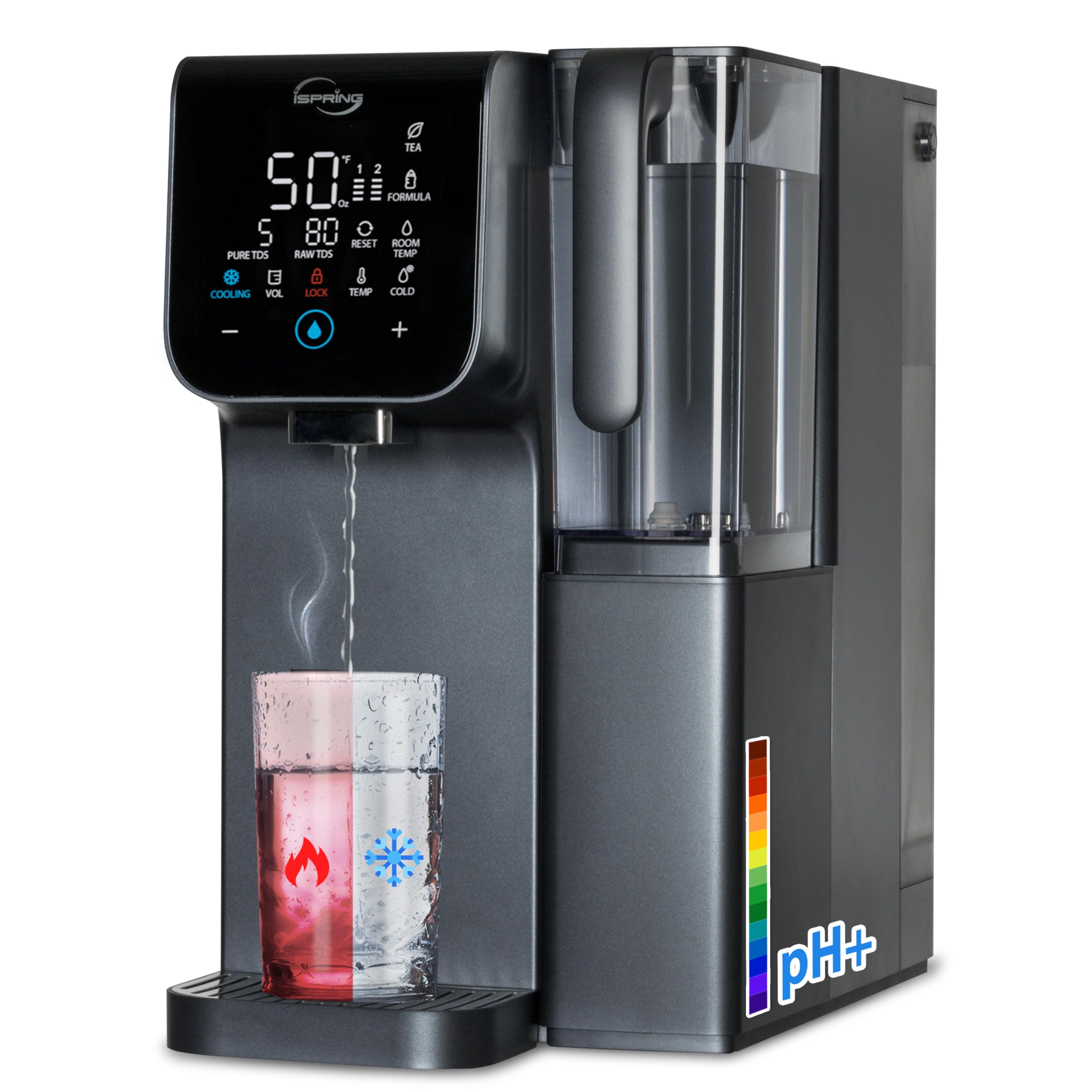
Figure 3.1: iSpring RCD100HCG-E Countertop Hot and Cold Reverse Osmosis Water Dispenser.

Figure 3.2: The dual pitcher design allows for convenient use and refrigeration.
4. Setup
4.1 Unpacking
- Carefully remove all components from the packaging.
- Inspect the dispenser for any signs of damage. If damaged, do not use and contact customer support.
- Remove all protective films and packaging materials.
4.2 Placement
- Place the dispenser on a flat, stable, and dry countertop.
- Ensure there is adequate ventilation around the unit.
- Keep the dispenser away from direct heat sources, such as ovens or radiators, and direct sunlight.
- Ensure the power cord can reach a grounded electrical outlet without being stretched or obstructed.
4.3 Filter Installation
The iSpring RCD100HCG-E uses two main filters: FPCA100 and MCD100HC. These filters are designed for easy twist-and-lock replacement.
- Open the filter compartment cover.
- Insert the FPCA100 filter into its designated slot and twist clockwise until it locks securely.
- Insert the MCD100HC filter into its designated slot and twist clockwise until it locks securely.
- Close the filter compartment cover.

Figure 4.1: Easy twist-and-lock filter replacement mechanism.
4.4 Initial Rinse
Before first use, the system requires an initial rinse to flush out any carbon fines and prepare the filters.
- Fill the raw water pitcher with tap water and place it into the dispenser.
- Plug in the dispenser. The system will automatically begin a flushing cycle.
- Dispense and discard at least two full pitchers of purified water. This ensures the filters are properly primed and any manufacturing residues are flushed.
5. Operating Instructions
5.1 Filling the Water Tank
The dispenser uses a raw water pitcher. Fill this pitcher with tap water and place it into the designated slot on the dispenser. The system will then filter the water into the purified water pitcher.
5.2 Dispensing Water
The control panel allows you to select desired water temperature and volume.

Figure 5.1: Control panel with temperature and volume selections.
- Place a cup or container under the dispenser nozzle.
- Use the temperature selection buttons to choose one of the 9 available temperatures (e.g., 10°C, 26.7°C, 46.1°C, 60°C, 71.1°C, 85°C, 90.6°C, 98.9°C).
- Use the volume selection buttons to choose one of the 6 available dispensing volumes (e.g., 88.72ml, 118.29ml, 177.44ml, 236.59ml, 295.74ml, 502.97ml).
- Press the dispense button to start water flow. Press again to stop.
5.3 Child Safety Lock
To prevent accidental hot water dispensing, the unit is equipped with a child safety lock. Activate or deactivate this feature as needed by pressing and holding the designated lock button on the control panel.
5.4 Real-time TDS Monitoring
The intelligent panel displays the Total Dissolved Solids (TDS) levels of both incoming (RAW TDS) and purified (PURE TDS) water, allowing you to monitor water quality in real-time.

Figure 5.2: Real-time TDS monitoring display.
5.5 Silent Mode
For quiet operation, especially in bedrooms or offices, activate the silent mode. Refer to the control panel instructions for specific button combinations to enable this feature (e.g., holding COOLING and LOCK simultaneously for 5 seconds).

Figure 5.3: Dispenser operating in silent mode.
6. Maintenance
6.1 Filter Replacement
The dispenser monitors filter life and will provide reminders when replacement is due. Replace filters promptly to maintain water quality.

Figure 6.1: Filter life monitoring display.
To replace filters (FPCA100 and MCD100HC):
- Unplug the dispenser from the power outlet.
- Open the filter compartment cover.
- Twist the old filter counter-clockwise to unlock and remove it.
- Insert the new filter and twist clockwise until it locks securely.
- Repeat for the other filter if necessary.
- Close the filter compartment cover and plug in the dispenser.
- Perform an initial rinse cycle as described in Section 4.4 to flush the new filters.
Replacement filters can be found by searching for "FPCA100" and "MCD100HC".
6.2 Cleaning
- Wipe the exterior of the dispenser with a soft, damp cloth. Do not use abrasive cleaners or solvents.
- Regularly clean the drip tray and purified water pitcher with mild soap and water.
- For internal cleaning or descaling, consult the iSpring customer support or refer to specific instructions on the manufacturer's website.
6.3 Automatic Flushing
The system performs an automatic 10-second flush each time the raw water tank lid is opened or closed. This helps to maintain filter efficiency and extend their lifespan.
7. Troubleshooting
| Problem | Possible Cause | Solution |
|---|---|---|
| No water dispensing | No power; Raw water tank empty; Filters clogged. | Check power connection; Refill raw water tank; Check filter life indicator and replace if necessary. |
| Water tastes unusual | New filters not flushed; Filters need replacement. | Perform initial rinse cycle; Replace filters. |
| Low water flow | Filters clogged; Low water level in raw tank. | Check filter life and replace if necessary; Refill raw water tank. |
| Hot water not dispensing or not hot enough | Child lock active; Heating element issue. | Deactivate child lock; Contact customer support if issue persists. |
| TDS readings are high | Filters need replacement; System malfunction. | Check filter life and replace if necessary; Contact customer support. |
8. Specifications
| Feature | Specification |
|---|---|
| Model Name | RCD100HCG-E |
| Brand | iSpring |
| Dimensions (L x W x H) | 18 cm x 39 cm x 39 cm |
| Material | Plastic |
| Capacity | 100 Gallons Per Day (GPD) |
| Purification Method | Reverse Osmosis |
| Installation Type | Countertop |
| Power Source | Electric Cord |
| Max Supported TDS Level | 1500 PPM |
| Max Hot Water Temperature | 95°C |
| Product ID | 810004176454 |
| Manufacturer | iSpring Water System |
| Country of Origin | China |
9. Warranty and Support
iSpring products are designed for reliability and performance. For warranty information, product registration, or technical assistance, please refer to the official iSpring website or contact their customer support directly.
When contacting support, please have your model number (RCD100HCG-E) and product ID (810004176454) available.

Figure 9.1: iSpring customer support is available to assist you.


