
Introduction
Thank you for choosing the DEWENWILS Indoor Remote Control Outlet. This device provides a convenient way to control your indoor electrical appliances with a wireless remote, eliminating the need to manually plug and unplug items. Its compact design and strong RF signal make it ideal for various household applications.
Safety Information
- For indoor use only. Do not expose to water or damp conditions.
- Do not exceed the maximum load rating of 10A/1200W, 1/3HP.
- Ensure the device is properly plugged into a grounded outlet.
- Unplug the device from the wall outlet before cleaning.
- Keep out of reach of children.
- The outlet will remain in the OFF state after a power outage for safety.
Package Contents
- 1 x DEWENWILS Indoor Remote Control Outlet
- 1 x Wireless Remote Control with Keychain
- 1 x AAA Battery (pre-installed in remote)

Setup
- Insert Battery: The remote control comes with a pre-installed AAA battery. Remove the plastic tab from the battery compartment to activate the remote.
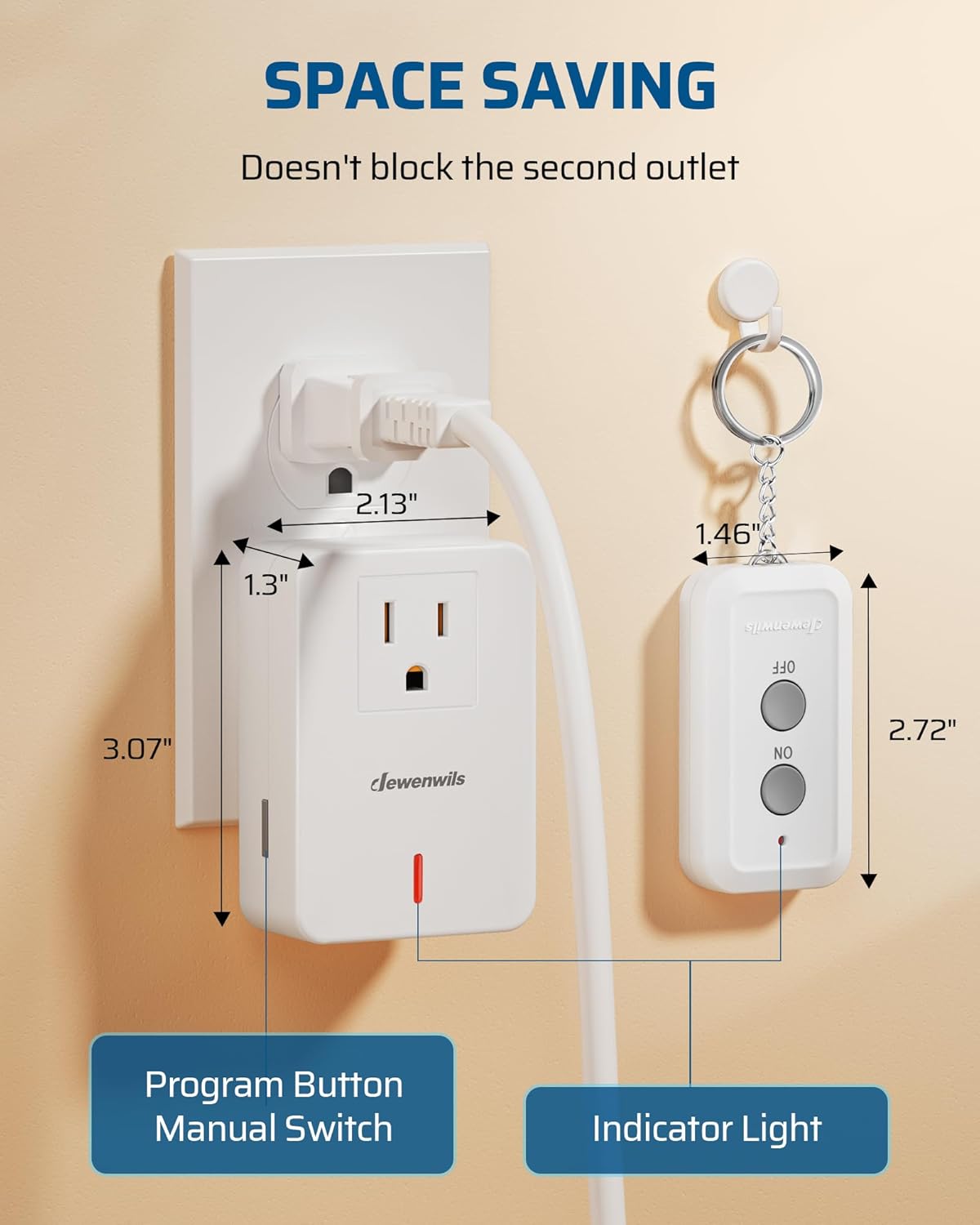
- Plug in the Outlet: Insert the DEWENWILS remote control outlet into any standard 3-prong indoor wall outlet. The indicator light on the outlet will illuminate briefly.
- Connect Appliance: Plug your desired appliance (e.g., lamp, fan, Christmas lights) into the remote control outlet.
- Initial Use: The remote and outlet are pre-programmed for immediate use. Press the 'ON' button on the remote to turn on the connected appliance, and 'OFF' to turn it off.
Pairing Additional Remotes/Outlets (Optional)
This system is expandable. To pair additional DEWENWILS remotes or outlets (same model only), follow these steps:
- Plug the new outlet into a wall socket.
- Press and hold the program button on the side of the outlet until the indicator light flashes.
- While the indicator light is flashing, press the 'ON' button for the desired channel (e.g., '1', '2', '3') on your remote control. The indicator light on the outlet will stop flashing and remain solid, indicating successful pairing.
Operating Instructions
Using the Remote Control
- Press the ON button on the remote to turn on the connected appliance.
- Press the OFF button on the remote to turn off the connected appliance.
- The remote control operates using an RF signal, allowing it to work through walls and doors with a range of up to 100 feet in open areas. Line of sight is not required.


Manual Operation
The remote control outlet also features a manual program button on its side. Pressing this button will toggle the power to the connected appliance ON or OFF, providing an alternative control method directly at the outlet.
Maintenance
- Cleaning: Disconnect the outlet from the power source before cleaning. Wipe with a dry, soft cloth. Do not use liquid cleaners.
- Remote Battery Replacement: If the remote control's indicator light does not illuminate or its range decreases significantly, replace the AAA battery. Open the battery compartment on the back of the remote, replace the old battery with a new AAA battery, and ensure correct polarity.
Troubleshooting
- Appliance not turning ON/OFF:
- Ensure the remote control outlet is securely plugged into a working wall outlet.
- Verify the appliance is properly plugged into the remote control outlet.
- Check if the appliance itself is switched ON (if it has its own power switch).
- Replace the remote control battery if it is low or depleted.
- Re-pair the remote control with the outlet following the 'Pairing Additional Remotes/Outlets' steps in the Setup section.
- Reduced Remote Range:
- Replace the remote control battery.
- Ensure there are no large metal objects or thick walls heavily obstructing the signal path.
Specifications
| Feature | Specification |
|---|---|
| Model Number | BH9912U-18D |
| Product Dimensions | 3.5 x 2.36 x 3.07 inches |
| Item Weight | 3.17 ounces |
| Current Rating | 10 Amps |
| Operating Voltage | 125 Volts |
| Operation Mode | ON-OFF-ON |
| Contact Type | Normally Open |
| Connector Type | Plug |
| Actuator Type | Push Button |
| Remote Battery | 1 AAA battery (included) |
| RF Range | Up to 100ft (open area) |
Warranty and Support
For warranty information or technical support, please refer to the product packaging or contact DEWENWILS customer service directly. Contact details can typically be found on the manufacturer's official website or through your purchase platform.
