
YUER BA-10Pro
Yuer BA-10Pro 10W Acoustic Guitar Amp
Instruction Manual
Introduction
Thank you for choosing the Yuer BA-10Pro 10W Acoustic Guitar Amp. This portable amplifier is designed for musicians seeking a versatile and compact solution for practice, recording, and small performances. It features dual inputs for guitar and microphone, digital delay and reverb effects, OTG recording capabilities, and Bluetooth connectivity. This manual provides detailed instructions to help you get the most out of your BA-10Pro amplifier.
Key Features:
- Dual 1/4-inch inputs for guitar and microphone.
- High-performance audio chip for balanced sound.
- Built-in digital delay and reverb effects.
- Vocal cut function for improved singing practice.
- OTG recording for direct connection to mobile phones and laptops.
- Bluetooth 5.3 for wireless audio streaming.
- 4000mAh rechargeable battery for 4-8 hours of playtime.
- 3.5mm headphone jack for silent practice.
- Compact and lightweight design (6x3x3.9 inches, 1.32 lbs).
Product Overview: Controls and Connections

Image: Top view of the Yuer BA-10Pro amplifier, highlighting the control knobs and input jack.
Front Panel Controls:
- DELAY & REVERB: Intensity adjustment knobs for digital effects.
- AUX\B.T. VOL: Volume adjustment for auxiliary input and Bluetooth audio.
- TONE: Tone instrument adjustment knob.
- LOW BATT: Low voltage and charging indicator light.
- VOLUME: Instrument volume control knob.
- POWER: Long press to turn on/off; short press to turn on/off vocal elimination, and status indicators.
- INPUT: 1/4" Instrument input interface.

Image: Rear view of the Yuer BA-10Pro amplifier, showing the various input and output ports.
Rear Panel Connections:
- USB-C: Charging / OTG Internal Recording port.
- Headphone Output: 3.5mm jack for headphones.
- AUX IN: Auxiliary Input jack.
- VOL: MIC Volume Adjustment knob.
- MIC: 1/4" MIC Input jack (compatible with dynamic microphones).
Setup
1. Initial Charging
Before first use, ensure the BA-10Pro is fully charged. Connect the white USB-C cable to the USB-C port on the rear panel and to a suitable USB power adapter (not included). The LOW BATT indicator will show charging status. A full charge provides 4-8 hours of playtime.
Note: The black USB-C cable is for OTG recording only, not for charging the amp. Use the white USB-C cable to charge the amp.
2. Connecting Instruments and Microphones
- Guitar: Plug your acoustic guitar into the INPUT 1/4" jack on the front panel.
- Microphone: Plug your dynamic microphone into the MIC 1/4" jack on the rear panel. Adjust microphone volume using the MIC VOL knob on the rear panel.

Image: A person singing into a microphone while another plays an acoustic guitar, demonstrating the dual input capability of the BA-10Pro.
3. Bluetooth Pairing
To connect a Bluetooth device (e.g., smartphone, tablet, laptop) for backing tracks or audio playback:
- Turn on the BA-10Pro by long-pressing the POWER button.
- Enable Bluetooth on your device.
- Search for "BA-10Pro" in your device's Bluetooth settings and select it to pair.
- Adjust the Bluetooth volume using the AUX\B.T. VOL knob on the front panel.
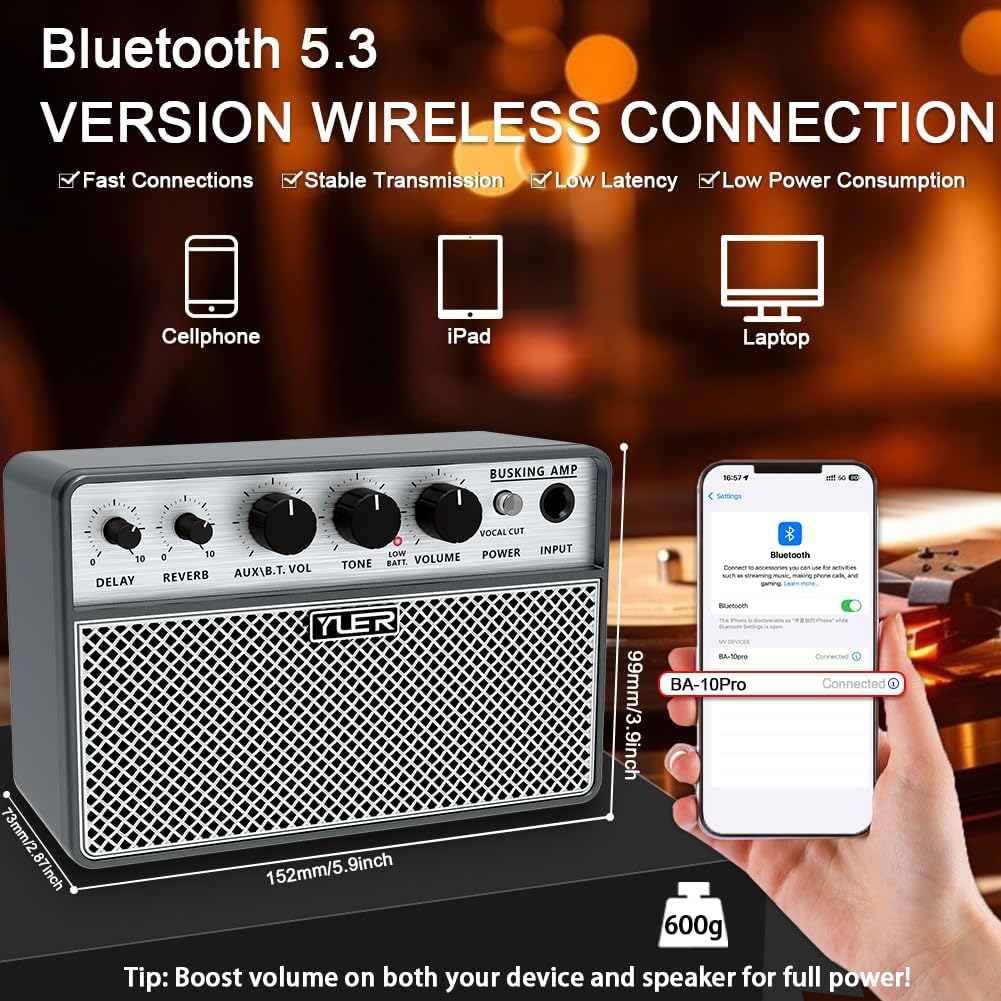
Image: The Yuer BA-10Pro amplifier positioned next to a smartphone displaying its Bluetooth connection screen, indicating successful pairing.
Operating Instructions
1. Power On/Off
Long press the POWER button on the front panel to turn the amplifier on or off.
2. Adjusting Volume and Tone
- Use the VOLUME knob to control the overall instrument volume.
- Use the TONE knob to adjust the tonal characteristics of your instrument.
- For microphone volume, use the MIC VOL knob on the rear panel.
- For AUX/Bluetooth volume, use the AUX\B.T. VOL knob.
3. Using Digital Effects (Delay & Reverb)
The BA-10Pro includes built-in digital delay and reverb effects. Adjust the intensity of these effects using their respective knobs on the front panel. Experiment with different settings to find the desired ambiance for your guitar and vocals.

Image: A musician playing an acoustic guitar, with the Yuer BA-10Pro amplifier in the foreground, illustrating the sound output and internal speaker components.
4. Vocal Cut Function
The vocal cut function can be activated by a short press of the POWER button. This feature helps to reduce or eliminate vocals from a track, allowing you to practice singing along more effectively.
5. OTG Recording
The BA-10Pro supports OTG (On-The-Go) recording, allowing you to directly record your guitar and vocal performance to mobile phones or laptops. Use the black USB-C to USB-C cable for this connection. This function also enables the amp to act as a simple audio interface for live streaming.
6. Headphone and AUX Input
- Headphone Jack: Plug 3.5mm headphones into the Headphone Output on the rear panel for silent practice.
- AUX IN: Connect external audio sources (e.g., MP3 player) to the AUX IN jack on the rear panel. Adjust volume with the AUX\B.T. VOL knob.
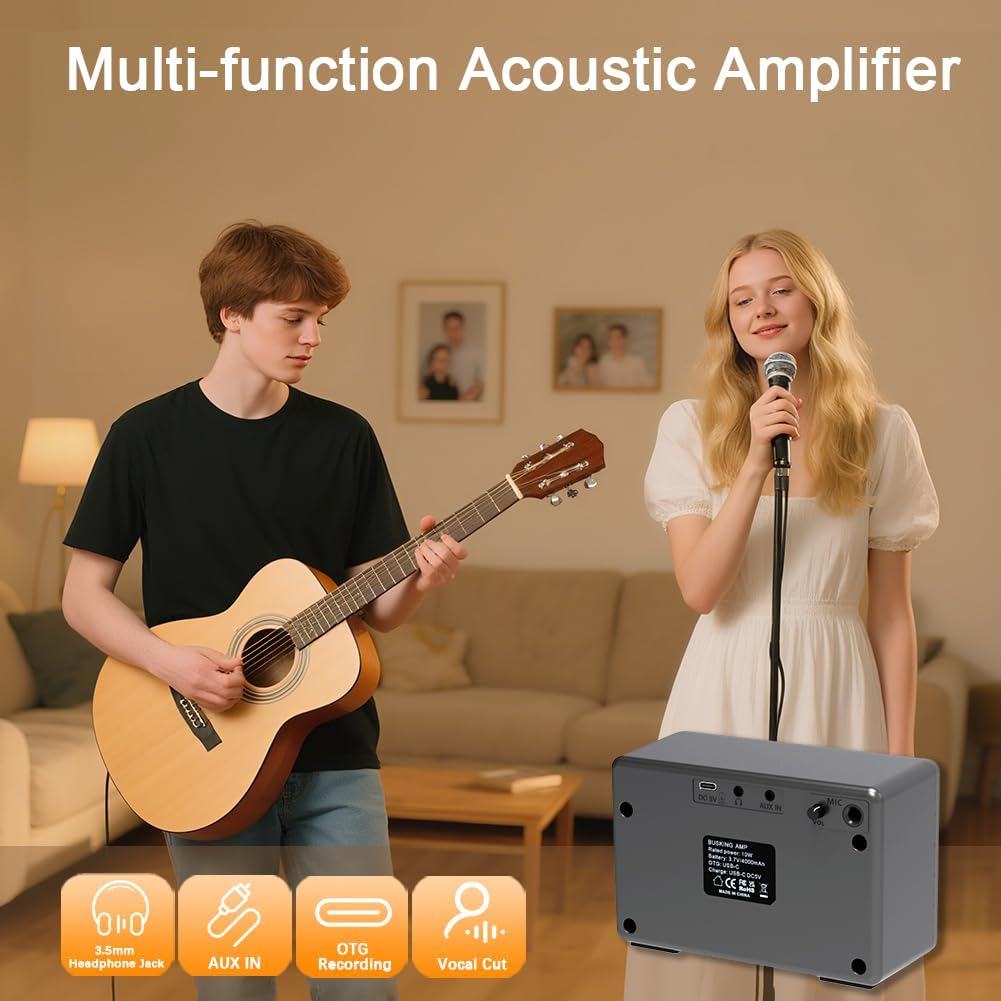
Image: A group of people enjoying music, with the Yuer BA-10Pro amplifier in the scene, accompanied by icons representing its multi-functional capabilities like headphone jack, AUX input, OTG recording, and vocal cut.
Maintenance
- Cleaning: Wipe the amplifier with a soft, dry cloth. Do not use abrasive cleaners or solvents.
- Storage: Store the amplifier in a cool, dry place away from direct sunlight and extreme temperatures.
- Battery Care: To prolong battery life, avoid fully discharging the battery frequently. If storing for an extended period, charge the battery to about 50% every few months.
- Protection: Use the included carry bag for transport to protect the amplifier from dust and minor impacts.
Troubleshooting
| Problem | Possible Cause | Solution |
|---|---|---|
| No sound from amplifier. | Amplifier not powered on; volume too low; instrument/mic not connected properly; low battery. | Long press POWER button; increase VOLUME/MIC VOL; check cable connections; charge the amplifier. |
| Bluetooth not connecting. | Bluetooth not enabled on device; amp not in pairing mode; too far from device. | Ensure Bluetooth is on; restart amp and device; move device closer to amp. |
| OTG recording not working. | Incorrect USB-C cable used; device not compatible with OTG; recording software issue. | Use the black USB-C to USB-C cable; check device's OTG compatibility; ensure recording software is configured correctly. |
| Sound is distorted or unclear. | Volume too high; TONE setting incorrect; faulty cable/instrument. | Reduce VOLUME; adjust TONE knob; try different cables/instruments to isolate the issue. |
| Battery drains quickly. | High volume usage; old battery; frequent charging/discharging cycles. | Reduce volume; ensure proper charging habits; contact support if battery life significantly degrades. |
Specifications
| Feature | Detail |
|---|---|
| Model | BA-10Pro |
| Output Wattage | 10 Watts |
| Item Weight | 1.61 pounds (approx. 0.73 kg) |
| Product Dimensions | 5.9 x 2.55 x 3.89 inches (approx. 15 x 6.5 x 9.9 cm) |
| Power Source | Battery Powered (4000mAh rechargeable battery) |
| Material Type | Acrylonitrile Butadiene Styrene (ABS) |
| Connector Type | 6.35mm Jack, 5.3 Wireless Connectivity (Bluetooth), USB-C |
| Compatible Devices | Guitar, Microphones, Phone, iPad, Laptops |
| Color | Grey Shell and Silver Grille |
What's in the Box
- BA-10Pro Guitar Amp x1
- White USB-A to Type-C Charging Cable x1
- Black OTG Cable USB-C to USB-C x1
- Product Manual x1
- Carry Bag x1
Image: The Yuer BA-10Pro amplifier displayed alongside its complete set of accessories, including the charging cable, OTG cable, product manual, and carry bag.
Warranty and Support
YUER provides a 12-Month Product Guarantee for the BA-10Pro amplifier. Additionally, the product is covered by Amazon's 30-Day Easy Return Policy. For any issues or support inquiries after receiving your BA-10Pro, please reach out to YUER customer service. We are committed to providing 24/7 customer service to ensure your satisfaction.
For further assistance, please visit the official YUER store or contact the seller directly through the platform where you purchased the product.
Related documentsBA-10Pro


Ask a question about this manual
Ask about setup, troubleshooting, compatibility, parts, safety, or missing instructions. Manuals+ will review the question and use this page’s manual context to help answer it.