Introduction
This manual provides essential instructions for the setup, operation, maintenance, and troubleshooting of your PAPIFEED Automatic Pet Feeder and Water Fountain. This integrated system is designed to provide a convenient and reliable feeding and hydration solution for your pets, ensuring they have access to fresh food and clean water throughout the day.
The system includes a 3-liter automatic feeder with smart app control and a 3-liter water fountain featuring a triple filtration system. It is suitable for cats and small dogs.
Package Contents
Before proceeding, please ensure all components are present:
- Automatic Pet Feeder Unit (3L capacity)
- Stainless Steel Food Bowl
- Water Fountain Unit (3L capacity)
- Water Fountain Pump
- Triple Filtration System for Water Fountain
- DC 5V Power Adapter (for feeder)
- USB Power Cable (for water fountain)
- User Manual
- Cleaning Brush
- Extra Spout for Water Fountain (optional)
- Silica Gel Desiccant (for feeder lid)
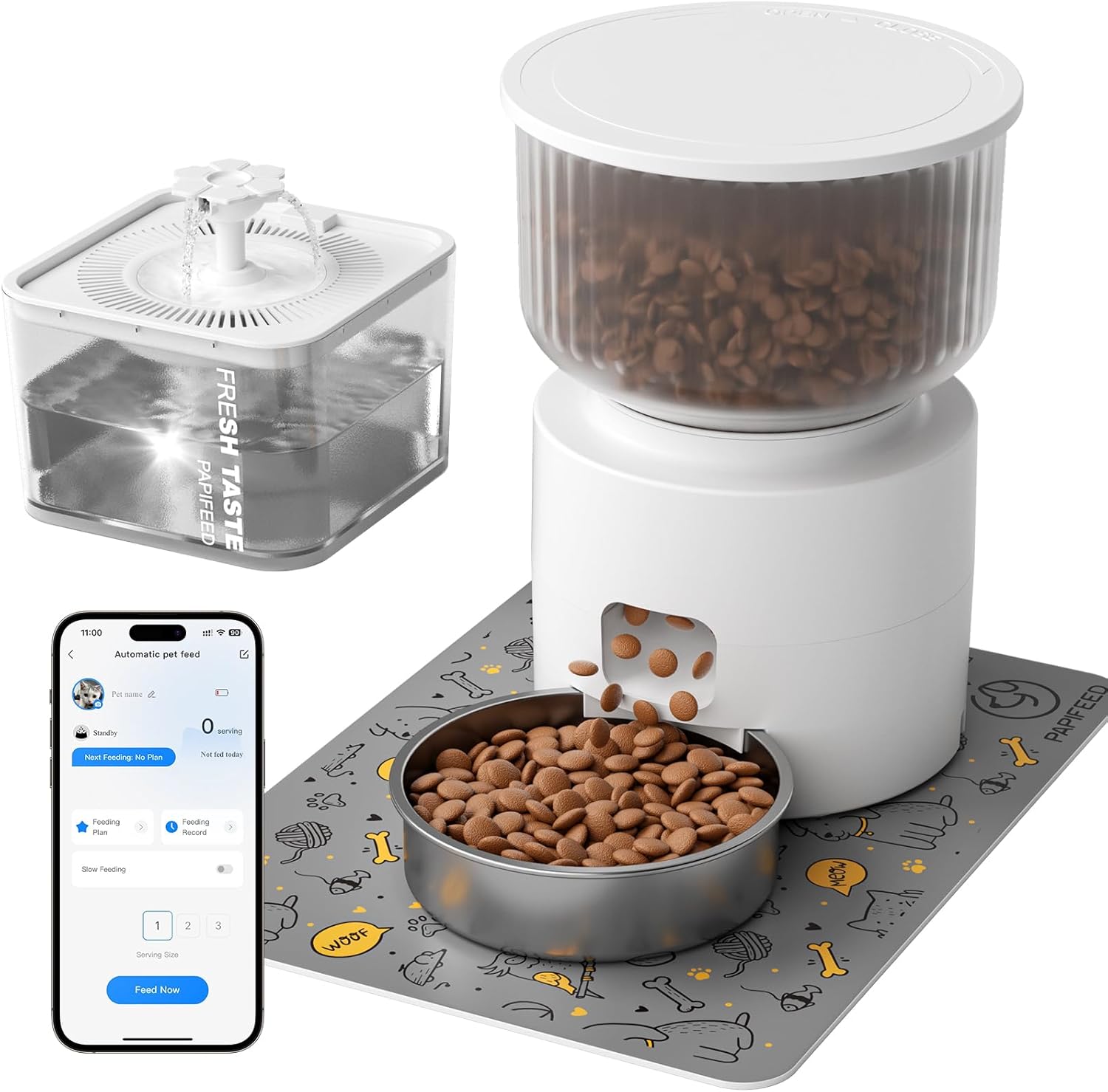
Image: All components of the PAPIFEED Automatic Pet Feeder and Water Fountain system.
Setup Instructions
1. Automatic Pet Feeder Setup
- Prepare the Feeder: Turn the lid counter-clockwise to remove it. Remove any internal accessories.
- Assemble Food Container: Align the food container with the base and rotate to secure it.
- Add Food: Fill the transparent food tank with dry pet food (0.2–0.39 inch / 5–10mm kibble size recommended). Ensure the desiccant packet is placed in the lid to maintain food freshness.
- Secure Lid: Rotate and close the lid securely.
- Place Bowl: Slide the stainless steel bowl into the designated slot at the base of the feeder.
- Power On: Plug the DC 5V power adapter into the feeder and a wall outlet. For backup, insert 4xAA batteries (not included) into the battery compartment at the bottom.

Image: Visual guide for assembling the automatic pet feeder.
2. Water Fountain Setup
- Install Pump: Place the water pump into the water tank.
- Fill Water Tank: Fill the water tank with clean water up to the maximum fill line.
- Insert Filter: Remove the cartridge frame, insert the triple filtration cartridge, and place the frame back.
- Attach Showerhead: Install the water storage tray and attach the desired showerhead/spout.
- Power On: Place the assembled water fountain on a level surface and connect the DC 5V power adapter.

Image: Visual guide for assembling the water fountain.
Video: A detailed unboxing and setup guide for the PAPIFEED Food and Water System.
Operating Instructions
Smart APP Control (2.4GHz WiFi)
The PAPIFEED Automatic Pet Feeder is controlled via the "Smartlyn" APP, allowing for remote management of your pet's feeding schedule. Ensure your device is connected to a 2.4GHz WiFi network (5G is not supported).
- Download App: Search for "Smartlyn" in your mobile app store or scan the QR code provided in the quick start guide.
- Connect Device:
- Ensure Bluetooth and WLAN are enabled on your mobile phone.
- Power on the feeder. Press the "+" key on the feeder until the blue light flashes, indicating pairing mode.
- Open the "Smartlyn" app, tap the "+" icon in the upper right corner to add the device.
- Follow the in-app prompts to complete the connection.
- Create Feeding Plan:
- Within the app, you can schedule up to 12 meals per day.
- Each meal can be set to dispense 1–10 portions (approximately 0.35 oz per portion).
- Adjust meal times and portion sizes to meet your pet's specific dietary needs.
- Monitor feeding records and adjust schedules remotely.
- Manual Feeding: Use the "Feed Now" option in the app or the manual feed button on the feeder for immediate dispensing.
- Slow Feed Function: Activate the slow feed mode via the app to help pets pace themselves, promoting better digestion.

Image: The automatic pet feeder with a smartphone displaying the "Smartlyn" app interface for remote control.
Video: A review highlighting the features and benefits of the PAPIFEED Food & Water Dispenser Set, including app control.
Maintenance
Feeder Cleaning
- The stainless steel bowl, grain bin, and removable rotor are detachable for easy cleaning.
- Wash these components with mild soap and water. Ensure they are completely dry before reassembly.
- The main base unit of the feeder is not washable. Wipe it clean with a damp cloth.

Image: Detachable components of the feeder, including the stainless steel bowl and food container, for easy cleaning.
Water Fountain Cleaning
- Regularly clean the water tank, pump, and filter components to ensure fresh water for your pet.
- The triple filtration system should be replaced periodically according to usage.
- Use the provided cleaning brush to clean the water pump every 1 to 2 weeks. Remove the pump cover, outer cover, and impeller for thorough cleaning.

Image: Step-by-step guide on how to clean the water pump for the fountain.
Troubleshooting
- Feeder Not Dispensing:
- Check if the feeder is powered on and connected to a power source.
- Ensure the food tank is not empty and kibble is not jammed in the dispenser.
- Verify the feeding schedule in the app is correctly set and enabled.
- Water Fountain Not Flowing:
- Check if the fountain is plugged in and receiving power.
- Ensure the water level is sufficient.
- Clean the water pump and filter to remove any blockages or debris.
- App Connectivity Issues:
- Confirm your mobile device is connected to a 2.4GHz WiFi network.
- Restart the feeder and your mobile device.
- Ensure Bluetooth is enabled on your phone during the initial pairing process.
- Power Outage: The feeder has a dual power supply. If the main power is lost, the 4xAA backup batteries (not included) will ensure continued scheduled feeding for approximately 15 hours.
Specifications
| Brand | PAPIFEED |
| Model | B0FJKVC2SQ |
| Feeder Capacity | 3 Liters / 12 Cups |
| Water Fountain Capacity | 3 Liters |
| Connectivity | 2.4GHz WiFi (Bluetooth for initial setup) |
| Power Supply | DC 5V Adapter (Feeder & Fountain), 4xAA Batteries (Feeder backup, not included) |
| Material | Polyester (for some internal components), Stainless Steel (bowl) |
| Color | White |
| Item Weight | 4.6 pounds |
| Product Dimensions | 6 x 11 x 6 inches |
| Compatible Kibble Size | 0.2–0.39 inches (5–10mm) |
Warranty and Support
This PAPIFEED product comes with a 2-Year Manufacturer Warranty.
For further assistance, troubleshooting, or to explore other PAPIFEED products, please visit the Official PAPIFEED Store.


