
1. Product Overview
The PAPIFEED Automatic Pet Feeder and Water Fountain combo provides a convenient and organized solution for daily pet care. This set ensures your pet has access to fresh food and clean water, ideal for busy households or short trips. The feeder features smart APP control via 2.4GHz WiFi for precise feeding schedules, while the water fountain offers triple filtration for clean, fresh water.

Image: The PAPIFEED Automatic Pet Feeder and Water Fountain set, showing the feeder dispensing kibble into a stainless steel bowl, the water fountain with flowing water, and a smartphone displaying the control app interface.
2. Safety Instructions
- Ensure the device is placed on a stable, level surface to prevent tipping.
- Use only the provided power adapters for both the feeder and water fountain.
- Keep the feeder base dry. Do not wash the feeder base with water.
- Regularly clean all detachable parts of both devices to maintain hygiene.
- Keep out of reach of children and pets that may chew on cords.
- Only use dry pet food with the automatic feeder. Do not use canned, wet, or moist food.
- Recommended kibble size is 0.2–0.39 inches (5–10mm) to prevent clogging.
3. Package Contents
Please verify that all items are present in the package:
- 3L Automatic Pet Feeder with APP control
- 3L Pet Water Fountain
- Stainless Steel Feeding Bowl
- USB Power Cable (for feeder)
- USB Power Cable with Pump (for water fountain)
- Water Fountain Filter (pre-installed)
- Cleaning Brush
- User Manuals (for feeder and fountain)

Image: A cat eating from the PAPIFEED Automatic Pet Feeder, with the water fountain visible next to it. This image illustrates the complete set in use.
4. Setup Instructions
4.1. Automatic Pet Feeder Setup
- Unpack Components: Turn the food container counterclockwise to remove the cover. Remove all internal accessories.
- Assemble Feeder: Align the food container with the base and rotate clockwise to secure it.
- Add Desiccant: Open the desiccant compartment on the lid and insert the desiccant packet to keep food fresh. Close the compartment securely.
- Fill Food Container: Add dry pet food (0.2–0.39 inch / 5–10mm kibble recommended) into the transparent container.
- Secure Lid: Rotate and close the lid securely to maintain food freshness.
- Place Bowl: Position the stainless steel feeding bowl in front of the dispenser opening.
- Power On: Plug the DC 5V power adapter into the feeder and a wall outlet. For battery backup, install 4x D-cell batteries (not included) in the bottom compartment.

Image: A six-step visual guide demonstrating the assembly of the automatic pet feeder, from unpacking to plugging in the power.
4.2. Water Fountain Setup
- Install Pump: Place the water pump into the water tank, ensuring the USB power cord is routed through the designated groove.
- Fill Water Tank: Fill the water tank with clean water up to the MAX fill line.
- Insert Filter: Remove the cartridge frame, insert the filter cartridge, and place the frame back into the water tank. (Pre-soak and rinse the filter before first use).
- Attach Showerhead: Install the water storage tray and attach the showerhead/spout onto the pump.
- Power On: Place the assembled water fountain on a level surface and connect the DC 5V power adapter to a wall outlet.

Image: A five-step visual guide showing how to install the pump, fill the water tank, insert the filter, attach the showerhead, and power on the water fountain.
5. Operating Instructions
5.1. Smart APP Control (2.4GHz WiFi)
The PAPIFEED feeder can be controlled remotely via the 'Smartlyn' APP. Ensure your device is connected to a 2.4GHz WiFi network (5G networks are not supported).
- Download App: Scan the QR code in the user manual or search for 'Smartlyn' in your app store (http://www.chuangzhile.com/smartlyn/downloadApp.php).
- Enable Bluetooth & WLAN: On your mobile phone, turn on Bluetooth and WLAN. Keep your phone within 1 meter of the feeder.
- Enter Pairing Mode: After powering on the feeder, long-press the '+' button for 10 seconds until the blue indicator light flashes.
- Add Device: Open the 'Smartlyn' APP, tap the '+' icon in the upper right corner to add the device. Follow the on-screen prompts to complete the connection.
- Set Feeding Plan: Once connected, you can create up to 12 meals per day, each offering 1–10 portions (approx. 0.35 oz per portion). Adjust schedules, monitor feeding records, and enable slow feeding mode.

Image: A visual guide illustrating the steps to connect the pet feeder to the 'Smartlyn' mobile application via Bluetooth and Wi-Fi.
5.2. Manual Feeding
To manually dispense food, short-press the '+' button on the back of the feeder. Each short press will dispense one portion of food.
5.3. Official Product Videos
Video: This video provides a detailed guide on how to use the PAPIFEED Automatic Pet Feeder and Water Fountain, covering assembly, app connection, and basic operation.
Video: A demonstration and setup guide for the PAPIFEED Automatic Pet Feeder, including app configuration and assembly steps, highlighting its ease of use.
6. Maintenance
6.1. Cleaning the Feeder
- The stainless steel bowl, food container, and rotor are detachable and washable.
- The stainless steel bowl is dishwasher safe.
- Do not wash the feeder base. Wipe it with a dry cloth.
- Replace the desiccant packet in the lid regularly (e.g., monthly) to ensure food freshness.
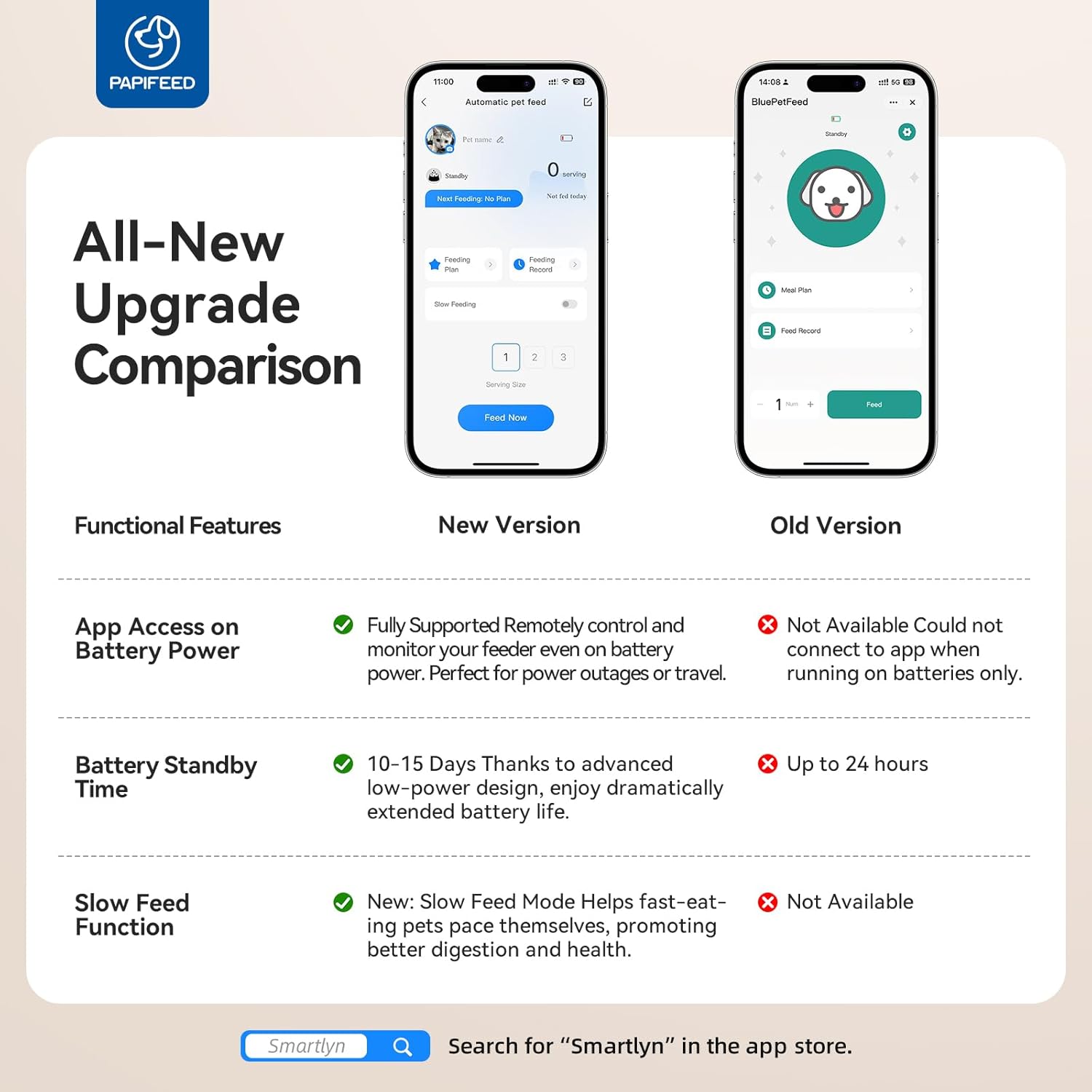
Image: Various detachable components of the pet feeder and water fountain are shown, emphasizing their easy-to-clean design. A note indicates that the main base is not washable.
6.2. Cleaning the Water Fountain
- Disassemble the water fountain by removing the showerhead, water storage tray, filter, and pump.
- Wash all detachable parts (water tank, tray, showerhead) with mild soap and water.
- Clean the pump: Remove the pump cover and outer cover. Use tweezers to take out the impeller. Clean all parts with the provided brush. Reassemble the pump.
- Rinse the filter thoroughly before reinserting.
- It is recommended to clean the pump every 1 to 2 weeks to prevent mineral buildup and ensure proper water flow.

Image: A three-step visual guide demonstrating how to disassemble and clean the water pump, including removing the cover, taking out the impeller, and cleaning with a brush.
6.3. Filter Replacement
- The water fountain filter should be replaced every 2-4 weeks, depending on usage and water quality.
- Always pre-soak new filters in clean water for 5-10 minutes before use.
7. Troubleshooting
| Problem | Possible Cause | Solution |
|---|---|---|
| Feeder not dispensing food. | Food container empty; kibble size too large; dispenser clogged; power issue. | Refill food; check kibble size (0.2-0.39 inch); clear any clogs; check power connection/batteries. |
| Water fountain not flowing. | Water level too low; pump clogged; power issue. | Refill water; clean pump and filter; check power connection. |
| App not connecting to feeder. | Incorrect WiFi (5G); feeder not in pairing mode; weak signal. | Ensure 2.4GHz WiFi; long-press '+' button to enter pairing mode (flashing blue light); move closer to router. |
| Food not fresh. | Desiccant expired; lid not sealed. | Replace desiccant; ensure lid is rotated and securely closed. |
8. Specifications
| Feature | Detail |
|---|---|
| Brand | PAPIFEED |
| Model Number | B0FJKP8WBN |
| Feeder Capacity | 3L / 12 Cups |
| Water Fountain Capacity | 3L |
| Connectivity | 2.4G WiFi (Not support 5G) |
| Feeding Schedule | Up to 12 meals/day, 1-10 portions/meal |
| Portion Size | Approx. 0.35 oz per portion |
| Power Supply | DC 5V adapter, 4x D-cell batteries (backup, not included) |
| Material | Polyester (Feeder), Stainless Steel (Bowl) |
| Color | Black |
| Item Weight | 4.44 pounds |
| Product Dimensions | 6 x 11 x 6 inches |
| Care Instructions | Dishwasher Safe (Bowl) |
9. Warranty and Support
The PAPIFEED Automatic Pet Feeder and Water Fountain comes with a 2-Year Manufacturer Warranty. For any product inquiries, technical support, or warranty claims, please contact PAPIFEED customer service through the retailer where the product was purchased.