
JBL flip7megen
JBL Flip 7 Portable Bluetooth Speaker User Manual
Model: flip7megen
Introduction
The JBL Flip 7 is a portable Bluetooth speaker designed to deliver powerful sound in a compact, durable form factor. Featuring IP68 waterproof, dustproof, and drop-proof ratings, it is built for various environments. With AI Sound Boost and up to 16 hours of playtime, the Flip 7 enhances your audio experience. This manual provides essential information for setting up, operating, maintaining, and troubleshooting your JBL Flip 7 speaker.
What's in the Box
Upon unboxing your JBL Flip 7, please verify that all the following items are included:
- JBL Flip 7 Bluetooth Speaker
- Megen Protection Case
- Quick Start Guide
- Please note: The JBL Flip 7 does NOT include a USB-C charging cable in the box. It is compatible with any standard USB-C cable (sold separately).

Image: JBL Flip 7 speaker shown alongside its Megen protection case, a carabiner, and a water splash graphic, illustrating its waterproof capabilities.

Image: An open Megen hardshell protection case, featuring a mesh pocket and elastic strap, designed to securely hold the JBL Flip 7 speaker.
Setup
Charging the Speaker
Before first use, fully charge your JBL Flip 7. Connect a standard USB-C charging cable (not included) to the speaker's charging port and the other end to a compatible USB power adapter (e.g., a wall charger or computer USB port). The charging indicator light will show the charging status.
Powering On/Off
To power on the speaker, press the Power button located on the side of the device. You will hear an audible tone, and the indicator light will illuminate. To power off, press and hold the Power button again until the speaker shuts down.
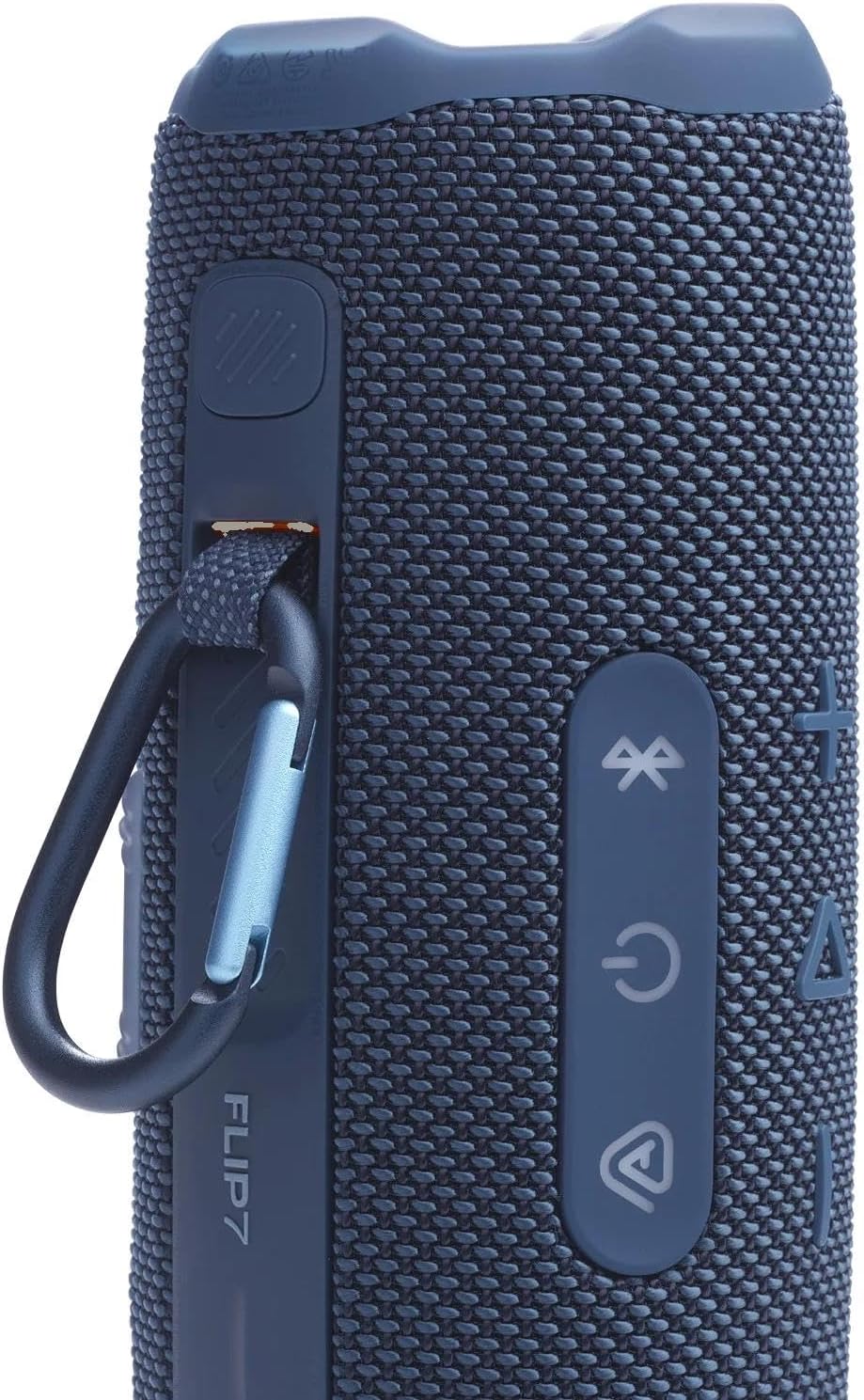
Image: Close-up side view of the JBL Flip 7 speaker, showing the power button, Bluetooth pairing button, volume controls, and a carabiner attached to the speaker's loop.
Bluetooth Pairing
- Turn on your JBL Flip 7 speaker.
- Press the Bluetooth button on the speaker. The indicator light will flash, indicating it is in pairing mode.
- On your mobile device (smartphone, tablet, computer), go to the Bluetooth settings.
- Select "JBL Flip 7" from the list of available devices.
- Once connected, the Bluetooth indicator light on the speaker will turn solid, and you will hear a confirmation tone.
Auracast Connection
The JBL Flip 7 supports Auracast, allowing you to connect with other Auracast-enabled JBL speakers to create a multi-speaker audio experience. Refer to the Quick Start Guide for detailed instructions on initiating an Auracast broadcast or joining an existing one.
Operating Instructions
Basic Controls
- Power Button: Press to turn on/off.
- Bluetooth Button: Press to enter pairing mode.
- Volume Up (+): Press to increase volume.
- Volume Down (-): Press to decrease volume.
- Play/Pause Button: Press once to play or pause audio. Press twice to skip to the next track.

Image: Side view of the JBL Flip 7 speaker, displaying the control panel with power, Bluetooth, volume, and play/pause buttons, along with the integrated carrying strap.
AI Sound Boost
The JBL Flip 7 features AI Sound Boost technology, which intelligently optimizes audio output for a richer and more dynamic sound experience. This feature operates automatically to enhance clarity and bass.
Playtime Boost
The speaker offers up to 16 hours of playtime. For extended listening, the Playtime Boost feature can provide an additional 2 hours of battery life when needed.
Waterproof, Dustproof, and Drop-Proof (IP68)
The JBL Flip 7 is rated IP68, meaning it is fully protected against dust ingress and can withstand immersion in water up to 1.5 meters for up to 30 minutes. Its durable fabric material and rugged rubber housing provide protection against drops and impacts, making it suitable for outdoor adventures.
Maintenance
Cleaning
To clean your JBL Flip 7, use a soft, damp cloth. Avoid using abrasive cleaners, solvents, or harsh chemicals, as these can damage the speaker's finish or internal components. Ensure the charging port is dry before charging.
Storage
When not in use for extended periods, store the speaker in a cool, dry place, away from direct sunlight and extreme temperatures. It is recommended to store the speaker in its Megen protection case to prevent dust accumulation and physical damage.
Battery Care
To prolong battery life, avoid fully discharging the speaker frequently. Charge the speaker regularly, even if not in constant use. Do not expose the battery to extreme heat or cold.
Megen Protection Case Care
The Megen hardshell case can be wiped clean with a damp cloth. Ensure it is dry before storing the speaker inside.
Troubleshooting
| Problem | Possible Cause | Solution |
|---|---|---|
| Speaker does not turn on | Low battery; Power button not pressed correctly | Charge the speaker; Press and hold the Power button firmly. |
| No sound | Volume too low; Not connected via Bluetooth; Audio source issue | Increase speaker and device volume; Re-pair Bluetooth; Check audio on source device. |
| Bluetooth pairing fails | Speaker not in pairing mode; Device too far; Interference | Ensure speaker is in pairing mode (flashing light); Move device closer; Turn off other Bluetooth devices. |
| Charging issue | Cable or adapter faulty; Port dirty | Try a different USB-C cable and adapter; Gently clean the charging port. |
| Sound distortion | Volume too high; Weak Bluetooth signal | Lower volume; Move device closer to speaker. |
Specifications
| Brand | JBL |
| Model Number | flip7megen |
| Product Dimensions | 7 x 4 x 4 inches |
| Item Weight | 2.29 pounds |
| Batteries | 1 Nonstandard Battery (included) |
| Special Feature | Dust Resistant, Waterproof (IP68) |
| Color | Blue |
| UPC | 644625528619 |
Warranty and Support
For warranty information and customer support, please refer to the official JBL website or contact their customer service directly. Keep your purchase receipt as proof of purchase for any warranty claims.
Related documentsflip7megen


Ask a question about this manual
Ask about setup, troubleshooting, compatibility, parts, safety, or missing instructions. Manuals+ will review the question and use this page’s manual context to help answer it.