
Introduction
This manual provides essential information for the safe and efficient operation of your EMSON STARTASTIC Solar Wireless Motion Holiday Projector. Please read these instructions carefully before use and retain for future reference. This projector is designed to create dynamic light displays for various occasions, utilizing solar power for convenience and portability.
Product Overview
The STARTASTIC Solar Wireless Motion Holiday Projector offers a hassle-free way to illuminate your home or outdoor space with festive lights. It features solar charging, remote control operation, and a durable, weatherproof design.
What's in the Box:
- 1x Solar Startastic Light Projector
- 1x Grounding Stake
- 1x Remote Control (batteries not included)
- 1x USB Charging Cable

Image: The STARTASTIC projector with its solar panel, ground stake, and remote control.
Features
- Solar Powered: Charges during the day using sunlight, eliminating the need for external wiring.
- Wireless Installation: Easy setup without tangled cords or outlets.
- Remote Control: Conveniently switch between 5 laser modes, adjust speed, and set timers from a distance.
- Waterproof Design: Built with durable ABS material to withstand various outdoor weather conditions (rain, snow).
- Wide Coverage: Projects vibrant red and green laser patterns covering up to 600 square feet.
- Auto-On/Off: Automatically activates at dusk and deactivates at dawn.
- USB Charging Option: For quick indoor charging or during periods of low sunlight.

Image: Key features of the STARTASTIC projector, including multiple light modes, IP65 waterproof rating, solar power, 600 sq ft projection area, and wireless operation.
Setup
- Assemble the Projector: Attach the projector head to the ground stake. Ensure it is securely fastened.
- Place the Stake in Ground: Select a location with direct sunlight exposure for the solar panel and where the projected lights will cover your desired area. Firmly insert the ground stake into the soil. Ensure the solar panel is facing upwards towards the sun.
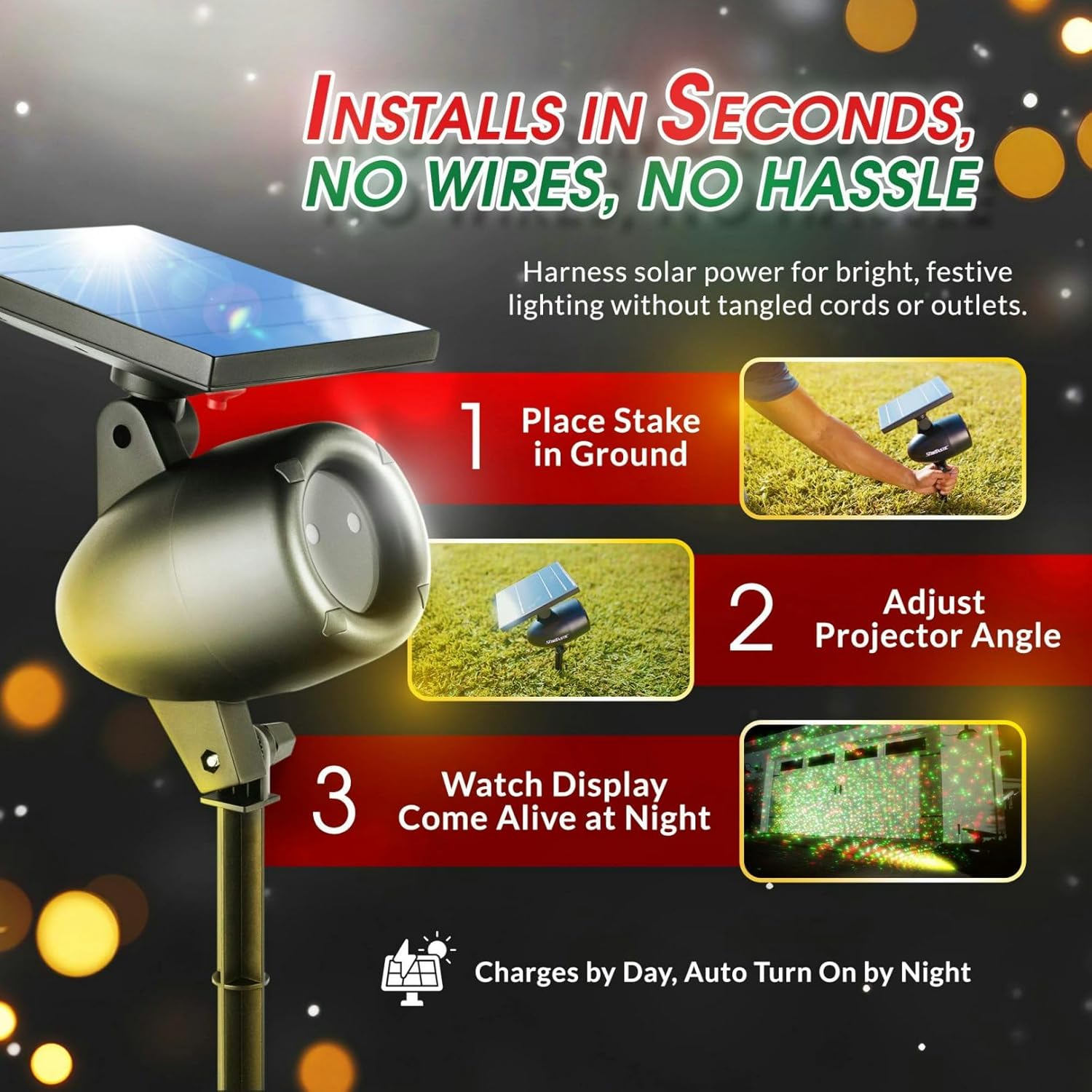
Image: A hand inserting the projector's ground stake into the lawn.
- Adjust Projector Angle: Angle the projector head to direct the laser lights onto your desired surface (e.g., house, trees, wall). The angle can be adjusted for optimal coverage.

Image: A hand adjusting the angle of the projector to aim the lights.
- Initial Charge: For first-time use or after prolonged storage, it is recommended to fully charge the unit. Allow the solar panel to charge in direct sunlight for at least 8-10 hours. Alternatively, use the provided USB cable for a quicker indoor charge.

Image: The projector being charged indoors via a USB-C cable.
Video: An overview of the Startastic Solar Powered Projector, demonstrating its features and ease of setup.
Operating Instructions
The projector is designed for automatic operation, turning on at dusk and off at dawn, provided it has sufficient charge. Use the remote control for manual adjustments.
Remote Control Functions:
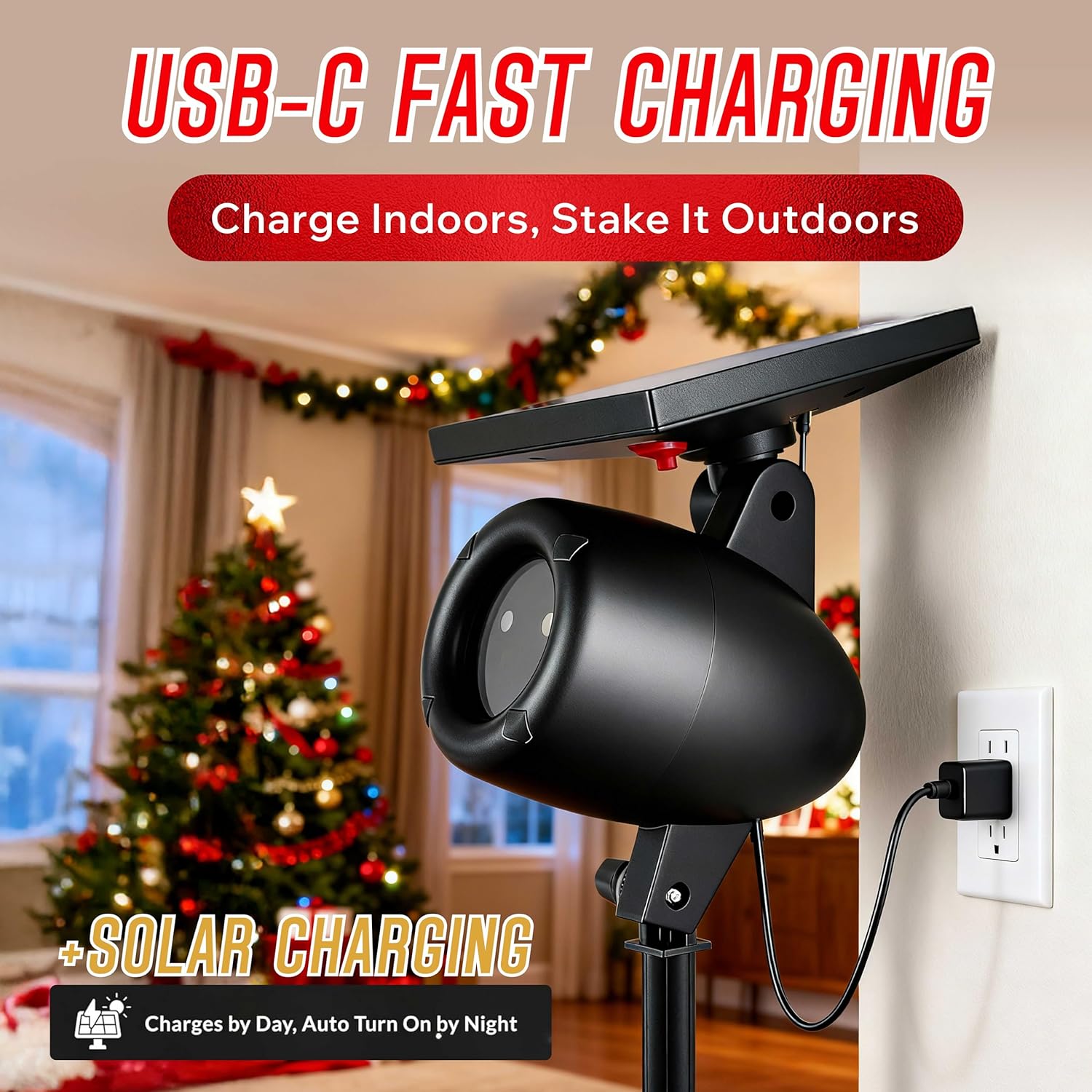
Image: The remote control for the STARTASTIC projector, showing buttons for power, mode, action, speed, and timer settings.
- On/Off: Press to manually turn the projector on or off.
- Mode: Cycles through the 5 available laser light patterns (e.g., static, moving, flashing).
- Action: Adjusts the movement or animation of the laser patterns.
- Speed (+/-): Increases or decreases the speed of the moving patterns.
- Timer (2H, 4H, 6H): Sets the projector to operate for 2, 4, or 6 hours before automatically turning off.
- Reset: Resets the projector to its default settings.
Note: Ensure the remote control has 2 AAA batteries installed (not included) and is pointed towards the projector for effective operation.
Maintenance
- Cleaning the Solar Panel: Regularly wipe the solar panel with a soft, damp cloth to remove dust, dirt, or debris. A clean panel ensures optimal charging efficiency.
- Lens Cleaning: If the projection appears dim or blurry, gently clean the projector lens with a soft, lint-free cloth.
- Seasonal Storage: If storing the projector for an extended period, ensure it is fully charged before storage. Store in a cool, dry place.
- Weather Protection: While the unit is weatherproof, extreme weather conditions (e.g., heavy snow accumulation on the solar panel) may affect performance. Clear snow from the solar panel as needed.
Troubleshooting
| Problem | Possible Cause | Solution |
|---|---|---|
| Projector does not turn on at night. | Insufficient solar charge. | Ensure the solar panel receives 8-10 hours of direct sunlight daily. Use USB charging if sunlight is consistently low. |
| Lights are dim or only last a short time. | Low battery charge or dirty solar panel. | Clean the solar panel. Allow for a full day of charging. Consider USB charging for a boost. |
| Remote control is not working. | Dead batteries or obstruction. | Replace remote control batteries (2 AAA). Ensure no obstructions between the remote and the projector. |
| Projector does not turn off at dawn. | Sensor obstruction or malfunction. | Check if anything is blocking the light sensor on the solar panel. Ensure the area around the sensor is clean. |
Specifications
| Specification | Detail |
|---|---|
| Brand | EMSON |
| Model Number | 6032 |
| Power Source | Solar Powered |
| Light Source Type | Light Emitting Diode (LED) |
| Color | Green and Red |
| Material | Acrylonitrile Butadiene Styrene (ABS) |
| Voltage | 5 Volts |
| Maximum Coverage Area | Up to 600 sq ft |
| Mounting Type | Surface Mount (Ground Stake) |
| Product Dimensions | 5"L x 3"W x 12"H |
| Item Weight | 15.9 ounces (450 Grams) |
| UPC | 080313060328 |
Warranty and Support
For warranty information, technical support, or service inquiries, please contact EMSON customer service directly. Details regarding specific warranty periods and coverage can typically be found on the product packaging or the manufacturer's official website. Please retain your proof of purchase for any warranty claims.