
1. Introduction
The RELX Mars Pro Full Body Massage Chair is designed to provide a comprehensive and customizable massage experience. Featuring advanced massage rollers that mimic human touch, an extended SL-track, Zero Gravity recline, full-body airbag massage, heating functions, foot rollers, yoga stretching, and AI voice control, this chair offers a wide range of therapeutic benefits.
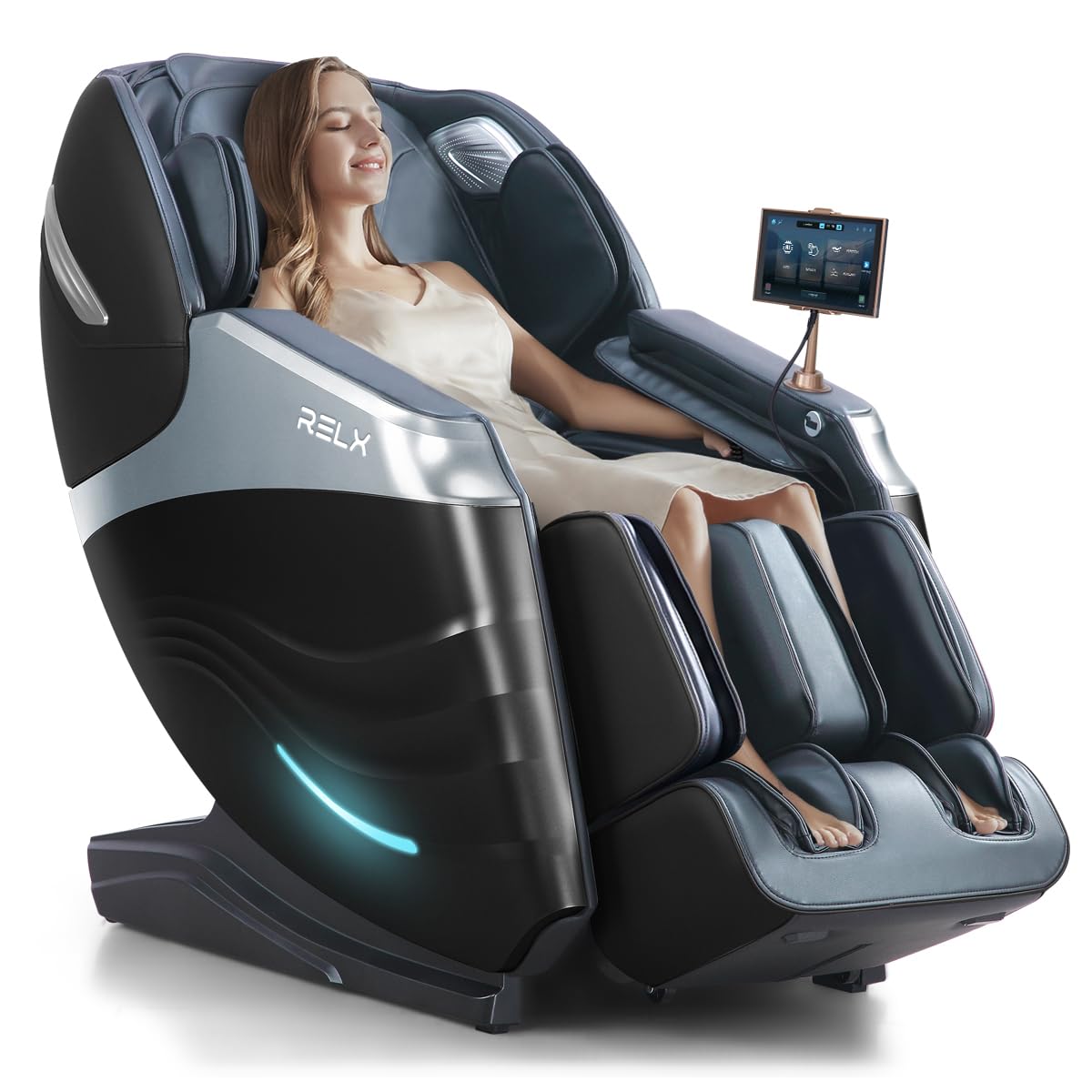
Figure 1: The RELX Mars Pro Full Body Massage Chair.
2. Safety Information
Please read and understand all safety warnings before operating the massage chair. Failure to do so may result in injury or damage to the product.
- This product is heavy and requires careful handling during assembly. It is recommended that two people maneuver the chair.
- Intended for adult use in indoor settings only.
- Keep away from water and wet surfaces.
- Place on a stable, level surface to prevent tipping over.
- Do not allow children to use without adult supervision.
- The product contains electronic components that may pose an electrical hazard if mishandled.
- Maximum weight recommendation: 330 pounds.
3. Package Contents
Upon unboxing, ensure all components are present:
- Main Massage Chair Unit
- Footrest
- User Manual
- Power Cord
- Hand Controller Bracket
4. Setup and Installation
The RELX Mars Pro massage chair comes in two main pieces: the back piece and the footrest. Assembly is straightforward but requires two people due to the weight of the unit.
4.1 Unboxing
- Prepare an unboxing tool, such as a pair of scissors.
- Use the scissors to cut the packing tape securing the outer carton.
- With two people, carefully lift and remove the outer carton from the massage chair.
- Remove the wooden cover, protective foam, and air cushion from inside the carton.
- Lift out the footrest from the packaging.
- Take out the accessory pack.
- Remove the protective packaging bag from the main massage chair unit.
- Peel off all protective films from the chair.
- With two people, carefully move the massage chair to its desired location.
Video 1: RELX Mars Pro Massage Chair Unboxing & Setup. This video demonstrates the unboxing and initial setup steps for the massage chair.
4.2 Footrest Installation
- Connect the wiring harness and air hoses from the footrest to the main unit securely.
- Lift the footrest and place it onto the mounting base of the chair.
- Align and fit the mounting cover into position.
- Install one fixing screw on each side of the footrest mounting base to secure it.
- Secure the leather cover using the hook-and-loop fasteners.
4.3 Hand Controller Bracket Installation
- Insert the hand controller bracket into the designated slot on the armrest.
- Turn the knob clockwise to tighten the bracket securely.
- Open the protective cover and remove the hand controller.
- Attach the hand controller to the bracket.
4.4 Power Connection
- Connect the power cord to the chair's power input.
- Plug the power cord into a suitable electrical outlet.
- Turn on the power switch located near the power input.
5. Operating Instructions
The RELX Mars Pro massage chair offers a variety of massage modes and customizable settings for a personalized experience.
5.1 Control Panel Overview

Figure 2: Detachable touchscreen controller and AI voice control features.
The chair is equipped with a detachable touchscreen controller for easy access to all functions. It also features AI voice control for hands-free operation.
5.2 Auto Massage Modes
The chair includes 20 auto massage modes designed for various needs, such as comfort, relaxation, stretching, and specific body area relief.

Figure 3: Overview of auto and manual massage programs.
To start an auto massage:
- Turn on the chair using the power button on the controller.
- Select an auto mode from the touchscreen display. The chair may perform an optional body scan to adjust massage positions.
- Adjust shoulder position detection if needed for optimal fit.
5.3 Manual Massage Modes
Customize your massage with 3 manual modes and various techniques:
- Massage Techniques: Shiatsu, Knead, Beat, Knead Pat, Knock.
- Massage Areas: Upper body, Lower body, Full body, Fixed, Partial.
- Adjustable Positions: Back Up/Down, Leg Up/Down, Linkage Up/Down.
- Adjustable Massage Width: 2.3"-8.2" with 5 levels.
5.4 Zero Gravity Recline
The Zero Gravity feature allows for customizable positions to reduce spinal compression, ease heart pressure, and enhance circulation. Choose from Initial, Comfort, or Deep Zero Gravity settings.
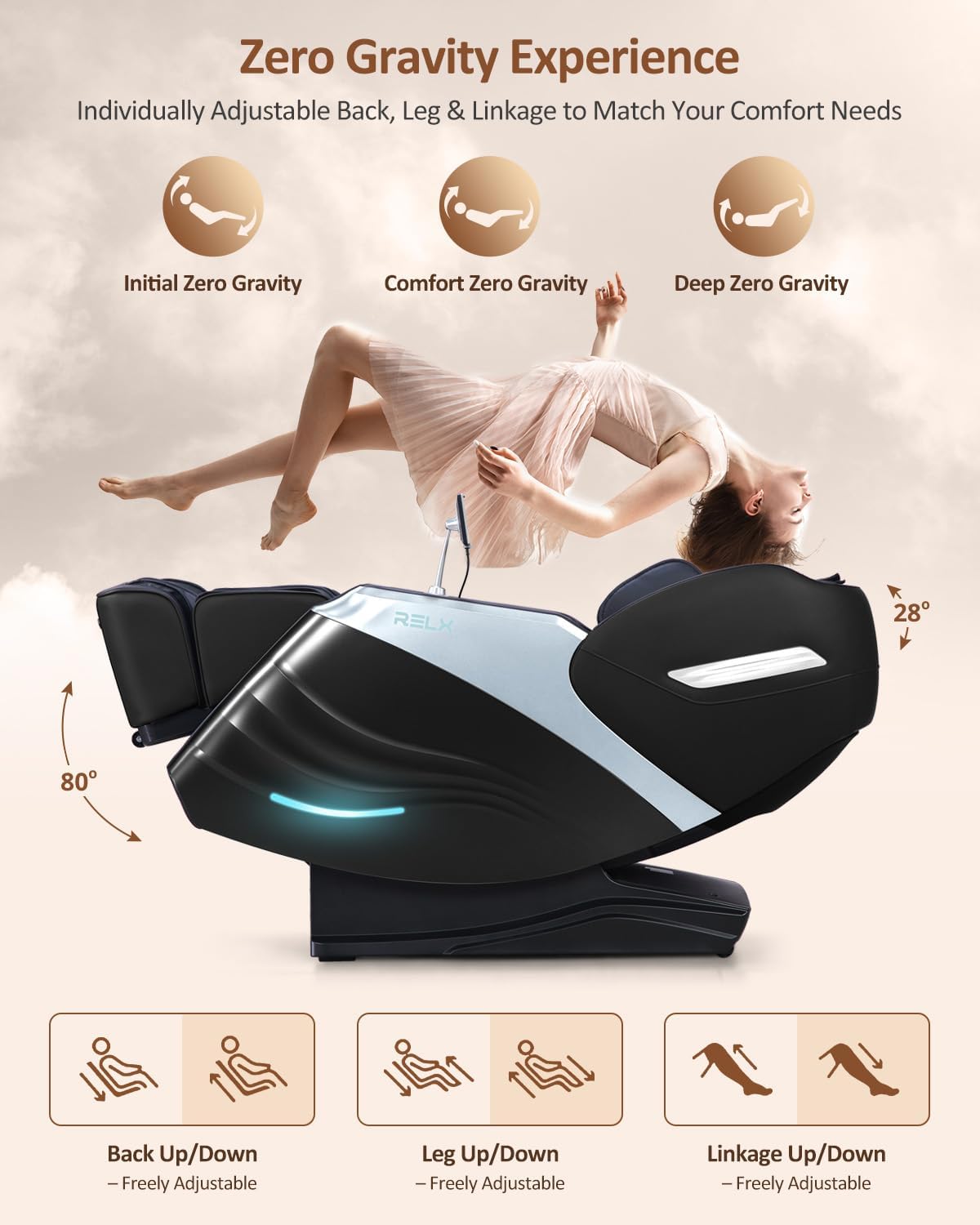
Figure 4: Zero Gravity positions and adjustable chair components.
5.5 SL-Track System
The 53-inch SL track is designed to fit body curves from the neck to the thighs, extending the massage area by 30%+. It intelligently detects shoulder position and adjusts massage position and back width for accurate massage.

Figure 5: SL-Track system and available massage techniques.
5.6 Airbag Massage and Heating
The chair features 32 airbag massage points with 3 pressure levels, providing full-body compression massage. Far infrared heating is available for the lower back and calves, offering soothing relief.

Figure 6: Full body airbag massage and heating zones.
5.7 Foot Rollers and Yoga Stretching
Full-roller kneading on the feet stimulates acupoints, while airbag pressure massage on the legs relieves soreness. The backrest provides yoga-style stretching to ease lower back discomfort.

Figure 7: Yoga stretching feature of the massage chair.
5.8 AI Voice Control and Bluetooth Speaker
Control the massage chair with voice commands, freeing your hands. The built-in Bluetooth speaker allows you to enjoy music during your massage.
Video 2: Experience Full Body Relaxation with RELX Massage Chair. This short video highlights various features of the massage chair in action.
6. Maintenance
To ensure the longevity and optimal performance of your RELX Mars Pro massage chair, follow these maintenance guidelines:
- Cleaning: Spot clean and wipe clean the faux leather surfaces as needed. Use a soft, damp cloth and mild soap if necessary. Avoid harsh chemicals or abrasive cleaners.
- Storage: When not in use for extended periods, consider covering the chair to protect it from dust and direct sunlight.
- Inspection: Periodically check all connections and fasteners to ensure they are secure.
7. Troubleshooting
If you encounter any issues with your RELX Mars Pro massage chair, please refer to the following common troubleshooting tips:
- Chair Not Powering On: Ensure the power cord is securely plugged into both the chair and the wall outlet, and that the power switch on the chair is in the 'On' position. Check the circuit breaker if necessary.
- Massage Rollers Not Moving: Verify that an auto program or manual massage mode has been selected on the controller. Ensure the body scan has completed successfully.
- Airbags Not Inflating: Check all air hose connections to ensure they are securely attached. Adjust airbag intensity settings on the controller.
- No Heat: Confirm that the heating function is activated on the controller. Allow a few minutes for the heating elements to warm up.
- Controller Unresponsive: Ensure the controller is properly connected to the chair. Try restarting the chair by turning off and on the main power switch.
For persistent issues, please contact customer support.
8. Specifications
| Feature | Detail |
|---|---|
| Brand | RELX |
| Model Name | RELX Mars Pro |
| Color | Black |
| Material | Faux Leather, Foam (Fill Material), Stainless Steel (Frame) |
| Product Dimensions (D x W x H) | 66.02"D x 29.84"W x 44.5"H |
| Item Weight | 192 Pounds |
| Maximum Weight Recommendation | 330 Pounds |
| Track Type | SL-Shape |
| Massage Modes | 20 Auto Modes, 3 Manual Modes |
| Features | Adjustable Backrest, Adjustable Height, Anti-Shock, Arm Rest, Foot Rest, Heated, Upholstered Leather, AI Voice Control, Bluetooth Speaker |
| Assembly Required | Yes |

Figure 8: Product dimensions and user recommendations.
9. Warranty and Support
RELX provides a 3-year limited guarantee for the Mars Pro massage chair. For any questions or support needs, please contact customer service.
- Customer Service: Available 7 days a week, 24 hours a day. Contact through Amazon or directly via the provided after-sales phone number.
- Protection Plans: Optional 3-Year Protection Plan and Complete Protect monthly plan available for purchase.
