
ASHATA ASHATA3ntgp8vguy-11
ASHATA Foldable Keyboard User Manual
Model: ASHATA3ntgp8vguy-11
Introduction
Thank you for choosing the ASHATA Foldable Keyboard. This manual provides essential information for the proper setup, operation, and maintenance of your new portable keyboard. Please read this manual thoroughly before use to ensure optimal performance and longevity of the product.

Image: The ASHATA Foldable Keyboard in its unfolded state, with a smartphone placed on its integrated stand, ready for use.
Package Contents
Please verify that all items are present in your package:
- ASHATA Foldable Keyboard
- USB Charging Cable (Type-C)
- Instruction Manual (this document)
Setup Guide
1. Charging the Keyboard
Before initial use, fully charge the keyboard. Connect the provided USB Type-C cable to the charging port on the keyboard and to a compatible USB power source.
- A full charge typically takes approximately 2 hours.
- The charging indicator light will illuminate during charging and turn off once fully charged.

Image: Visual representation of the keyboard's battery performance: 2 hours charging time, 45 hours continuous usage, and 90 days standby time.
2. Unfolding the Keyboard
Gently unfold the keyboard from its compact state. The keyboard is designed with a horizontal folding mechanism. Ensure it is fully extended and flat before use.

Image: The ASHATA Foldable Keyboard demonstrating its horizontal folding design, showing both its compact, folded form and its expanded, ready-to-use state.
3. Using the Integrated Stand
The keyboard features a concealed stand for your mobile device. Extend the stand to securely hold your smartphone or tablet for an optimal viewing and typing angle.

Image: The ASHATA Foldable Keyboard with its integrated stand deployed, illustrating how it provides a stable platform for a mobile device.
4. Bluetooth Pairing
The keyboard uses Bluetooth 3.0 for wireless connection. Follow these steps to pair it with your device:
- Turn on the keyboard by sliding the power switch (usually located on the side or top edge). The Bluetooth indicator light will begin to flash.
- On your device (smartphone, tablet, laptop), enable Bluetooth and search for available devices.
- Select "ASHATA Keyboard" or a similar name from the list of found devices.
- If prompted, enter the pairing code displayed on your device using the ASHATA keyboard and press Enter.
- Once paired, the Bluetooth indicator light on the keyboard will stop flashing and remain solid or turn off, indicating a successful connection.
The keyboard supports automatic connection to previously paired devices.
Operating Instructions
Typing and Key Functions
The ASHATA Foldable Keyboard features a 60-key layout with matte touch buttons designed for comfortable and efficient typing. The scissor-foot key structure provides a responsive and quiet typing experience.
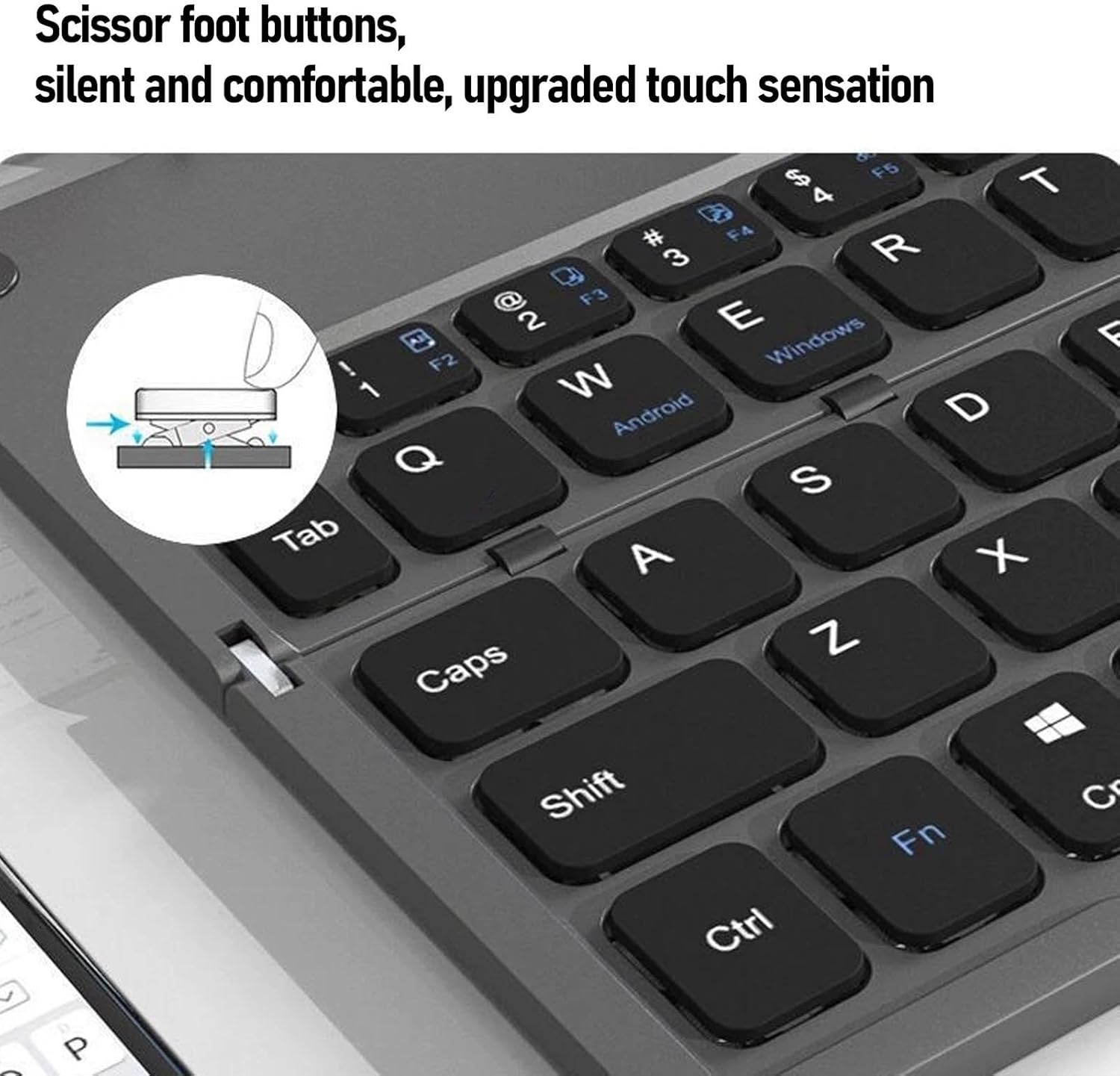
Image: A detailed view of the keyboard's keys, illustrating the scissor-foot button design for silent and comfortable typing.
The keyboard is compatible with iOS, Android, and Windows systems. Specific function keys (F1-F12) may vary in behavior depending on the operating system of the connected device.
Battery Life and Power Saving
The integrated rechargeable battery provides approximately 45 hours of continuous typing or up to 90 days of standby time on a single charge. To conserve battery life, the keyboard will enter an energy-saving mode after a period of inactivity. Press any key to wake it up.
Maintenance
- Cleaning: Use a soft, dry cloth to clean the keyboard surface. Avoid using harsh chemicals or abrasive materials.
- Storage: When not in use, fold the keyboard to protect the keys and make it more compact for storage or travel. Store in a cool, dry place.
- Charging: Recharge the keyboard regularly to maintain battery health, especially if it will be stored for an extended period.
Troubleshooting
- Keyboard not connecting via Bluetooth:
- Ensure the keyboard is powered on and fully charged.
- Make sure Bluetooth is enabled on your device.
- Try unpairing and re-pairing the keyboard from your device's Bluetooth settings.
- Ensure the keyboard is within the 10-meter operating range of your device.
- Keys not responding:
- Check the battery level and charge the keyboard if necessary.
- Verify that the keyboard is properly connected via Bluetooth.
- Restart both the keyboard (power off/on) and your connected device.
- Unexpected behavior:
- Ensure your device's operating system is updated.
- If issues persist, contact ASHATA customer support.
Specifications
| Model Number | ASHATA3ntgp8vguy-11 |
| Brand | ASHATA |
| Connectivity Technology | Bluetooth 3.0 |
| Compatible Devices | Smartphones, Tablets, Laptops, Desktops (iOS, Android, Windows systems) |
| Key Layout | 60-key ergonomic layout |
| Battery Type | Rechargeable Lithium-ion |
| Charging Time | Approx. 2 hours |
| Continuous Usage Time | Approx. 45 hours |
| Standby Time | Approx. 90 days |
| Operating Distance | Up to 10 meters (33 feet) |
| Item Weight | 11.6 ounces (329 grams) |
| Package Dimensions | 9.45 x 3.15 x 1.18 inches (24 x 8 x 3 cm) |
| Color | Grey Black |
Customer Support
For further assistance, technical support, or warranty inquiries, please contact ASHATA customer service through the retailer where the product was purchased or visit the official ASHATA website.
Ask a question about this manual
Ask about setup, troubleshooting, compatibility, parts, safety, or missing instructions. Manuals+ will review the question and use this page’s manual context to help answer it.