
1. Introduction
Thank you for purchasing the SEDETA 67" Farmhouse L Shaped Desk. This executive home office desk is designed to provide a spacious and functional workspace with integrated storage and power solutions. This manual provides detailed instructions for assembly, operation, maintenance, and troubleshooting to ensure optimal use and longevity of your desk.
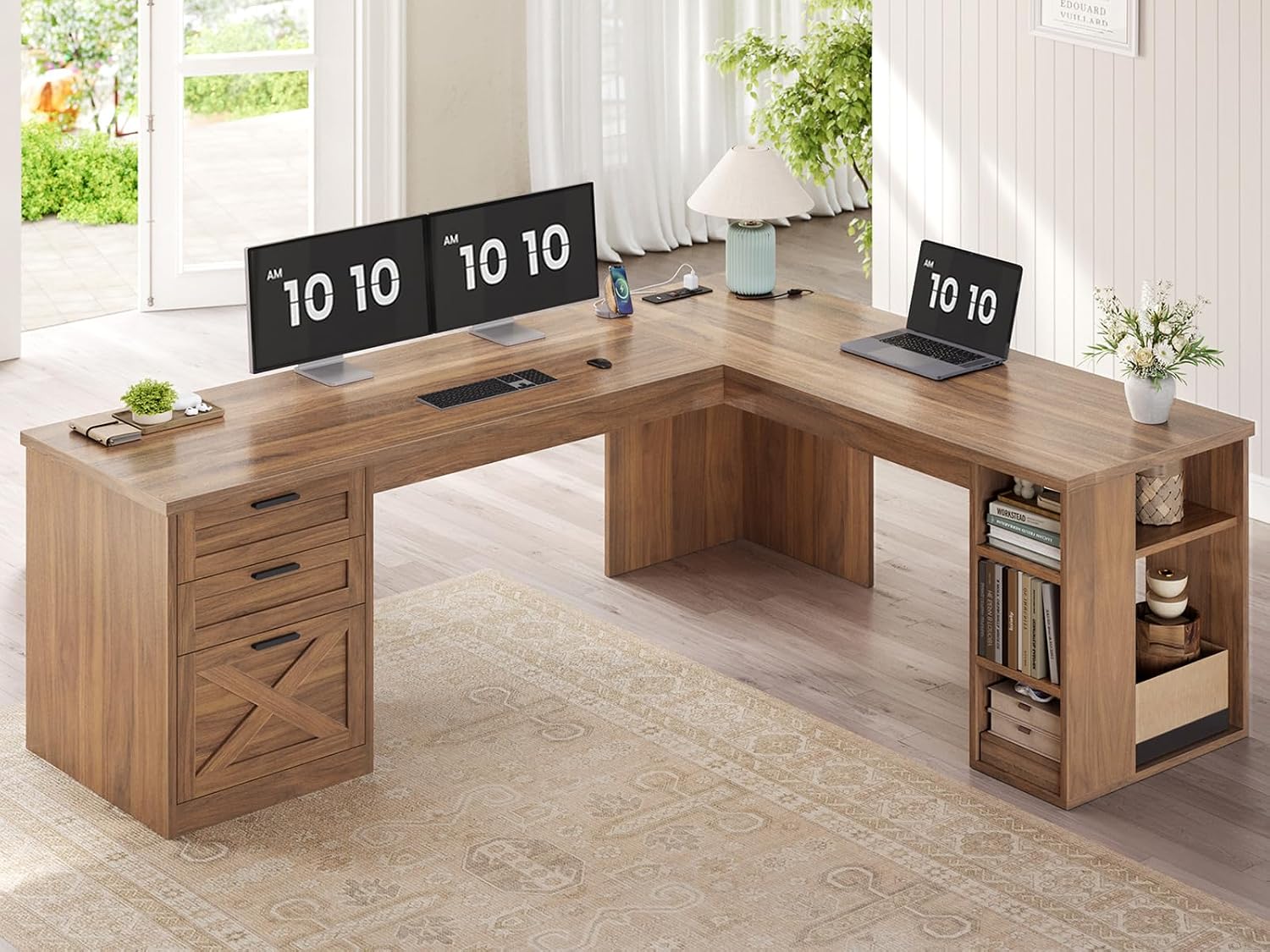
Figure 1.1: The SEDETA 67" Farmhouse L Shaped Desk, showcasing its spacious design and integrated features in a modern home office environment.
2. Safety Information
Please read and understand all safety instructions before assembly and use. Failure to follow these instructions may result in injury or damage to the product.
- Keep all packaging materials away from children.
- Assemble the desk on a soft, clean surface to prevent scratches.
- Ensure all screws and fasteners are securely tightened before use. Periodically check and re-tighten as necessary.
- Do not overload the desk or shelves. Refer to the specifications for maximum load capacity.
- Use the integrated power outlets and USB ports only for compatible devices and within the specified electrical ratings. Always use the on-off switch to power off the charging station when not in use or during electrical storms.
- Keep liquids away from electrical components.
- This product is designed for indoor use only.
3. Setup & Assembly
The SEDETA L Shaped Desk requires assembly. It is recommended that two people assemble this desk for ease and safety. A screwdriver is required for assembly; other tools are not included.
3.1 Package Contents
Before beginning assembly, verify that all parts are present and undamaged. The package includes all necessary desk components and hardware. Refer to the included assembly instructions for a detailed list of numbered parts.
3.2 Assembly Steps
- Unpack all components and lay them out on a protected surface.
- Follow the step-by-step pictorial instructions provided in the separate assembly manual. Each part is numbered for easy identification.
- Begin by assembling the main desk frame, ensuring all connections are secure.
- Proceed to attach the L-shaped extension and the drawer cabinet.
- Install the three storage drawers, ensuring the full-pull slides operate smoothly.
- Attach the open storage shelves and adjust the lower shelves to your desired height.
- Finally, install the power outlet module into the designated cutout on the desktop.
- Once assembled, carefully move the desk to its final position. Avoid pushing it too tightly into a corner until all final adjustments or access to the back are complete.

Figure 3.1: Desk dimensions and maximum load capacity. The desk measures 67"W x 55.1"D x 29.5"H, with a maximum load capacity of 200 lbs.

Figure 3.2: An aerial view illustrating the 67" and 55.1" lengths of the L-shaped desk, highlighting the spacious desktop for study and work.
4. Operating Instructions
4.1 Drawer System
The desk features three integrated storage drawers. The top two drawers are standard storage drawers, while the bottom drawer is a file drawer designed to accommodate both A4 and letter-sized files. All drawers are equipped with full-pull slides for smooth and complete extension.

Figure 4.1: Detailed view of the three drawers, demonstrating their capacity for general storage, letter-sized files, and A4-sized files.
4.2 Storage Shelves
The side of the desk includes open storage shelves. The lower shelves are adjustable, allowing you to customize the storage space to fit various items, including a CPU tower. This flexibility helps meet diverse storage needs.

Figure 4.2: The adjustable shelf feature, demonstrating its utility for tiered storage or as a dedicated CPU stand.
4.3 Integrated Charging Station
The desk is equipped with a convenient charging station featuring 2 AC outlets (120V/12A) and 2 USB ports (5V/2A). This allows you to power and charge up to four devices simultaneously. A 6.5-foot power cord is provided. The charging station includes an on-off switch for safe and easy power management.
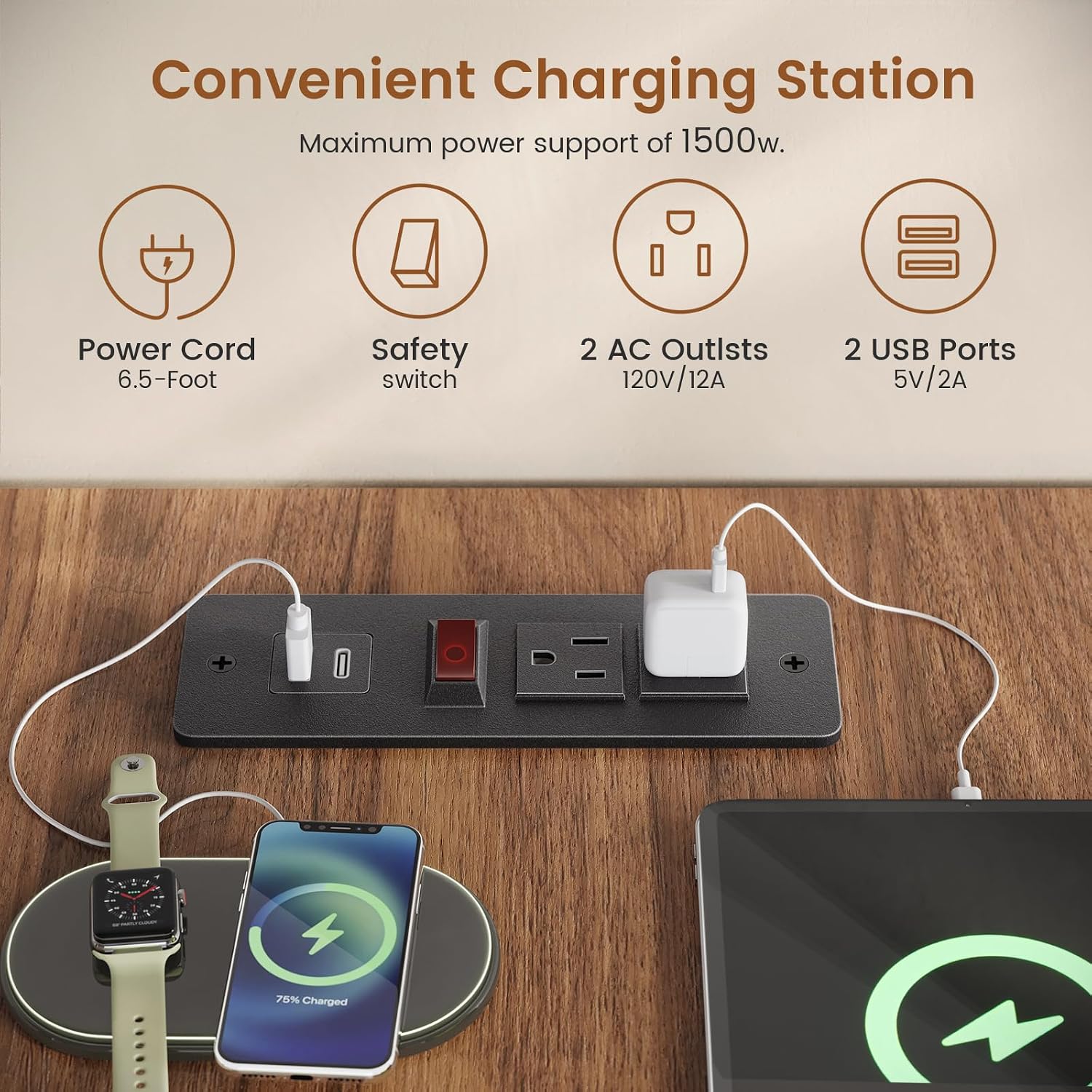
Figure 4.3: The integrated charging station, highlighting its 2 AC outlets, 2 USB ports, safety switch, and 6.5-foot power cord for convenient device charging.
5. Maintenance
To ensure the longevity and appearance of your SEDETA desk, follow these simple maintenance guidelines:
- Dust Regularly: Use a soft, dry cloth to dust the desk surfaces regularly.
- Cleaning Spills: Wipe up spills immediately with a damp cloth and dry thoroughly. Avoid abrasive cleaners or harsh chemicals that could damage the finish.
- Hardware Check: Periodically check all screws and fasteners to ensure they remain tight. Re-tighten if necessary to maintain stability.
- Drawer Slides: If drawer slides become stiff, a small amount of silicone lubricant can be applied to ensure smooth operation.
- Avoid Direct Sunlight: Prolonged exposure to direct sunlight can cause fading or discoloration of the wood finish.
6. Troubleshooting
This section addresses common issues you might encounter with your SEDETA desk.
| Problem | Possible Cause | Solution |
|---|---|---|
| Desk is wobbly or unstable. | Loose fasteners; uneven floor. | Ensure all screws and bolts are tightened. Check if the desk is on a level surface; use shims if necessary. |
| Drawers do not slide smoothly. | Misalignment; debris in slides; dry slides. | Check drawer alignment and ensure nothing is obstructing the slides. Clean any debris. Apply a small amount of silicone lubricant to the slides. |
| Charging station not working. | Power switch off; not plugged in; overloaded. | Ensure the on-off switch is in the 'on' position. Verify the desk's power cord is securely plugged into a working wall outlet. Do not exceed the maximum power support of 1500W. |
| Damaged or missing parts upon arrival. | Shipping damage; packaging error. | Do not attempt to assemble. Contact SEDETA customer service immediately for a free replacement or partial refund. |
7. Specifications
| Feature | Detail |
|---|---|
| Brand | SEDETA |
| Model Name | l shaped desk with drawers |
| Product Dimensions | 55.1"D x 67"W x 29.5"H |
| Item Weight | 110 Pounds |
| Color | Brown |
| Style | Farmhouse |
| Base Material | Engineered Wood |
| Top Material Type | Engineered Wood |
| Number of Drawers | 3 (including 1 file drawer) |
| Number of Shelves | 3 (open shelves, lower adjustable) |
| Charging Station | 2 AC Outlets (120V/12A), 2 USB Ports (5V/2A) |
| Power Cord Length | 6.5-Foot |
| Maximum Power Support | 1500W (for charging station) |
| Required Assembly | Yes |
| Recommended People for Assembly | 2 |
| Tools Recommended for Assembly | Screw Driver |
| Product Care Instructions | Dust Regularly |
8. Warranty & Support
SEDETA is committed to providing high-quality products and customer satisfaction.
8.1 Product Warranty
For specific warranty details and duration, please refer to the warranty information included with your product packaging or contact SEDETA customer service directly. Generally, SEDETA offers support for manufacturing defects and issues arising from normal use.
8.2 Customer Support
If your executive desk arrives damaged, scratched, or with parts missing, please do not hesitate to contact SEDETA customer service. We will replace it for free or provide a partial refund as applicable.
For any questions, concerns, or support needs, please reach out to SEDETA customer service through the retailer's platform where you purchased the product or visit the official SEDETA store page on Amazon for contact information.
Thank you for choosing SEDETA.


