
1. Introduction
This manual provides essential information for the safe and efficient operation of your DOEL 120000BTU Full DC Inverter Swimming Pool Heat Pump, Model CIP-35SE. This heat pump is designed to heat and cool pools up to 30,000 gallons, offering comfortable swimming temperatures year-round. Please read this manual thoroughly before installation and use, and retain it for future reference.

Image 1.1: The DOEL Inverter Heat Pump, highlighting its heating capacity, COP, pool volume suitability, heating & cooling functions, app control, and titanium heat exchanger.
2. Safety Information
Always adhere to the following safety precautions to prevent injury or damage to the equipment:
- Electrical Safety: Ensure the unit is connected to a properly grounded electrical supply. All electrical work must be performed by a qualified electrician and comply with local codes.
- Refrigerant: This unit uses R32 refrigerant. Only qualified personnel should handle refrigerant. Do not attempt to repair or modify the refrigerant system.
- Installation: Install the heat pump in a well-ventilated area, ensuring adequate clearance around the unit for proper airflow.
- Water Connection: Ensure all water connections are secure and leak-free before operating the unit.
- Children and Pets: Keep children and pets away from the unit during operation.
- Maintenance: Disconnect power before performing any maintenance or cleaning.
3. Setup and Installation
3.1 Unpacking and Inspection
Carefully unpack the heat pump and inspect it for any shipping damage. Report any damage to your supplier immediately.
3.2 Placement
Position the heat pump on a solid, level surface. Ensure there is sufficient space around the unit for unrestricted airflow (minimum 50 cm on all sides, 100 cm above). Avoid placing the unit near windows or vents where noise might be an issue.
3.3 Water Connections
Connect the heat pump to your pool's filtration system. The unit typically connects after the filter and before any chemical feeders. Use appropriate plumbing fittings to ensure a watertight seal.

Image 3.1: Examples of plumbing fittings, including 1.25" & 1.5" hose adapters, 4560 pool hose conversion adapters, and 1.5" PVC plumbing fittings, used for connecting the heat pump to the pool system.
3.4 Electrical Connections
Connect the power cord to a dedicated 220-240V, 50Hz electrical circuit as directed. The water pump's power cord can be connected to the designated terminal on the heat pump to enable synchronized operation.
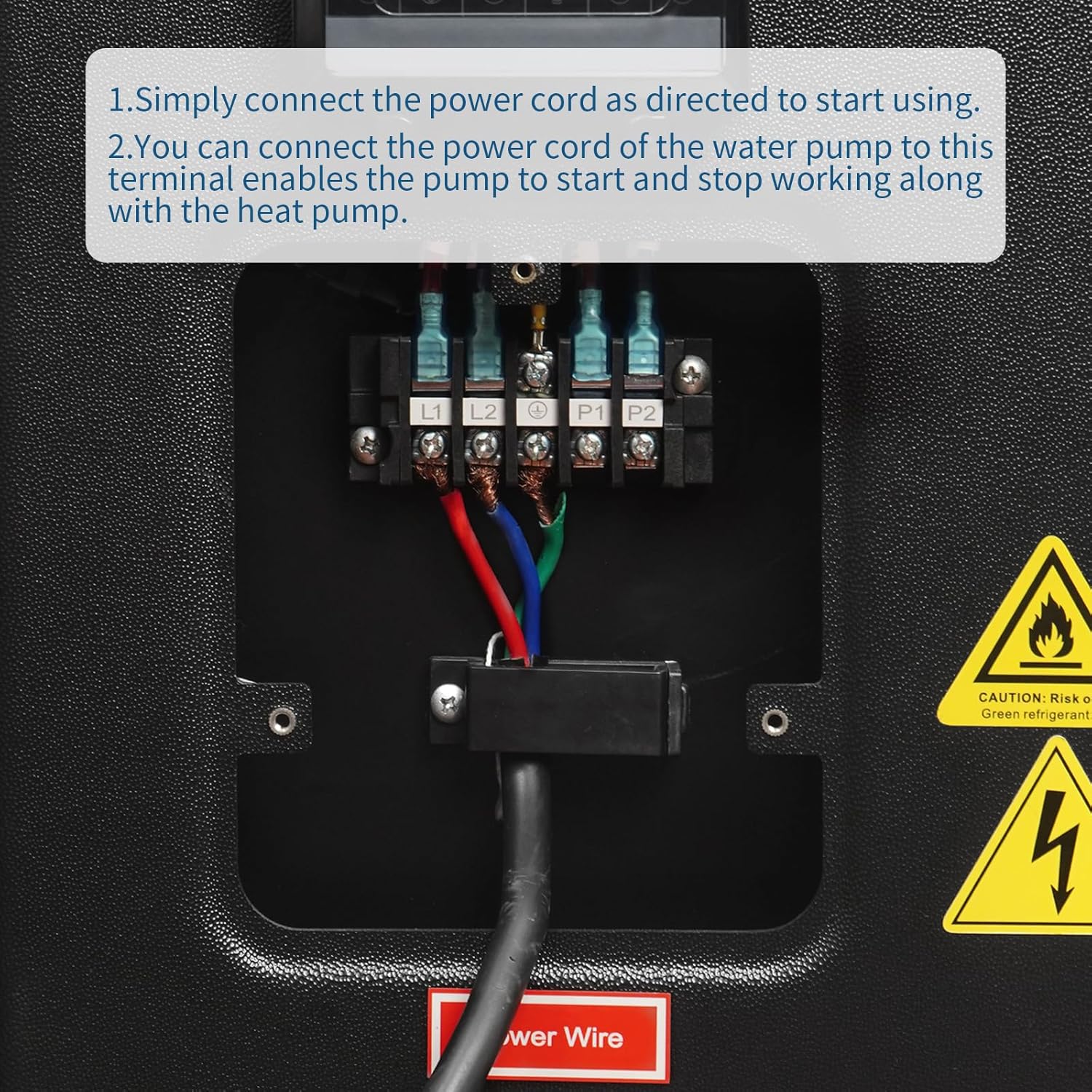
Image 3.2: Internal view of the heat pump's electrical terminal block, showing connections for L1, L2, P1, and P2, and the main power cord entry point. This illustrates how to connect the power cord and the water pump's power cord for synchronized operation.
4. Operating Instructions
4.1 Control Panel and WiFi Connectivity
The heat pump features an intelligent control panel and WiFi connectivity, allowing remote control via a mobile application. Download the dedicated app from your device's app store and follow the in-app instructions to connect your heat pump to your home WiFi network.

Image 4.1: The DOEL heat pump shown alongside a smartphone displaying its WiFi control application. The app allows for On/Off control, temperature setting, mode selection, and timer functions.
4.2 Operating Modes
The heat pump offers multiple operating modes to suit your needs:
- Heating Mode: Heats the pool water to your desired temperature (47-104°F).
- Cooling Mode: Cools the pool water to your desired temperature (47-82°F).
- Auto Mode: Automatically switches between heating and cooling to maintain the set temperature.
- Powerful Mode: Provides maximum heating or cooling capacity for faster temperature changes.
- Silent Mode: Operates at a reduced noise level (approximately 56 dB) for quiet operation, ideal for nighttime use.
- Defrost Mode: Automatically activates in cold conditions to prevent ice buildup on the evaporator coil.

Image 4.2: The heat pump illustrating its heating temperature range of 47-104°F and cooling temperature range of 47-82°F, indicating its dual functionality.

Image 4.3: The heat pump with a graphic illustrating its low noise operation, indicating a sound level of 56dB, comparable to ambient sound of discussion.
4.3 Setting Temperature and Timer
Use the control panel or the mobile app to set your desired water temperature. You can also set timers for the heat pump to turn on or off automatically, optimizing energy consumption and convenience.
5. Maintenance
Regular maintenance ensures optimal performance and longevity of your heat pump.
5.1 Cleaning
- Keep the area around the heat pump clear of debris, leaves, and other obstructions to ensure proper airflow.
- Clean the exterior casing with a soft, damp cloth. Do not use harsh chemicals or abrasive cleaners.
- Periodically inspect the evaporator coil for dirt buildup. If dirty, gently clean with a soft brush or vacuum.
5.2 Drainage
For extended periods of non-use, especially during winter, drain the water from the titanium heat exchanger to prevent freezing and damage.

Image 5.1: Close-up view of the heat pump's drainage point, labeled 'Drainage'. This shows the location of the drain hole for the titanium heat exchanger, used to remove water when the unit is not in use for an extended period.
5.3 Professional Inspection
It is recommended to have a qualified technician inspect the heat pump annually to ensure all components are functioning correctly and to perform any necessary adjustments.
6. Troubleshooting
Before contacting customer support, review the following common issues and solutions:
| Problem | Possible Cause | Solution |
|---|---|---|
| Heat pump not turning on | No power supply, circuit breaker tripped, control panel error | Check power connection, reset circuit breaker, consult control panel manual for error codes. |
| Insufficient heating/cooling | Low water flow, dirty coils, incorrect temperature setting, ambient temperature too low/high | Ensure adequate water flow, clean coils, verify temperature settings, check operating temperature range. |
| Unusual noise | Loose components, fan obstruction, refrigerant issue | Inspect for loose parts, clear fan area, contact qualified technician for refrigerant issues. |
| Water leakage | Loose plumbing connections, condensation | Tighten connections. Condensation is normal; ensure proper drainage. |
If the problem persists after attempting these solutions, please contact DOEL customer support.
7. Specifications
The following table outlines the key technical specifications for the DOEL CIP-35SE Swimming Pool Heat Pump:
| Parameter | Value |
|---|---|
| Model Number | CIP-35SE |
| Heating Capacity | 120,000 BTU |
| Refrigerant | R32 |
| Max Power Input | 4.76 kW |
| Max Current | 30 A |
| Casing Material | ABS |
| Heat Exchanger | Titanium |
| Water Flow Volume | 3170 Gal/h |
| Noise Level (3.28ft / 1m) | 49-59 dB(A) |
| Noise Level (10ft / 3m) | 29-39 dB(A) |
| Working Temperature Range | 5-109.4°F |
| Product Dimensions | 109.22 x 40.64 x 73.66 cm (42.7 x 16 x 29 inches) |
| Product Weight | 102.51 kg (226 lbs) |

Image 7.1: The DOEL heat pump with its dimensions indicated: 42.7 inches in length, 17.5 inches in width, and 29 inches in height. The weight is also noted as 216 pounds.
8. Warranty and Support
Your DOEL Swimming Pool Heat Pump is covered by a manufacturer's warranty. Please refer to the warranty card included with your product for specific terms and conditions. For technical assistance, troubleshooting beyond this manual, or warranty claims, please contact DOEL customer support through the retailer where the product was purchased or visit the official DOEL website for contact information.