
Fanttik F2 Master, M10 ACE
Fanttik F2 Master Mini Cordless Rotary Tool Kit & M10 ACE Cordless Angle Grinder User Manual
Model: F2 Master, M10 ACE
1. Introduction
This manual provides comprehensive instructions for the safe and efficient operation, maintenance, and troubleshooting of your Fanttik F2 Master Mini Cordless Rotary Tool Kit and Fanttik M10 ACE Cordless Angle Grinder. Please read this manual thoroughly before initial use and retain it for future reference.
2. Safety Instructions
General Safety Warnings:
- Always wear appropriate personal protective equipment (PPE) such as safety glasses, gloves, and hearing protection during operation.
- Ensure the work area is well-lit and clear of obstructions.
- Keep children and bystanders away while operating power tools.
- Do not operate power tools in explosive atmospheres, such as in the presence of flammable liquids, gases, or dust.
- Avoid accidental starting. Ensure the switch is in the off-position before connecting to a battery pack, picking up or carrying the tool.
- Maintain tools with care. Check for misalignment or binding of moving parts, breakage of parts, and any other condition that may affect the tool's operation.
- Use the correct tool for your application. Do not force a small tool or attachment to do the job of a heavy-duty power tool.
- Disconnect the battery pack from the tool before making any adjustments, changing accessories, or storing tools.
3. Product Overview
3.1 Fanttik F2 Master Mini Cordless Rotary Tool
The Fanttik F2 Master is a compact, cordless rotary tool designed for precision tasks such as grinding, polishing, drilling, and engraving. It features a brushless motor for quiet operation and extended lifespan.
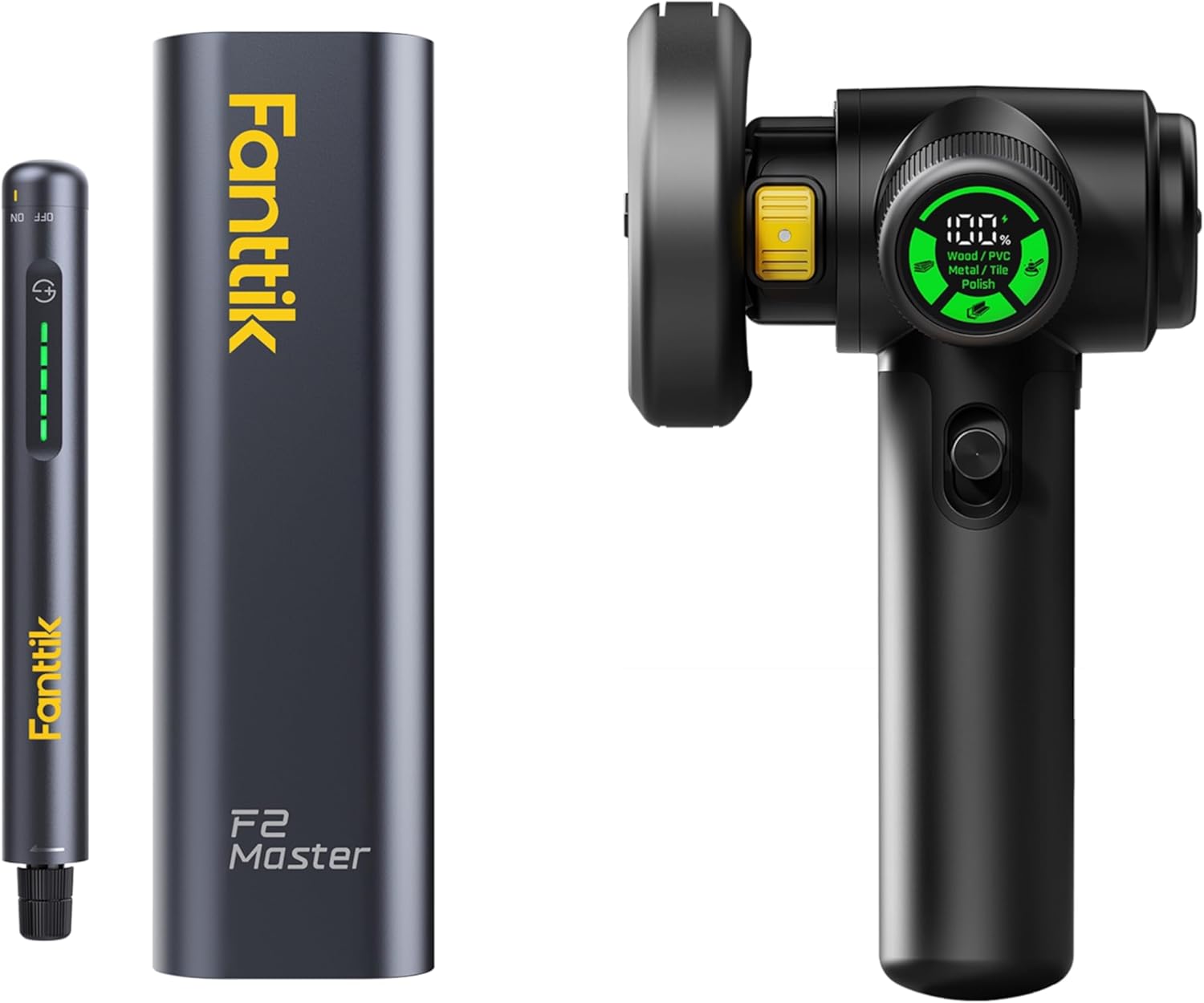
Figure 3.1: Fanttik F2 Master Mini Cordless Rotary Tool (left) and M10 ACE Cordless Angle Grinder (right).
Key Features:
- Brushless Hollow Cup Motor: Reduces noise by 30% and offers stronger performance with less heat. Max speed: 25,000 RPM.
- 5 Adjustable Speed Settings: For various precision tasks.
- Revostor Hub: 360° rotating magnetic stand with 35 organized accessories (3/32" / 2.3mm).
- Mini & Portable: Weighs 0.22 lb, durable aluminum case with one-click pop-out design.
- Seamless Integrated Button: Press down to set speed.
3.2 Fanttik M10 ACE Cordless Angle Grinder
The Fanttik M10 ACE is a lightweight and powerful cordless angle grinder, equipped with a brushless motor for extended lifespan and quieter operation. It is suitable for cutting, grinding, and polishing various materials.

Figure 3.2: Fanttik M10 ACE Cordless Angle Grinder in operation, highlighting its 160W cutting performance.
Key Features:
- Brushless Motor: Delivers up to 10,000 RPM cutting speed.
- Compact & Powerful: Weighs 1.66 lbs, max depth 20mm.
- LED Display with EZShift 3 Power Modes: Real-time battery/mode visibility and automatic alerts. Three preset modes for different materials.
- Protective Guard: Includes guards for both cutting and polishing applications.
- Double Safety Switch: Two-step switch mechanism for enhanced user safety.
4. Setup
4.1 Charging the Battery
Both the F2 Master and M10 ACE are battery-powered. Ensure the tools are fully charged before first use.
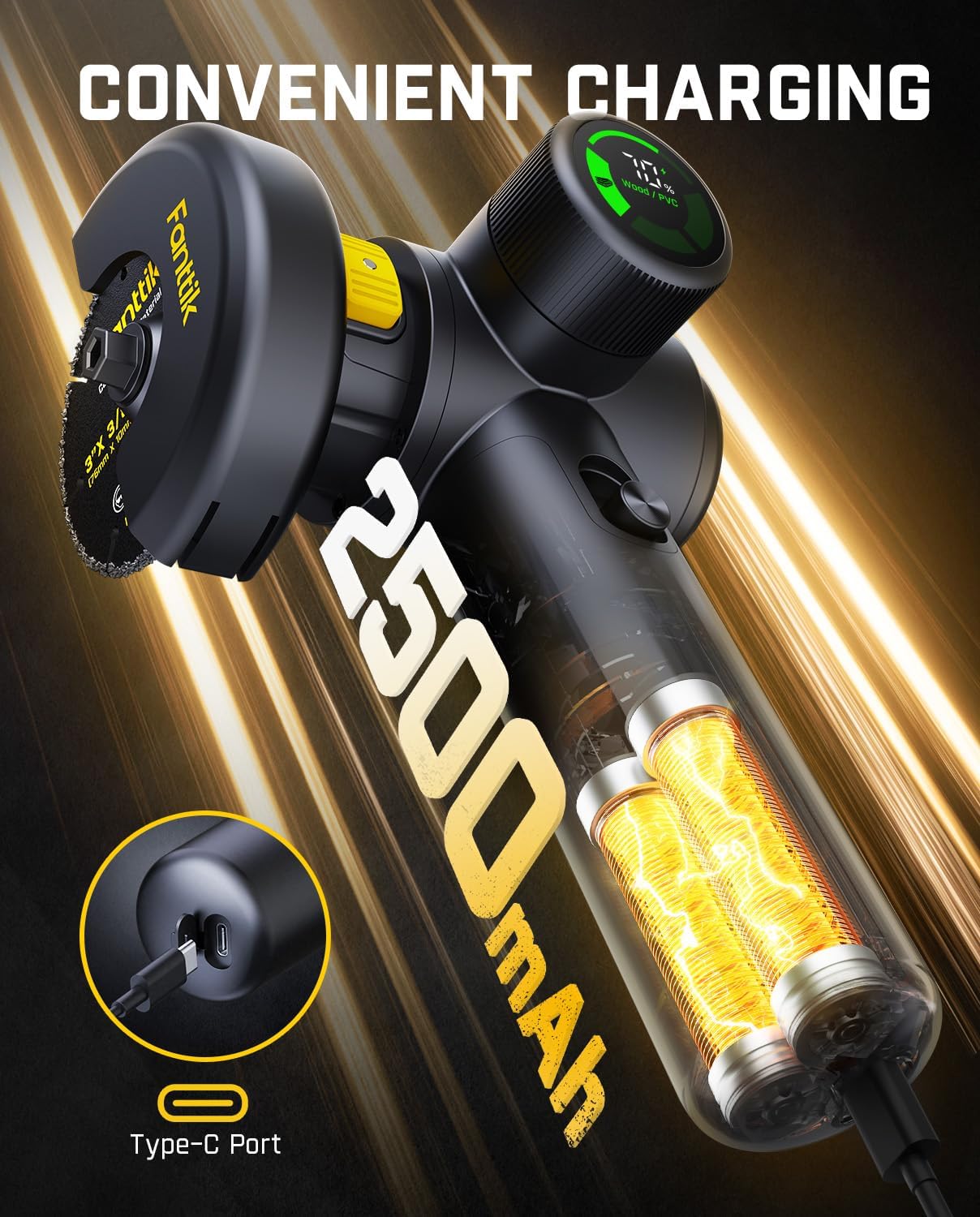
Figure 4.1: The M10 ACE features a Type-C port for convenient charging of its 2500mAh battery.
- Locate the Type-C charging port on the tool.
- Connect the provided USB-C cable to the tool and a suitable power adapter (not included).
- The LED indicator on the tool will show charging status. Refer to the LED display section for details.
- Once fully charged, disconnect the cable.
4.2 Installing Accessories (F2 Master)
The F2 Master comes with a Revostor Hub for organized accessory storage and easy access.

Figure 4.2: The F2 Master's Revostor Hub keeps 35 accessories organized and easily accessible with a 360° rotation.
- Select the desired accessory from the Revostor Hub.
- Ensure the F2 Master is turned off.
- Insert the accessory shank (3/32" / 2.3mm) into the collet of the rotary tool.
- Tighten the collet nut securely to hold the accessory in place. Do not overtighten.
4.3 Installing Blades/Attachments (M10 ACE)
The M10 ACE requires proper installation of cutting or grinding discs.

Figure 4.3: The M10 ACE features interchangeable protective guards for cutting and polishing applications.
- Ensure the M10 ACE is turned off and the battery is removed.
- Select the appropriate protective guard for your task (cutting or polishing) and attach it securely.
- Press the spindle lock button (if applicable) to prevent the spindle from rotating.
- Place the desired cutting or grinding disc onto the spindle, ensuring it is centered.
- Thread and tighten the flange nut using the provided wrench. Release the spindle lock.
5. Operating Instructions
5.1 Fanttik F2 Master Operation

Figure 5.1: The F2 Master's seamless integrated button allows for easy speed adjustment.
- Power On/Off: Press and hold the power button until the tool activates/deactivates.
- Adjusting Speed: Briefly press the integrated button to cycle through the 5 adjustable speed settings. The LED indicators will show the current speed level.
- Usage: Apply gentle pressure to the workpiece. Allow the tool to do the work. For engraving, use light, controlled movements. For polishing, use appropriate polishing compounds and pads.

Figure 5.2: The F2 Master operates quietly at 32 dB when idle, suitable for detailed work like engraving.
5.2 Fanttik M10 ACE Operation

Figure 5.3: The M10 ACE features a Smart LED Display for real-time battery status and active mode (Wood/PVC, Metal/Tile, Polish).
- Power On/Off: The M10 ACE features a double safety switch. Push the safety lock forward and then press the power button to activate the tool. Release the power button to turn off.
- Selecting Modes: Use the EZShift system to select one of the three preset power modes:
- Wood/PVC Mode: Optimized for cutting and shaping wood and PVC materials.
- Metal/Tile Mode: Suitable for grinding and cutting metal and tile.
- Polish Mode: For polishing applications.
- Cutting/Grinding: Hold the tool firmly. Allow the disc to reach full speed before contacting the workpiece. Apply steady, even pressure.
- Polishing: Use appropriate polishing pads and compounds. Move the tool smoothly over the surface.

Figure 5.4: The M10 ACE incorporates a double safety two-step switch for secure operation.

Figure 5.5: The M10 ACE operating in Metal/Tile mode, suitable for cutting and grinding metal surfaces.

Figure 5.6: The M10 ACE in Polish mode, demonstrating its capability for surface finishing. Note: Grinding and polishing mode is suitable for metal polishing, not for wood polishing.

Figure 5.7: The M10 ACE operating in Wood/PVC mode, ideal for cutting wood and PVC materials.
6. Maintenance
- Cleaning: Regularly clean the tools with a soft, dry cloth. Do not use harsh chemicals or abrasive cleaners. Ensure ventilation openings are free from dust and debris.
- Accessory Care: Inspect accessories before each use for wear or damage. Replace worn or damaged accessories immediately.
- Storage: Store the tools and accessories in a dry, secure location, out of reach of children. When storing the F2 Master, utilize its Revostor Hub to keep accessories organized.
- Battery Care: Store batteries in a cool, dry place. Do not store fully discharged batteries for extended periods.
7. Troubleshooting
This section addresses common issues you might encounter. For problems not listed here, please contact customer support.
- Tool not turning on:
- Check if the battery is charged.
- Ensure the battery is properly inserted.
- For M10 ACE, ensure the double safety switch is correctly engaged.
- Reduced performance:
- Battery may be low; recharge the tool.
- Accessory might be dull or damaged; replace it.
- For M10 ACE, ensure the correct power mode is selected for the material.
- Excessive vibration or noise:
- Ensure accessories are securely fastened and not bent or damaged.
- Check for any loose parts on the tool.
8. Specifications
| Feature | Fanttik F2 Master | Fanttik M10 ACE |
|---|---|---|
| Brand | Fanttik | Fanttik |
| Voltage | 4 Volts (DC) | 4 Volts (DC) |
| Power Source | Battery Powered | Battery Powered |
| Recommended Uses | Grinding, Polishing, Drilling, Engraving | Grinding, Polishing, Cutting |
| Color | Black | Black |
| Special Features | Portable, Cordless, Compact, Brushless Motor, Revostor Hub, 5 Speed Settings | Portable, Cordless, Compact, Brushless Motor, LED Display, EZShift 3 Power Modes, Protective Guard, Double Safety Switch |
| Included Components | 35 accessories | (Specific accessories not detailed in input, assumed standard for angle grinder) |
| Maximum Rotational Speed | 25000 RPM | 10000 RPM |
| Weight | 0.22 lb | 1.66 lbs |
| Max Cutting Depth (M10 ACE only) | N/A | 20mm |
9. Warranty and Support
Fanttik products are manufactured to high-quality standards. For warranty information, product registration, or technical support, please visit the official Fanttik website or contact their customer service department.
Please retain your proof of purchase for warranty claims.
Fanttik Official Website: www.fanttik.com
Related documentsF2 Master, M10 ACE

Ask a question about this manual
Ask about setup, troubleshooting, compatibility, parts, safety, or missing instructions. Manuals+ will review the question and use this page’s manual context to help answer it.